
在企业级场景中,EDAS会被集成到客户侧的研发测试的IT流程中形成更加完整的企业IT云化整体解决方案,如对接到客户的CMP多云管理平台,被串联到客户的CICD流水线中,和客户的统一监控运维平台对接等。为方便EDAS更好的在各行业中使用和集成,我们基于多个真实项目经验输出了本次最佳实践,以供您参考。
背景信息
企业级分布式应用服务EDAS(Enterprise Distributed Application Service)是阿里云原生产品体系的核心产品之一,为复杂微服务的构建和托管提供端到端应用生命周期管理。
最佳实践概述
本次最佳实践通过打通客户侧GitLab、Jenkins与专有云企业版提供的EDAS和ACK来帮助客户构建端到端企业级云原生CICD流水线。具体实现思路为通过Java编写一个EDAS-SDK适配插件,Jenkins通过在脚本库预先设置的Shell脚本来调用该插件,从而集成EDAS在持续交付层面的能力。在大中型场景中,我们推荐企业级开发测试云场景使用企业版或敏捷版中的云效+EDAS组合。
最佳实践价值
EDAS本身可以作为微服务精细化治理中心,并联动ACK容器服务支撑微服务的部署和运行,是一个非常完整优质的云原生解决方案(关于使用EDAS进行微服务开发的最佳实践将在另外的篇章中单独输出,在这里不做赘述)。通过企业版的POP 网关,您可以快速的调用EDAS-OpenAPI,从而将阿里侧云原生能力快速集成到企业的现有研发和运维IT流程中。
软件环境介绍
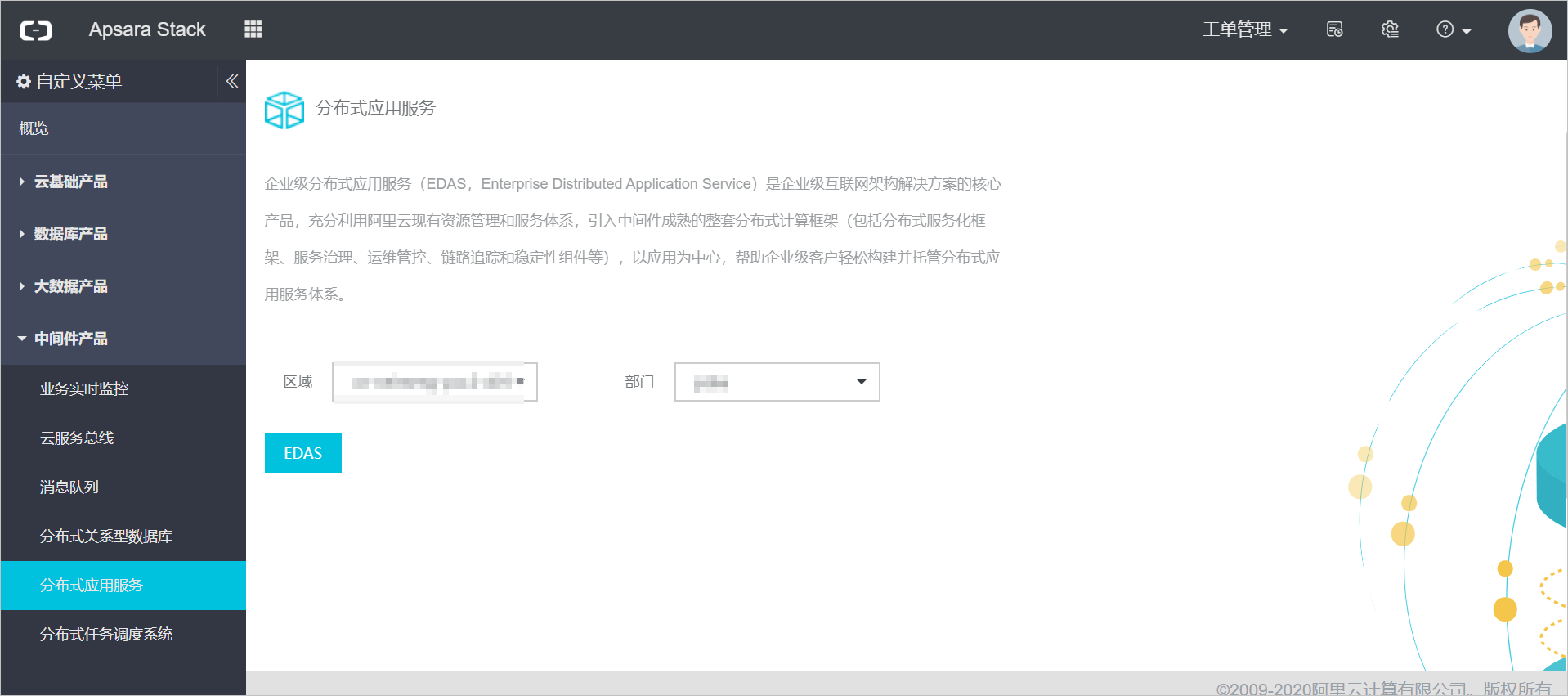
本最佳实践基于阿里云专有云企业版V3.9.0版,如下图为专有云企业版V3.9.0 Apsara Stack控制台界面。EDAS控制台由Apsara Stack控制台单点登录并跳转。
提交代码
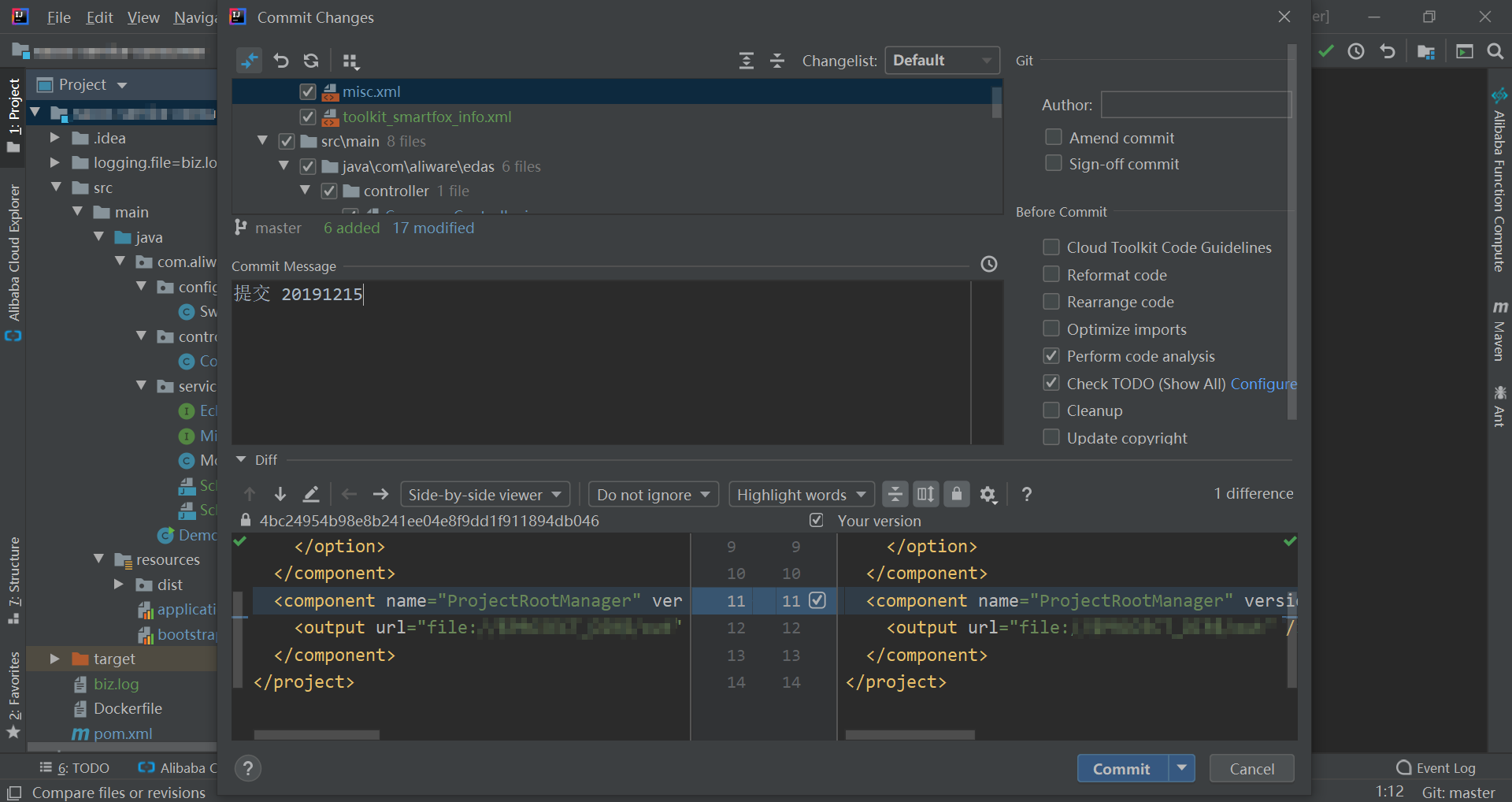
本示例中代码管理在GitLab中。完成以下步骤提交代码:
- 开发提交代码到Git本地仓库。
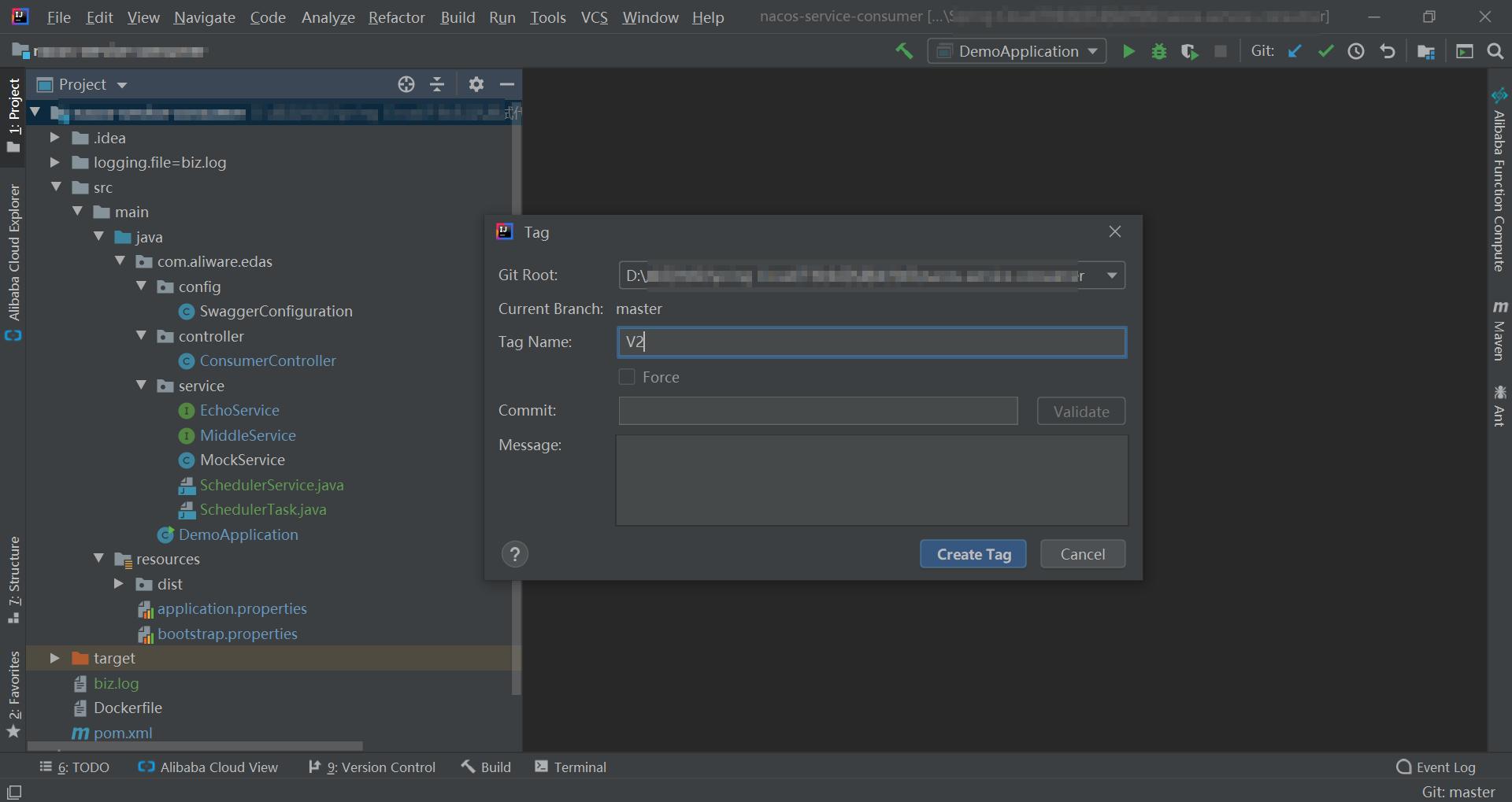
- 开发对需要发布的版本打上Tag。
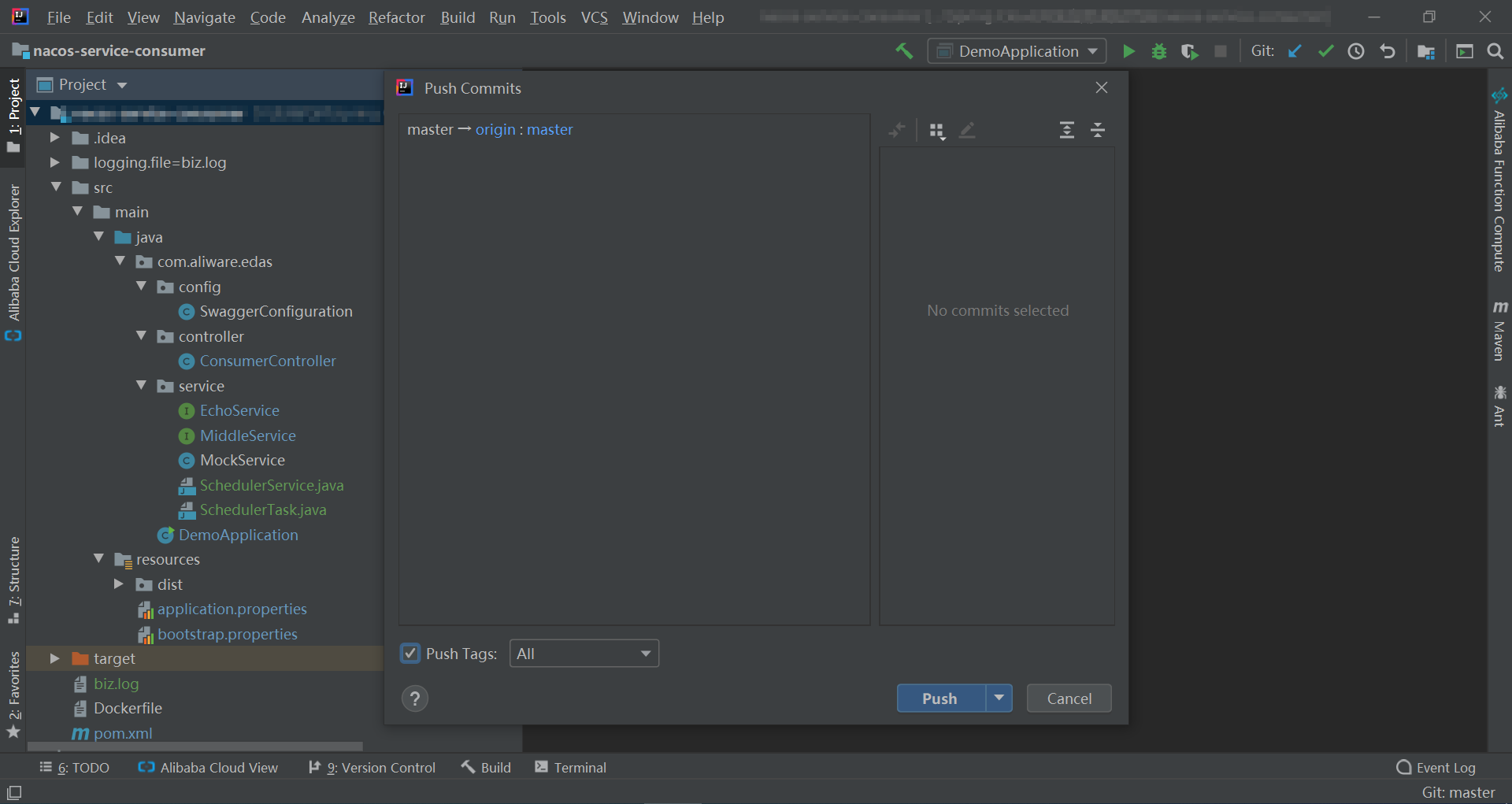
- 通过GitLab的tag push,将本地仓库代码同步到远程的GitLab服务上。
WebHook触发Jenkins的构建任务
前提条件:代码已提交到GitLab服务。
完成以下步骤,触发构建任务:
- 在cicd的源码管理页面,配置Git库地址。
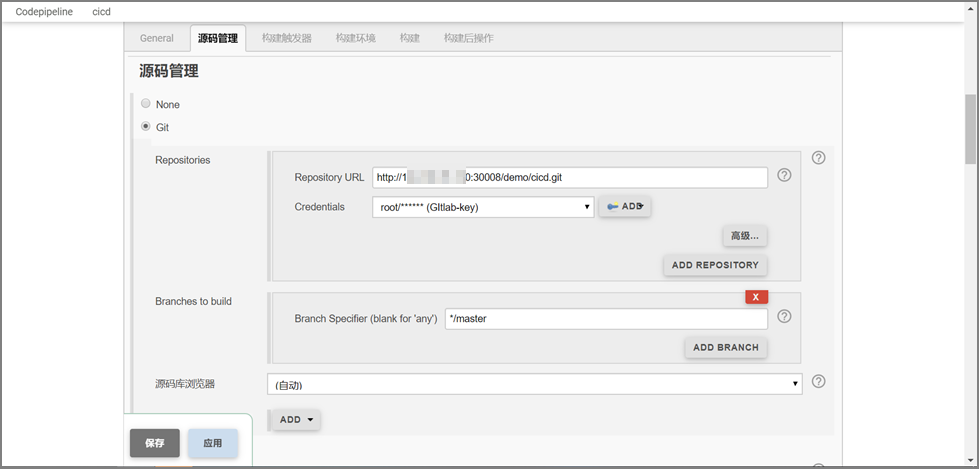
- 在cicd的构建触发器页面,配置触发器,并获取触发器的URL和Secret Token。
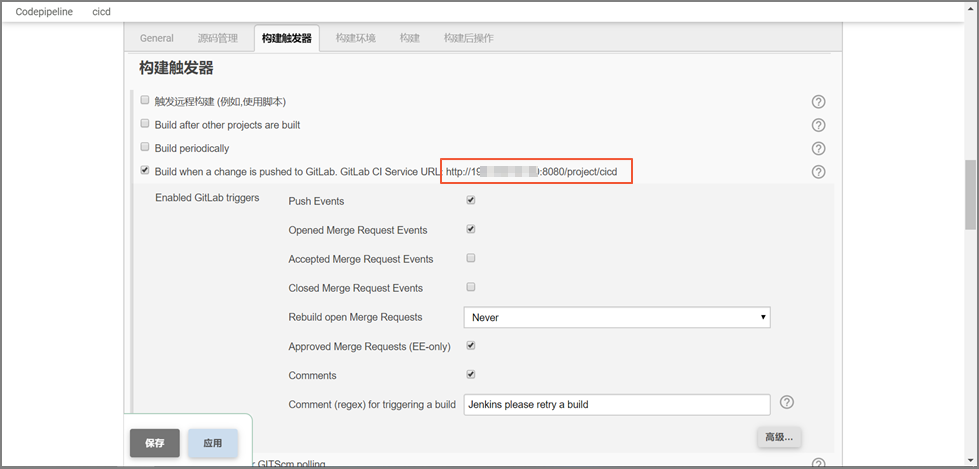
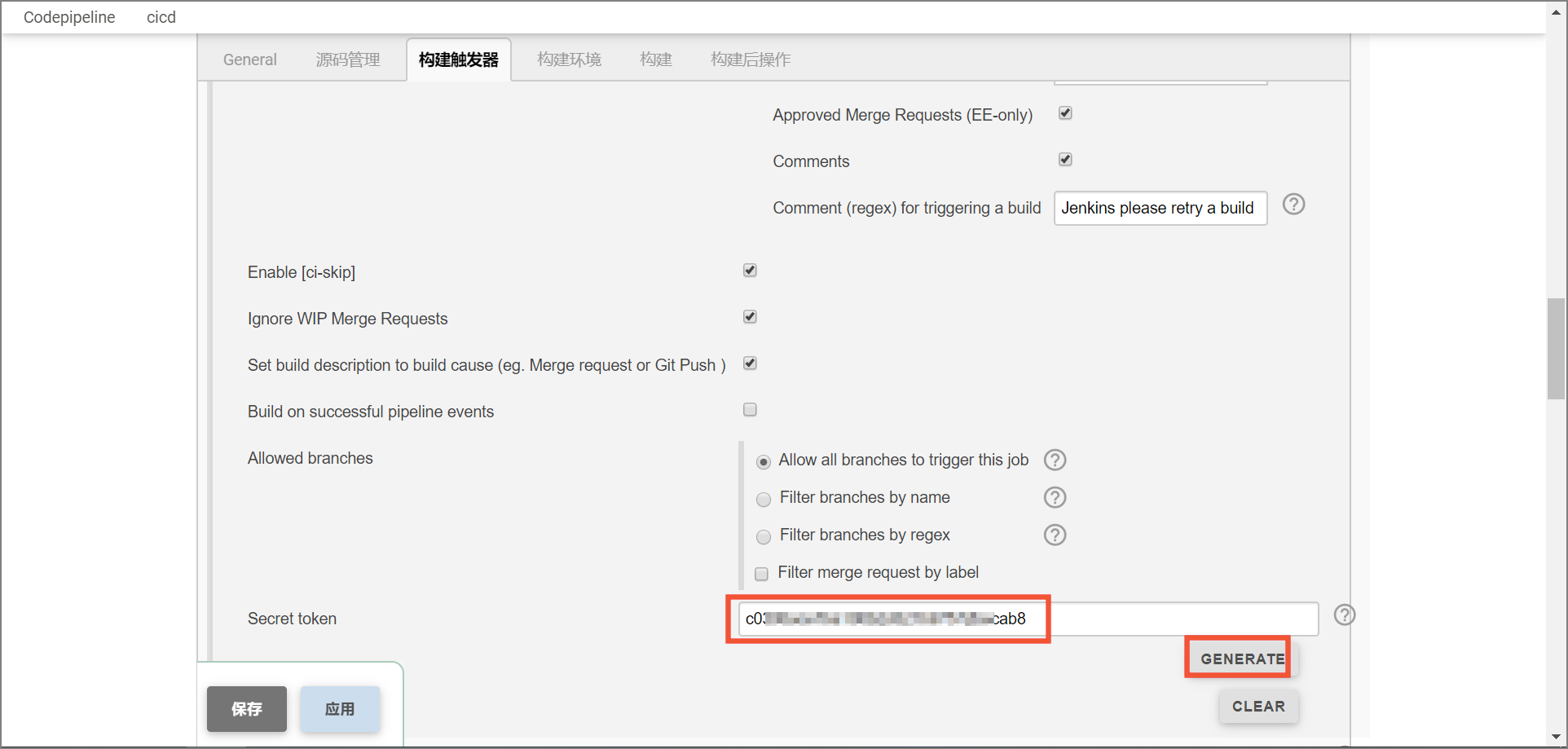
- 在cicd的Settings页面,配置Git库的WebHook。
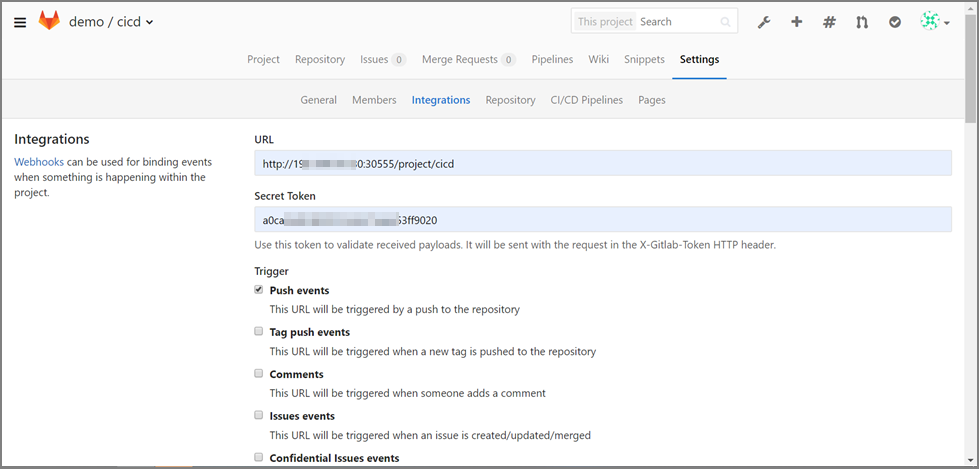 说明 URL和Secret Token的值即上一步中获取的触发器的URL和Secret Token。
 - 在cicd的构建页面,配置构建镜像和推送镜像。
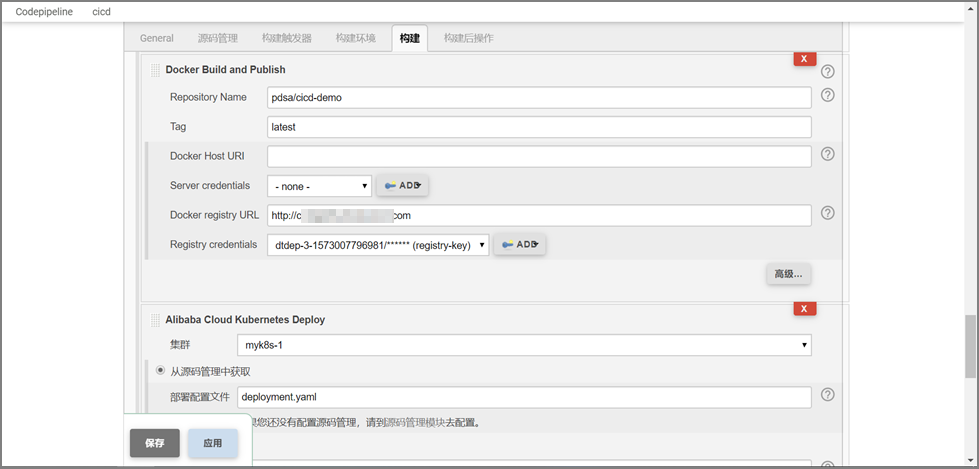
- 执行如下命令配置触发调用EDAS OpenAPI小程序对外暴露的请求地址,用于访问EDAS后台。
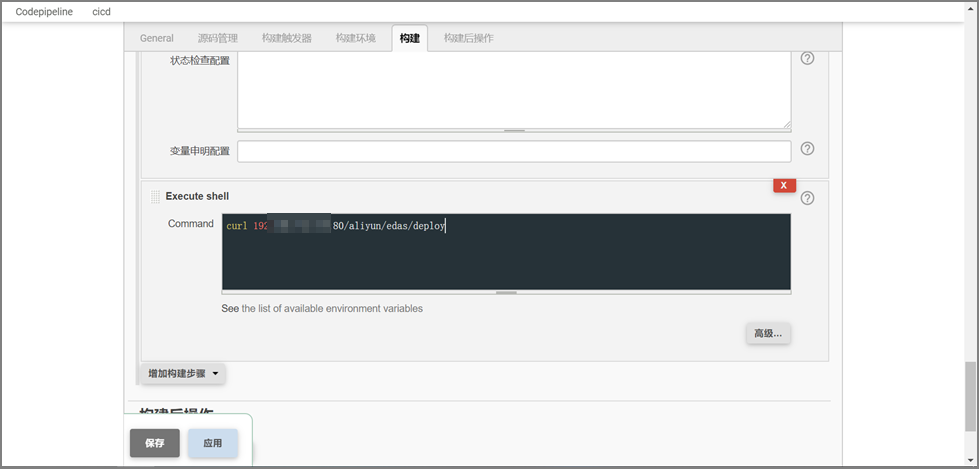
curl 192.XXX.XXX.XXX:XXX/aliyun/edas/deploy
准备工作
Jenkins构建完项目后,您需要按版本号通过以下步骤操作把镜像上传到镜像仓库,然后即可调用EDAS OpenAPI拉取镜像部署应用、通知相关人员等。
- 在Java项目工程中声明并引入EDAS-SDK。
- 获取EDAS-OpenAPI对外的服务域名,即专有云EDAS-endpoint地址。
- 在适配插件中拼装请求报文,完成API调用的指令。
- 调用GetK8sApplication接口获取容器服务K8s中部署的应用镜像URL信息。
- 调用DeployK8sApplication接口拉取应用镜像部署容器服务K8s应用。
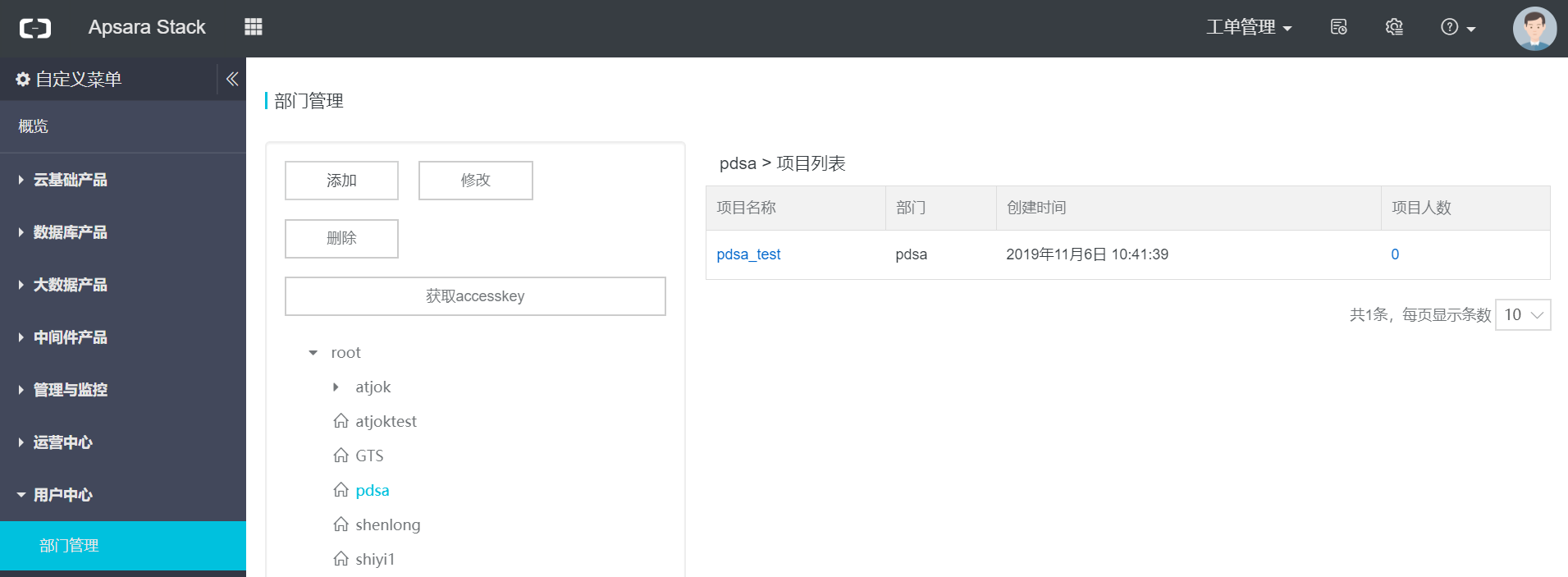
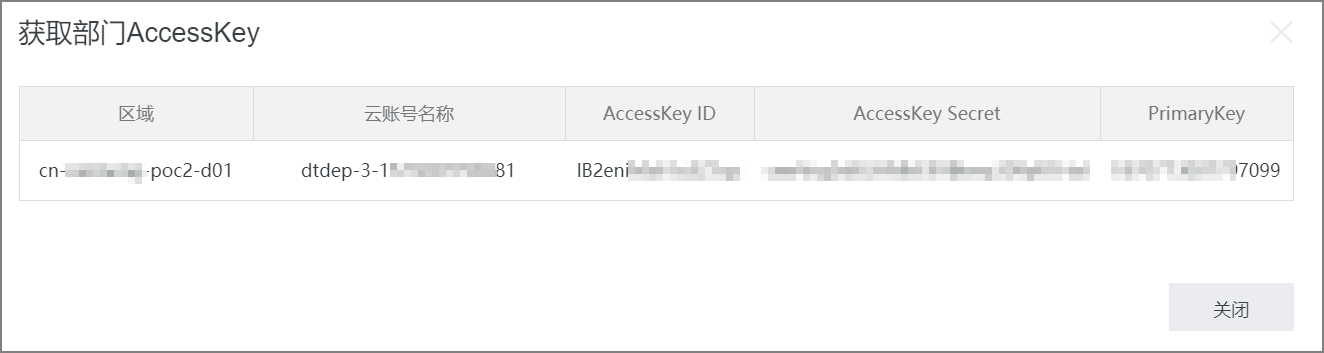
- 获取RegionId、AccessKey ID和AccessKey Secret。登录Apsara Stack控制台,在左侧导航栏单击,选择对应的部门,单击获取AccessKey 。
- 获取EDAS API服务地址endpoint。登录天基平台,单击,全局搜索edas-api,其中详情页面domain即endpoint的值。
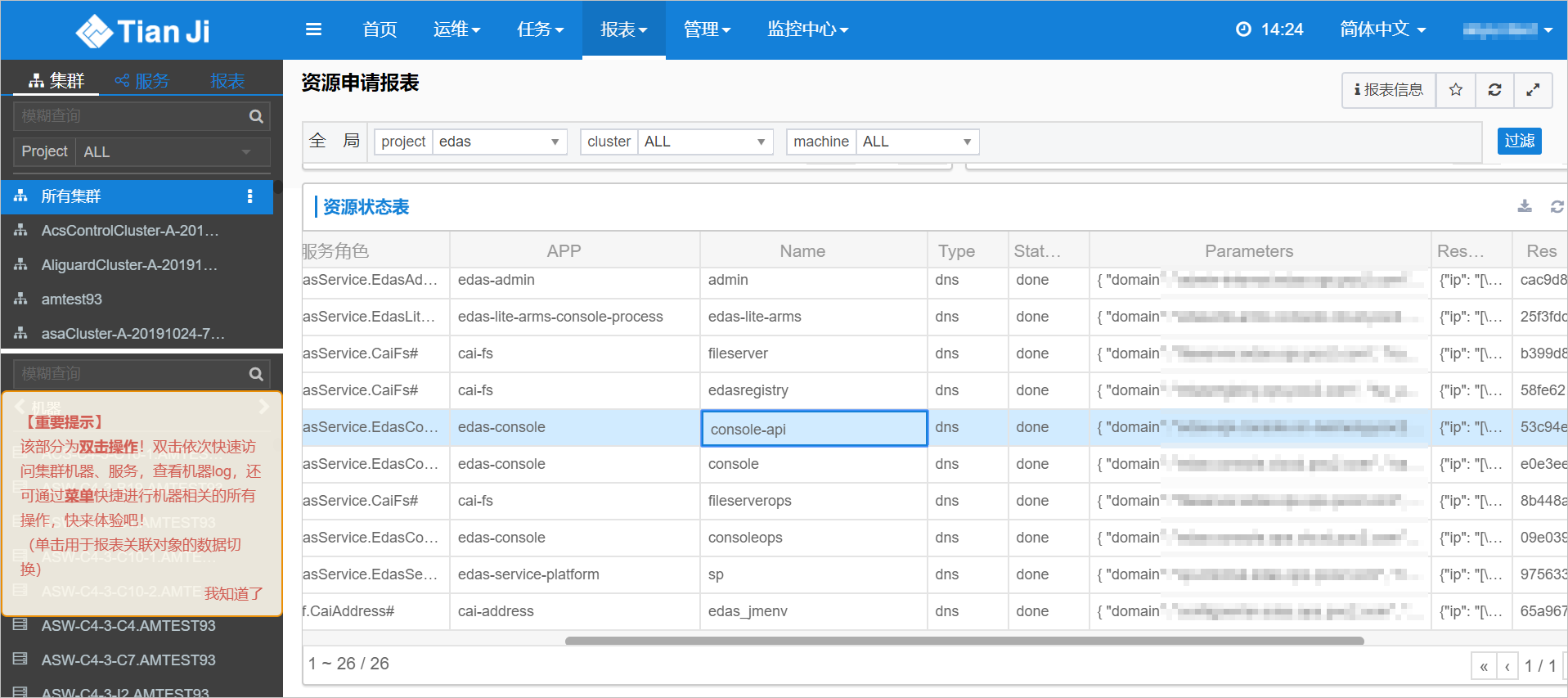
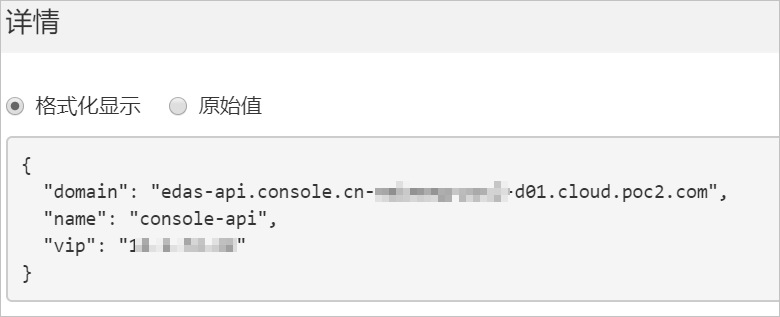
获取容器服务中部署的应用信息
请求URL
/pop/v5/changeorder/co_application
请求参数
| 名称 | 类型 | 是否必选 | 描述 |
|---|---|---|---|
| AppId | String | 是 | 应用ID。 |
| EndPoint | String | 是 | - |
| From | String | 否 | 来源。 |
返回参数
| 名称 | 类型 | 描述 |
|---|---|---|
| Code | Integer | 返回码。 |
| Message | String | 返回信息。 |
| AppId | String | 应用ID。 |
| ImageUrl | String | 镜像URL。 |
| RepoName | String | 镜像仓库名称。 |
| RegionId | String | 镜像区域ID。 |
| RepoId | String | 镜像仓库ID。 |
| RepoNamespace | String | 镜像仓库命名空间。 |
| RepoOriginType | String | 镜像仓库来源类型。 |
| Tag | String | 镜像tag。 |
| ApplicationType | String | 应用类型。 |
| Cmd | String | startUp 命令。 |
| CmdArgs | String | 命令参数。 |
| DeployType | String | 部署类型。 |
| EdasContainerVersion | String | EDAS 容器版本。 |
| BuildpackId | String | 应用构建类型 ID。 |
| TomcatVersion | String | Apache Tomcat 版本。 |
| Name | String | 环境变量名称。 |
| Value | String | 环境变量值。 |
| JarStartArgs | String | JAR 启动参数。 |
| JarStartOptions | String | JAR 启动选项。 |
| K8sCmd | String | 启动命令。 |
| K8sCmdArgs | String | 启动命令参数。 |
| K8sLocalvolumeInfo | String | 本地存储信息。 |
| K8sNasInfo | String | NAS存储信息。 |
| K8sVolumeInfo | String | 存储信息。 |
| Liveness | String | K8s容器存活状态监测信息。 |
| PostStart | String | K8s容器启动后执行信息。 |
| PreStop | String | K8s容器停止前执行信息。 |
| Readiness | String | K8s容器业务状态检查信息。 |
| ComponentId | String | 组件ID。 |
| ComponentKey | String | 组件关键字。 |
请求示例
public class GetK8sApplicationSimpleInfo {

    public String getK8sApplication() throws ClientException {
        //请填写要执行 API 调用的应用所在地域 ID.
        String regionId = "your_ regionId";
        //请填写阿里云主账号或子账号 AccessKey ID.
        String accessKeyId = " your_accessKeyId ";
        //请填写阿里云主账号或子账号 AccessKey Secret.
        String accessKeySecret = " your_accessKeySecret ";
        String productName = "Edas";
        String domain ="edas-api.console.cn-*******-****-***.com";
        DefaultProfile defaultProfile = DefaultProfile.getProfile(regionId,
accessKeyId, accessKeySecret);
        DefaultAcsClient defaultAcsClient = new DefaultAcsClient(defaultProfile);
        GetK8sApplicationRequest request = new GetK8sApplicationRequest();
        request.setAppId("f66a22ec-c98d-4b79-ab41-c8641bf9ac87");
        request.setEndpoint("edas-api.console. your_regionId.cloud.poc2.com");
        GetK8sApplicationResponse response;
        String resp = "";
        try {
            response = defaultAcsClient.getAcsResponse(request);
            resp = "返回码:" + response.getCode() + "----" + "返回信息:" + response.getMessage()
            + "镜像URL:" + response.getApplcation().getImageInfo().getImageUrl();
            System.out.printf("返回码:" + response.getCode() + "----" + "返回信息:" + response.getMessage()
            + "镜像URL:" + response.getApplcation().getImageInfo().getImageUrl());
            } catch(ClientException e) {
                e.printStackTrace();
        }
        return resp;

    }

}
返回示例
GetK8sApplicationResponse response;
        String resp = "";
        try {
            response = defaultAcsClient.getAcsResponse(request);
            resp = "返回码:" + response.getCode() + "----" + "返回信息:" + response.getMessage()
            + "镜像URL:" + response.getApplcation().getImageInfo().getImageUrl();
            System.out.printf("返回码:" + response.getCode() + "----" + "返回信息:" + response.getMessage()
            + "镜像URL:" + response.getApplcation().getImageInfo().getImageUrl());
            } catch(ClientException e) {
                e.printStackTrace();
        }
return resp;部署容器服务K8s应用
请求URL
/pop/v5/k8s/acs/k8s_apps
请求参数
| 名称 | 类型 | 是否必选 | 描述 |
|---|---|---|---|
| AppId | String | 是 | 应用ID。 |
| EndPoint | String | 是 | - |
| PreStop | String | 否 | 停止前执行脚本,格式如:{"tcpSocket":{"host":"", "port":8080}}。如果设置为“”或者 {} 代表删除,不设置代表忽略。 |
| Envs | String | 否 | - |
| ImageTag | String | 否 | 镜像Tag。 |
| BatchWaitTime | Integer | 否 | PoD更新最小间隔时间。 |
| Command | String | 否 | 容器启动Command命令。清空需设置为空字符串 ""。 |
| PostStart | String | 否 | - |
| Readiness | String | 否 | - |
| Liveness | String | 否 | - |
| Args | String | 否 | - |
| Replicas | Integer | 否 | - |
| Image | String | 否 | - |
| CpuLimit | Integer | 否 | - |
| MemoryLimit | Integer | 否 | - |
| CpuRequest | Integer | 否 | - |
| MemoryRequest | Integer | 否 | - |
| NasId | String | 否 | - |
| MountDescs | String | 否 | - |
| StorageType | String | 否 | - |
| LocalVolume | String | 否 | - |
| PackageUrl | String | 否 | - |
| PackageVersion | String | 否 | - |
| JDK | String | 否 | - |
| WebContainer | String | 否 | - |
| EdasContainerVersion | String | 否 | - |
| UriEncoding | String | 否 | - |
| UseBodyEncoding | Boolean | 否 | - |
| UpdateStrategy | String | 否 | - |
| MCpuRequest | Integer | 否 | - |
| MCpuLimit | Integer | 否 | - |
返回参数
| 名称 | 类型 | 示例值 | 描述 |
|---|---|---|---|
| ChangeOrderId | String | cd65b247-****-475b-ad4b-7039040d625c | 调用GetChangeOrderInfo接口获取这次部署具体执行进展。 |
| Code | Integer | 200 | code码。 |
| Message | String | success | 信息。 |
| RequestId | String | a5281053-08e4-47a5-b2ab-5c0323de7b5a | 请求唯一标示ID。 |
请求示例
public class DeployK8sApplictionSimpleInfo {
        public String deployK8sApplication() {
        //请填写阿里云主账号或子账号 AccessKey ID.
        String aliyun_user_ak = "your_ AccessKey ID ";
        //请填写阿里云主账号或子账号 AccessKey Secret.
        String aliyun_user_sk = "your_ AccessKey Secret ";
        //请填写要执行 API 调用的应用所在地域 ID.
        String region_id = "your_regionid";
        DefaultProfile defaultProfile = DefaultProfile.getProfile(region_id,
aliyun_user_ak, aliyun_user_sk);
        DefaultAcsClient defaultAcsClient = new
        DefaultAcsClient(defaultProfile);
        DeployK8sApplicationRequest request = new DeployK8sApplicationRequest();
        request.setAppId("f66a22ec-c98d-4b79-ab41-c8641bf9ac87");
        request.setEndpoint("edas-api.console. your_regionId.cloud.poc2.com");
        request.setImage("cr.registry.cloud.poc2.com/pdsa/k8s-nacos-consumer:v2");
        request.setImageTag("v2");
        request.setJDK("Open JDK 8");
        request.setEnvs("[{\"name\":\"updatetime\",\"value\":\""+ new Date() + "\"}]");
        DeployK8sApplicationResponse response;
        String resp = "";
        try {
            response = defaultAcsClient.getAcsResponse(request);
            resp = "返回码:" +response.getCode() + "----" + "返回信息:" + response.getMessage();
            System.out.printf("返回码:" + response.getCode() + "----" + "返回信息:" + response.getMessage());
        }catch (ClientException e) {
            e.printStackTrace();
        }
        return resp;
    }
}
返回示例
DeployK8sApplicationResponse response;
String resp = "";
try {
    response = defaultAcsClient.getAcsResponse(request);
    resp = "返回码:" +response.getCode() + "----" + "返回信息:" + response.getMessage();
    System.out.printf("返回码:" + response.getCode() + "----" + "返回信息:" + response.getMessage());
}catch (ClientException e) {
    e.printStackTrace();
}
return resp;