基于GAN的3D点云图像转换
本实验介绍jupyter notebook中运行的基于GAN的3D点云图像转换代码
场景简介
本实验介绍:jupyter notebook中运行的基于GAN的3D点云图像转换代码
实验室资源方式简介
进入实操前,请确保阿里云账号满足以下条件:
个人账号资源
使用您个人的云资源进行操作,资源归属于个人。
平台仅提供手册参考,不会对资源做任何操作。
确保已完成云工开物300元代金券领取。
已通过实名认证且账户余额≥100元。
本次实验将在您的账号下开通实操所需计算型实例规格族c7a,费用约为:25元(以实验时长2小时预估,具体金额取决于实验完成的时间),需要您通过阿里云云工开物学生专属300元抵扣金兑换本次实操的云资源。
如果您调整了资源规格、使用时长,或执行了本方案以外的操作,可能导致费用发生变化,请以控制台显示的实际价格和最终账单为准。
领取专属权益及创建实验资源
在开始实验之前,请先点击右侧屏幕的“进入实操”再进行后续操作

领取300元高校专属权益优惠券(若已领取请跳过)
实验产生的费用优先使用优惠券,优惠券使用完毕后需您自行承担。

实验步骤
1、服务部署
点击链接,进入部署页面
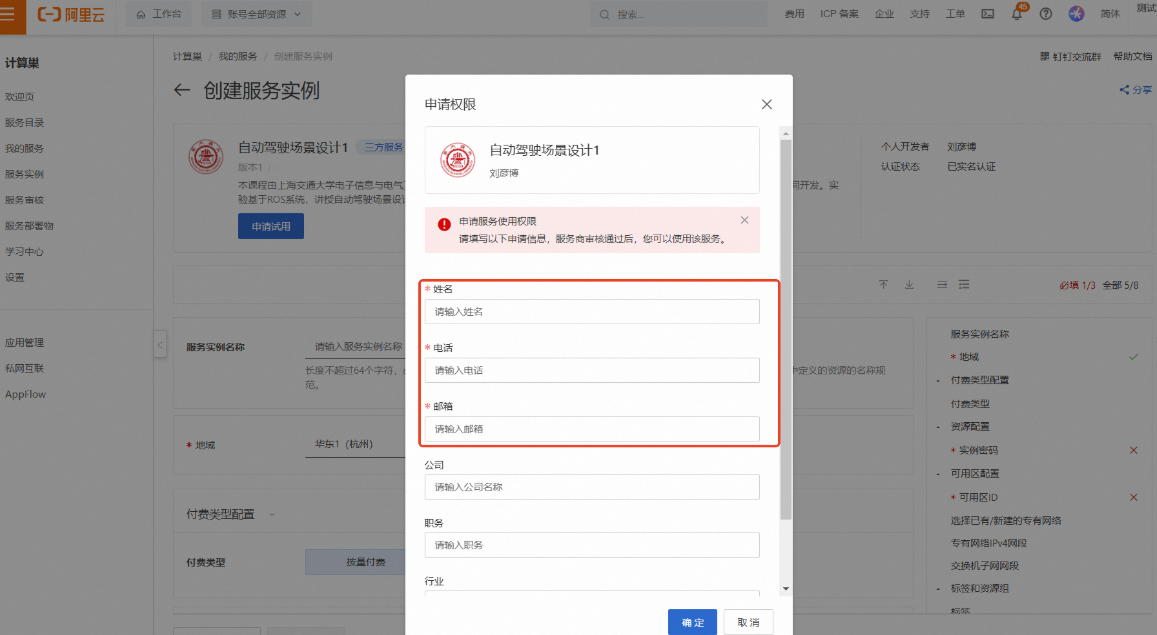
按弹窗提示进行权限申请。其中【姓名】、【电话】、【邮箱】为必填项,完成填写后点击【确定】
说明请填写您的学校邮箱(.edu),便于审核
提交申请后将提示
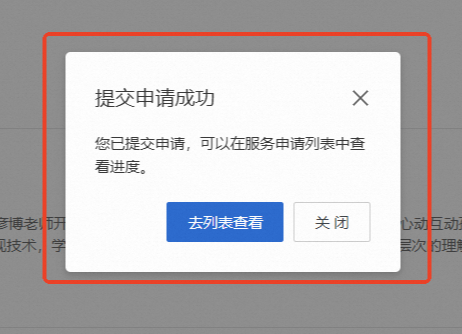
当申请通过后,将会收到短信提示可以进行部署

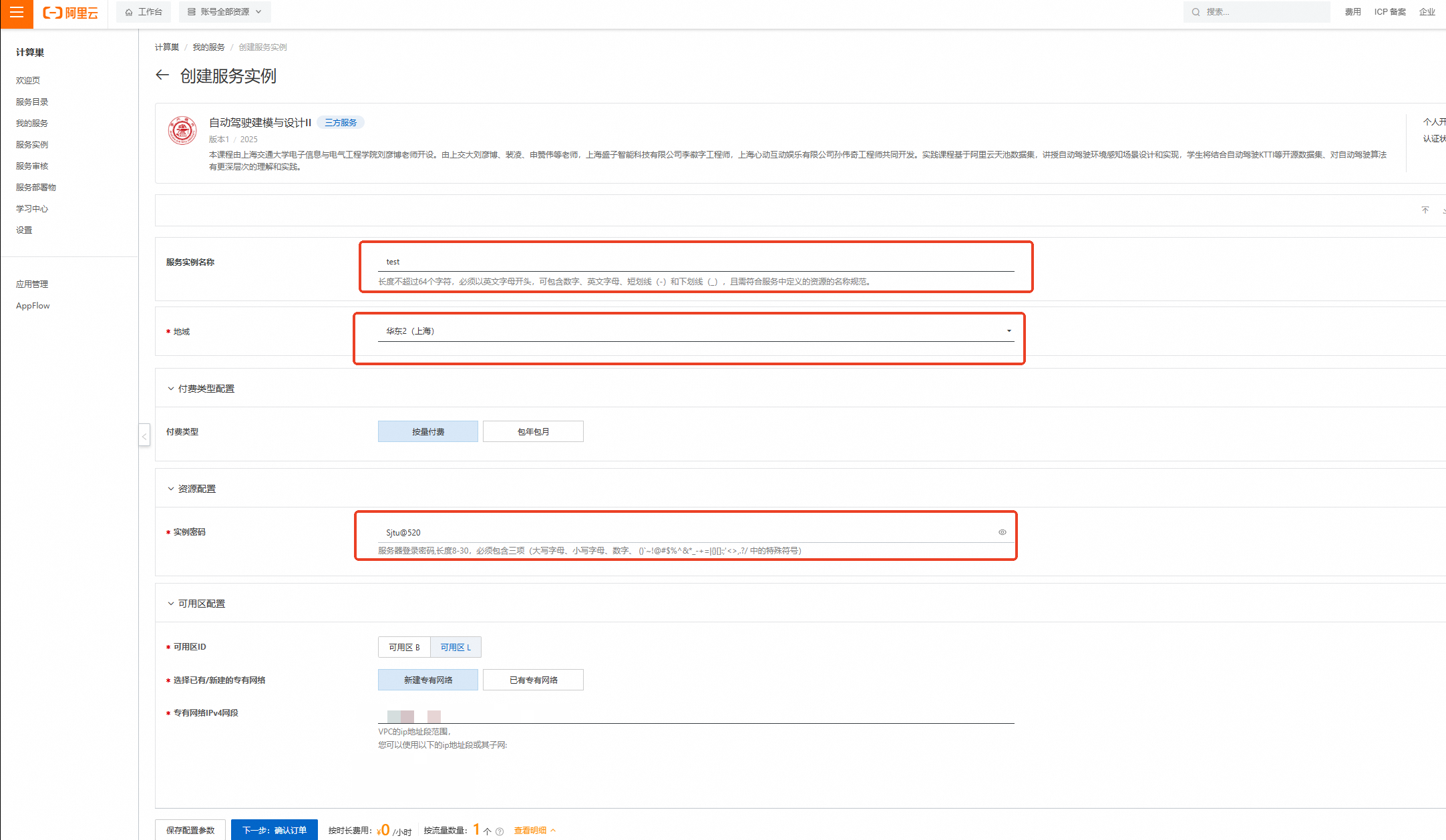
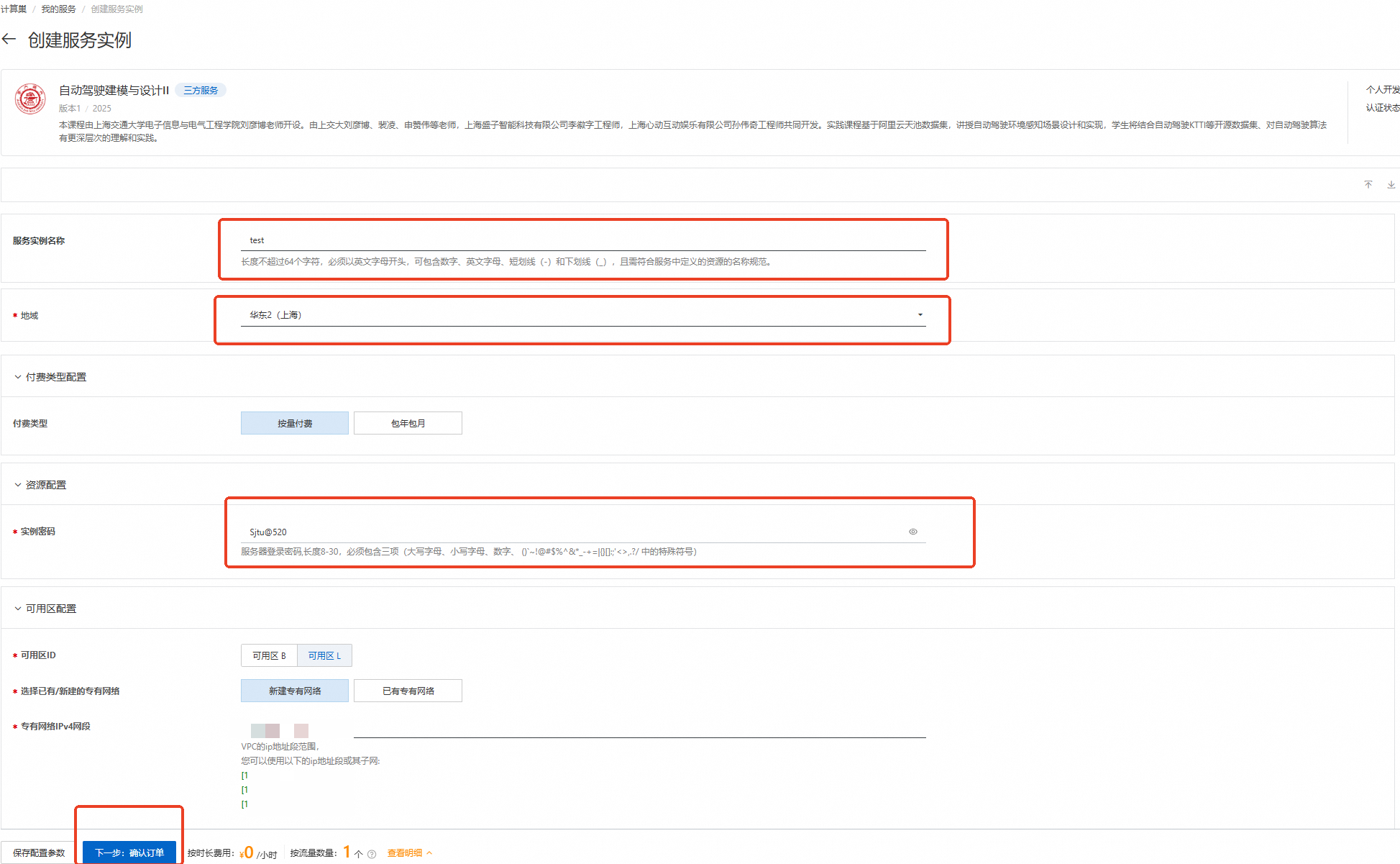
刷新部署页面,按下图设置【服务实例名称】、【地域】、【实例密码】
服务实例名称:test(可自定义命名)
地域:华东2(上海)
实例密码:Sjtu@520
说明输入实例密码时请注意大小写,请记住您设置的实例名称及对应密码,后续实验过程会用到。

完成填写后点击【下一步:确认订单】
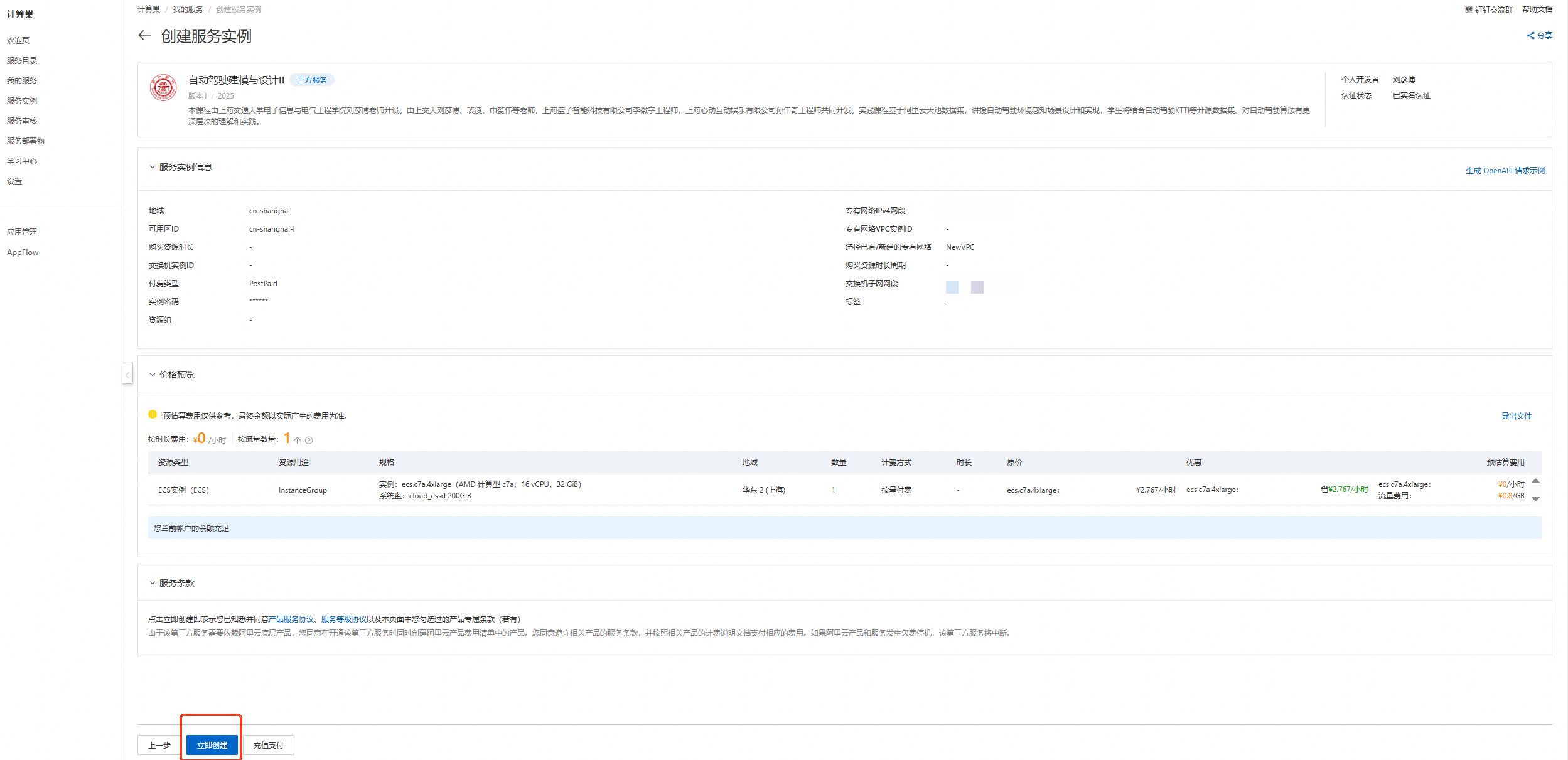
核对实例信息及价格预览,无误请点击【立即创建】
重要领取300元优惠券后,资源应为0元/小时,且会提示【您当前账户的余额充足】!若提示余额不足等,请检查是否正确领取优惠券
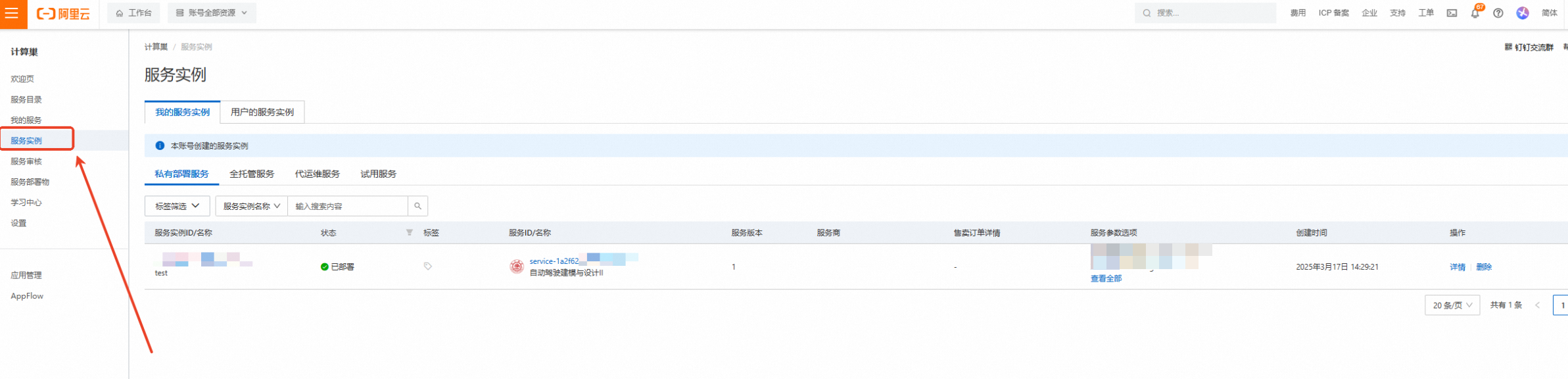
创建成功,点击【去列表查看】
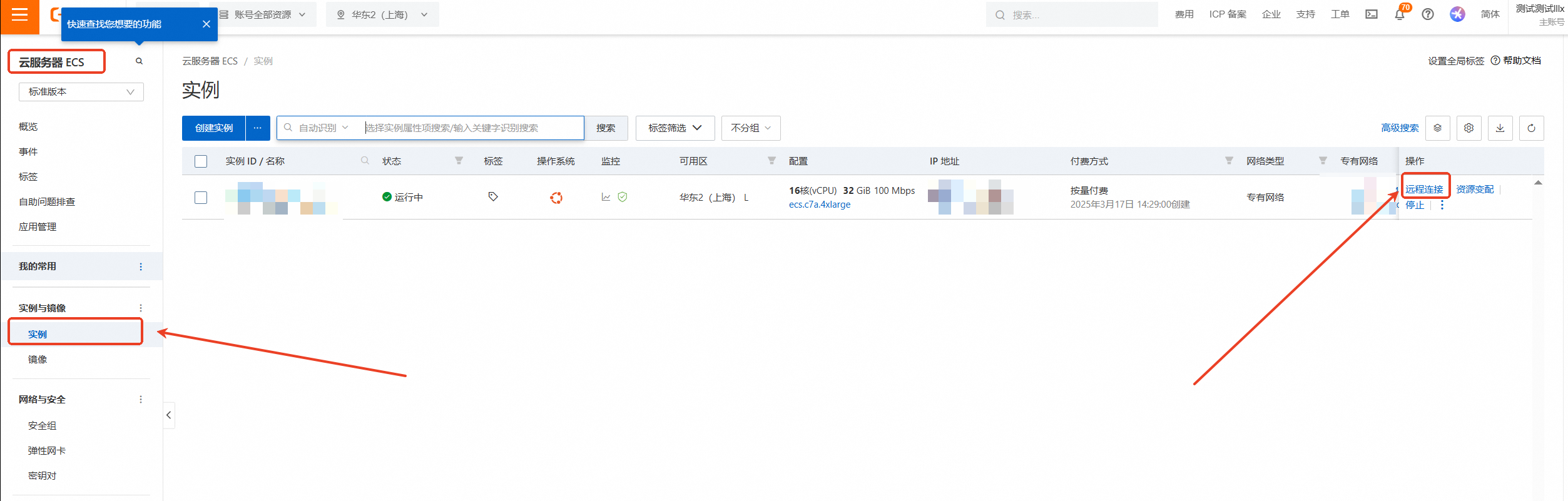
查看实例,点击左侧的图标展开目录
选择目录中的【云服务器ECS】
云服务器ECS—实例—远程连接
下拉展开更多登录方式,选择【通过VNC远程连接】
输入实例密码:Sjtu@520(请输入您设置的密码)后回车
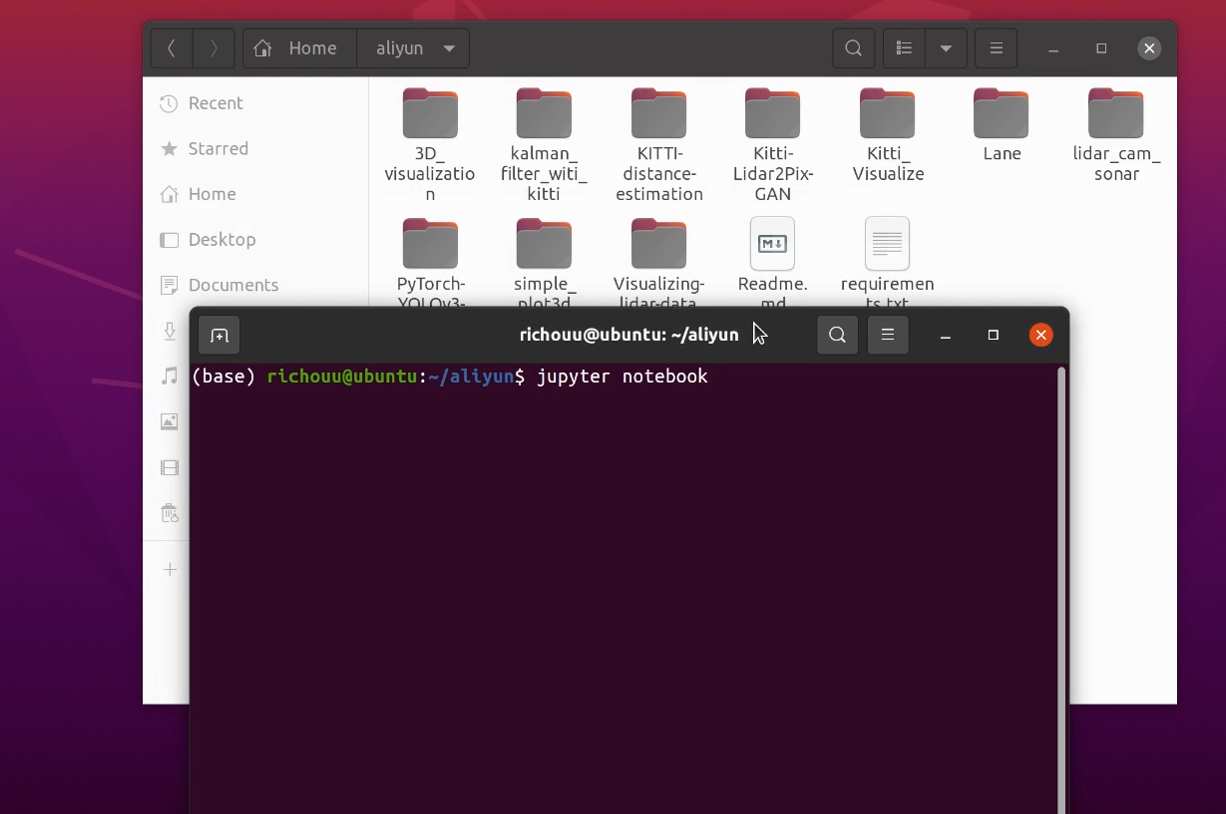
进入Ubuntu20.04系统后打开aliyun文件夹,在文件夹中右键开启终端并输入 /jupyter notebook 命令,用户名前面的(base)表示此时处于anaconda的base环境中
2、打开文件并运行
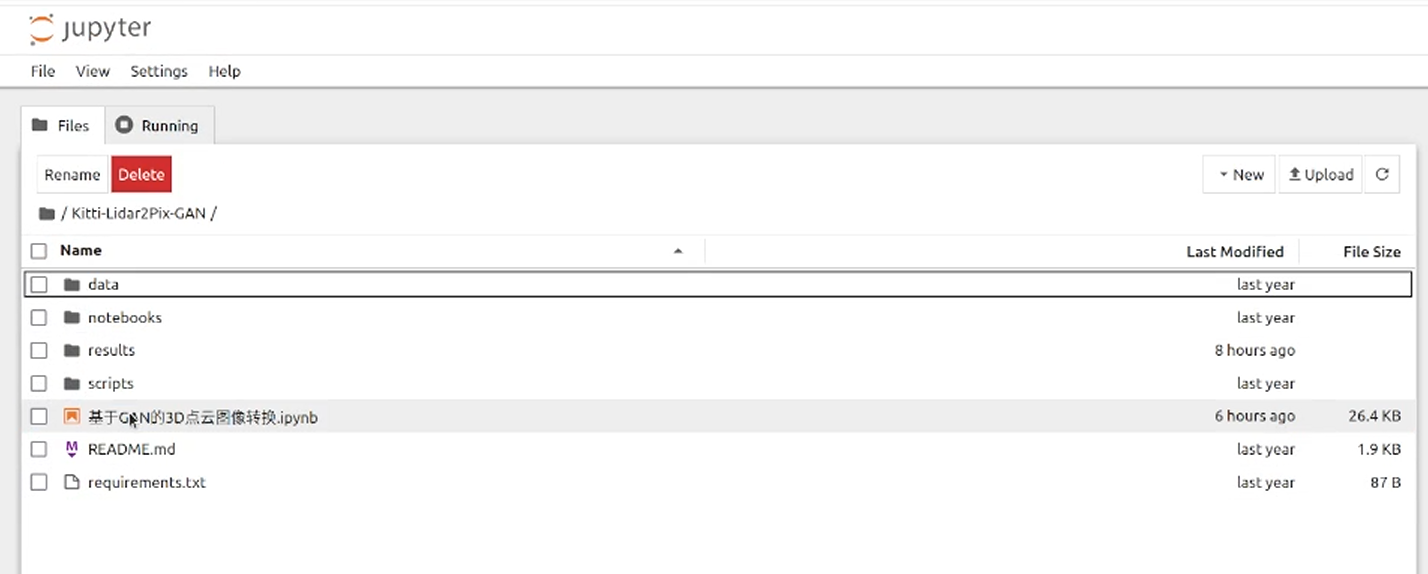
在自动弹出的浏览器页面中选择/Kitti-Lidar2Pix-GAN/基于GAN的3D点云图像转换.ipynb并打开
点击此选项可按步运行
3、导入依赖
import os import glob import functools import time from __future__ import print_function import random import torch import torch.optim as optim from torch import nn import torch.utils.data from torch.utils.data import Dataset, DataLoader from torchvision import transforms from torch.utils.data import random_split, Subset from torch.nn import L1Loss import numpy as np import matplotlib.pyplot as plt from skimage import io from IPython.display import clear_output %matplotlib inline #torch.manual_seed(1)4、定义参数和文件夹路径
# 参数 MIN_POINTS = 300 IMG_H = 374 IMG_W = 1238 batch_size = 64 # 文件夹路径 PC_DIR = '/home/ecs-user/aliyun/Kitti-Lidar2Pix-GAN/data/processed/{}/training/point_clouds/'.format(MIN_POINTS) IMG_DIR = '/home/ecs-user/aliyun/Kitti-Lidar2Pix-GAN/data/processed/{}/training/image_2/'.format(MIN_POINTS) CENTERS_DIR = '/home/ecs-user/aliyun/Kitti-Lidar2Pix-GAN/data/processed/{}/training/centers/'.format(MIN_POINTS) CALIB_DIR = '/home/ecs-user/aliyun/Kitti-Lidar2Pix-GAN/data/processed/{}/training/calib/'.format(MIN_POINTS)5、定义函数
点云到图像的投影。
def pcd_to_img(pcd, index):
    FRAME = f'{"0"*(6 - len(str(index)))}{index}'
    # 加载二进制点云
    with open(f'{CALIB_DIR}{FRAME}.txt', 'r') as f:
        calib = f.readlines()
    P2 = np.array([float(x) for x in calib[2].strip('\n').split(' ')[1:]]).reshape(3, 4)
    R0_rect = np.array([float(x) for x in calib[4].strip('\n').split(' ')[1:]]).reshape(3,3)
    # 右下角添加一个1,重塑为4 x 4
    R0_rect = np.insert(R0_rect,3,values=[0,0,0],axis=0)
    R0_rect = np.insert(R0_rect,3,values=[0,0,0,1],axis=1)
    Tr_velo_to_cam = np.array([float(x) for x in calib[5].strip('\n').split(' ')[1:]]).reshape(3,4)
    Tr_velo_to_cam = np.insert(Tr_velo_to_cam,3,values=[0,0,0,1],axis=0)
    # 重塑和删除反射值
    pcd = pcd.reshape((-1, 4))
    points, reflectances = pcd[:, 0:3], pcd[:, 3]
    velo = np.insert(points,3,1,axis=1).T
    cam = P2.dot(R0_rect.dot(Tr_velo_to_cam.dot(velo)))
    cam[:2] /= cam[2,:]
    return cam, reflectances
在图像中嵌入点云投影。
def make_hybrid_image(border_size, pcd, img):
    """ 将投影的点云图像嵌入RGB图像中 """
    imsize = img.shape[-1]
    hybrid_img = img.detach().clone()
    pcd_center = pcd.detach().clone()[:, :,
                                      border_size:imsize-border_size,
                                      border_size:imsize-border_size
                                     ]
    hybrid_img[:, :, border_size:imsize-border_size,
               border_size:imsize-border_size] \
    = pcd_center.clone()
    return hybrid_img
可视化。
def show_results(data, clip=4, save=False): titles = ['in', 'out', 'true'] if clip > data[0].shape[0]: clip = data[0].shape[0] # 绘制 for j in range(clip): fig, axes = plt.subplots(1, 3, sharey=True, figsize=(11,4)) fig.suptitle('Lidar point cloud -> RGB', color="white") fig.patch.set_facecolor('black') for i in range(3): ax = axes[i] ax.imshow(((data[i][j].numpy().transpose(1, 2, 0) + 1)*127.5).astype('uint8')) ax.set_title(titles[i], color="white") ax.get_xaxis().set_visible(False) ax.get_yaxis().set_visible(False) plt.savefig("/home/ecs-user/aliyun/Kitti-Lidar2Pix-GAN/results/"+str(j)+'.png', format='png') plt.show()6、定义数据集类
class ProjectedPointCloudDataset(Dataset): def __init__(self, folder, trans): self.folder = folder self.files = glob.glob(os.path.join(folder, '*.bin')) self.trans = trans def __getitem__(self, index): # 小端序float32 pc = np.fromfile(os.path.join(self.folder, '{0:06d}.bin'.format(index)), '<f4') cam, refl = pcd_to_img(pc, index) [cH, cW] = np.load(os.path.join(CENTERS_DIR, '{0:06d}.npy'.format(index) ) ) # 将3D点云投影到2D u, v, z = cam # 转换2D图像 u -= cW - 128 v -= cH - 128 proj_mat = np.zeros((IMG_H, IMG_W)) # 填充矩阵 for idx in range(u.shape[0]): row = int(v[idx]) col = int(u[idx]) proj_mat[row, col] = z[idx] mat256 = proj_mat[:256, :256] # 简单的3通道来匹配RGB条件图像边框 pm3c = np.stack((mat256, mat256, mat256)) # 归一化为[-1, 1] pm3c = torch.Tensor(pm3c) if self.trans: pm3c = self.trans(pm3c) pm3c = 2*(pm3c - pm3c.min())/(pm3c.max()-pm3c.min()) pm3c -= 1 return pm3c def __len__(self): return len(self.files) class KittiLeftColorDataset(Dataset): """ Kitti Left Color (image_2)数据集""" def __init__(self, folder, trans=None): self.folder = folder self.files = glob.glob(os.path.join(folder, '*.png')) self.trans = trans def __getitem__(self, index): img_path = os.path.join(self.folder, f'{"0"*(6 - len(str(index)))}{index}.png') img = torch.Tensor(io.imread(img_path).transpose(2, 0, 1)) if self.trans: img = self.trans(img) img = (img/127.5) img -= 1 return img def __len__(self): return len(self.files) class ConcatDataset(torch.utils.data.Dataset): """ 连接多个数据集 """ def __init__(self, *datasets): self.datasets = datasets def __getitem__(self, i): return tuple(d[i] for d in self.datasets) def __len__(self): return max(len(d) for d in self.datasets)7、定义网络模型
class ConvBlock(nn.Module): def __init__(self, ch_in, ch_out): super().__init__() self.conv = nn.Sequential( nn.Conv2d(ch_in, ch_out, kernel_size=3, stride=1, padding=1, bias=True), nn.BatchNorm2d(ch_out), nn.ReLU(inplace=True), nn.Conv2d(ch_out, ch_out, kernel_size=3, stride=1, padding=1, bias=True), nn.BatchNorm2d(ch_out), nn.ReLU(inplace=True), ) def forward(self, x): x = self.conv(x) return x class UpConvBlock(nn.Module): def __init__(self, ch_in, ch_out): super().__init__() self.up = nn.Sequential( nn.Upsample(scale_factor=2), nn.Conv2d(ch_in, ch_out, kernel_size=3,stride=1, padding=1, bias=True), nn.BatchNorm2d(ch_out), nn.ReLU(inplace=True), ) def forward(self, x): x = x = self.up(x) return x class AttentionBlock(nn.Module): def __init__(self, f_g, f_l, f_int): super().__init__() self.w_g = nn.Sequential( nn.Conv2d(f_g, f_int, kernel_size=1, stride=1, padding=0, bias=True), nn.BatchNorm2d(f_int) ) self.w_x = nn.Sequential( nn.Conv2d(f_l, f_int, kernel_size=1, stride=1, padding=0, bias=True), nn.BatchNorm2d(f_int) ) self.psi = nn.Sequential( nn.Conv2d(f_int, 1, kernel_size=1, stride=1, padding=0, bias=True), nn.BatchNorm2d(1), nn.Sigmoid(), ) self.relu = nn.ReLU(inplace=True) def forward(self, g, x): g1 = self.w_g(g) x1 = self.w_x(x) psi = self.relu(g1+x1) psi = self.psi(psi) return psi*x class AttentionUNet(nn.Module): def __init__(self, n_classes=1, in_channel=6, out_channel=3): super().__init__() self.maxpool = nn.MaxPool2d(kernel_size=2, stride=2) self.conv1 = ConvBlock(ch_in=in_channel, ch_out=64) self.conv2 = ConvBlock(ch_in=64, ch_out=128) self.conv3 = ConvBlock(ch_in=128, ch_out=256) self.conv4 = ConvBlock(ch_in=256, ch_out=512) self.conv5 = ConvBlock(ch_in=512, ch_out=1024) self.up5 = UpConvBlock(ch_in=1024, ch_out=512) self.att5 = AttentionBlock(f_g=512, f_l=512, f_int=256) self.upconv5 = ConvBlock(ch_in=1024, ch_out=512) self.up4 = UpConvBlock(ch_in=512, ch_out=256) self.att4 = AttentionBlock(f_g=256, f_l=256, f_int=128) self.upconv4 = ConvBlock(ch_in=512, ch_out=256) self.up3 = UpConvBlock(ch_in=256, ch_out=128) self.att3 = AttentionBlock(f_g=128, f_l=128, f_int=64) self.upconv3 = ConvBlock(ch_in=256, ch_out=128) self.up2 = UpConvBlock(ch_in=128, ch_out=64) self.att2 = AttentionBlock(f_g=64, f_l=64, f_int=32) self.upconv2 = ConvBlock(ch_in=128, ch_out=64) self.conv_1x1 = nn.Conv2d(64, out_channel, kernel_size=1, stride=1, padding=0) def forward(self, x): x1 = self.conv1(x) x2 = self.maxpool(x1) x2 = self.conv2(x2) x3 = self.maxpool(x2) x3 = self.conv3(x3) x4 = self.maxpool(x3) x4 = self.conv4(x4) x5 = self.maxpool(x4) x5 = self.conv5(x5) d5 = self.up5(x5) x4 = self.att5(g=d5, x=x4) d5 = torch.concat((x4, d5), dim=1) d5 = self.upconv5(d5) d4 = self.up4(d5) x3 = self.att4(g=d4, x=x3) d4 = torch.concat((x3, d4), dim=1) d4 = self.upconv4(d4) d3 = self.up3(d4) x2 = self.att3(g=d3, x=x2) d3 = torch.concat((x2, d3), dim=1) d3 = self.upconv3(d3) d2 = self.up2(d3) x1 = self.att2(g=d2, x=x1) d2 = torch.concat((x1, d2), dim=1) d2 = self.upconv2(d2) d1 = self.conv_1x1(d2) return d18、加载数据与模型
proj_point_clouds = ProjectedPointCloudDataset(PC_DIR, trans = transforms.Resize(64, antialias=True)) images = KittiLeftColorDataset(IMG_DIR, trans = transforms.Resize(64, antialias=True)) dataset = ConcatDataset(images, proj_point_clouds) split_fracs = [0.8, 0.2] splits = [int(split_fracs[0]*len(dataset)), len(dataset) - int(split_fracs[0]*len(dataset))] train_data, test_data = random_split(dataset, splits) train_loader = torch.utils.data.DataLoader(train_data, batch_size=batch_size, shuffle=True, num_workers=3, pin_memory=True, drop_last=True ) n_batches = len(train_loader) # 设置设备 device = torch.device("cuda:0" if torch.cuda.is_available() else "cpu") G_Net = AttentionUNet() #G_Net.load_state_dict(torch.load("G")) G_Net.to(device) D_Net = NLayerDiscriminator(3) #D_Net.load_state_dict(torch.load("D")) D_Net.to(device) # 初始化BCELoss函数 criterion = nn.BCEWithLogitsLoss() L1 = L1Loss() # 训练期间真假标签的约定 real_label = 1. fake_label = 0. lr = 0.00002 # 为G和D设置Adam优化器 optimizerD = optim.Adam(D_Net.parameters(), lr=lr, betas=(0.5, 0.999)) optimizerG = optim.Adam(G_Net.parameters(), lr=lr, betas=(0.5, 0.999))9、训练
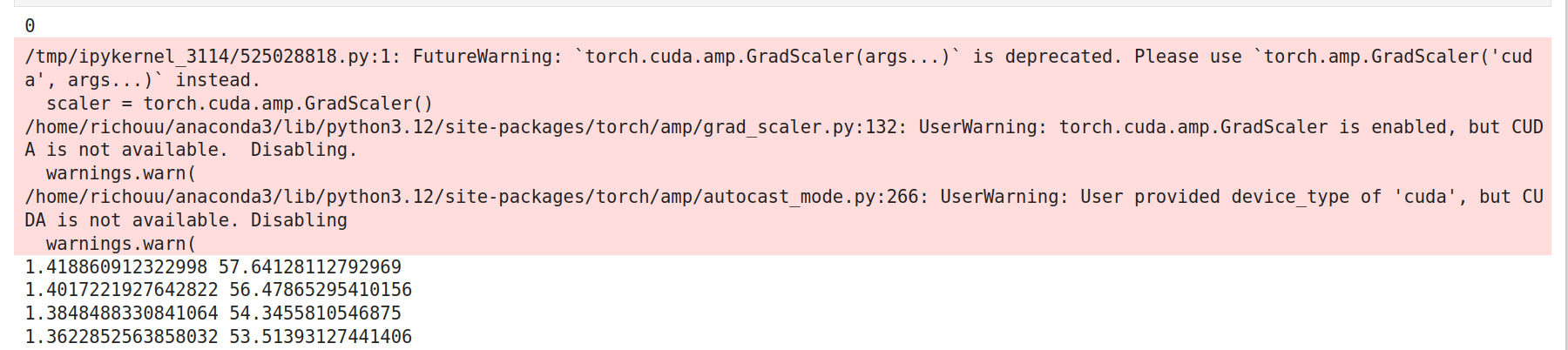
scaler = torch.cuda.amp.GradScaler()

#自行设置epoch
for epoch in range(1):
    print(epoch)
    G_err_avg = 0.
    D_err_avg = 0.
    t_start = time.time()
    for i, batch in enumerate(train_loader):

        img_batch = batch[0].to(device)
        pc_batch = batch[1].to(device)
        hyb_batch = make_hybrid_image(5, pc_batch, img_batch)

        G_Net.zero_grad()
        D_Net.zero_grad()

        with torch.amp.autocast(device_type="cuda", dtype=torch.float16):
            t = torch.full((hyb_batch.shape[0],), 0, device=device)
            noise = torch.randn_like(hyb_batch).to(device)
            hyb_batch = torch.cat([noise, hyb_batch], 1)
            # 判别器优化
            # 生成fake
            fake_batch = G_Net(hyb_batch)

            # 对real进行分类
            D_out_real = D_Net(img_batch).view(-1)
            # 对fake进行分类
            D_out_fake = D_Net(fake_batch).view(-1)

            D_target_real = torch.full(D_out_real.shape, real_label, device=device)
            D_target_fake = torch.full(D_out_fake.shape, fake_label, device=device)

            D_err_real = criterion(D_out_real, D_target_real)
            D_err_fake = criterion(D_out_fake, D_target_fake)
            D_err = D_err_real + D_err_fake

        # Scaler
        scaler.scale(D_err).backward(retain_graph=True)
        scaler.step(optimizerD)

        # No scaler
        #D_err.backward()
        #optimizerD.step()
        with torch.amp.autocast(device_type="cuda", dtype=torch.float16):
            # 生成器优化
            fake_batch = G_Net(hyb_batch)
            D_out_fake = D_Net(fake_batch).view(-1)

            G_target = torch.full(D_out_fake.shape, real_label, device=device)

            G_err = criterion(D_out_fake, G_target) + 100*L1(fake_batch, img_batch)
        # Scaler
        scaler.scale(G_err).backward()
        scaler.step(optimizerG)
        scaler.update()

        # No scaler
        #G_err.backward()
        #optimizerG.step()

        with open('/home/ecs-user/aliyun/Kitti-Lidar2Pix-GAN/notebooks/p2p_losses_test.txt', 'a') as f:
            f.write(f'{epoch}, {i}, {D_err}, {G_err}\n')
        t_end = time.time()
        print(D_err.item(), G_err.item())

    if epoch % 10 == 0:
        torch.save(G_Net.state_dict(), "/home/ecs-user/aliyun/Kitti-Lidar2Pix-GAN/notebooks/G_test")
        torch.save(D_Net.state_dict(), "/home/ecs-user/aliyun/Kitti-Lidar2Pix-GAN/notebooks/D_test")

    if (epoch + 1) % 1 == 0:
        clear_output(wait=True)
        display_data = [hyb_batch[:, 3:, :, :].detach().cpu(),
                        fake_batch.detach().cpu(),
                        img_batch.detach().cpu()]
        show_results(display_data, clip=4, save=False)
        plt.show()
开始训练。
根据需要的效果和可用时间自定义epoch。epoch为25时,训练时的转换结果如图所示:
10、在测试数据集上生成
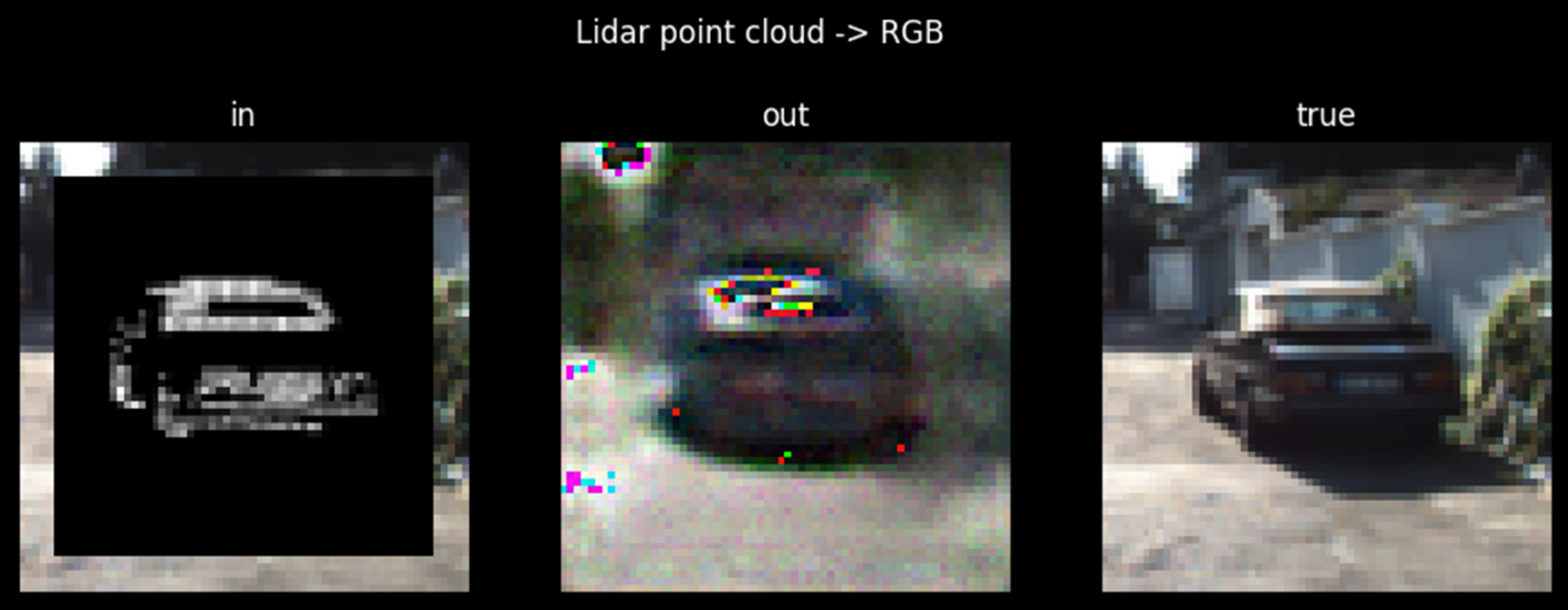
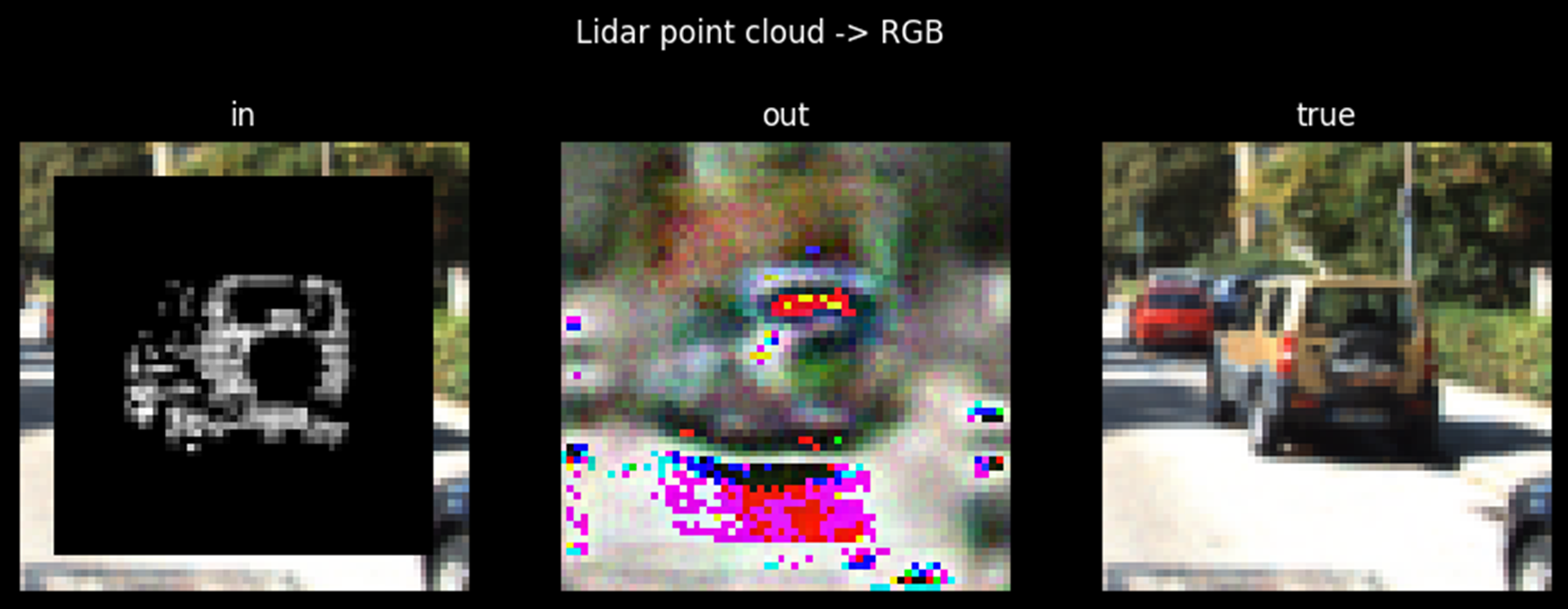
test_loader = torch.utils.data.DataLoader(test_data, batch_size=batch_size, shuffle=False, num_workers=3, pin_memory=True, drop_last=True ) test_iter = iter(test_loader) img_batch, proj_batch = next(test_iter) with torch.no_grad(): hyb_batch = make_hybrid_image(5, proj_batch, img_batch).to(device) noise = torch.randn_like(hyb_batch).to(device) hyb_batch = torch.cat([noise, hyb_batch], 1) generated = G_Net(hyb_batch) display_data = [hyb_batch[:,3:,:,:].detach().cpu(), generated.detach().cpu(), img_batch.detach().cpu()] show_results(display_data, clip=100, save=True) import numpy as np import matplotlib.pyplot as plt with open('/home/ecs-user/aliyun/Kitti-Lidar2Pix-GAN/notebooks/p2p_losses_test.txt') as f: lines = f.readlines() p2p_losses = [] for line in lines: line = line.strip('\n').split(',') D_loss = float(line[2]) G_loss = float(line[3]) p2p_losses.append([D_loss, G_loss]) p2p_losses = np.array(p2p_losses) fig, ax1 = plt.subplots() color = 'tab:red' ax1.set_xlabel('iteration') ax1.set_ylabel('Discriminator', color=color) print(p2p_losses) ax1.plot(p2p_losses[:, 0], color=color) ax1.tick_params(axis='y', labelcolor=color) ax2 = ax1.twinx() color = 'tab:blue' ax2.set_ylabel('Generator', color=color) ax2.plot(p2p_losses[:,1], color=color) ax2.tick_params(axis='y', labelcolor=color) ax2.set_title('Learning curves') fig.tight_layout() plt.show()epoch为25时,测试时的转换结果如图所示:





清理资源
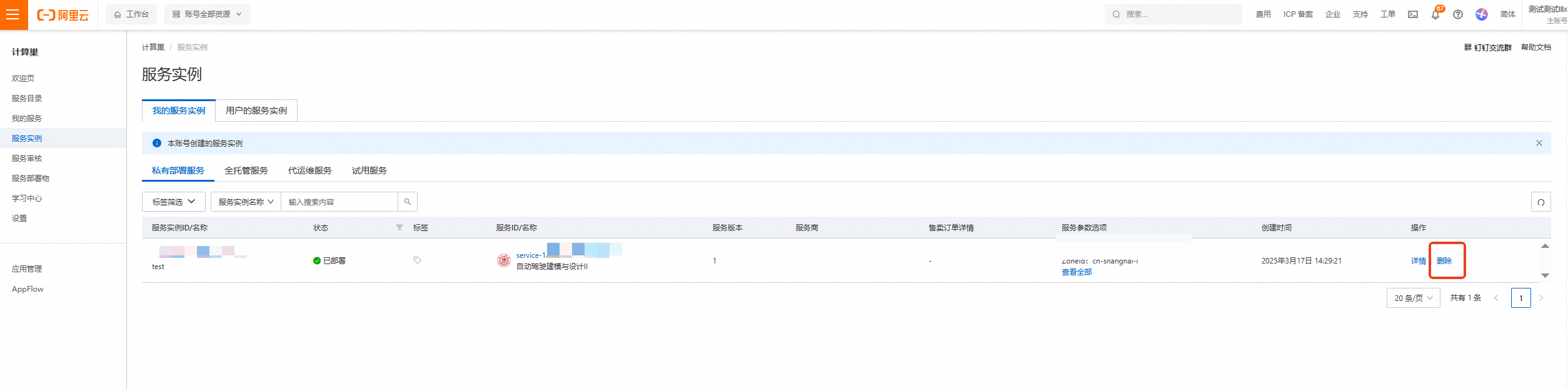
计算巢—服务实例—复制服务实例ID,点击【删除】
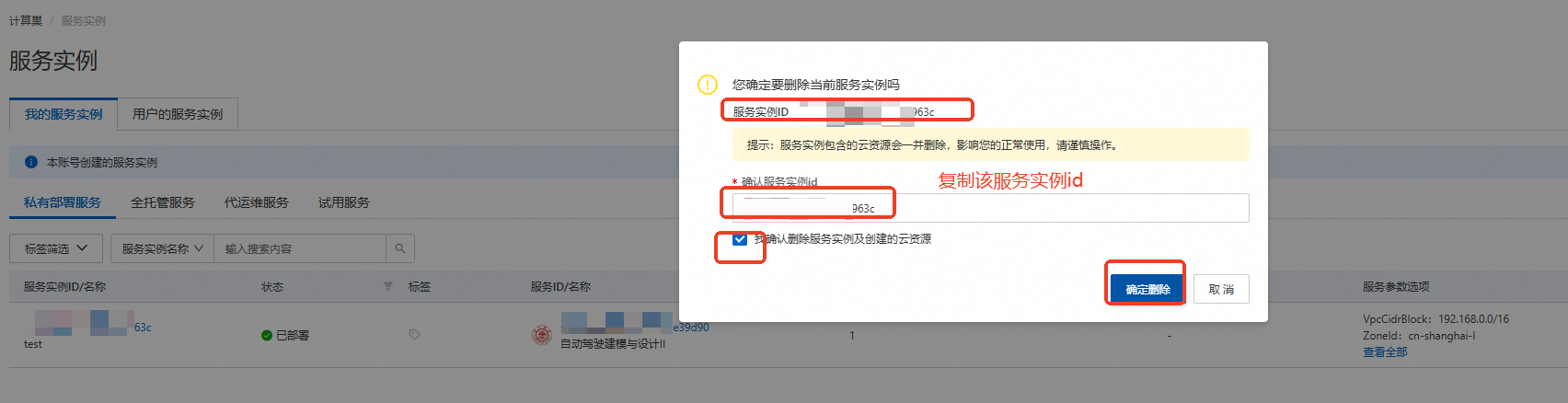
在弹窗粘贴服务实例ID,并进行勾选,点击【确定删除】
完成安全验证后,即可成功释放实例。
回到云服务器ECS——实例,检查是否成功释放资源


关闭实验
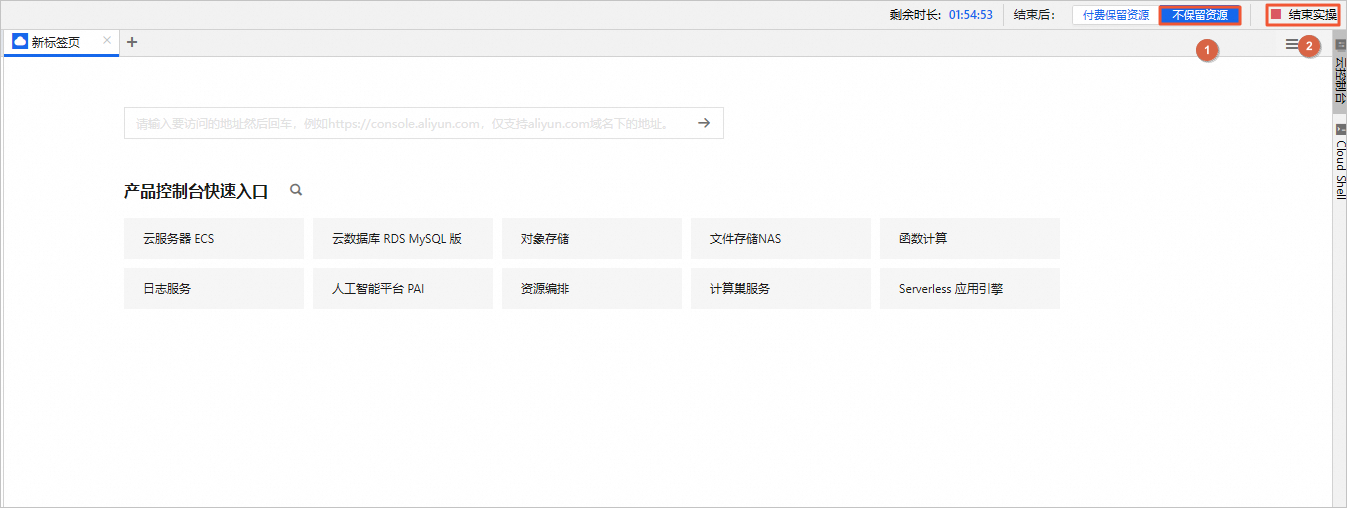
在完成实验后,如果无需继续使用资源,选择不保留资源,单击结束实操。在结束实操对话框中,单击确定。
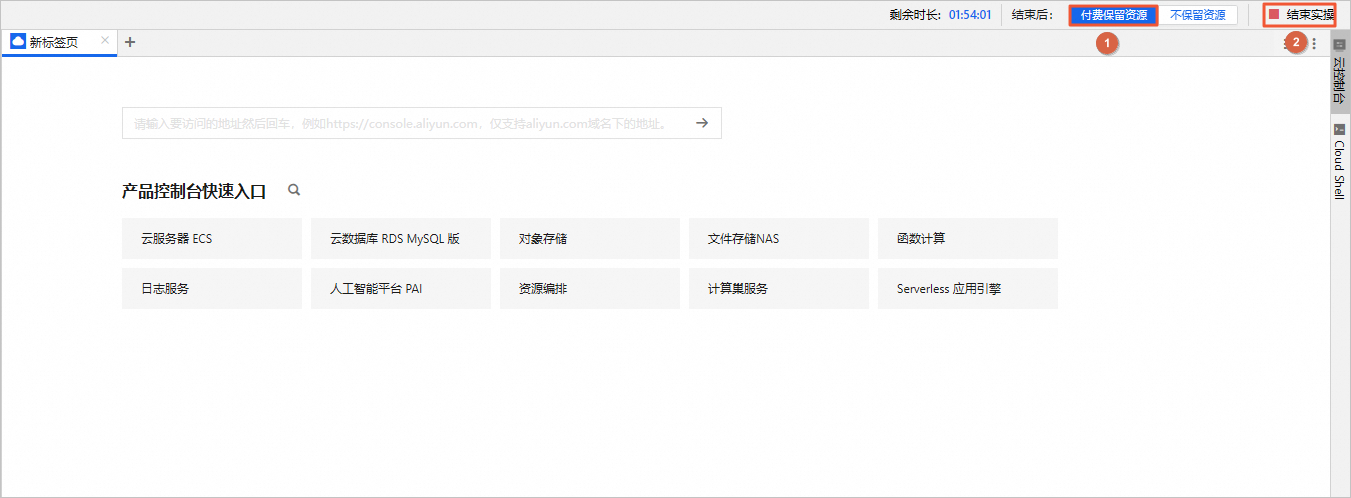
在完成实验后,如果需要继续使用资源,选择付费保留资源,单击结束实操。在结束实操对话框中,单击确定。请随时关注账户扣费情况,避免发生欠费。