Overview of managed node pools
Managed node pools automate node operations and maintenance (O&M) in Container Service for Kubernetes (ACK), so your team can focus on application development instead of routine node upkeep. ACK handles OS Common Vulnerabilities and Exposures (CVE) patching, kubelet updates, and node restarts on your behalf—within a maintenance window you define.
Use cases
Managed node pools are a good fit when:
Your team prioritizes application development over node O&M. Offload CVE patching, runtime updates, and node repair to ACK instead of managing them manually.
Your workloads tolerate node changes. Pods must be insensitive to node replacements and able to migrate without data loss. If your application relies on node-local state, evaluate whether managed node pools are appropriate.
How it works
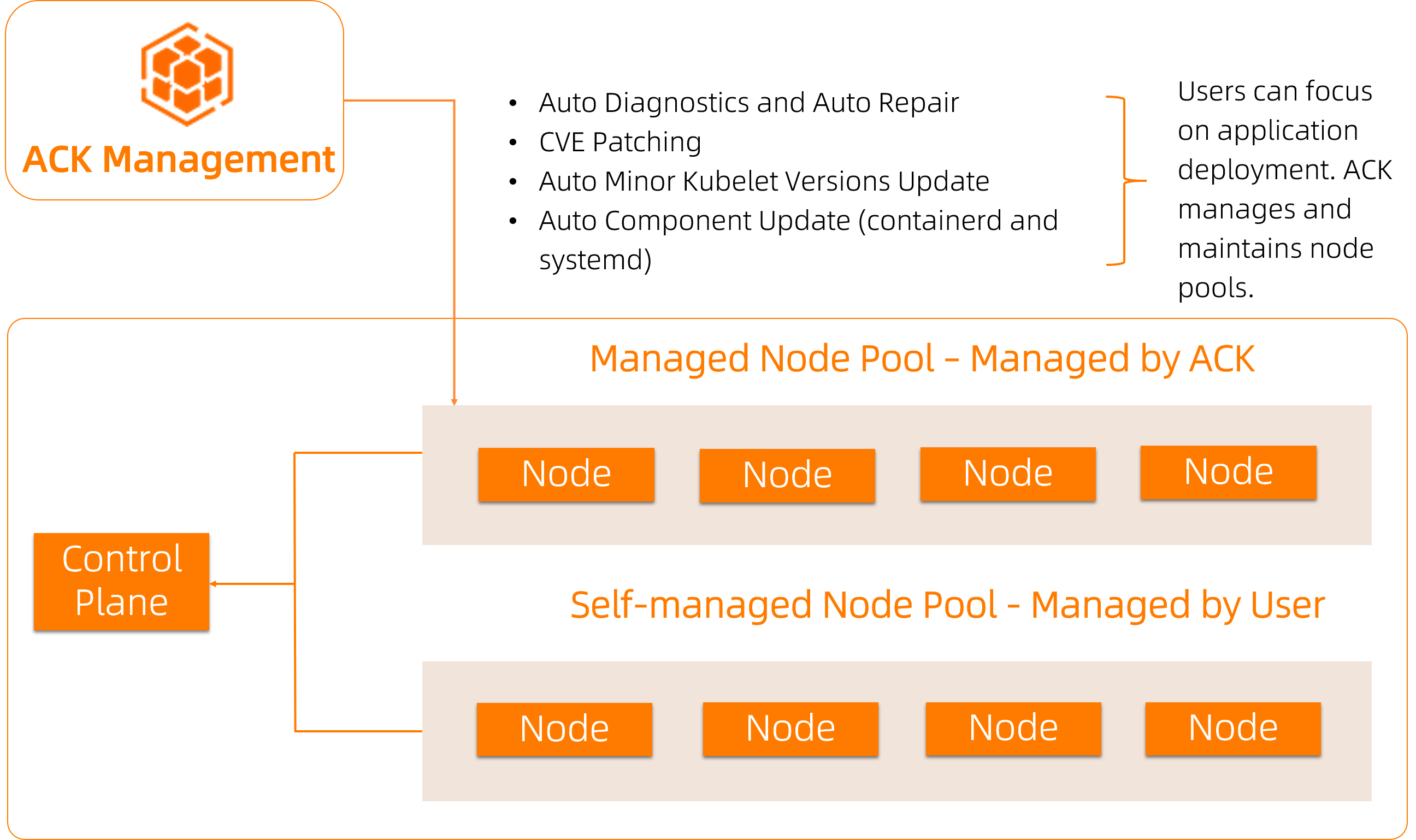
When a managed node pool detects that a node needs updating or repair, it:
Cordons the node (marks it unschedulable).
Drains pods from the node, evicting them to other available nodes.
Performs the required operation—system disk replacement, CVE patching, or restart.
Returns the node to service.
All automated tasks run within the maintenance window you configure. To set the maintenance window, go to the Node Pools page in the ACK console, select the managed node pool, and click Configure Managed Node Pool in the Actions column.
Managed node pools vs. regular node pools
ACK offers two node pool types. To switch between them, go to the Node Pools page, find the node pool, and click Enable Managed Node Pool or Disable Managed Node Pool in the Actions column.
| Feature | Regular node pool | Managed node pool |
|---|---|---|
| O&M | Managed by you | Partially managed by ACK |
| Node repair | Manual | Automatic — anomalies are detected and repaired; node restart behavior is configurable |
| OS CVE patching | Manual | Automatic — covers high-, medium-, and low-severity vulnerabilities |
| Minor kubelet version update | Manual | Automatic |
| containerd update | Manual | Automatic — major OS CVE vulnerabilities in containerd are patched by default |
| ECS system event response | Manual | Automatic — see ECS system event response below |
Managed node pools simplify O&M but do not replace all manual intervention. Complex node issues may still require manual troubleshooting. For details, see Auto repair of managed node pools.
Usage notes
Prerequisites
Before you enable a managed node pool:
Security Center (required for OS CVE patching): Purchase the Ultimate edition of Security Center and make sure you have a sufficient server protection quota. ACK does not charge additional fees for OS CVE patching. See Purchase Security Center and Functions and features.
(Recommended) Event center: Enable the event center to receive alert notifications about managed node pool activity. See Event monitoring.
(Recommended) `ack-node-problem-detector`: Install
ack-node-problem-detectorto enable node anomaly detection. See ack-node-problem-detector.
Node update behavior
Managed node pools update nodes by replacing their system disks.
Data on the previous system disk is deleted after the update. Data disks mounted to the node are not affected.
Do not use system disks to persist data.
Node draining
Before replacing a system disk, ACK cordons the node using kubectl cordon or the ACK console, then evicts all pods. This may restart pods and interrupt persistent connections.
To minimize disruption:
Deploy multiple replicas of backend services across multiple nodes.
Configure Container Service consolePod Disruption Budgets (PDB) for critical applications to protect availability during eviction.
Auto repair behavior
A managed node pool continuously monitors node status. ACK restarts a node when either condition is true:
The node has not reported its status for more than 10 minutes.
The node is in the
NotReadystate.
When ACK restarts a node, pods on that node are also restarted.
ECS system event response
For SystemMaintenance.Reboot events, ACK responds automatically:
ACK receives the event and sends an internal notification.
ACK drains the affected node—migrating pods to available nodes—and restarts the Elastic Compute Service (ECS) instance.
Timing: If a maintenance window is available before the ECS-scheduled execution time, ACK performs the response within that window. Otherwise, ACK acts one hour before the scheduled time.
If draining fails: ACK does not forcefully restart the instance.
Configure PDB for critical applications to protect availability during node draining. See the PDB documentation.
What's next
Node pool management — Create, view, modify, scale, delete, and manage nodes in a node pool.
Node pool O&M — Node pool updates, auto repair, and OS CVE patching.
Best practices for node pools — Deployment sets, preemptible instances, and adding free nodes.