Alibaba Cloud Container Compute Service (ACS) integrates with ACK Edge clusters through virtual nodes, giving your cluster elastic compute capacity without managing node pools. When traffic spikes, ACS pods scale onto virtual nodes without capacity planning. When traffic drops, remove those pods to cut costs.
This topic describes how to install the virtual node add-on and schedule ACS pods in an ACK Edge cluster.
How it works
ACS decouples Kubernetes orchestration from compute resource management using two layers:
-
Compute resources layer: handles resource scheduling and allocation for pods.
-
Control layer: manages core workload objects such as Deployments, Services, StatefulSets, and CronJobs.
Virtual nodes bridge your ACK Edge cluster and ACS compute capacity. Once a virtual node is deployed, pods scheduled to it run as ACS pods in a secure, isolated environment — the cluster no longer manages underlying VM resources or plans for node capacity.
ACS pods on virtual nodes can communicate with pods on physical nodes in the same cluster. For long-running workloads with fluctuating traffic, schedule a portion to virtual nodes to improve resource utilization, reduce scaling overhead, and speed up scaling.

Supported scenarios
Before reading further, confirm that ACS compute power meets your requirements:
| Scenario | Supported |
|---|---|
| CPU workloads on virtual nodes | Yes |
| GPU workloads on virtual nodes | Yes (invitational preview — to enable) |
| ACK managed clusters | Yes |
| ACK dedicated clusters | Yes |
| ACK One registered clusters | Yes |
| ACK Edge clusters | Yes |
| ACK Serverless clusters | No — the alibabacloud.com/acs: "true" label does not apply |
| Communication between ACS pods and physical-node pods | Yes |
| Capacity planning required for scaling | No — ACS handles resource allocation automatically |
Prerequisites
Before you begin, ensure that you have:
-
Activated Container Service for Kubernetes, assigned default roles to ACS, and activated other required cloud services. For details, see Create an ACK managed cluster
-
Activated ACS by logging on to the ACS console and following the on-screen instructions
-
An ACK Edge cluster running Kubernetes 1.26 or later. To upgrade, see Update an ACK Edge cluster
-
The ACK Virtual Node add-on at the required version:
Kubernetes version Required add-on version 1.26 or later 2.13.0 or later
Install the ACK Virtual Node add-on
-
Log on to the ACK console. In the left-side navigation pane, click Clusters.
-
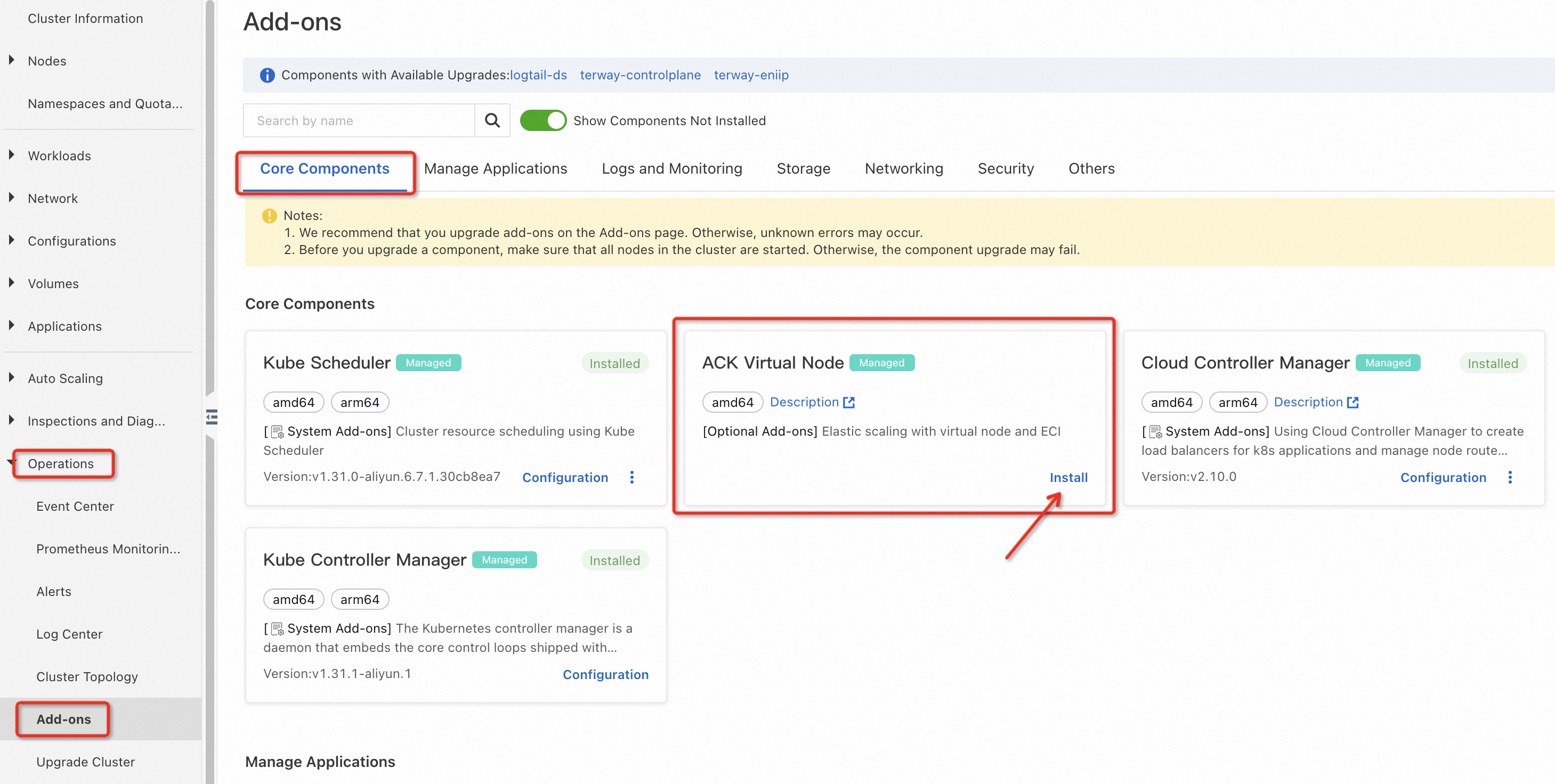
On the Clusters page, find your cluster and click its name. In the left-side navigation pane, choose Operations > Add-ons.
-
On the Core Components tab, find ACK Virtual Node. Click Install to install it, or Update to upgrade it to the required version.
-
If the console prompts you to activate and grant permissions to ACS, follow the on-screen instructions and click OK.
-
After installation, go to Nodes > Nodes in the left-side navigation pane. Virtual nodes appear with names prefixed by
virtual-kubelet-.
Schedule ACS CPU pods
Use one of the following three methods to schedule pods to virtual nodes.
If you schedule a pod to a virtual node without specifying a compute class, elastic container instances are used by default.
Choose a scheduling method
| Method | How it works | When to use |
|---|---|---|
| NodeSelector | Set type: virtual-kubelet as the node selector and add a toleration for the virtual node taint |
You want explicit, per-workload control over which Deployments run on virtual nodes |
| Pod labels | Add alibabacloud.com/acs: "true" to the pod template labels |
Simpler setup — no node selector or toleration needed; the label alone triggers ACS scheduling |
| ResourcePolicy | Create a ResourcePolicy CRD that binds to the Deployment |
You want to centralize scheduling rules and decouple them from the pod spec |
Schedule by NodeSelector
Virtual nodes carry a NoSchedule taint on the virtual-kubelet.io/provider key. Any pod targeting a virtual node must include a matching toleration, or the Kubernetes scheduler will not place the pod there.
-
Query the labels on your virtual node to confirm the node name. Replace
virtual-kubelet-cn-hangzhou-kwith the actual virtual node name.kubectl get node virtual-kubelet-cn-hangzhou-k -oyamlThe relevant section of the output:
apiVersion: v1 kind: Node metadata: labels: kubernetes.io/arch: amd64 kubernetes.io/hostname: virtual-kubelet-cn-hangzhou-k kubernetes.io/os: linux kubernetes.io/role: agent service.alibabacloud.com/exclude-node: "true" topology.diskplugin.csi.alibabacloud.com/zone: cn-hangzhou-k topology.kubernetes.io/region: cn-hangzhou topology.kubernetes.io/zone: cn-hangzhou-k type: virtual-kubelet # Use this label as the nodeSelector to target virtual nodes. name: virtual-kubelet-cn-hangzhou-k spec: taints: - effect: NoSchedule key: virtual-kubelet.io/provider value: alibabacloud -
Create
nginx.yamlwith the following content:apiVersion: apps/v1 kind: Deployment metadata: name: nginx labels: app: nginx spec: replicas: 2 selector: matchLabels: app: nginx template: metadata: name: nginx labels: app: nginx alibabacloud.com/compute-class: general-purpose # ACS compute class. Default: general-purpose. alibabacloud.com/compute-qos: default # ACS QoS class. Default: default. spec: nodeSelector: type: virtual-kubelet # Target virtual nodes. tolerations: - key: "virtual-kubelet.io/provider" # Tolerate the NoSchedule taint on virtual nodes. operator: "Exists" effect: "NoSchedule" containers: - name: nginx image: registry.openanolis.cn/openanolis/nginx:1.14.1-8.6 resources: limits: cpu: 2 requests: cpu: 2 -
Deploy the application and verify that pods land on virtual nodes.
kubectl apply -f nginx.yaml
kubectl get pods -o wide
Expected output:
NAME                    READY   STATUS    RESTARTS   AGE   IP               NODE                            NOMINATED NODE   READINESS GATES
nginx-9cdf7bbf9-s****   1/1     Running   0          36s   10.0.6.68        virtual-kubelet-cn-hangzhou-j   <none>           <none>
nginx-9cdf7bbf9-v****   1/1     Running   0          36s   10.0.6.67        virtual-kubelet-cn-hangzhou-k   <none>           <none>
Both pods are running on nodes with the
type=virtual-kubeletlabel.
Schedule by pod labels
This method requires no node selector or toleration. Adding alibabacloud.com/acs: "true" to the pod template is enough to trigger ACS scheduling.
This label applies to ACK managed clusters, ACK dedicated clusters, ACK One registered clusters, and ACK Edge clusters. It does not apply to ACK Serverless clusters.
Create nginx.yaml with the following content and deploy it:
apiVersion: apps/v1
kind: Deployment
metadata:
  name: nginx
  labels:
    app: nginx
spec:
  replicas: 2
  selector:
    matchLabels:
      app: nginx
  template:
    metadata:
      labels:
        app: nginx
        alibabacloud.com/acs: "true"                      # Use ACS compute power.
        alibabacloud.com/compute-class: general-purpose   # ACS compute class. Default: general-purpose.
        alibabacloud.com/compute-qos: default             # ACS QoS class. Default: default.
    spec:
      containers:
      - name: nginx
        image: registry.openanolis.cn/openanolis/nginx:1.14.1-8.6
        resources:
          limits:
            cpu: 2
          requests:
            cpu: 2
kubectl apply -f nginx.yaml
kubectl get pods -o wideExpected output:
NAME                    READY   STATUS    RESTARTS   AGE   IP               NODE                            NOMINATED NODE   READINESS GATES
nginx-9cdf7bbf9-s****   1/1     Running   0          36s   10.0.6.68        virtual-kubelet-cn-hangzhou-j   <none>           <none>
nginx-9cdf7bbf9-v****   1/1     Running   0          36s   10.0.6.67        virtual-kubelet-cn-hangzhou-k   <none>           <none>
Verify ACS pods
To confirm a pod is running as an ACS pod, inspect its annotations:
kubectl describe pod nginx-9cdf7bbf9-s****Key annotations in the output:
Annotations:  ProviderCreate: done
              alibabacloud.com/client-token: edf29202-54ac-438e-9626-a1ca007xxxxx
              alibabacloud.com/instance-id: acs-2ze008giupcyaqbxxxxx
              alibabacloud.com/pod-ephemeral-storage: 30Gi
              alibabacloud.com/pod-use-spec: 2-4Gi
              alibabacloud.com/request-id: A0EF3BF3-37E7-5A07-AC2D-68A0CFCxxxxx
              alibabacloud.com/schedule-result: finished
              alibabacloud.com/user-id: 14889995898xxxxx
              kubernetes.io/pod-stream-port: 10250
              kubernetes.io/preferred-scheduling-node: virtual-kubelet-cn-hangzhou-j/1
              kubernetes.io/resource-type: serverless
The alibabacloud.com/instance-id annotation with an acs- prefix confirms the pod is an ACS pod.
Use ACS GPU compute power (invitational preview)
The GPU feature follows the same scheduling model as CPU workloads, with additional version requirements and labels.
This feature is in invitational preview. Submit a ticket to request access.
Version requirements for GPU workloads
Your kube-scheduler version must meet the following requirements:
| Kubernetes version | Required kube-scheduler version |
|---|---|
| 1.31 | v1.31.0-aliyun.6.8.4.8f585f26 or later |
| 1.30 | v1.30.3-aliyun.6.8.4.946f90e8 or later |
| 1.28 | v1.28.12-aliyun-6.8.4.b27c0009 or later |
| 1.26 | v1.26.3-aliyun-6.8.4.4b180111 or later |
For more information, see kube-scheduler.
GPU-specific labels
Add the following labels to the pod template to request GPU resources:
| Label | Value | Description |
|---|---|---|
alibabacloud.com/compute-class |
gpu |
Set to gpu for GPU workloads |
alibabacloud.com/compute-qos |
default |
QoS class (same options as CPU workloads) |
alibabacloud.com/gpu-model-series |
e.g., T4 |
GPU model series |
For the compute class and QoS class relationship, see Relationship between compute classes and QoS classes. For supported GPU models, see GPU models.
Schedule GPU workloads
The following examples show all three scheduling methods for GPU workloads.
NodeSelector
apiVersion: apps/v1
kind: Deployment
metadata:
  name: dep-node-selector-demo
  labels:
    app: node-selector-demo
spec:
  replicas: 1
  selector:
    matchLabels:
      app: node-selector-demo
  template:
    metadata:
      labels:
        app: node-selector-demo
        alibabacloud.com/compute-class: gpu
        alibabacloud.com/compute-qos: default
        alibabacloud.com/gpu-model-series: example-model   # GPU model, such as T4.
    spec:
      nodeSelector:
        type: virtual-kubelet
      tolerations:
      - key: "virtual-kubelet.io/provider"
        operator: "Exists"
        effect: "NoSchedule"
      containers:
      - name: node-selector-demo
        image: registry-cn-hangzhou.ack.aliyuncs.com/acs/stress:v1.0.4
        command:
        - "sleep"
        - "1000h"
        resources:
          limits:
            cpu: 1
            memory: 1Gi
            nvidia.com/gpu: "1"
          requests:
            cpu: 1
            memory: 1Gi
            nvidia.com/gpu: "1"
ResourcePolicy
apiVersion: scheduling.alibabacloud.com/v1alpha1
kind: ResourcePolicy
metadata:
  name: dep-rp-demo
  namespace: default
spec:
  selector:
    app: dep-rp-demo
  units:
  - resource: acs
    podLabels:
      alibabacloud.com/compute-class: gpu
      alibabacloud.com/compute-qos: default
      alibabacloud.com/gpu-model-series: example-model   # GPU model, such as T4.
---
apiVersion: apps/v1
kind: Deployment
metadata:
  name: dep-rp-demo
  labels:
    app: dep-rp-demo
  annotations:
    resourcePolicy: "dep-rp-demo"   # Name of the ResourcePolicy.
spec:
  replicas: 1
  selector:
    matchLabels:
      app: dep-rp-demo
  template:
    metadata:
      labels:
        app: dep-rp-demo
    spec:
      containers:
      - name: demo
        image: registry-cn-hangzhou.ack.aliyuncs.com/acs/stress:v1.0.4
        command:
        - "sleep"
        - "1000h"
        resources:
          limits:
            cpu: 1
            memory: 1Gi
            nvidia.com/gpu: "1"
          requests:
            cpu: 1
            memory: 1Gi
            nvidia.com/gpu: "1"
For more about ResourcePolicy-based scheduling, see Resource scheduling based on custom priorities.
Pod labels
apiVersion: apps/v1
kind: Deployment
metadata:
  name: dep-node-selector-demo
  labels:
    app: node-selector-demo
spec:
  replicas: 1
  selector:
    matchLabels:
      app: node-selector-demo
  template:
    metadata:
      labels:
        app: node-selector-demo
        alibabacloud.com/acs: "true"                        # Use ACS compute power.
        alibabacloud.com/compute-class: gpu
        alibabacloud.com/compute-qos: default
        alibabacloud.com/gpu-model-series: example-model   # GPU model, such as T4.
    spec:
      containers:
      - name: node-selector-demo
        image: registry-cn-hangzhou.ack.aliyuncs.com/acs/stress:v1.0.4
        command:
        - "sleep"
        - "1000h"
        resources:
          limits:
            cpu: 1
            memory: 1Gi
            nvidia.com/gpu: "1"
          requests:
            cpu: 1
            memory: 1Gi
            nvidia.com/gpu: "1"
Verify GPU workloads
kubectl get pod node-selector-demo-9cdf7bbf9-s**** -oyamlThe relevant section of the expected output:
phase: Running

    resources:
      limits:
        #other resources
        nvidia.com/gpu: "1"
      requests:
        #other resources
        nvidia.com/gpu: "1"
What's next
-
ACS pod overview — compute classes, QoS classes, and pod specifications
-
Node affinity scheduling — advanced scheduling with affinity and anti-affinity rules
-
Resource scheduling based on custom priorities — ResourcePolicy for centralized scheduling control
-
What is ACK Edge? — ACK Edge architecture and capabilities