Customize auto repair
Container Service for Kubernetes (ACK) node pools support customized auto repair. On ECS and Lingjun nodes, including super nodes, ACK detects GPU faults and underlying node faults, repairs them by using the steps you define, and reports the progress through Kubernetes Events.
Before you begin
Node pool types: Elastic Compute Service (ECS) node pools and Lingjun node pools, including super nodes.
Fault types: node faults, GPU faults, and system and component faults.
Add-on dependency
Fault detection: Requires ack-node-problem-detector (NPD) v1.2.36 or later to detect GPU, system, component, and add-on faults.
Auto repair: Managed by node-lifecycle-controller. Upgrade to the latest version to obtain the newest repair capabilities. For upgrade instructions, see Upgrade the node auto repair add-on.
Automatic fault diagnosis: Supported for ECS node pools only.
Regions: Not supported in dedicated cloud regions.
Auto repair mechanism
Node auto repair monitors the fault signals that nodes report, such as CloudMonitor (CMS) events, underlying system events, and the GPU, system, and component faults that NPD detects. ACK converts each detected fault into a Kubernetes Event and a Node Condition, repairs the node based on the configured auto repair rules, and reports the progress through Kubernetes Events.
Process
Fault detection: ACK continuously monitors underlying node events and the anomalies that NPD reports. When ACK detects a fault, it adds the corresponding Node Condition to the node and generates a repair plan.
Fault handling: ACK runs the repair steps in sequence based on the auto repair rule. Each step can be enabled or skipped, and any enabled step can require manual intervention, in which case ACK proceeds only after authorization is granted.
Node isolation: Marks the faulty node as Unschedulable to prevent new workloads from being scheduled on it.
Node draining: Evicts the workloads that run on the node.
Automatic repair: Initiates a repair action, such as a hardware repair or a node reboot, based on the fault type.
Node isolation removal: Restores the node to a Schedulable state after the repair is complete.
To determine whether a repair succeeded or failed, see Kubernetes Events for node auto repair.
The following figure shows the auto repair process.

ACK handles faults by priority: high-priority repair-type faults are repaired first, and low-priority reboot-type faults are deferred until all high-priority faults are handled.
Precautions
If the cluster already runs other node auto repair software, evaluate the setup carefully before you use this feature to avoid conflicts between multiple repair mechanisms.
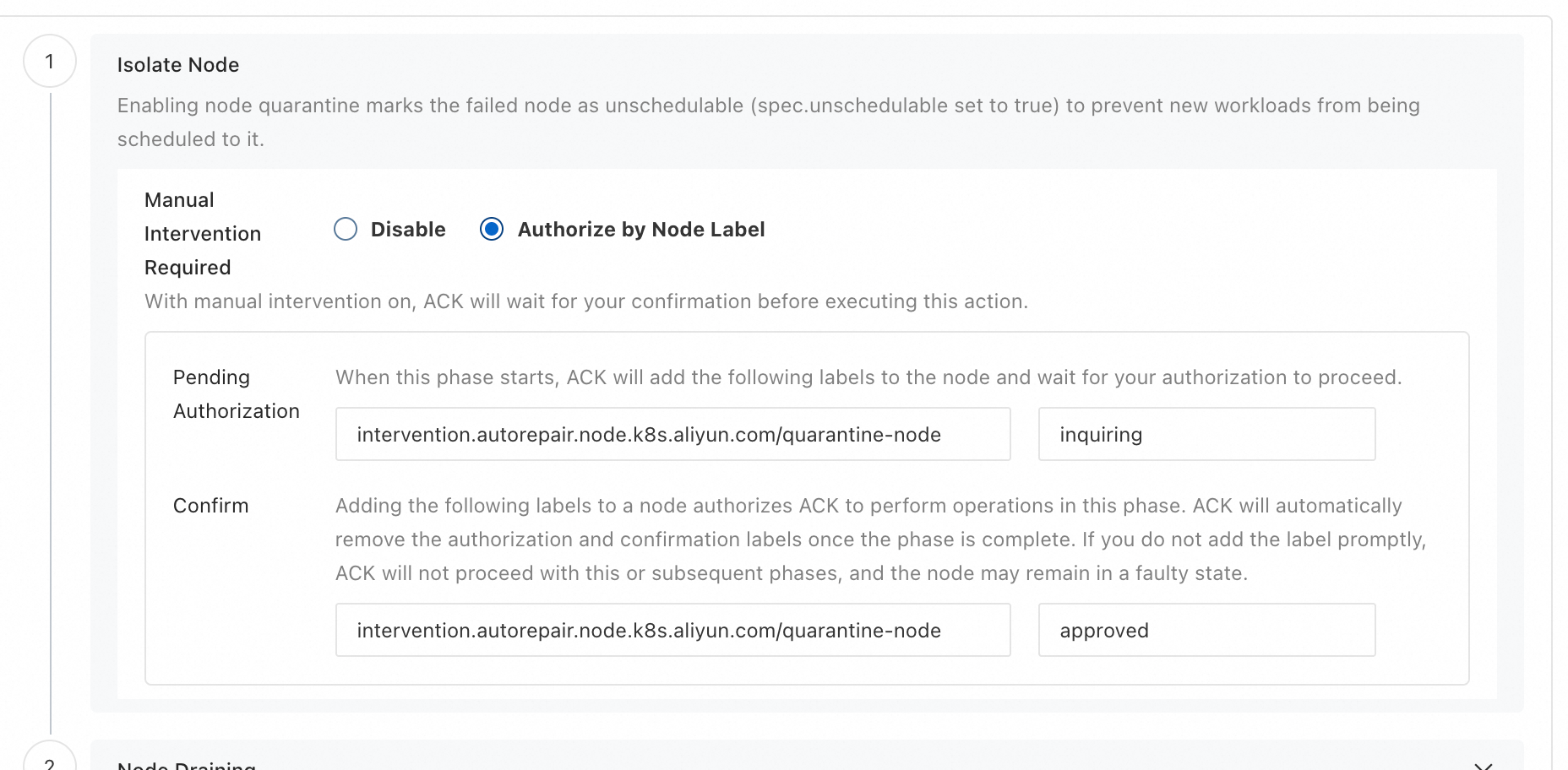
If manual intervention is enabled for any repair step, grant the authorization promptly. Otherwise, ACK pauses the current step and all subsequent steps, and the node may remain in an unhealthy state.
When a node-type fault occurs on a Lingjun node, ACK repairs it during the repair stage through the Lingjun approval-based O&M operation. Monitor the health of the Lingjun node and its node status in the ACK cluster to limit the impact on your workloads.
If the node auto repair process fails, log on to the cluster as soon as possible, repair the node manually, and restore it to a Schedulable state. For assistance, contact Technical Support.
After you enable node auto repair, enable alert management and activate the GPU monitoring and alert rules, Alert Rules for Node Pool O&M Events, and Cluster Node Auto Repair Alert Rule Set alert rule sets. For more information, see Configure alerts.
Configure auto repair rules
Procedure
To configure and use node auto repair, complete the following steps:
Configure auto repair rules: In the managed configurations of a new or existing node pool, create an auto repair rule and specify the fault types and the repair process. For more information, see Auto repair configuration.
Configure throttling and circuit breaking (optional): In the managed configurations, set the maximum number of nodes repaired in parallel and the circuit breaking threshold to prevent repair operations from overloading the cluster during large-scale faults. For more information, see Auto repair throttling and circuit breaking.
Enable automatic fault diagnosis (optional, for ECS node pools only): In the managed configurations, select Automatic Fault Diagnosis to enable in-depth diagnosis of GPU hardware faults. For more information, see Enable automatic fault diagnosis.
Enable alerts: Activate alert management and the alert rule sets for node auto repair. For more information, see Configure alerts.
Monitor and handle events: Track the auto repair progress through Kubernetes Events (see Kubernetes Events for node auto repair). Grant authorization as soon as ACK requests it, and intervene manually if the process fails.
Auto repair configuration
You can enable node auto repair and define auto repair rules when you create a node pool or modify an existing node pool.
Entry points
New node pool: When you create a node pool, in the Configure Managed Node Pool area, select Custom Node Management. Then follow the on-screen instructions to enable Auto Repair and create auto repair rules. For a full description of the configuration items, see Create and manage node pools.
Existing node pool: In the node pool list, find the target node pool. In the Actions column, click
 Enable Managed Node Pool if managed mode is not enabled, or click Configure Managed Node Pool if managed mode is already enabled. Then follow the on-screen instructions to create auto repair rules and enable node auto repair.
Configure an auto repair rule
Access the rule configuration page: Open the Create Self-Healing Rule panel from the node pool creation or configuration page, or click Create Self-Healing Rule on the Self-Healing Rule page.
Configure sub-rules:
Select the fault type and the repair action: Based on the fault type (node faults, GPU faults, or system and component faults), select the corresponding repair action (see Faults).
Configure the repair process: All of the following steps support manual intervention, in which case ACK runs the step only after authorization is granted. For more information, see the description in the console.
Parameter
Description
Node isolation
Marks the faulty node as Unschedulable (
spec.unschedulable=true) to prevent new workloads from being scheduled on it.Node draining
Requires node isolation. Evicts the workloads on the node one by one and respects Pod Disruption Budget (PDB) constraints. The default timeout is 300 seconds and is configurable. Pods managed by a DaemonSet or an OpenKruise Advanced DaemonSet, and Pods labeled
alibabacloud.com/evict-pod=skip, are not evicted. The process advances to the next step after the timeout elapses.Automatic repair
Runs the repair action that corresponds to the fault type (for more information, see Faults).
Node isolation removal
Requires node isolation. Makes the node Schedulable again (
spec.unschedulable=false). If the node was already Unschedulable before the repair process started, this step does not restore it to a Schedulable state.
Auto repair throttling and circuit breaking
After you select Custom Node Management and enable Auto Repair on the Configure Managed Node Pool page, the auto repair throttling and circuit breaking policy takes effect with its default settings.
Default policy
By default, if multiple nodes in a node pool become abnormal at the same time, ACK repairs them one at a time and does not trigger circuit breaking.
Modify the default policy
If the default policy does not meet your requirements, click Modify Auto Repair Throttling and Circuit Breaking Policy and configure the following parameters:
Parameter | Description |
Maximum number of nodes repaired in parallel | The maximum number of nodes that ACK repairs at the same time when many nodes in the node pool are abnormal. |
Circuit breaking condition | When the number of faulty nodes exceeds this threshold, auto repair enters the circuit breaking state and stops initiating new repair operations. |
Circuit breaker threshold: Must be ≥ the parallel repair limit to prevent repairs from stopping prematurely.
Parallel repair limit: For super node recovery, ACK repairs all child nodes concurrently. This limit must be at least the number of child nodes in a single super node.
Enable automatic fault diagnosis
After you enable automatic fault diagnosis, ACK uses the ack-node-problem-detector node-side probe to detect potential anomalies and run in-depth diagnosis of the GPU hardware. When an anomaly is confirmed, ACK raises alerts through Kubernetes Events, Node Conditions, and ECS system events. Combine these alerts with auto repair rules so that ACK responds automatically.
This option applies to ECS node pools only.
How to enable
New node pool
When you create a node pool, in the Configure Managed Node Pool area, select Custom Node Management and then select the Automatic Fault Diagnosis check box.
Existing node pool
For managed node pools: In the node pool list, click
> Configure Managed Node Pool in the Actions column for the target node pool. In the Configure Managed Node Pool dialog box, select the Auto Fault Diagnosis check box.For unmanaged node pools: In the node pool list, click
 > Enable Managed Node Pool in the Actions column for the target node pool. In the Enable Managed Node Pool dialog box, select Custom Node Management and then select the Auto Fault Diagnosis check box.
The following NPD error items trigger an ECS in-depth diagnosis:
Error item | Description |
| Double Bit ECC Error (DBE). This event is logged when the GPU detects an uncorrectable error. |
| GPU internal microcontroller halt. |
| NVLink error. |
| GPU has fallen off the bus. |
| Context Switch Timeout Error. |
| A timeout occurs while waiting for the GSP core to respond to an RPC message. |
| An error occurs in the code running on the GPU's GSP core. |
| NVLink: RLW Error. |
| GPU Recovery Action Changed. |
| The device's external power cable is not properly connected. |
Configure alerts
After you enable node auto repair, enable alert management and activate the following alert rule sets: GPU monitoring and alert rules, Alert Rules for Node Pool O&M Events, and Cluster Node Auto Repair Alert Rule Set. Configure a dedicated alert group or contact so that you are notified promptly when an exception occurs.
For information about how to enable rule sets, see ACK alert management.
Alert descriptions
The alert rule sets include the following alert items related to node auto repair:
Alert item | Description |
Underlying event conversion alert | Triggered when underlying node events (Lingjun CloudMonitor events and ECS system events) are converted into Node Conditions and Kubernetes Events, so that you can detect node hardware and system anomalies in time. For the complete mapping, see Underlying event to Node Condition conversion. |
GPU monitoring alert | Triggered when NPD detects an anomaly on a GPU device. For the specific fault items and remediation actions, see GPU faults. |
Overall auto repair progress alert | Reports the overall progress of the node auto repair process, including the results of the Node isolation, Node draining, Automatic repair, and Node isolation removal steps. For the events of each step, see Kubernetes Events for node auto repair. |
Auto repair summary for cluster node pools | Summarizes the auto repair status of each node pool in the cluster at 10:00 and 18:00 local time every day. The summary highlights the nodes waiting for approval and the nodes in an Unschedulable state, and provides ready-to-run query commands so that you can respond in time. |
Upgrade the node auto repair add-on
Node auto repair is driven by the node-lifecycle-controller add-on. New fault types, repair actions, and alert items require a later version, so upgrade the add-on to the latest version.
Log on to the ACK console. In the left-side navigation pane, open the target cluster.
In the left-side navigation pane of the cluster management page, click Components and Add-ons.
Search for and find the
node-lifecycle-controlleradd-on. If a new version is available, click Upgrade and confirm in the dialog box.For more operations on add-ons, see Components.
Faults
The following tables describe the Node Conditions that trigger auto repair, the remediation actions, and the recovery criteria for each fault type.
Node faults
Applies to underlying hardware anomalies and reboot-type faults on ECS and Lingjun nodes, including super nodes.
Lingjun
Fault name | Underlying event name | Kubernetes Node Condition | Description | Remediation action | Recovery criteria |
Lingjun node requires repair due to an underlying hardware anomaly |
resourceType: Node |
| The Lingjun node has a hardware fault and requires repair. The repair may cause data loss on the node's local disks. | Repair Lingjun node Important Repairing a Lingjun node may cause data loss on its local disks. Back up your data in advance. If the container runtime and kubelet directories are mounted on a local disk, remove the node from the ACK cluster node list and add it back after the repair is complete. | Both of the following conditions are met:
|
Lingjun node requires a reboot due to an underlying anomaly |
resourceType: Node |
| The Lingjun node has a fault. Reboot the node as soon as possible to attempt a repair. | Reboot node | Both of the following conditions are met:
|
Lingjun node requires repair due to an underlying hardware anomaly (affected by a super node) |
resourceType: HyperNode |
| The Lingjun super node has a hardware fault that requires repair. Authorize the repair as soon as possible. ACK initiates a separate auto repair flow for each child node of the super node. When all child node repair processes reach the repair step, ACK requests a single authorization to repair the entire super node. | Repair Lingjun node Important Repairing a Lingjun node may cause data loss on its local disks. Back up your data in advance. If the container runtime and kubelet directories are mounted on a local disk, remove the node from the ACK cluster node list and add it back after the repair is complete. | Both of the following conditions are met:
|
Lingjun node requires a reboot due to an underlying anomaly (affected by a super node) |
resourceType: HyperNode |
| The Lingjun super node has a fault. Authorize the repair as soon as possible. ACK initiates a separate auto repair flow for each child node of the super node. When all child node repair processes reach the repair step, ACK requests a single authorization to repair the entire super node. | Reboot node | Both of the following conditions are met:
|
ECS
Fault name | Underlying event name | Kubernetes Node Condition | Description | Remediation action | Recovery criteria |
Instance redeployment required for system maintenance (Scheduled) |
|
| Alibaba Cloud has detected a potential software or hardware risk on the underlying host of the ECS instance, which may require an instance redeployment (not yet a fault). Initiate the redeployment immediately to mitigate the risk. Otherwise, ECS will trigger the redeployment after 24 to 48 hours. For more information, see Overview of ECS system events. | Redeploy node Important Data on the local disk may be lost during the node redeployment. Back up your data in advance. | Both of the following conditions are met:
|
Instance redeployment required for system maintenance (Inquiring) |
|
| Alibaba Cloud has detected a potential software or hardware risk on the underlying host of the ECS instance, which may require an instance redeployment (not yet a fault). Initiate the redeployment immediately to mitigate the risk. For more information, see Overview of ECS system events. | Redeploy node Important Data on the local disk may be lost during the node redeployment. Back up your data in advance. | Both of the following conditions are met:
|
Instance reboot required for system maintenance (Scheduled) |
|
| Alibaba Cloud has detected a potential software or hardware risk on the underlying host of the ECS instance, which may require an instance reboot (not yet a fault). Initiate the reboot immediately to mitigate the risk. Otherwise, ECS will trigger the reboot after 24 to 48 hours. For more information, see Overview of ECS system events. | Reboot node | Both of the following conditions are met:
|
Instance reboot required for system maintenance (Inquiring) |
|
| Alibaba Cloud has detected a potential software or hardware risk on the underlying host of the ECS instance, which may require an instance reboot (not yet a fault). Initiate the reboot immediately to mitigate the risk. For more information, see Overview of ECS system events. | Reboot node | Both of the following conditions are met:
|
For a complete mapping of underlying events, Node Conditions, and Kubernetes Events, see Underlying event to Node Condition conversion.
GPU faults
Detection of these faults depends on the NPD add-on. All GPU faults share the same recovery criteria: the node status is Ready and the triggering Node Condition is resolved.
Lingjun
Fault name | Kubernetes Node Condition | Description | Remediation action |
|
| Double Bit ECC Error (DBE). This event is logged when the GPU detects an uncorrectable error. | Reboot node |
|
| GPU internal microcontroller halt. | Reboot node |
|
| The GPU driver detects an uncorrectable error in the GPU memory. | Reboot node |
|
| The GPU driver detects an uncorrectable error in the GPU memory, and suppression has failed. | Reboot node |
|
| An error occurs in the code running on the GPU's GSP core. | Reboot node |
|
| GPU memory page fault. | Reboot node |
|
| The GPU has retired pages in a pending state. | Reboot node |
|
| Row remapping is pending and will be performed on the next GPU reset. | Reboot node |
|
| A timeout occurs while waiting for the GSP core to respond to an RPC message. | Reboot node |
All GPU faults are remediated by rebooting the node. If a GPU fault coincides with a Lingjun system event that requires repair, ACK does not reboot the node, because a reboot during the repair may cause data loss on the local disk, and the auto repair process fails. Configure a separate auto repair rule for repair-type faults to cover this scenario. For more information, see Lingjun node requires repair due to an underlying hardware anomaly.
ECS
Fault name | Kubernetes Node Condition | Description | Remediation action |
|
| Double Bit ECC Error (DBE). This event is logged when the GPU detects an uncorrectable error. | Reboot node |
|
| GPU internal microcontroller halt. | Reboot node |
|
| The GPU driver detects an uncorrectable error in the GPU memory. | Reboot node |
|
| The GPU driver detects an uncorrectable error in the GPU memory, and suppression has failed. | Reboot node |
|
| An error occurs in the code running on the GPU's GSP core. | Reboot node |
|
| GPU memory page fault. | Reboot node |
|
| The GPU has retired pages in a pending state. | Reboot node |
|
| Row remapping is pending and will be performed on the next GPU reset. | Reboot node |
|
| A timeout occurs while waiting for the GSP core to respond to an RPC message. | Reboot node |
System and component faults
Detection of these faults depends on the NPD add-on.
Fault name | Kubernetes Node Condition | Description | Remediation action | Fault detection threshold | Recovery criteria |
Node time synchronization process is abnormal |
| The time synchronization process (ntpd or chronyd) is abnormal. | Log on to the node and run repair commands Note If you enable the option to allow node reboots during the Automatic repair stage, ACK attempts to reboot the node if the anomaly persists after the automatic repair action is run. | 10s | The node status is |
Node container runtime is unavailable |
| The container runtime (containerd or Docker Engine) has stopped, and the node is unavailable. | Log on to the node and run repair commands Note If you enable the option to allow node reboots during the Automatic repair stage, ACK attempts to reboot the node if the anomaly persists after the automatic repair action is run. | 90s | The node status is |
Node systemd unit is abnormal |
| The systemd status is abnormal, preventing containers from being started or destroyed. | Reboot node | 90s | The node status is |
Node is in NotReady state |
| The kubelet has stopped or its heartbeat is abnormal, causing the node to enter the NotReady state. | Log on to the node and run repair commands Note If you enable the option to allow node reboots during the Automatic repair stage, ACK attempts to reboot the node if the anomaly persists after the automatic repair action is run. | 180s | For three consecutive probes, the node status is |
Node file system (FS) is in read-only state |
| The node's file system has become read-only. | Reboot node | 90s | The node status is |
Underlying event to Node Condition conversion
ACK converts the underlying events generated by Lingjun nodes, Lingjun super nodes, and ECS nodes into the corresponding Node Conditions and Kubernetes Events. The tables in this section provide the complete status mapping for troubleshooting. For the faults that trigger auto repair, their remediation actions, and their recovery criteria, see Faults.
Underlying events are mapped to Node Conditions by using the following fields:
Type: Identifies the fault type.Reason: Identifies the current phase of the event.
Underlying event sources
ACK node auto repair converts underlying events from two sources: CloudMonitor events published by the Lingjun control plane, and system events published by ECS.
Lingjun Cloud Monitor events
The Lingjun control plane publishes hardware and system anomalies for Lingjun bare metal nodes as CloudMonitor events. An event transitions from Inquiring to Executing, and then to Executed or Terminated. ACK periodically pulls these events, identifies the event type, such as Node.HardwareFault.HOST for a required repair or Node.FaultNeedReboot.HOST for a required reboot, and converts them into the corresponding Node Conditions.
The following flowchart uses the Node.HardwareFault.HOST CloudMonitor event for a Lingjun node hardware fault as an example:

ECS system events
ECS nodes reuse the ECS system event framework. The event lifecycle includes the following statuses: Inquiring, Scheduled, Executing, Executed, Avoided, Failed, and Canceled. ACK calls the ECS system event API to retrieve instance maintenance events, such as SystemMaintenance.Reboot and SystemMaintenance.Redeploy, and maps them to the corresponding Node Condition on the node.
The following flowchart describes the status changes of a SystemMaintenance.Reboot reboot maintenance event from its initial Inquiring status:

Underlying event conversion for regular Lingjun nodes
Each underlying event for a regular Lingjun node is converted into the corresponding Node Condition and Kubernetes Event of that node in the cluster.
Event status | Description | Node Condition | Kubernetes Event |
resourceType: Node | A check for a node hardware fault is in progress. |
|
|
resourceType: Node | Maintenance for a node hardware fault has started. |
|
|
resourceType: Node | Maintenance for a node hardware fault is complete. |
|
|
resourceType: Node | Maintenance for a node hardware fault is terminated. |
|
|
resourceType: Node | A check for a fault that requires a node reboot is in progress. |
|
|
resourceType: Node | The node reboot to fix a fault has started. |
|
|
resourceType: Node | The node reboot to fix a fault is complete. |
|
|
resourceType: Node | Maintenance for a fault that requires a node reboot is terminated. |
|
|
Underlying event conversion for Lingjun super nodes
Each underlying event for a Lingjun super node is converted into the corresponding Node Conditions and Kubernetes Events for all child nodes within that super node.
Event status | Description | Node Condition | Kubernetes Event |
resourceType: HyperNode | A check for a node hardware fault is in progress. |
|
|
resourceType: HyperNode | Maintenance for a node hardware fault has started. |
|
|
resourceType: HyperNode | Maintenance for a node hardware fault is complete. |
|
|
resourceType: HyperNode | Maintenance for a node hardware fault is terminated. |
|
|
resourceType: HyperNode | A check for a fault that requires a node reboot is in progress. |
|
|
resourceType: HyperNode | The node reboot to fix a fault has started. |
|
|
resourceType: HyperNode | The node reboot to fix a fault is complete. |
|
|
resourceType: HyperNode | Maintenance for a fault that requires a node reboot is terminated. |
|
|
Underlying maintenance event conversion for ECS nodes
ACK converts system maintenance events for ECS nodes into the corresponding Node Conditions and Kubernetes Events.
Event status | Description | Node Condition | Kubernetes Event |
| A check for an instance reboot due to system maintenance is in progress. |
|
|
| An instance reboot due to system maintenance is scheduled. |
|
|
| An instance reboot due to system maintenance is in progress. |
|
|
| The instance reboot due to system maintenance is complete. |
|
|
| The instance reboot due to system maintenance has been avoided. |
|
|
| The instance reboot due to system maintenance has failed. |
|
|
| The instance reboot due to system maintenance is canceled, as the risk has been mitigated. |
|
|
| A check for an instance redeployment due to system maintenance is in progress. |
|
|
| An instance redeployment due to system maintenance is scheduled. |
|
|
| An instance redeployment due to system maintenance is in progress. |
|
|
| The instance redeployment due to system maintenance is complete. |
|
|
| The instance redeployment due to system maintenance has been avoided. |
|
|
| The instance redeployment due to system maintenance is canceled. |
|
|
Kubernetes Events for node auto repair
After managed mode is enabled and an auto repair rule is associated with a node pool, ACK converts node fault events into Kubernetes Events and Node Conditions, and reports repair plan progress through Kubernetes Events. To view these events, run kubectl describe node <node-name> or kubectl get events.
Determine whether auto repair is successful
Auto repair is complete when the node status returns to Ready, the triggering Node Condition is cleared (or the fault-specific success criteria are met), and a RepairPlanCompleted event with a success message is generated. If a NodeNotRecovery or RepairPlanFailed event occurs, the node has not recovered. In this case, log on to the cluster and repair the node manually as described in Precautions.
Common auto repair process events
The following table describes the Kubernetes Events that ACK generates during the auto repair process.
Event (Reason) | Description |
| A Lingjun node fault event is detected, or the status of a fault event is updated. |
| A Lingjun super node fault event is detected, or the status of a fault event is updated. |
| An ECS node fault event is detected, or the status of a fault event is updated. |
| A repair plan is created. |
| The current step requires manual authorization. The event message describes the operation to authorize and how to authorize it. |
| The authorization label is added to the node labels. |
| The repair plan status is updated. This event records the current step and its result. |
| The Lingjun control plane is authorized to perform the repair. |
| After the repair is complete, the node status is checked every 30 minutes. This event is triggered if the node has not recovered. |
| The repair plan is complete. The event message indicates whether the repair succeeded or failed. |
| Auto repair for a super node event waits for all child nodes of the super node to enter the repair phase. |
| The number of faulty nodes in the node pool exceeds the circuit breaking threshold. Auto repair enters the circuit breaking state and stops initiating new repair operations. |
| The number of faulty nodes repaired in parallel in the node pool has reached the upper limit. |
| The node fault is recovered and the self-check passes. |
Events for special scenarios
The following table describes the Kubernetes Events that ACK generates in special scenarios.
Event (Reason) | Description |
| The previous repair plan succeeded, but the current fault type differs from the previous one. The system waits for a 10-minute cool-down period before it creates a new repair plan. |
| The most recent auto repair process handled the current fault successfully, but the node has not recovered. Manual troubleshooting is required. |
| The repair plan for the current fault failed. The node remains unrecovered and requires manual troubleshooting. |
| The repair plan status update failed. |
| The authorization label failed to be set, and the auto repair process is aborted. |
| The current instance status does not meet the requirements of the repair action, so auto repair is temporarily skipped. |