Schedule pods to ECI with Elastic Workload (Deprecated)
Elastic Workload monitors a source workload and, based on a defined scheduling policy, clones it to create a corresponding workload for an elastic unit. It dynamically allocates replicas between the source workload and the elastic unit based on changes in the total replica count. This topic describes how to install and use Elastic Workload.
You can still use Elastic Workload. However, active development on Elastic Workload stopped in June 2024. We recommend that you use UnitedDeployment instead.
For more information about virtual node scheduling solutions, comparisons, and selection recommendations, see Schedule a pod to a virtual node.
Prerequisites
The ack-virtual-node component of version v2.0.0.102-045a06eb4-aliyun or later must be deployed in your cluster. For more information, see Schedule pods to ECI to run.
Limitations
Elastic Workload does not support OpenKruise workloads. We recommend that you use UnitedDeployment.
Deploy ack-kubernetes-elastic-workload
Log on to the Container Service Management Console.
In the left navigation pane, choose .
-
On the Marketplace page, click the App Catalog tab, and then select the ack-kubernetes-elastic-workload application.
-
On the ack-kubernetes-elastic-workload page, click Deploy.
-
In the Deploy panel, select a cluster and namespace, and then click Next.
-
On the Parameters page, configure the parameters, and then click OK.
After the deployment is complete, the ack-kubernetes-elastic-workload application appears under in the left-side navigation pane of the cluster management page.
Use Elastic Workload
This example demonstrates an application with the following capacity planning requirements: a maximum of four replicas run on ECS instances, with two replicas maintained during off-peak hours. When the replica count exceeds four, the workload scales out to virtual nodes to avoid interfering with other applications that have fixed capacity plans.
In Kubernetes, workload management involves two main aspects: scheduling and lifecycle management. Implementing this scenario requires addressing the following questions:
-
How to change the scheduling policy when the number of replicas reaches a certain threshold.
-
How to prioritize certain pods during lifecycle management.
The following procedure shows how to use Elastic Workload to address this scenario.
-
Create a simple Deployment.
apiVersion: apps/v1 # for versions before 1.8.0 use apps/v1beta1 kind: Deployment metadata: name: nginx-deployment-basic labels: app: nginx spec: replicas: 2 selector: matchLabels: app: nginx template: metadata: labels: app: nginx spec: # nodeSelector: # env: test-team containers: - name: nginx image: anolis-registry.cn-zhangjiakou.cr.aliyuncs.com/openanolis/nginx:1.14.1-8.6 ports: - containerPort: 80 resources: limits: cpu: "500m" -
Define an ElasticWorkload resource.
apiVersion: autoscaling.alibabacloud.com/v1beta1
kind: ElasticWorkload
metadata:
  name: elasticworkload-sample
spec:
  sourceTarget:
    name: nginx-deployment-basic
    kind: Deployment
    apiVersion: apps/v1
    min: 2        # The minimum number of replicas.
    max: 4        # The maximum number of replicas.
  replicas: 6
  elasticUnit:
  - name: virtual-kubelet
    labels:
      alibabacloud.com/eci: "true"
An ElasticWorkload resource is similar to a Horizontal Pod Autoscaler (HPA). It is applied externally and does not affect your original application.
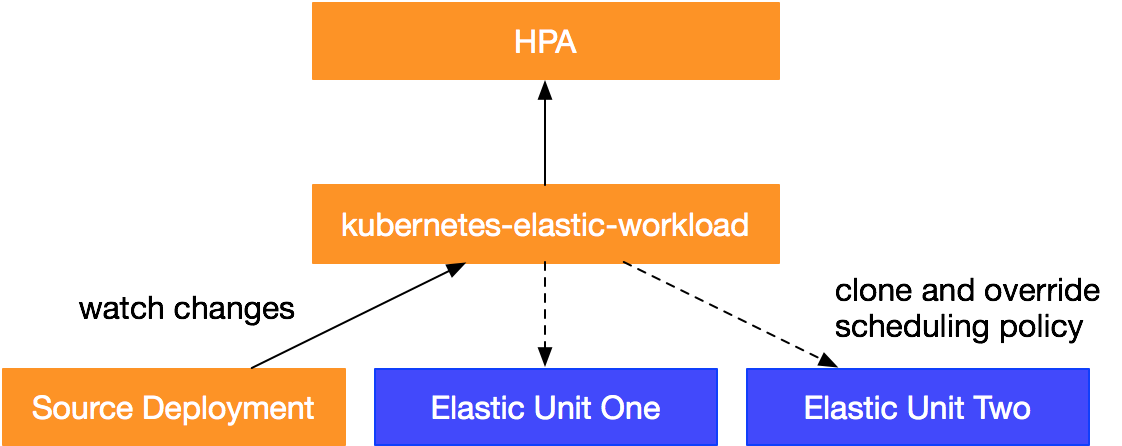
A typical ElasticWorkload resource consists of two main parts:
-
The
sourceTargetsection defines the type of the source workload and its scalable replica range. -
The
elasticUnitsection is an array that defines the scheduling policy for the elastic units. If you have multiple elastic units, Elastic Workload processes them in their defined order.
In this example:
-
The
sourceTargetsection defines a replica range of 2 to 4. When thereplicascount in the ElasticWorkload is between 2 and 4, pods are scheduled to thesourceTarget. When the count exceeds 4, the extra pods are scheduled to theelastic unit, which is thevirtual-kubeletvirtual node. -
The
elasticUnitsection defines the elastic unit as thevirtual-kubeletvirtual node. The scheduling policy is specified by the labelalibabacloud.com/eci: "true".
-
-
Verify the deployment.
-
Check the current status.
kubectl describe ew elasticworkload-sample # same as kubectl get elasticworkloadThe command returns the following output. In the
Statussection,Desired Replicasfor each unit indicates the number of replicas allocated by the ElasticWorkload.Name: elasticworkload-sample Namespace: default Labels: <none> Annotations: <none> API Version: autoscaling.alibabacloud.com/v1beta1 Kind: ElasticWorkload Metadata: Creation Timestamp: 2021-05-21T01:53:58Z Generation: 4 Managed Fields: API Version: autoscaling.alibabacloud.com/v1beta1 Fields Type: FieldsV1 fieldsV1: f:spec: .: f:elasticUnit: f:replicas: f:sourceTarget: .: f:apiVersion: f:kind: f:max: f:min: f:name: Manager: Apache-HttpClient Operation: Update Time: 2021-05-21T01:53:58Z API Version: autoscaling.alibabacloud.com/v1beta1 Fields Type: FieldsV1 fieldsV1: f:status: .: f:elasticUnitsStatus: f:replicas: f:selector: f:sourceTarget: .: f:apiVersion: f:desiredReplicas: f:kind: f:name: f:updateTimestamp: Manager: manager Operation: Update Time: 2021-05-21T01:56:45Z Resource Version: 8727 Self Link: /apis/autoscaling.alibabacloud.com/v1beta1/namespaces/default/elasticworkloads/elasticworkload-sample UID: c4a508aa-2702-4d17-ac25-e6a207c0761a Spec: Elastic Unit: Labels: alibabacloud.com/eci: true Name: virtual-kubelet Replicas: 6 Source Target: API Version: apps/v1 Kind: Deployment Max: 4 Min: 2 Name: nginx-deployment-basic Status: Elastic Units Status: Desired Replicas: 2 Name: nginx-deployment-basic-unit-virtual-kubelet Update Timestamp: 2021-05-21T01:56:45Z Replicas: 6 Selector: app=nginx Source Target: API Version: apps/v1 Desired Replicas: 4 Kind: Deployment Name: nginx-deployment-basic Update Timestamp: 2021-05-21T01:56:45Z Events: Type Reason Age From Message ---- ------ ---- ---- ------- Normal SourceUpdate 12m ElasticWorkload Source Target scale from 2 to 4 Normal UnitCreation 12m ElasticWorkload ElasticWorkloadUnit nginx-deployment-basic-unit-virtual-kubelet created Normal ElasticWorkloadUpdate 9m27s (x9 over 12m) ElasticWorkload ElasticWorkload update Normal UnitUpdate 9m27s (x8 over 12m) ElasticWorkload ElasticWorkloadUnit virtual-kubelet has been updated -
Check the pod status.
kubectl get pod -o wideThe command returns the following output. This output shows that Elastic Workload cloned a new Deployment and its pods, and dynamically allocated the replicas according to the scheduling policy.
NAME                                                           READY   STATUS    RESTARTS   AGE   IP              NODE                           NOMINATED NODE   READINESS GATES
nginx-deployment-basic-5bf87f5f59-22jnw                        1/1     Running   0          16m   10.34.0.131     cn-beijing.172.16.0.1          <none>           <none>
nginx-deployment-basic-5bf87f5f59-gfp24                        1/1     Running   0          13m   10.34.0.133     cn-beijing.172.16.0.1          <none>           <none>
nginx-deployment-basic-5bf87f5f59-pw2zx                        1/1     Running   0          13m   10.34.0.134     cn-beijing.172.16.0.1          <none>           <none>
nginx-deployment-basic-5bf87f5f59-qvh7m                        1/1     Running   0          16m   10.34.0.132     cn-beijing.172.16.0.1          <none>           <none>
nginx-deployment-basic-unit-virtual-kubelet-65fb6f4cd7-48ssb   1/1     Running   0          13m   172.16.22.157   virtual-kubelet-cn-beijing-e   <none>           <none>
nginx-deployment-basic-unit-virtual-kubelet-65fb6f4cd7-gjqhm   1/1     Running   0          13m   172.16.22.158   virtual-kubelet-cn-beijing-e   <none>           <none>
-
You can also use Elastic Workload with a Horizontal Pod Autoscaler (HPA). By targeting the HPA at the ElasticWorkload resource, you can dynamically adjust the replica distribution for each unit based on the HPA's status. For example, if the replica count scales down from 6 to 4, the replicas in the elastic unit are removed first.
apiVersion: autoscaling/v2beta2
kind: HorizontalPodAutoscaler
metadata:
  name: elastic-workload-demo
  namespace: default
spec:
  scaleTargetRef:
    apiVersion: autoscaling.alibabacloud.com/v1beta1
    kind: ElasticWorkload
    name: elasticworkload-sample
  minReplicas: 2
  maxReplicas: 10
  metrics:
  - type: Resource
    resource:
      name: cpu
      target:
        type: Utilization
        averageUtilization: 50
In summary, Elastic Workload manages scheduling policies by cloning and overwriting them to generate multiple Deployments. It also prioritizes pods by adjusting the replica distribution between the source workload and elastic units.