Troubleshoot ACK storage issues
Resolve pod startup failures and PVC binding issues for disk, NAS, and OSS volumes in ACK clusters.
Diagnostic procedure
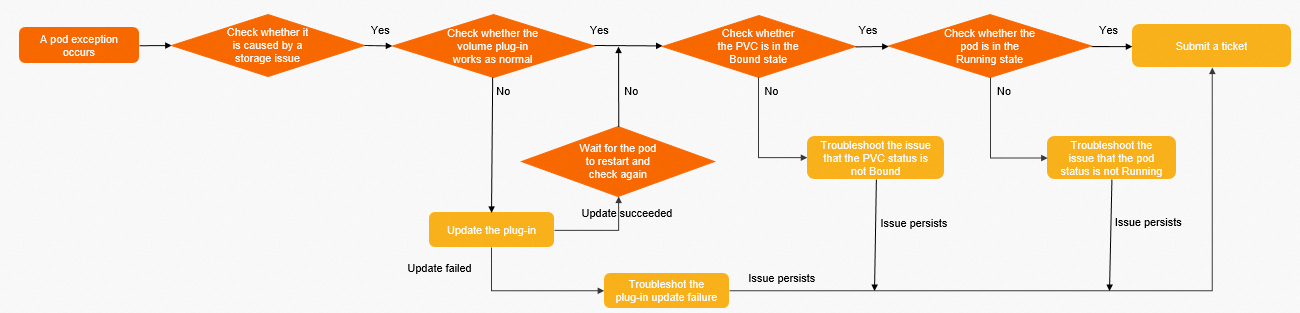
Complete these checks before troubleshooting by storage type.
Step 1: Confirm the failure is storage-related.
Run kubectl describe pods <pod-name> and inspect the Events section.
If the pod shows the state below, the volume mounted successfully. CrashLoopBackOff or similar exit codes at this stage indicate an application error, not a storage issue.

Step 2: Verify the CSI plug-in is running.
kubectl get pod -n kube-system | grep csiExpected output:
NAME                       READY   STATUS    RESTARTS   AGE
csi-plugin-***             4/4     Running   0          23d
csi-provisioner-***        7/7     Running   0          14d
If either pod is not Running, run kubectl describe pods <pod-name> -n kube-system to check the exit reason and events.
Step 3: Verify the CSI plug-in is up to date.
kubectl get ds csi-plugin -n kube-system -oyaml | grep imageExpected output:
image: registry.cn-****.aliyuncs.com/acs/csi-plugin:v*****-aliyunCompare the image tag against the csi-plugin version history and the csi-provisioner version history.
If the version is outdated, upgrade the CSI plug-in. For upgrade failures, see Troubleshoot component update failures.
Step 4: Troubleshoot pod pending issues.
Disk volume: see Pod not running (disk)
NAS volume: see Pod not running (NAS)
OSS volume: see Pod not running (OSS)
Step 5: Troubleshoot PVC not Bound issues.
Disk volume: see PVC not Bound (disk)
NAS volume: see PVC not Bound (NAS)
OSS volume: see PVC not Bound (OSS)
Troubleshoot component update failures
csi-provisioner
csi-provisioner is a 2-replica Deployment with pod anti-affinity across nodes.
If the upgrade fails, verify the cluster has at least two schedulable nodes (required for 2 replicas).
csi-provisioner 1.14 and earlier used a StatefulSet. If a StatefulSet named
csi-provisionerstill exists, delete it and reinstall:kubectl delete sts csi-provisionerThen log in to the Container Service console and reinstall csi-provisioner from Add-ons. See Manage components.
csi-plugin
csi-plugin is a DaemonSet deployed on every node.
Check for
NotReadynodes, which block DaemonSet upgrades.If the upgrade fails but all plug-ins work normally, the component center may have timed out and rolled back.
Disk troubleshooting
The node and disk must be in the same region and zone. Different ECS instance types support different disk types—see Instance family.
Pod not running (disk)
Symptom
The PVC status is Bound but the pod is not Running.
Possible causes and resolution
Symptom in | Cause | Resolution |
| No schedulable node where the disk is available | Schedule the pod to a node where the disk is available. See Schedule applications to specified nodes. |
| Disk mount error | Check pod events for the specific error. For mounting errors, see Disk volume FAQ. For unmounting errors, see Disk volume FAQ. |
| ECS instance does not support the disk type | Use a disk type supported by your ECS instance. See Instance family. For ECS API errors, see ECS error codes. |
PVC not Bound (disk)
Symptom
Both the PVC and pod are not Running.
Fault locating
Run kubectl describe pvc <pvc-name> -n <namespace> and inspect the events to determine whether this is a static or dynamic provisioning issue.
Static provisioning
The PVC and PV selectors do not match. Common mismatches:
The PVC selector differs from the PV selector.
They reference different StorageClass names.
The PV status is
Released.
Check the YAML configuration of both the PVC and PV. See Use static disk volumes.
A Released PV still references its previous claim and cannot be rebound. Create a new PV to bind the disk to a new PVC.Dynamic provisioning
csi-provisioner failed to create the disk. Check PVC events for the error:
Error type | Reference |
Disk creation errors | |
Disk expansion errors | |
ECS API errors during disk creation |
NAS troubleshooting
The node and NAS mount target must be in the same Virtual Private Cloud (VPC). If in different VPCs, connect them with Cloud Enterprise Network (CEN).
Cross-zone mounting is supported within the same VPC.
The mount directory for Extreme NAS and CPFS 2.0 must start with
/share.
Pod not running (NAS)
Symptom
The PVC status is Bound but the pod is not Running.
Possible causes and resolution
Symptom in | Cause | Fault locating | Resolution |
Pod stays in |
| Check whether | Remove |
| Port 2049 (NFS) is blocked in the security group | Check security group rules for the node | Add an inbound rule for TCP port 2049. See Add security group rules. |
Mount target unreachable; connection timeout in events | Node and NAS in different VPCs | Verify whether the node VPC and the NAS mount target VPC match | Move the NAS mount target to the same VPC as the node, or use CEN to connect the two VPCs |
Other events | Other errors | Check pod events with | See NAS volume FAQ. |
PVC not Bound (NAS)
Symptom
The PVC is not Bound and the pod is not Running.
Fault locating
Run kubectl describe pvc <pvc-name> -n <namespace> and inspect the events to determine whether this is a static or dynamic provisioning issue.
Static provisioning
PVC and PV selectors do not match. Common mismatches:
Selector configuration differs between PVC and PV.
They reference different StorageClass names.
The PV status is
Released.
Check the YAML configuration of both the PVC and PV. See Use static NAS volumes.
A Released PV cannot be reused. Create a new PV pointing to the NAS file system.Dynamic provisioning
csi-provisioner failed to provision the NAS volume. Check PVC events for the error. See NAS volume FAQ.
OSS troubleshooting
Mounting an OSS bucket requires AccessKey credentials in the PV, provided via a Kubernetes Secret.
Use the public endpoint for cross-region access; use the internal endpoint for same-region access.
Pod not running (OSS)
Symptom
The PVC status is Bound but the pod is not Running.
Possible causes and resolution
Symptom in | Cause | Fault locating | Resolution |
Pod stays in |
| Check whether | Remove |
| Cross-region access using the internal (private) endpoint | Check whether the bucket endpoint in the PV is a private address while the node is in a different region | Switch the endpoint to the public address of the OSS bucket |
Other events | Other errors | Check pod events with | See OSS volume FAQ. |
PVC not Bound (OSS)
Symptom
The PVC is not Bound and the pod is not Running.
Fault locating
Run kubectl describe pvc <pvc-name> -n <namespace> and inspect the events to determine whether this is a static or dynamic provisioning issue.
Static provisioning
PVC and PV selectors do not match. Common mismatches:
Selector configuration differs between PVC and PV.
They reference different StorageClass names.
The PV status is
Released.
Check the YAML configuration of both the PVC and PV. See Use static OSS volumes.
A Released PV cannot be reused. Extract the bucket address and create a new PV.Dynamic provisioning
csi-provisioner failed to mount the OSS bucket. Check PVC events for the error. See OSS volume FAQ.