Deploy a DeepSeek distilled model inference service on ACK
Use KServe in Container Service for Kubernetes (ACK) to deploy a production-ready DeepSeek model inference service.
Background
DeepSeek-R1 model
KServe
Arena
Prerequisites
-
A Kubernetes cluster that contains GPUs is created. For more information, see Add a GPU node pool to a cluster.
-
The cluster is connected by using kubectl. For more information, see Connect to a cluster by using kubectl.
-
The ack-kserve add-on is installed. For more information, see Install the ack-kserve add-on.
-
The Arena client is installed. For more information, see Configure the Arena client.
GPU instance specifications and cost estimation
During inference, model parameters consume most of the GPU memory. You can calculate the required GPU memory by using the following formula.
Take a 7B model whose default precision is FP16 as an example. The number of model parameters is 7B (7 billion), and the number of bytes of the precision data type is: default precision of 16-bit floating-point / 8 bits per byte = 2 bytes.
In addition to the GPU memory used to load the model, you must also consider the size of the KV cache required for computation and GPU utilization. A portion of GPU memory is usually reserved as a buffer. Therefore, use a GPU instance with 24 GiB of GPU memory, such as ecs.gn7i-c8g1.2xlarge or ecs.gn7i-c16g1.4xlarge. For more information, see Recommended instance types. For more information about GPU instance types and billing, see GPU-accelerated compute-optimized instance families and Billing for Elastic GPU Service.
Model deployment
Step 1: Prepare the DeepSeek-R1-Distill-Qwen-7B model files
-
Run the following commands to download the DeepSeek-R1-Distill-Qwen-7B model from ModelScope.
NoteMake sure that the git-lfs plugin is installed. If it is not installed, run
yum install git-lfsorapt-get install git-lfsto install it. For more installation methods, see Install git-lfs.git lfs install GIT_LFS_SKIP_SMUDGE=1 git clone https://www.modelscope.cn/deepseek-ai/DeepSeek-R1-Distill-Qwen-7B.git cd DeepSeek-R1-Distill-Qwen-7B/ git lfs pull -
Create a directory in Object Storage Service (OSS) and upload the model to OSS.
NoteFor more information about how to install and use ossutil, see Install ossutil.
ossutil mkdir oss://<your-bucket-name>/models/DeepSeek-R1-Distill-Qwen-7B ossutil cp -r ./DeepSeek-R1-Distill-Qwen-7B oss://<your-bucket-name>/models/DeepSeek-R1-Distill-Qwen-7B -
Create a Persistent Volume (PV) and a Persistent Volume Claim (PVC). For the target cluster, configure a PV named
llm-modeland a PVC. For more information, see Use an ossfs 1.0 static volume.Console
The following table describes the basic configurations of the sample PV:
Parameter
Description
PV type
OSS
Name
llm-model
Access certificate
The AccessKey ID and AccessKey secret that are used to access OSS.
Bucket ID
Select the OSS bucket that you created in the previous step.
OSS Path
Select the path where the model is stored, such as
/models/DeepSeek-R1-Distill-Qwen-7B.The following table describes the basic configurations of the sample PVC:
Parameter
Description
PVC type
OSS
Name
llm-model
Allocation mode
Select an existing PV.
Existing volumes
Click the Select Existing Volume link and select the PV that you created.
kubectl
Sample YAML file:
apiVersion: v1
kind: Secret
metadata:
  name: oss-secret
stringData:
  akId: <your-oss-ak> # The credential used to access OSS: AccessKey ID
  akSecret: <your-oss-sk> # The credential used to access OSS: AccessKey Secret
---
apiVersion: v1
kind: PersistentVolume
metadata:
  name: llm-model
  labels:
    alicloud-pvname: llm-model
spec:
  capacity:
    storage: 30Gi
  accessModes:
    - ReadOnlyMany
  persistentVolumeReclaimPolicy: Retain
  csi:
    driver: ossplugin.csi.alibabacloud.com
    volumeHandle: llm-model
    nodePublishSecretRef:
      name: oss-secret
      namespace: default
    volumeAttributes:
      bucket: <your-bucket-name> # bucket name
      url: <your-bucket-endpoint> # Endpoint information, such as oss-cn-hangzhou-internal.aliyuncs.com
      otherOpts: "-o umask=022 -o max_stat_cache_size=0 -o allow_other"
      path: <your-model-path> # In this example, the path is /models/DeepSeek-R1-Distill-Qwen-7B/
---
apiVersion: v1
kind: PersistentVolumeClaim
metadata:
  name: llm-model
spec:
  accessModes:
    - ReadOnlyMany
  resources:
    requests:
      storage: 30Gi
  selector:
    matchLabels:
      alicloud-pvname: llm-model
Step 2: Deploy the inference service
-
Run the following command to start an inference service named deepseek.
arena serve kserve \
    --name=deepseek \
    --image=kube-ai-registry.cn-shanghai.cr.aliyuncs.com/kube-ai/vllm:v0.6.6 \
    --gpus=1 \
    --cpu=4 \
    --memory=12Gi \
    --data=llm-model:/models/DeepSeek-R1-Distill-Qwen-7B \
    "vllm serve /models/DeepSeek-R1-Distill-Qwen-7B --port 8080 --trust-remote-code --served-model-name deepseek-r1 --max-model-len 32768 --gpu-memory-utilization 0.95 --enforce-eager"
The following table describes the parameters.
Parameter
Required
Description
--name
Yes
The name of the inference service that you submit. The name must be globally unique.
--image
Yes
The image address of the inference service.
--gpus
No
The number of GPUs required by the inference service. Default value: 0.
--cpu
No
The number of CPUs required by the inference service.
--memory
No
The amount of memory required by the inference service.
--data
No
The model address of the inference service. In this topic, the model is the
llm-modelPV that you created in the previous step, which is mounted to the /models/ directory in the container.Expected output:
inferenceservice.serving.kserve.io/deepseek created
INFO[0003] The Job deepseek has been submitted successfully
INFO[0003] You can run `arena serve get deepseek --type kserve -n default` to check the job status
Step 3: Verify the inference service
-
Run the following command to view the deployment status of the KServe inference service.
arena serve get deepseekExpected output:
Name:       deepseek
Namespace:  default
Type:       KServe
Version:    1
Desired:    1
Available:  1
Age:        3m
Address:    http://deepseek-default.example.com
Port:       :80
GPU:        1
Instances:
  NAME                                 STATUS   AGE  READY  RESTARTS  GPU  NODE
  ----                                 ------   ---  -----  --------  ---  ----
  deepseek-predictor-7cd4d568fd-fznfg  Running  3m   1/1    0         1    cn-beijing.172.16.1.77
The output indicates that the KServe inference service is deployed.
-
Run the following commands to access the inference service by using the obtained Nginx Ingress gateway address.
# Get the IP address of the Nginx Ingress.
NGINX_INGRESS_IP=$(kubectl -n kube-system get svc nginx-ingress-lb -ojsonpath='{.status.loadBalancer.ingress[0].ip}')
# Get the hostname of the inference service.
SERVICE_HOSTNAME=$(kubectl get inferenceservice deepseek -o jsonpath='{.status.url}' | cut -d "/" -f 3)
# Send a request to access the inference service.
curl -H "Host: $SERVICE_HOSTNAME" -H "Content-Type: application/json" http://$NGINX_INGRESS_IP:80/v1/chat/completions -d '{"model": "deepseek-r1", "messages": [{"role": "user", "content": "Say this is a test!"}], "max_tokens": 512, "temperature": 0.7, "top_p": 0.9, "seed": 10}'
Expected output:
{"id":"chatcmpl-0fe3044126252c994d470e84807d4a0a","object":"chat.completion","created":1738828016,"model":"deepseek-r1","choices":[{"index":0,"message":{"role":"assistant","content":"<think>\n\n</think>\n\nIt seems like you're testing or sharing some information. How can I assist you further? If you have any questions or need help with something, feel free to ask!","tool_calls":[]},"logprobs":null,"finish_reason":"stop","stop_reason":null}],"usage":{"prompt_tokens":9,"total_tokens":48,"completion_tokens":39,"prompt_tokens_details":null},"prompt_logprobs":null}
Observability
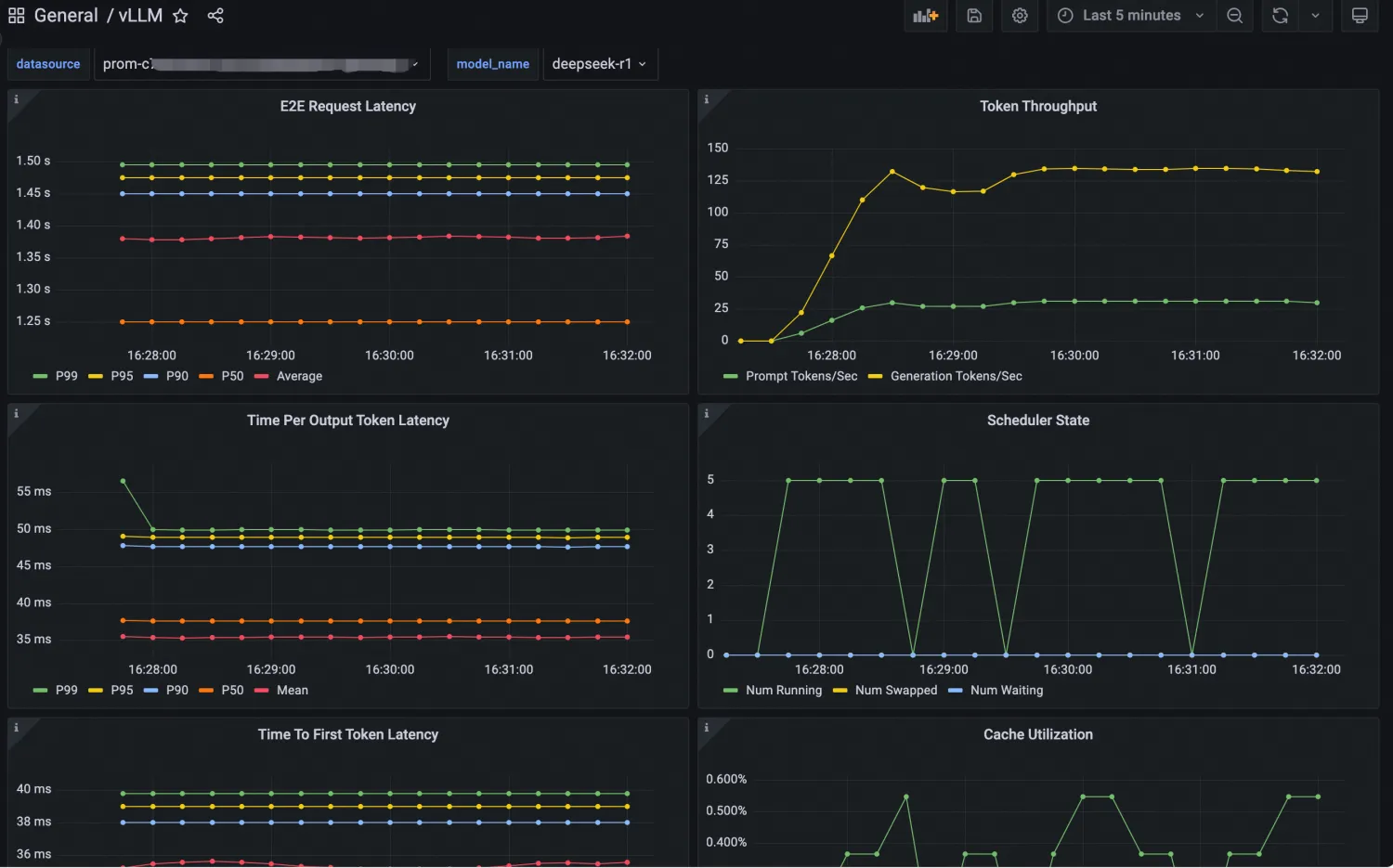
Observability is critical for large language model (LLM) inference services in a production environment because it helps you detect and locate faults in advance. The vLLM framework provides many LLM inference metrics. For more information about the metrics, see the Metrics documentation. KServe also provides metrics to help you monitor the performance and health of model services. These capabilities are integrated into Arena. When you submit the application, you need only add the --enable-prometheus=true parameter.
arena serve kserve \
    --name=deepseek \
    --image=kube-ai-registry.cn-shanghai.cr.aliyuncs.com/kube-ai/vllm:v0.6.6 \
    --gpus=1 \
    --cpu=4 \
    --memory=12Gi \
    --enable-prometheus=true \
    --data=llm-model:/models/DeepSeek-R1-Distill-Qwen-7B \
    "vllm serve /models/DeepSeek-R1-Distill-Qwen-7B --port 8080 --trust-remote-code --served-model-name deepseek-r1 --max-model-len 32768 --gpu-memory-utilization 0.95 --enforce-eager"
You can use a Grafana dashboard to observe the LLM inference service that is deployed based on vLLM. First, import the vLLM Grafana JSON model into Grafana, and then create an observability dashboard for the LLM inference service. For more information about the JSON model to import, see the vLLM official website. For more information about how to import a dashboard, see Export and import Grafana dashboards. The following figure shows the dashboard after configuration:
Import a Grafana dashboard
Import the dashboard
-
Log on to the ARMS console.
-
In the navigation pane on the left, click Integration Management.
-
On the Integrated Environments tab, select Container Environment, search for an environment by ACK cluster name, and then click the target environment.
-
On the Component Management tab, copy and save the Cluster ID, and then click Dashboard Directory.
In the Basic Information section at the top of the page, you can find the Cluster ID field and the Dashboard Directory field. The dashboard directory name contains the cluster ID.
-
On the right side of the Dashboards tab, click Import.
-
Copy the grafana.json file contents and paste them into the Import via panel json text box, and then click Load.
NoteYou can also import the dashboard by uploading a JSON file.
-
Keep the default settings and click Import. The observability dashboard for the LLM inference service is imported.
Verify the dashboard data
-
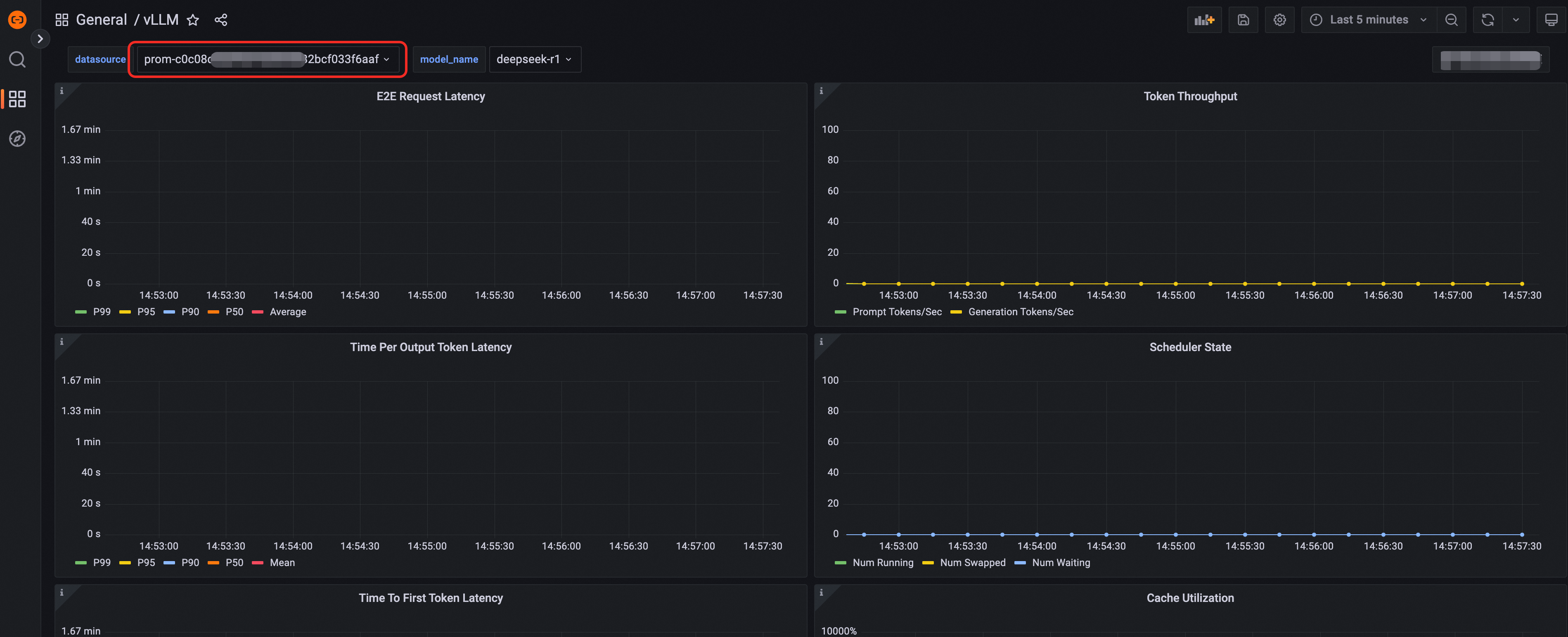
Search for a data source by using the saved cluster ID or the Prometheus instance ID, and then select the target data source.
-
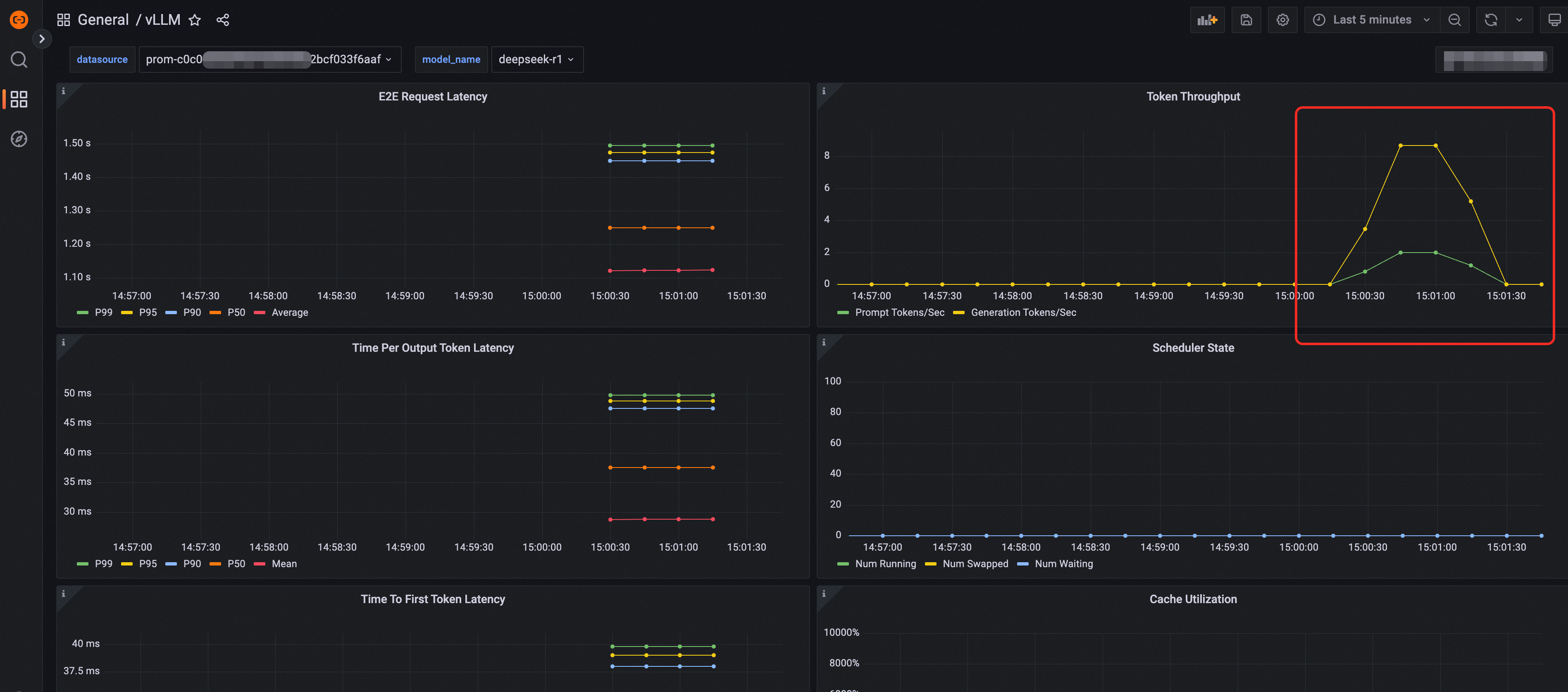
Send several requests to access the inference service, which simulates inference traffic. Then, verify the observability dashboard data of the LLM inference service, such as Token Throughput.
Auto scaling
When you deploy and manage KServe model services, you may encounter dynamic load fluctuations. KServe uses the Horizontal Pod Autoscaler (HPA) feature of Kubernetes and the ack-alibaba-cloud-metrics-adapter add-on of ACK. It automatically adjusts the number of pods for a model service based on CPU utilization, memory utilization, GPU utilization, and custom performance metrics to keep the service stable and efficient. For more information, see Configure auto scaling for a service.
Model acceleration
As technology evolves, the model data of AI applications keeps growing. However, pulling these large files from storage services such as OSS and NAS may cause long delays and cold start issues. You can use Fluid to significantly accelerate model loading and improve the performance of inference services, especially KServe-based inference services. For more information, see Accelerate models using Fluid.
Canary release
Publishing application updates is the most common operation in a production environment. To keep your business stable and reduce change risks, a canary release is essential. ACK supports multiple canary release strategies, such as canary releases based on a traffic percentage or on request headers. For more information, see Implement a phased release for an inference service.
GPU sharing inference
The DeepSeek-R1-Distill-Qwen-7B model requires only 14 GB of GPU memory. If you use a GPU instance type with higher specifications, you can use GPU sharing inference to improve GPU utilization. GPU sharing partitions a single GPU so that multiple inference services share it, which improves GPU utilization. For more information, see Deploy GPU-shared Inference Services.