Deploy FastChat on an ACK Serverless cluster
Deploy FastChat with the ACK console or kubectl, access it through an external endpoint, and start an AIGC experience on ECI GPU Pods in an ACK Serverless cluster — no node management required.
Alibaba Cloud does not guarantee the legitimacy, security, or accuracy of the third-party model FastChat, and is not liable for any damages from using it. By proceeding, you agree to abide by FastChat user agreements, usage specifications, and applicable laws and regulations. You are responsible for all consequences of your use of FastChat.
Prerequisites
Ensure that you have:
An ACK Serverless cluster in the China (Beijing), China (Hangzhou), China (Shanghai), or China (Shenzhen) region with Internet access enabled.
How it works
FastChat is a platform for training, serving, and evaluating large language models (LLMs). It is a distributed multi-model service that supports models such as Vicuna and FastChat-T5, and provides an OpenAI-compatible web interface.
FastChat runs on ECI GPU Pods in an ACK Serverless cluster. Pod annotations select the Elastic Compute Service (ECS) GPU instance type, and a Server Load Balancer (SLB) endpoint exposes the service externally. You pay only while the Pod runs — no idle node charges.
Step 1: Deploy the FastChat application
Deploy using the console
Log on to the ACK console. In the left navigation pane, click Clusters.
On the Clusters page, click the name of your cluster. In the left navigation pane, choose Workloads > Deployments.
On the Deployments page, click Create from Image.
On the Basic Information step, set Name to
fastchatand Replicas to1, then click Next.On the Container step, set the following parameters and click Next. Leave other parameters at default.
The CPU and Memory values in Required Resources do not take effect. A Pod annotation in step 7 specifies the ECS instance type instead.
Section
Parameter
Value
General
Image Name
yunqi-registry.cn-shanghai.cr.aliyuncs.com/lab/fastchat:v1.1.0Required Resources
CPU / Memory
CPU: 8 cores, Memory: 32 GB
Health Check
Readiness
Select Readiness, select TCP, port:
7860Lifecycle
Start
["sh","-c","/root/webui.sh"]On the Advanced step, click Create next to Services and set the following parameters. Leave other parameters at default.
Parameter
Value
Name
fastchat-svcService Type
SLB — Classic Load Balancer (CLB), Create Resource
Port Mapping
Name:
example-port; Service Port:7860; Container Port:7860; Protocol: TCPOn the Advanced page, scroll to Labels and Annotations. Add these Pod annotations and click Create.
Name
Value
k8s.aliyun.com/eci-use-specsecs.gn6i-c8g1.2xlarge,ecs.gn5-c8g1.2xlarge,ecs.gn6v-c8g1.8xlarge,ecs.gn6i-c16g1.4xlargek8s.aliyun.com/eci-extra-ephemeral-storage100Gi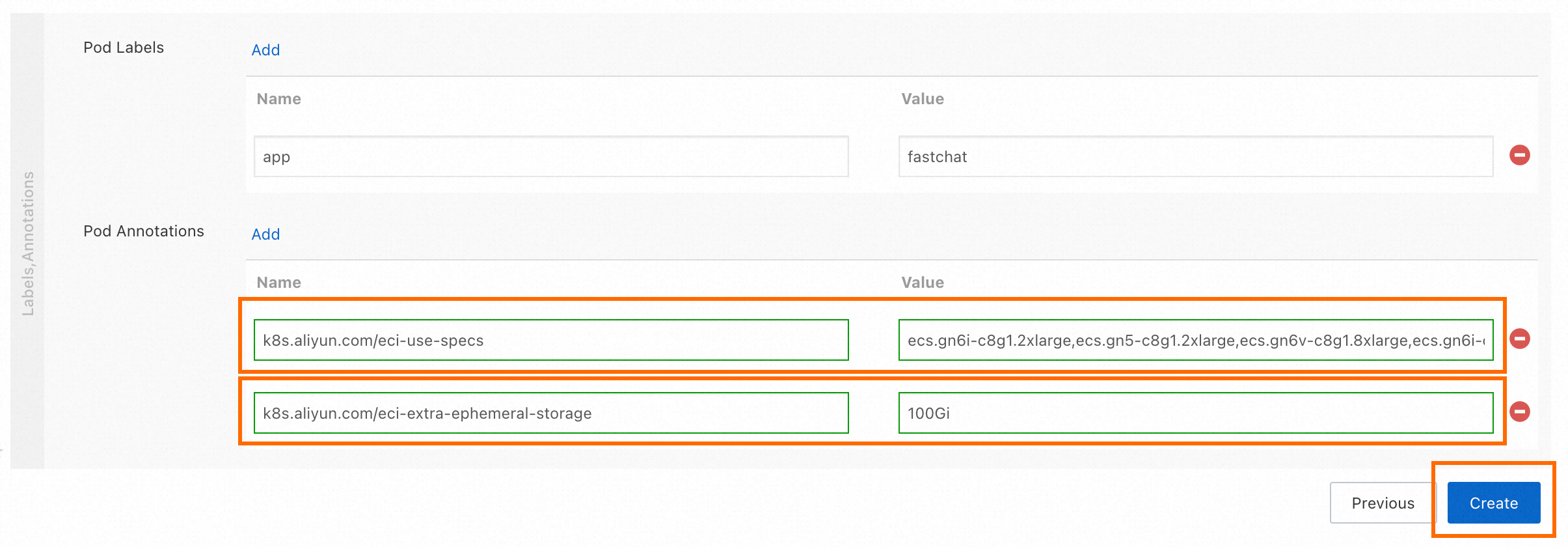
Go to the Deployments page and click
fastchat. On the Pods tab, wait for the Pod status to reach Running. Click the Access Method tab and copy the IP address from External Endpoint for use in step 2.
Deploy using kubectl
Connect to the ACK Serverless cluster with kubectl.
Create
fastchat.yamlwith the following content:apiVersion: apps/v1 kind: Deployment metadata: labels: app: fastchat name: fastchat namespace: default spec: replicas: 1 selector: matchLabels: app: fastchat template: metadata: labels: app: fastchat alibabacloud.com/eci: "true" annotations: k8s.aliyun.com/eci-use-specs: ecs.gn6i-c8g1.2xlarge,ecs.gn5-c8g1.2xlarge,ecs.gn6v-c8g1.8xlarge,ecs.gn6i-c16g1.4xlarge k8s.aliyun.com/eci-extra-ephemeral-storage: 100Gi spec: dnsPolicy: Default containers: - command: - sh - -c - "/root/webui.sh" image: yunqi-registry.cn-shanghai.cr.aliyuncs.com/lab/fastchat:v1.1.0 imagePullPolicy: IfNotPresent name: fastchat ports: - containerPort: 7860 protocol: TCP readinessProbe: failureThreshold: 3 initialDelaySeconds: 5 periodSeconds: 10 successThreshold: 1 tcpSocket: port: 7860 timeoutSeconds: 1 resources: requests: cpu: "8" memory: 16Gi limits: nvidia.com/gpu: 1 --- apiVersion: v1 kind: Service metadata: annotations: service.beta.kubernetes.io/alibaba-cloud-loadbalancer-address-type: internet service.beta.kubernetes.io/alibaba-cloud-loadbalancer-instance-charge-type: PayByCLCU name: fastchat-svc namespace: default spec: externalTrafficPolicy: Local ports: - port: 7860 protocol: TCP targetPort: 7860 selector: app: fastchat type: LoadBalancerDeploy the application:
kubectl apply -f fastchat.yamlVerify the Deployment is ready:
kubectl get deployment fastchatThe Deployment is ready when the output shows
READY 1/1:NAME READY UP-TO-DATE AVAILABLE AGE fastchat 1/1 1 1 38m
Step 2: Access the service
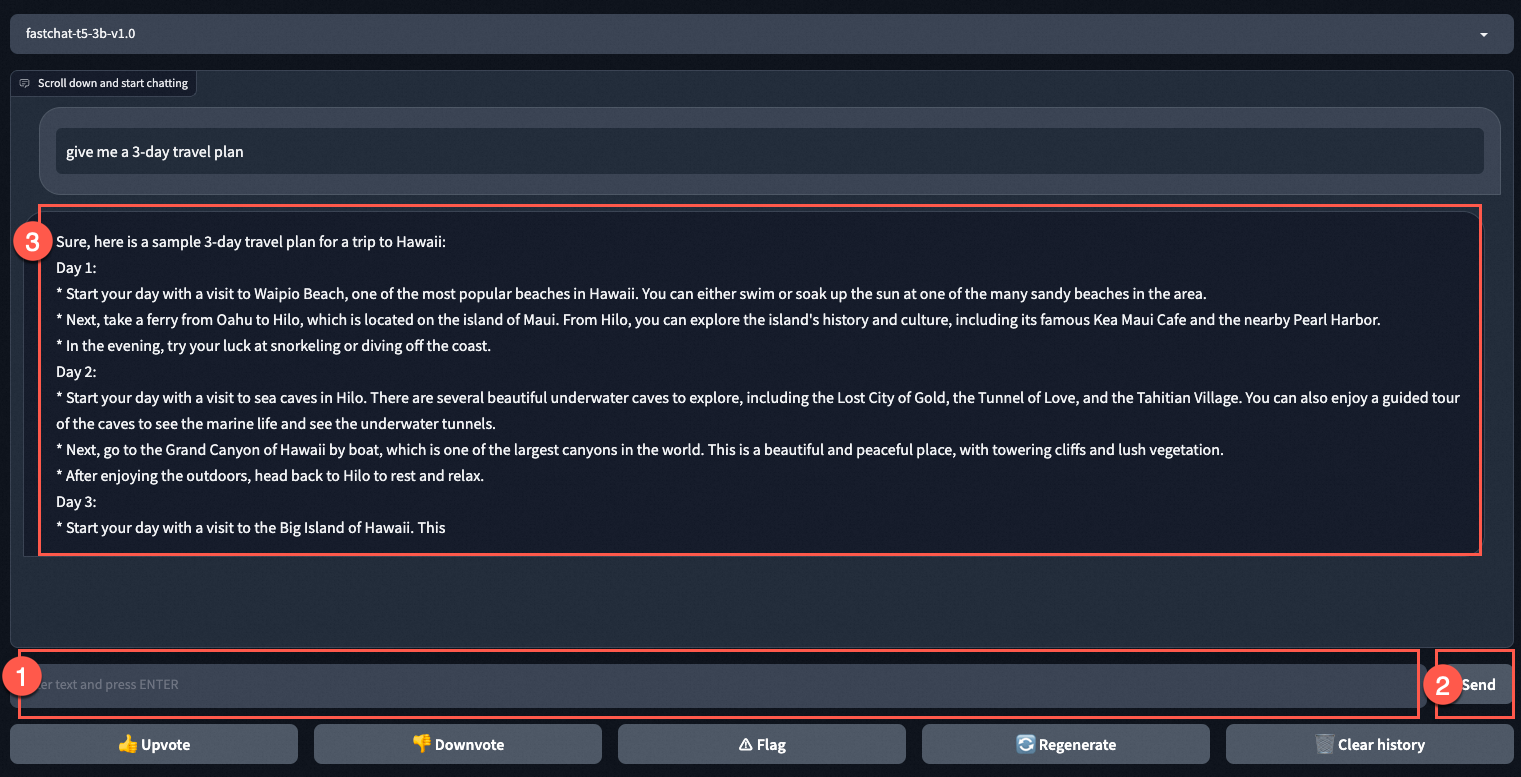
Enter the fastchat-svc external IP in your browser to access FastChat. The FastChat page provides a model selection dropdown (for example, fastchat-t5-3b-v1.0). Enter a question in the text box at the bottom (for example, give me a 3-day travel plan), click Send, and view the model reply in the conversation area. You can also use Upvote, Downvote, Flag, Regenerate, and Clear history.
Step 3: Release resources
Release resources to avoid ongoing charges.
Delete the application and Service
Log on to the ACK console. On the Clusters page, click the name of your cluster.
In the left navigation pane, choose Workloads > Deployments. Select
fastchat, click Batch Delete, and confirm.NoteDeleting the Deployment terminates the ECI GPU Pod and stops GPU instance charges.
Delete the cluster
ACK Serverless clusters offer a free trial during public preview. Other services — such as SLB — are billed separately and accrue charges until the cluster is deleted.
To delete the cluster:
On the Clusters page, find the cluster and choose More > Delete in the Actions column.
In the Delete Cluster dialog box, select the following options, then click OK. See Delete an ACK Serverless cluster.
Delete ALB Instances Created by the Cluster
Delete Alibaba Cloud DNS PrivateZone instances Created by the Cluster
I understand the above information and want to delete the specified cluster
To keep the cluster and continue using it:
Recharge your Alibaba Cloud account at least 1 hour before the free trial ends and maintain a balance of at least CNY 100. See Cloud service fee.
Contact us
For questions about running AI-generated content (AIGC) workloads on ACK, join the DingTalk group 31850017754.