Network access control
This topic describes three common methods for network access control: security groups, network ACLs, and Cloud Firewall. You can select one or more of these methods based on how you use cloud resources to ensure that your network access complies with your security policies.
After migrating to the cloud, the first step is to plan your network architecture and manage your network attack surface. You can use cloud networking technologies to build a flexible network for your business. To reduce security risks while ensuring normal business operations, you must minimize the network attack surface. The following figure shows a reference model for network layers.
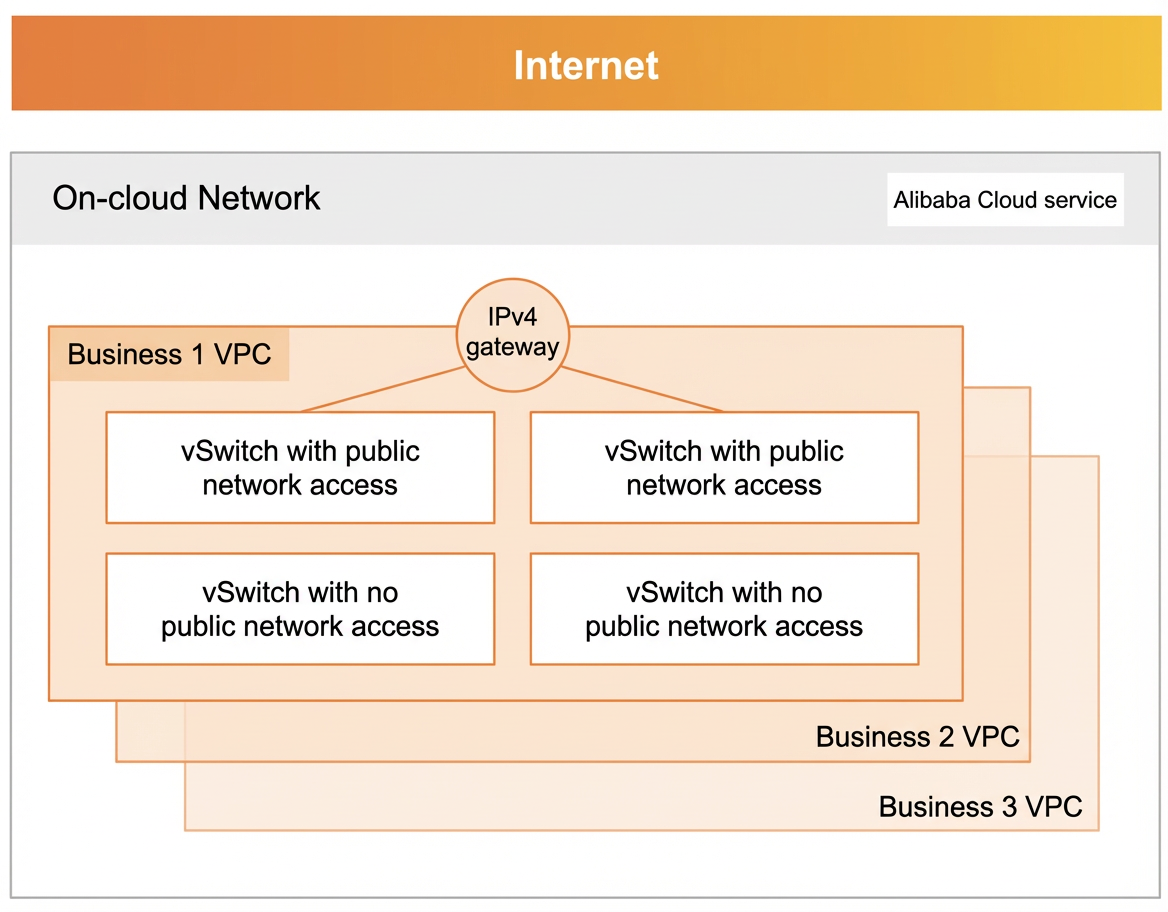
A virtual private cloud (VPC) is a fundamental service that creates an isolated network environment for deploying different business systems. You should deploy different products and business systems in separate VPCs. A network access control list (ACL) is a feature within a VPC that provides network access control. You can customize network ACL rules and attach them to a vSwitch to control traffic to and from the Elastic Compute Service (ECS) instances in that vSwitch.
Network isolation must go beyond restricting access at the border. You should adopt a zero-trust approach that does not rely solely on network boundaries and implement thorough network isolation, even within the same network area. For example, you can use security groups to restrict network access between different ECS instances. If your business does not require public network access, you can attach the instances to a vSwitch that has no route to the Internet.
Alibaba Cloud also provides security products, such as Cloud Firewall, to help businesses defend against advanced and complex attacks. These native security features meet default security requirements and support rapid expansion.
For more information about the relationship between security groups, network ACLs, and Cloud Firewall, see:
Security group | Network ACL | Cloud Firewall | |
Applicable scope | Attached directly to ECS instances or other cloud resources to control inbound and outbound traffic for a single instance. | Applied at the VPC subnet level to control traffic entering and leaving an entire subnet. | Provides unified security policy management for an entire VPC or between specific VPCs. |
How it works | Exact match for rules based on IP address, port, and protocol. | Exact match for rules based on IP address, port, and protocol. | Uses deep packet inspection (DPI) to perform detailed analysis and filtering of traffic content. |
Scenarios | Simple applications or basic protection | Advanced enterprise security policies and application-layer protection | |
1. Use security groups to manage instance traffic
A security group is a virtual firewall that controls inbound and outbound traffic for instances such as ECS, ApsaraDB RDS (RDS), and Server Load Balancer (SLB). Inbound rules control incoming traffic to an instance, and outbound rules control outgoing traffic from an instance.
Security group configuration planning
On Alibaba Cloud, an instance can be added to a maximum of five security groups, and a security group can contain up to 200 rules. This means an instance can have over a thousand rules applied to it simultaneously. Before you configure security group rules, you must define the access restrictions for all instances. You should plan each rule and its corresponding applications or instances in advance. This practice prevents the complexity that arises from adding too many rules on an ad-hoc basis.
Security group configuration principles
Follow these principles when you use security groups:
Follow the principle of least privilege: Open only specific ports, such as port 80. Avoid setting the authorization object to 0.0.0.0/0. Do not assign a public IP address to resources that do not require public network access.
Refine permissions by role: A security group defines a business role from a network access perspective, and the instances in the group assume that role. An instance should not have too many roles. Therefore, do not add an instance to too many groups. Do not use a single security group to manage all applications or create a separate security group for each instance.
Test before making changes: Before you modify a security group in a production environment, clone the security group. Test your changes on the cloned group to avoid affecting your live applications.
Configure security group auditing: Audit the compliance of your security group rules and deliver the results to Simple Log Service (SLS). If a rule change violates your audit policies, you will receive an alert notification through SLS.
Restrict RAM user permissions: Restrict Resource Access Management (RAM) sub-accounts from creating or referencing security groups that pose a security risk. Ensure that all new security groups meet your security baselines and requirements to achieve consistent security group administration.
Maintain all rules: Security group rules are a critical part of an instance's configuration. Add comments to every rule you create so that others can understand its purpose. When an instance is released or an IP address changes, check for and promptly remove any obsolete rules from the security group.
2. Use ACLs to control a virtual private cloud (VPC)
A network ACL is a network access control feature in a VPC. You can customize network ACL rules and attach the network ACL to a vSwitch to control traffic for the ECS instances in that vSwitch. You can use both network ACLs and security groups to control traffic for vSwitches and ECS instances, respectively. The following figure shows the relationship between network ACLs and security groups:
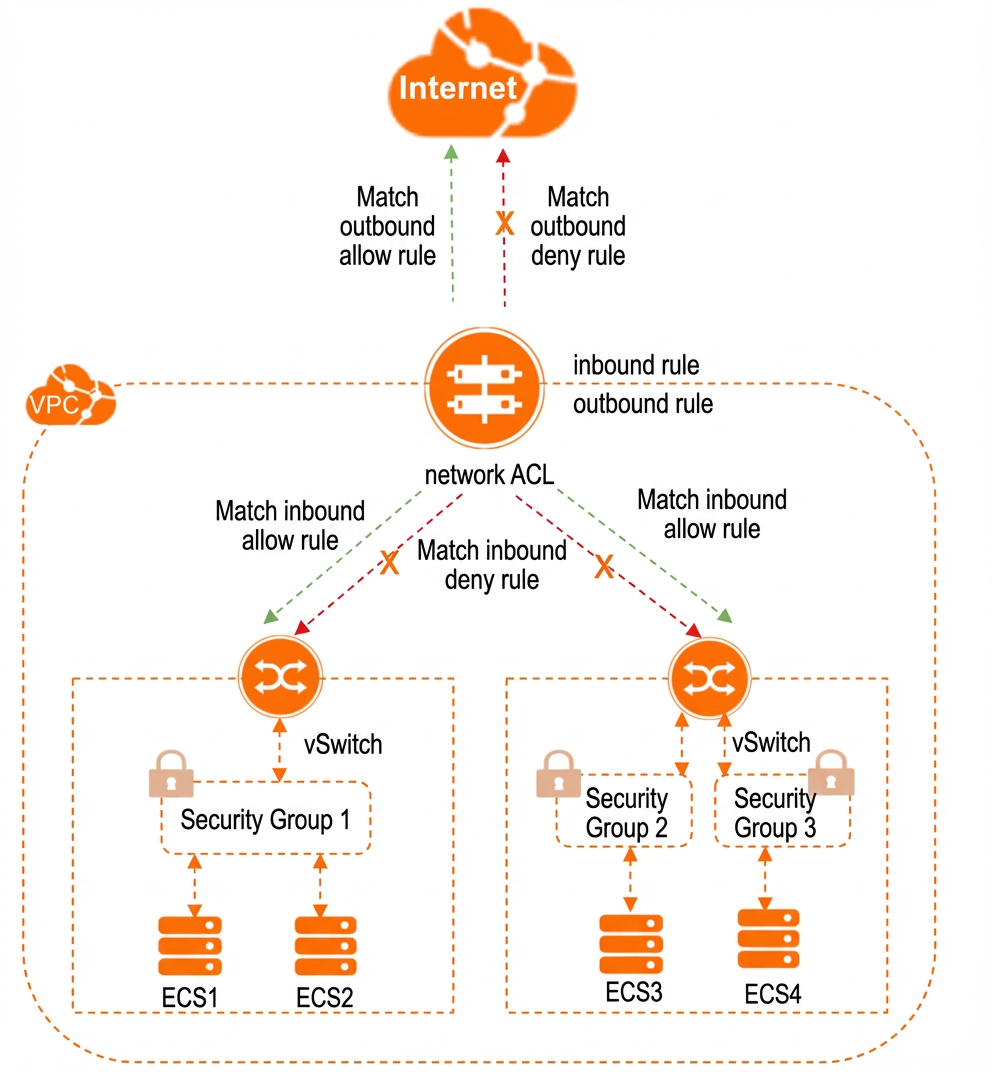
Security groups and network ACLs are both important tools for network access control, especially in a VPC environment. Each has a different focus. Using them together can enhance the security of your cloud environment. The following are suggestions for how to use security groups and network ACLs together:
Define a clear hierarchy and responsibilities: Security groups provide granular control. They are attached directly to cloud resources, such as ECS instances, to control traffic to and from that instance. They focus on instance-level access control. By default, instances within the same security group trust each other and do not require additional rules. Network ACLs operate at the subnet level as an optional security layer for the VPC. They control traffic into and out of one or more subnets. They are suitable for broader, subnet-level control and act as a first line of defense.
Design complementary rules: Ensure that security group and network ACL rules do not conflict but instead complement each other. For example, if a network ACL restricts inbound traffic on a specific port, the security groups for instances in that subnet must allow the necessary outbound response traffic to ensure that communication is complete.
Consider the order of execution: Network ACL rules are processed before security group rules. You might need to set looser rules in the network ACL to allow traffic to reach an instance. Then, use the security group for more fine-grained control.
Use a layered defense: Treat security groups and network ACLs as part of a multilayer defense strategy. If one layer is misconfigured, the other can still provide protection. For example, you can use a network ACL to globally block certain high-risk ports, while using security groups to define more specific access permissions.
3. Use Cloud Firewall to control traffic for the entire cloud environment
For enterprise scenarios, Alibaba Cloud provides Cloud Firewall. It offers unified security policy management for an entire VPC or between specific VPCs. Cloud Firewall controls network traffic that enters and leaves your entire cloud environment, which includes ECS instances, VPC networks, and database services. It provides centralized management, flexible policy configuration, and supports application-layer rules to control protocols such as HTTP and HTTPS. Cloud Firewall is available in several types based on its applicable scope:
Internet firewall: The Internet firewall operates at the Internet border to control and protect all inbound and outbound traffic for your public assets. It includes a built-in intrusion prevention module that supports compromised host detection, blocking of outbound connections, and visualization of business access relationships. You can enable protection with one click, without complex network configuration or image installation. It uses a clustered deployment that supports smooth performance scaling.
VPC firewall: This firewall detects and controls east-west traffic between VPCs that are connected through an Enterprise Edition transit router or a Basic Edition transit router of Cloud Enterprise Network (CEN), or through Express Connect. It also secures traffic between VPCs and data centers. It secures internal-facing traffic in various scenarios, such as between VPCs on the cloud, between a VPC and a data center (via VBR), between a VPC and a third-party cloud (via VBR), and between a VPC and a VPN.
Internal firewall: This firewall manages ECS security groups to control inbound and outbound traffic for ECS instances within a VPC. After you publish an access control policy for the internal firewall, the policy is automatically synchronized to the relevant ECS security groups and takes effect. This firewall also supports security group compliance checks and micro-segmentation visualization.