Security Posture Report - July 2026
Platform threat landscape
Default cloud protection
Default protection is a baseline security capability built into the Alibaba Cloud platform. It uses extensive cloud security threat intelligence to automatically block widespread attacks against customers. This provides essential security by default, without requiring manual configuration.
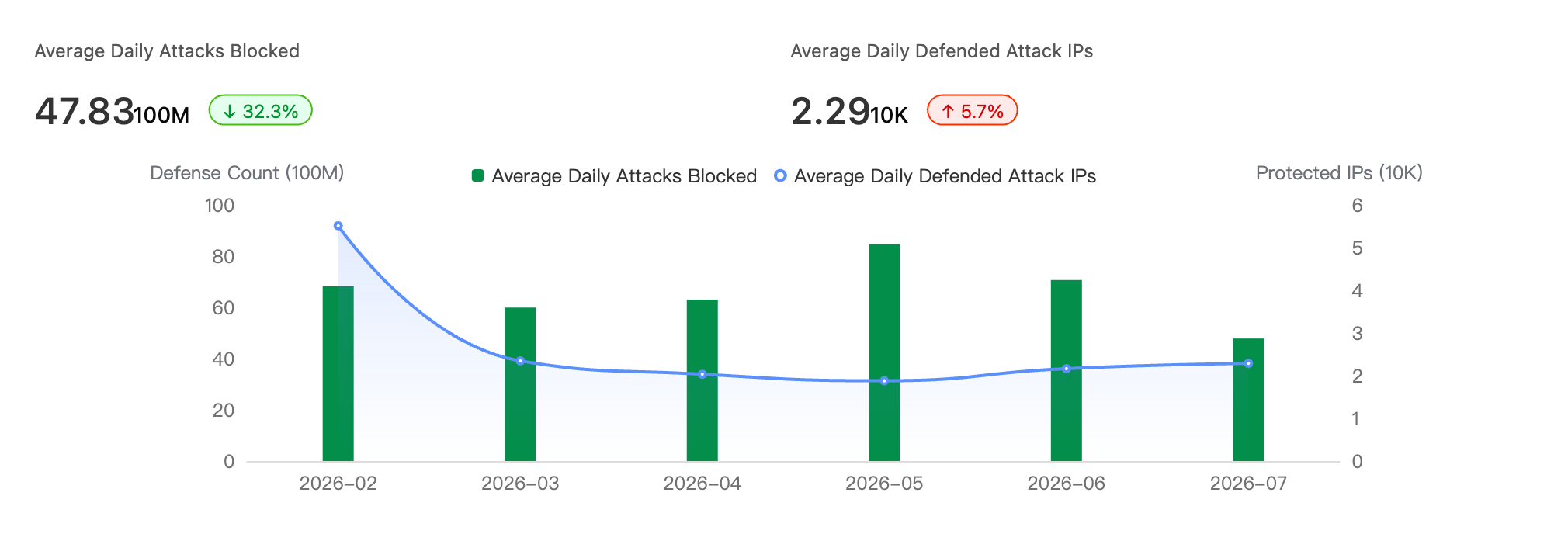
In July 2026, the cloud platform blocked an average of the following for customers each day:
4.783 billion attacks, down 32.3% month-over-month
22,900 attacking IP addresses, up 5.7% month-over-month
DDoS attack interception
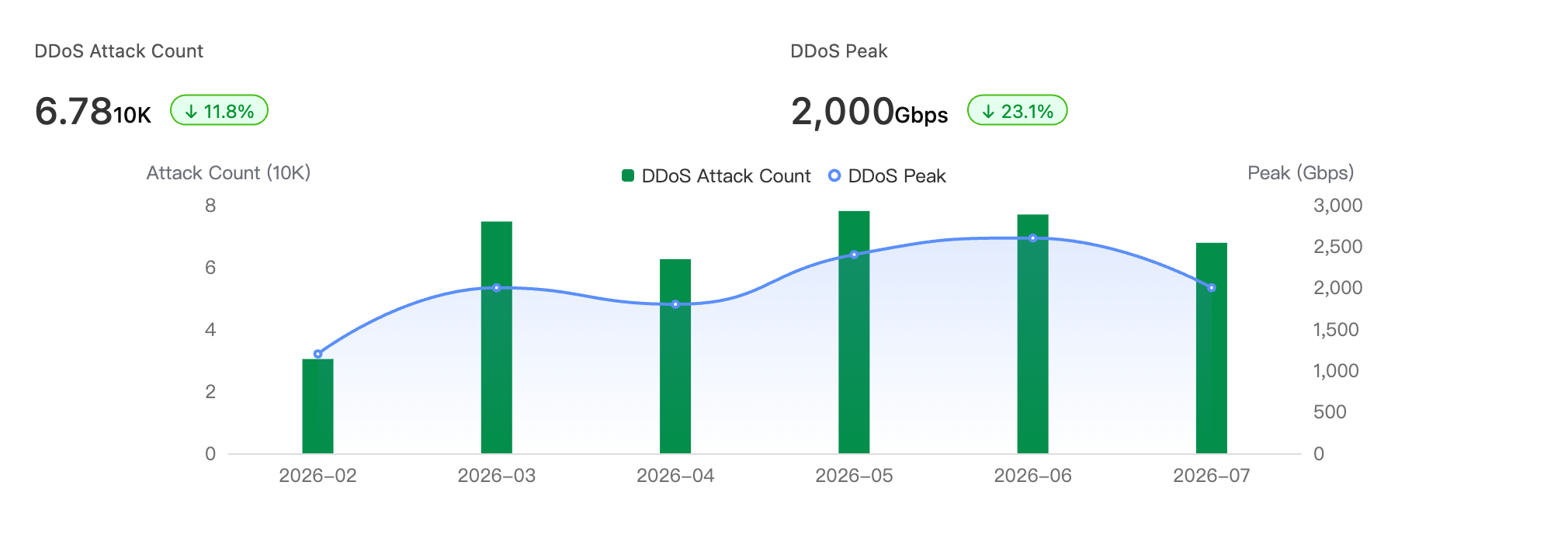
In July, the Alibaba Cloud platform detected and blocked a total of:
67,800 DDoS attacks, down 11.8% month-over-month
A peak attack bandwidth of 2,000 Gbps, down 23.1% month-over-month
Recent attack methods and trends
Trend: Widespread attacks on XXL-JOB
XXL-JOB is a popular open-source distributed task scheduling platform composed of a scheduler and multiple executors. In July 2026, we observed multiple threat groups launching widespread intrusions against its publicly exposed attack surface. Attackers can execute arbitrary commands on a server by either logging in to the admin console with a weak password or by directly accessing an unauthorized executor API. Threat actors use this access to install malicious mining programs, fileless backdoors, and DDoS trojans, and then clear task records to cover their tracks. The low barrier to exploitation and wide impact make this a high-risk threat.
Attack chain
Initial access: Attackers scan for publicly exposed XXL-JOB assets. They gain the ability to dispatch tasks either by logging in to the scheduler's admin console with a weak password, such as
admin/123456, or by directly accessing an executor's unauthorized API.Execution: Attackers use scheduled tasks to deliver and run scripts. The executor then runs these scripts on the target server to execute arbitrary system commands.
Payload delivery: Attackers implant malicious mining programs, fileless backdoors, and DDoS trojans to consume computing resources and enroll the host in a botnet.
Defense evasion: After execution, they clear the scheduled task logs to hide evidence of the intrusion, which complicates forensic investigation.
Affected versions: All versions are affected when the executor's accessToken is empty or uses the default value, and both the scheduler and executor are exposed to the public internet. Scheduler versions 3.3.2 and earlier also have a hardcoded default accessToken issue (CVE-2026-7306). | Secure versions: 3.4.2 and later
Security recommendations
If you are using XXL-JOB, perform the following checks and take immediate action:
Reduce the publicly exposed attack surface (Recommended): Do not expose the scheduler
xxl-job-adminand executor ports (default9999) to the public internet. Use a security group to create an IP address allowlist that only permits access from trusted sources like schedulers and bastion hosts.Rotate the accessToken and remove weak passwords: Do not leave the
xxl.job.accessTokenempty or use the default valuedefault_token. Change it to a strong, random value and apply it to both the scheduler and all executors. Reset weak passwords for default accounts, such asadmin/123456.Upgrade to a secure version: Upgrade to version 3.4.2 or later. You can download it from https://github.com/xuxueli/xxl-job/releases.
Note: Before upgrading or changing configurations, create backups and verify business connectivity. The accessToken must be updated on both the scheduler and executors simultaneously to avoid disrupting the task scheduling process.
If you receive a related security alert, follow the provided guidance to remediate the issue immediately. If you have any questions, submit a security ticket for assistance.
Frequently exploited vulnerabilities
Key vulnerabilities
Gitea remote code execution vulnerability (CVE-2026-60004)
Gitea is a lightweight, self-hosted Git service that is easy to deploy and often used by teams on private networks. In July 2026, a code injection vulnerability was disclosed. An attacker with repository write permissions, which can be obtained by self-registering on instances with open registration, can use the diffpatch API to implant and execute arbitrary code on the server. This allows them to take control of the server with the privileges of the Gitea service account and steal sensitive information like configurations and credentials. We have observed threat actors exploiting this vulnerability to install malicious mining programs. A public proof-of-concept (PoC) and a low barrier to exploitation make this a high-risk vulnerability. We strongly recommend addressing this issue immediately.
Affected versions: 1.17 to 1.27.0 (including all branches from 1.23 to 1.26) | Secure versions: 1.27.1 and later
If you are using an affected version of Gitea, perform the following checks and take immediate action:
Upgrade to a secure version (Recommended): Upgrade to version 1.27.1 or later. This is the only complete fix, which changes the temporary clone from a bare to a non-bare repository. Gitea Cloud instances have been automatically upgraded.
Restrict accounts and public exposure: Disable open registration on internet-facing instances (
service.DISABLE_REGISTRATION = true). Audit and revoke unnecessary repository write permissions. Note that disabling registration alone does not fix the vulnerability and does not prevent existing users with write access from exploiting it.Temporarily block the high-risk API endpoint: Until you can apply a patch, use a reverse proxy or WAF to block requests to the
/api/v1/repos/*/diffpatchpath. If possible, mount the temporary directory with thenoexecoption to prevent malicious file execution.Check for signs of compromise: Given the recent mining exploits, check for suspicious processes running under the Gitea service account, especially those with high CPU usage or connections to unknown external IPs or mining pools. Look for unusual scheduled tasks and newly added hook files. If you find any suspicious activity, isolate the host and take remedial action immediately.
Note: These actions involve version upgrades and changes to network or permission policies. Before implementing them, test their impact on your existing CI and code hosting workflows in a staging environment. Always back up your data and configurations.
WordPress "wp2shell" remote code execution vulnerability
WordPress is a popular PHP-based application for building websites, often used as both a blog platform and a content management system (CMS). In July 2026, security researchers disclosed two high-risk vulnerabilities that can be chained together, collectively known as "wp2shell." An unauthenticated attacker can exploit these vulnerabilities remotely. By abusing a path confusion issue in the /batch/v1 REST API endpoint, an attacker can send arbitrary SQL queries to steal sensitive data from the database. After obtaining an administrator's password hash, they can then achieve remote code execution by uploading a malicious plugin and gain full control of the site. Technical details and a PoC are publicly available.
Affected versions: WordPress 6.8.0 to 6.8.5 (affected only by CVE-2026-60137), 6.9.0 to 6.9.4, and 7.0.0 to 7.0.1 | Secure versions: WordPress 6.8.6 and later, 6.9.5 and later, and 7.0.2 and later
CVE ID | CVSS | Vulnerability type | Core impact |
High | REST API path confusion | An array index mismatch in the | |
High | SQL injection | GET parameters in nested batch requests are not sanitized and are concatenated directly into an SQL query, leading to a blind SQL injection that can read the entire database. |
If you are using an affected version of WordPress, perform the following checks and take immediate action:
Upgrade to a secure version (Recommended): Official patches are available. Please upgrade after assessing business compatibility. Releases are available at: https://github.com/WordPress/wordpress-develop/tags
Apply temporary mitigations: Use a WAF or ESA to block requests to
/wp-json/batch/v1and/?rest_route=/batch/v1. Alternatively, use the Disable WP REST API plugin to block unauthenticated access to the REST API, but note that this may affect features that rely on the API. You can also use the custom plugin released by Searchlight Cyber (see wp2shell.com) to enforce authentication for the REST Batch API.Investigate and detect: Check if your WordPress version is in the affected range. Review server logs for suspicious batch requests targeting the
/batch/v1endpoint. You can also use the online scanner provided at wp2shell.com to run a targeted scan.
Always back up your data before upgrading to prevent data loss.
Fastjson 1.x deserialization remote code execution vulnerability (CVE-2026-16723)
Fastjson is a high-performance, open-source Java library from Alibaba for serializing and deserializing Java objects to and from JSON. In July 2026, security researchers disclosed a high-risk remote code execution vulnerability (CVSS 9.0) affecting Fastjson 1.x. The vulnerability allows for a "gadget-free" exploit, meaning an attacker can construct a malicious payload using only Fastjson's own deserialization logic. This enables arbitrary code execution without requiring any third-party gadget classes in the target environment, rendering traditional mitigations like blacklisting or removing dangerous classes ineffective. Because Fastjson 1.x reached its end-of-life in 2024, it will not receive a patch.
Affected versions: 1.2.68 to 1.2.83 | Secure version: Fastjson 2.x (current latest is 2.0.61)
If you are using an affected version of Fastjson, take the following actions immediately:
Migrate to Fastjson 2.x (Recommended): Version 2.x eliminates these design flaws at an architectural level and is secure by default. Before upgrading, review the official compatibility documentation to ensure compatibility.
Enable SafeMode to completely disable the AutoType feature: Use the JVM parameter
-Dfastjson.parser.safeMode=trueor set it in your code withParserConfig.getGlobalInstance().setSafeMode(true).Use the
noneautotypeversion: Use the Maven coordinatecom.alibaba:fastjson:1.2.83_noneautotype. This version removes the AutoType capability at compile time, eliminating the deserialization risk at its source.
Kafka-UI unauthenticated remote code execution vulnerability (CVE-2026-5562)
Kafka-UI is a widely used open-source visual management tool for Apache Kafka, often deployed on corporate intranets. In April 2026, a code injection vulnerability was disclosed in the tool: the /api/smartfilters/testexecutions endpoint fails to perform authentication, role, and feature switch validation when processing the filterCode parameter, and directly executes arbitrary incoming Groovy code. Because authentication is disabled by default, attackers can remotely execute operating system commands without credentials, which enables them to read sensitive information, exfiltrate data, and perform lateral movement on the internal network. A Proof of Concept (PoC) has been publicly disclosed and can be automated for exploitation, the vendor has not responded, and no official patch is available, so the risk persists.
Affected versions: 0.7.0 to 0.7.2 | Secure versions: None available (Vendor has not responded; mitigation is required)
If you are using an affected version of Kafka-UI, perform the following checks and take immediate action:
Limit public exposure (Recommended): Check if Kafka-UI is exposed to the public internet or a wide internal network. Use security groups, a firewall, or network segmentation to restrict access to the smallest possible set of trusted sources, such as an operations jump server. Never expose it directly to the internet.
Enable and enforce authentication: Kafka-UI lacks authentication by default. Configure a login mechanism (such as setting
auth.typewith OAuth2 or LDAP) by following the official documentation. Alternatively, enforce authentication with Basic Auth or SSO on a reverse proxy (such as Nginx) in front of the application to prevent unauthenticated access.Temporarily disable the high-risk feature: If your business does not rely on the smart filter feature, you can block requests to the
/api/smartfilters/testexecutionspath on the reverse proxy until a patch is released. You can also use WAF rules to block related injection signatures.Continuously track and monitor: Follow the official provectus/kafka-ui repository for patch announcements and upgrade as soon as a fix is released. In the meantime, monitor the Kafka-UI host for suspicious process creation and outbound network connections.
Note: These mitigations involve changes to network policies and authentication configurations. Before implementing them, test their impact on your existing operational workflows in a staging environment and back up your configurations to avoid disrupting normal Kafka management tasks.
Other vulnerabilities to watch
No. | Vulnerability | ID |
1 | React Server Components deserialization remote code execution vulnerability | |
2 | XXL-JOB remote code execution vulnerability | |
3 | Docker daemon API unauthenticated access vulnerability | |
4 | PHP CGI Windows platform remote code execution vulnerability | |
5 | Hadoop YARN REST API command execution vulnerability | |
6 | php < 7.1.32 PHP-FPM misconfiguration remote code execution vulnerability | |
7 | Redis unauthenticated access vulnerability | |
8 | PostgreSQL arbitrary code execution vulnerability | |
9 | Apache ActiveMQ remote code execution vulnerability |