Overview of Skill Version Management
Skill version management meets two needs at the same time: fast edits and debugging during development, and stable, traceable content in production use. It gives each Skill a continuously editable workspace version (HEAD), release versions that are immutable after creation, and version aliases that reference the release versions. You can iterate on content at any time and control the upgrade pace in production as needed. This topic describes these concepts, the release path and availability states of release versions, and how to choose a reference method for different scenarios.
The workspace version, release versions, and the system-reserved alias latest are currently supported. Custom alias are currently unavailable.
Terms
Skill version management involves the following concepts:
Concept | Description | Mutable | Scenarios |
Workspace version (HEAD) | The Skill content that you are currently editing and saving | Continuously editable | Development, debugging, and fast iteration |
Release version | A content snapshot created from the workspace version, such as | Immutable after creation | Stable use, rollback, and audit |
Version alias | A fixed name that points to a published release version, including the system-reserved alias | The target of a custom alias can be changed; | Switch versions uniformly without changing the Agent configuration |
Workspace version (HEAD)
HEAD is the identifier of the workspace version. The workspace version always represents the latest saved content. After you modify and save a Skill, the workspace version changes accordingly, and the Agents that reference the workspace version directly use the latest content. The workspace version is not a release version. It does not take part in release version number ordering, and no version alias points to it.
Release version
A release version is an immutable snapshot created from the workspace version. It cannot be modified after it is created, which keeps content stable and traceable. If the content has problems, return to the workspace version, fix the content, and create a new release version. Version numbers use semantic versioning by default:
Major version: contains incompatible changes, for example,
1.0.0→2.0.0.Minor version: adds backward-compatible features, for example,
1.0.0→1.1.0.Patch version: contains backward-compatible fixes, for example,
1.0.0→1.0.1.
Version alias
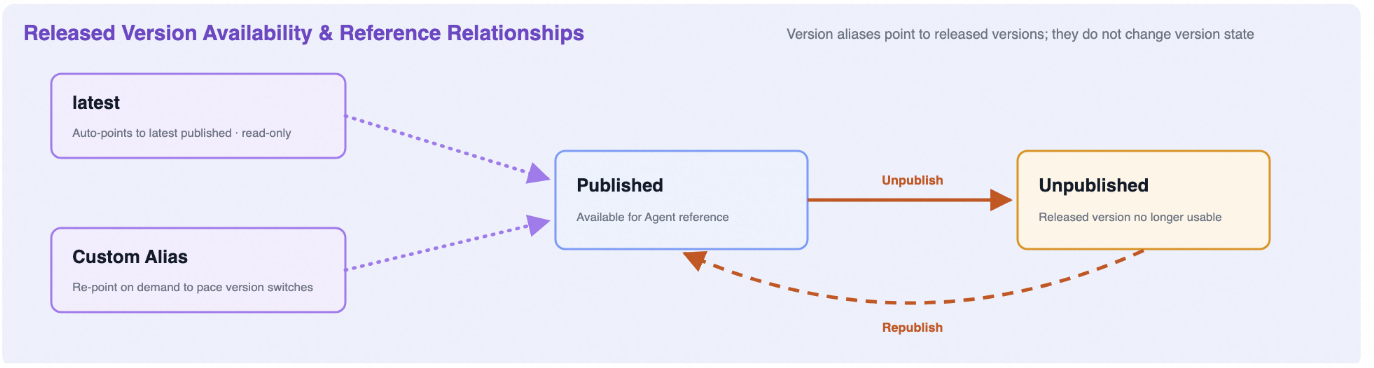
A version alias is a fixed name that points to a published release version. You can change the target of an alias to switch versions uniformly without changing the Agent configuration. The two categories of version aliases are the system-reserved alias latest and custom aliases:
latest: Currently supported. It points automatically to the most recently published release version and is suitable for automatically following each release.latestis maintained automatically by the system: each time a new release version is published, the system automatically pointslatestto that version; modifying and saving the workspace version does not changelatest.latestcannot be modified, deleted, or created again with the same name.Custom alias: You can create one and point it to a specified release version, edit its target and description, or delete it. Custom aliases are suitable for controlling the upgrade pace, multi-environment use, and fast rollback. An alias name cannot be modified directly after creation. To rename an alias, create a new alias, migrate the references, and then delete the old alias.
After custom aliases become available, you can point
productionto1.1.0and later change it to point to1.2.0. The Agents that useproductionautomatically switch to1.2.0, without changing the Agent configuration.
Release publishing and availability states
The workspace version is the starting point for publishing a release version and is not itself a release version state. The pre-release security review is provided by AI Guardrails, a separate product, and is not a feature of AgentCore itself. To use the security review, activate AI Guardrails first.
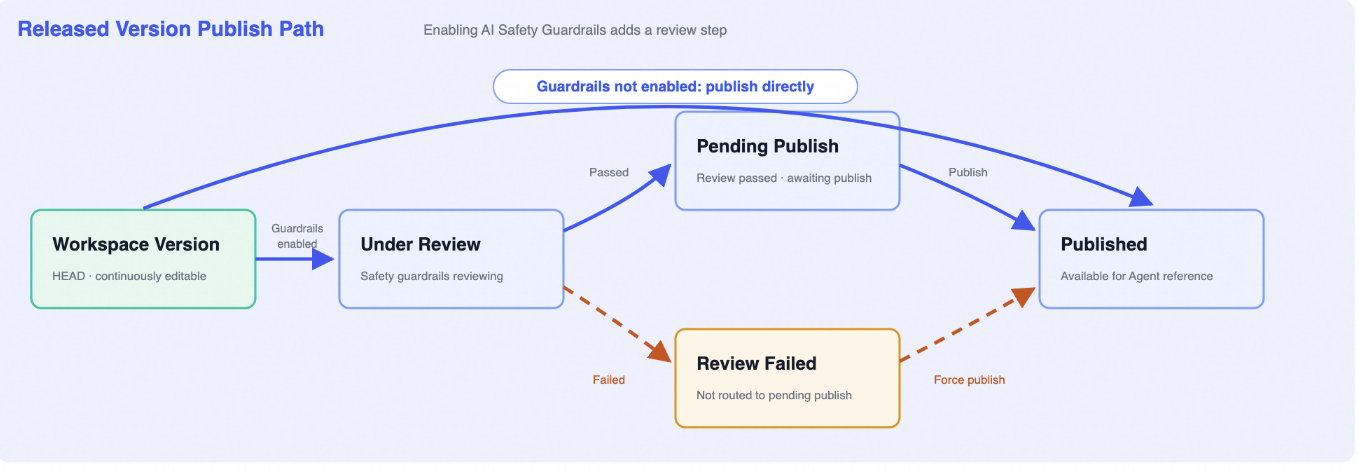
Release path
If AI Guardrails is not activated, the workspace version can be published directly as a release version and enters the Published state. After AI Guardrails is activated, AgentCore calls its review capability before publishing a release version, and the version first enters Under Review. If the review passes, the version enters Pending Release and becomes Published after you confirm the release. If the review does not pass, the version enters Review Failed and does not enter Pending Release, but you can choose to force the release.
Availability states and references
Published and Unpublished describe whether a release version is available for use. A version alias is not a version state. It is a reference path that points to a published release version: latest is maintained automatically by the system, and you change the target of a custom alias as needed.
State | Occurs when | Description | Main operations |
Under Review | AI Guardrails is activated and release version publishing is initiated | AI Guardrails is running the review. The version has not entered Pending Release. | Wait for the review result |
Review Failed | The AI Guardrails review did not pass | The version does not enter Pending Release, but you can still force the release | View the review result, or force the release |
Pending Release | The AI Guardrails review passed | The review passed. The version waits for release confirmation. | View, or publish |
Published | The version is published | Agents can use the version directly, and version aliases can point to it | View, or as needed, take the version offline |
Offline | A published version is taken offline | The version is no longer offered as a normally available version | View, or bring back online |
Publishing a release version does not lock the workspace version. You can continue to develop the next change in the workspace version.
Choose a reference method
When you choose a reference method, first determine whether you need to control the upgrade pace. For simple scenarios without multi-environment or canary requirements, you do not need to create additional custom aliases. Reference the workspace version during development. For production use, based on your stability requirements, reference latest or a release version by an exact version number. The following table lists the recommended choice, when it takes effect, and the current availability for common scenarios:
Scenarios | Recommended choice | When it takes effect | Current availability | Reason |
Personal development and frequent debugging | Reference the workspace version | Takes effect immediately after a developer saves a change | Supported | Changes can be verified as soon as they are saved, without repeated releases |
Automatic upgrades after each release | Reference | Takes effect automatically after a developer publishes a new release version | Supported | Always follows the most recently published release version, with no manual switchover |
Centralized control of the upgrade pace in the production environment | Use a custom alias | Takes effect for all consumers after an administrator changes the alias target | Not available yet. Refer to | Verify a new version first, and then change the alias target for all consumers |
Critical production tasks, audits, or experiment reproduction | Reference a release version by an exact version number | Never changes unless you modify the Agent configuration yourself | Supported | The reference does not change when the workspace version, releases, or aliases change |
Multi-environment management | Create a separate alias for each environment, for example, | Takes effect for all consumers after an administrator changes the alias target | Not available yet. Refer to | Each environment controls its own version |
Recommended workflow
Use the recommended workflow of workspace development, release version publishing, and gradual alias rollout. Complete the related operations by using Skill management in the AgentCore console:
Edit and complete debugging in the workspace version.
Initiate release version publishing from the current workspace version, and enter the version number and the release notes.
If AI Guardrails is not activated, the version is published directly. If AI Guardrails is activated, AgentCore calls AI Guardrails to complete the review. After the review passes, confirm the release. If the review does not pass, handle the version based on the review result and, when necessary, choose to force the release.
When you want to follow releases automatically, use
latest. When you need to control the upgrade pace, switch a test alias to the new version first.After verification passes, switch the production alias to the new version.
If a problem occurs, point the custom alias back to the previous available version for a fast rollback.
The test alias switch in step 4 and steps 5 and 6 depend on custom aliases, which are not available yet. Before custom aliases become available, use
latestor reference a release version by its exact version number.
Operational risks and confirmation points
Conditional release states and forced release
Under Review, Review Failed, and Pending Release depend on the review capability of AI Guardrails. They appear only in the release path where AI Guardrails is activated, and not every release version goes through them. A version that does not pass the review can be force-released. Before you force a release, confirm the review result and the related risks.
Impact of changing an alias target
After you change the target of a custom alias, all Agents that use the alias switch to the target version. Check the alias usage and complete verification before you switch the target.
Difference between deleting an alias and deleting a version
Deleting a custom alias does not delete the release version that it points to, but the Agents that use the alias can no longer get the Skill through that alias. Migrate the references before you delete the alias.
Reference confirmation before taking a version offline
Agents may reference a release version by an exact version number, and a custom alias may also point to that version. Before you take the version offline, confirm the related references and plan the migration based on the actual usage to avoid unavailability after the version goes offline.
Reference methods in the production environment
Any change to the workspace version can immediately affect consumers. For production tasks, shared Skills, or scenarios where you cannot verify the downstream impact in time, reference latest, a custom alias, or a release version by an exact version number. Do not reference the workspace version directly.
Next steps
AgentCore console: Skill management is where you publish release versions and manage aliases.
Manage Skill: the detailed procedure for creating and publishing versions.