Integrate Spring Boot/Spring Cloud applications
This topic shows you how to integrate a Spring Boot or Spring Cloud application by using an SDK.
Procedure
Log in to the AHAS console.
In the upper-left corner of the AHAS console, select the region where your application is deployed.
In the left-side navigation pane, choose .
In the upper-right corner of the Application Protection page, click New Application.
On the JAVA tab, click SDK-based Integration, and then click Spring Boot Application.
Add the dependency to your application's pom file.
<dependency>
  <groupId>com.alibaba.csp</groupId>
  <artifactId>spring-boot-starter-ahas-sentinel-client</artifactId>
  <!-- Replace x.y.z with the latest version. You can find the version number on the New Application page in the AHAS console. -->
  <version>x.y.z</version>
</dependency>
On the Spring Boot Application page, find the latest dependency version in Step 1: Add the Pom dependency, and replace
x.y.zwith the new version number.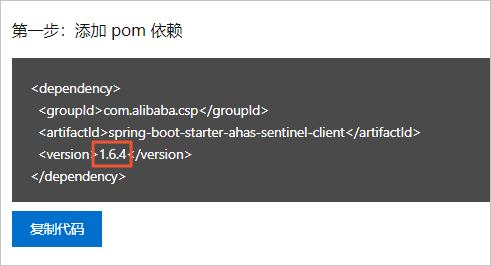
Add instrumentation points to your application project.
Adding the spring-boot-starter-ahas-sentinel-client dependency automatically adds instrumentation points for web endpoints.
NoteIf you upgrade from a version earlier than 1.5.1 to version 1.5.1 or later, or if you have added extra beans such as web filters, you must first remove the previous bean registration code to prevent generating duplicate metrics.
Add MyBatis SQL instrumentation points:
If you use MyBatis Spring Boot Starter, DAO instrumentation points are automatically identified after you add the AHAS dependency. This requires spring-boot-starter-ahas-sentinel-client version 1.5.1 or later.
If you do not use MyBatis Spring Boot Starter, you must add the SentinelMyBatisMapperInterceptor dependency to the XML configuration file of your MyBatis application.
<?xml version="1.0" encoding="UTF-8" ?>
<!DOCTYPE configuration
        PUBLIC "-//mybatis.org//DTD Config 3.0//EN"
        "http://mybatis.org/dtd/mybatis-3-config.dtd">
<configuration>
    <plugins>
      <!-- Add the AHAS Sentinel interceptor. -->
        <plugin interceptor="com.alibaba.csp.sentinel.adapter.mybatis.SentinelMyBatisMapperInterceptor"/>
    </plugins>
</configuration>
Add instrumentation points for custom methods (annotation-based):
Add the spring-boot-starter-aop dependency.
NoteIf this dependency is already included in your project, skip this step.
Use an annotation as an instrumentation point in your business method.
If a BlockHandler is not configured, a BlockException is thrown directly when the method is throttled or degraded. If the method does not declare "throws BlockException", the JVM wraps the exception in an UndeclaredThrowableException. The method signatures for BlockHandler and Fallback functions must meet specific requirements. For more information, see Configure the logic for triggered rules.
@SentinelResource(value = "getUserById")
public User getUserById(String id) {
return new User(id);
}
Add Feign instrumentation points: After you add the starter dependency, configure the
feign.sentinel.enabledparameter in theapplication.propertiesfile. The resource name format for a Feign instrumentation point isfeign:${httpMethod}:${url}, for example,feign:http://localhost:8088/hello.NoteThis feature is supported in spring-boot-starter-ahas-sentinel-client version 1.8.4 and later.
Configure your application's startup parameters in one of the following ways:
Add JVM -D parameters.
Network type
Example
non-public network
-Dahas.namespace=default -Dproject.name=AppName -Dahas.regionId=<RegionId>NoteReplace AppName with your custom application name.
Replace <RegionId> with the ID for your application's region. For a list of regions and their Region IDs, see Region and RegionId mappings below.
public network
-Dahas.namespace=default -Dproject.name=AppName -Dahas.license=<license> -Dahas.regionId=cn-publicNoteReplace AppName with your custom application name and replace <license> with your actual license key.
Add the following content to the application.properties file:
Network type
Example
non-public network
# Specifies the AHAS namespace to connect to.
ahas.namespace=default# Your custom application name.
project.name=AppName# The region where your application is deployed.
ahas.regionId=RegionIdNoteReplace RegionId with the ID of the region where your application is deployed. For a list of regions and their Region IDs, see Region and RegionId mappings below.
public network
# Specifies the AHAS namespace to connect to.
ahas.namespace=default# Your custom application name.
project.name=AppName# Your license key.
ahas.license=<license># The region for public network access.
ahas.regionId=cn-public
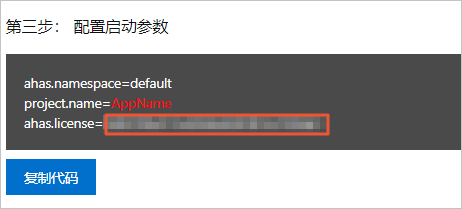
If your application is deployed on the public network, you need to provide the license key. You can find your license key in the Step 3: Configure startup parameters section. This is not required for non-public network deployments. For more information, see View the license.
Optional: You can customize how your Spring Boot application handles triggered throttling, degradation, or system protection rules.
If you added HTTP instrumentation points, configure the handling logic by using a Web Servlet Filter. For more information, see Web Servlet Filter.
If you added custom instrumentation points, configure the handling logic by using annotations. For more information, see Annotation-based method.
NoteIf you skip this step, the default behavior applies. When a web endpoint triggers a flow control or degradation rule, it returns a default message with an HTTP status code of 429. For an annotation-based method, it throws a subclass of BlockException by default. For example, a FlowException is thrown for a flow control rule, and a DegradeException is thrown for a degradation rule. If the method does not declare "throws BlockException", the JVM wraps the exception in an UndeclaredThrowableException.
Verification
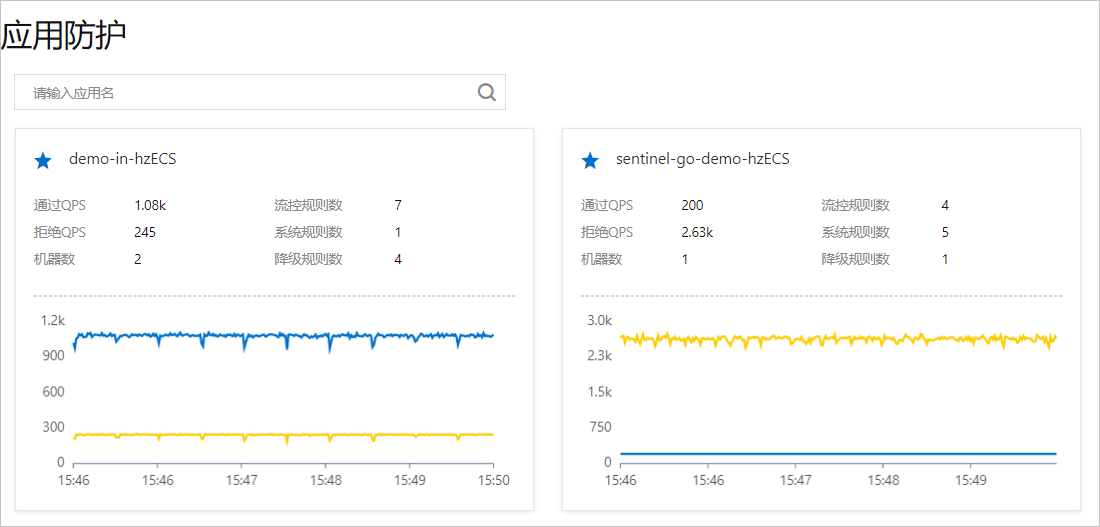
Log in to the AHAS console. In the left-side navigation pane, choose . If a resource card for the application appears on the Application Protection page and reports data, the integration is successful.
Region and RegionId mappings
Region | RegionId |
public network | cn-public |
China (Hangzhou) | cn-hangzhou |
China (Shanghai) | cn-shanghai |
China (Beijing) | cn-beijing |
China (Zhangjiakou) | cn-zhangjiakou |
China (Shenzhen) | cn-shenzhen |
Singapore | ap-southeast-1 |
Germany (Frankfurt) | eu-central-1 |