Integrate a Spring Cloud Gateway application
Integrate Spring Cloud Gateway applications with AHAS Gateway Protection by using an SDK. This integration allows you to configure flow control rules to ensure system stability.
Procedure
Log on to the AHAS console and select a region in the upper-left corner of the page.
In the left-side navigation pane, choose .
In the upper-right corner of the Gateway Protection page, click Add Gateway. Then, click the Spring Cloud Gateway tab.
Add the following dependency to your Spring Cloud Gateway application's
pom.xmlfile:<dependency> <groupId>com.alibaba.csp</groupId> <artifactId>spring-cloud-gateway-starter-ahas-sentinel</artifactId> <version>x.y.z</version> </dependency>Replace
x.y.zwith the latest version number, which is displayed on the Spring Cloud Gateway tab.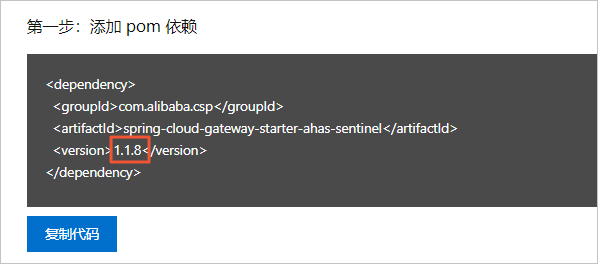
Configure the startup parameters for your application using one of the following methods.
Add JVM
-Dparameters.For environments not on the public network, add the following parameter:
// Replace AppName with a custom application name.
-Dproject.name=AppName
For environments on the public network, add the following parameters:
// Replace AppName with a custom application name and <license> with your license key.
-Dproject.name=AppName
-Dahas.license=<license>
Add the following configuration to the
application.propertiesfile:For environments not on the public network, add the following parameters:
# Specify the AHAS environment to connect to.
ahas.namespace=default
# Specify a custom name for your application.
project.name=AppName
For environments on the public network, add the following parameters:
# Specify the AHAS environment to connect to.
ahas.namespace=default
# Specify a custom name for your application.
project.name=AppName
# Configure your license key.
ahas.license=<license>
Connecting to AHAS over the public network requires a license key. You can find the key in the Step 2: Configure the startup parameters section. For more information, see View License.
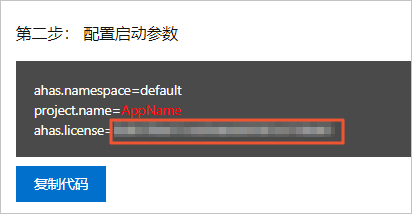
Restart the gateway application.
Verify the result
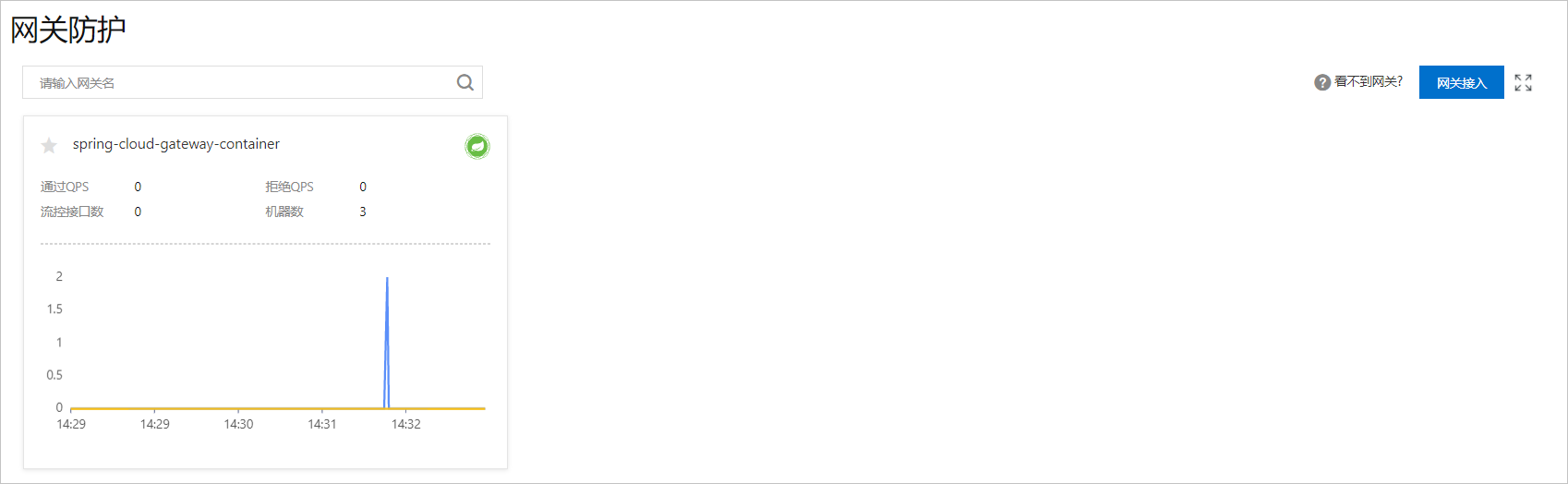
To verify the integration, log on to the AHAS console and go to . The integration is successful if a resource card for the gateway application appears on the Gateway Protection page.
Next steps
After integrating the gateway application, you can configure gateway flow control rules.