Users typically create separate environments for production, testing, and development to isolate the resources for each stage. In the Application High Availability Service (AHAS) console, you can create up to 10 environments to define the scope of AHAS for each. Each environment contains its own set of AHAS resources.
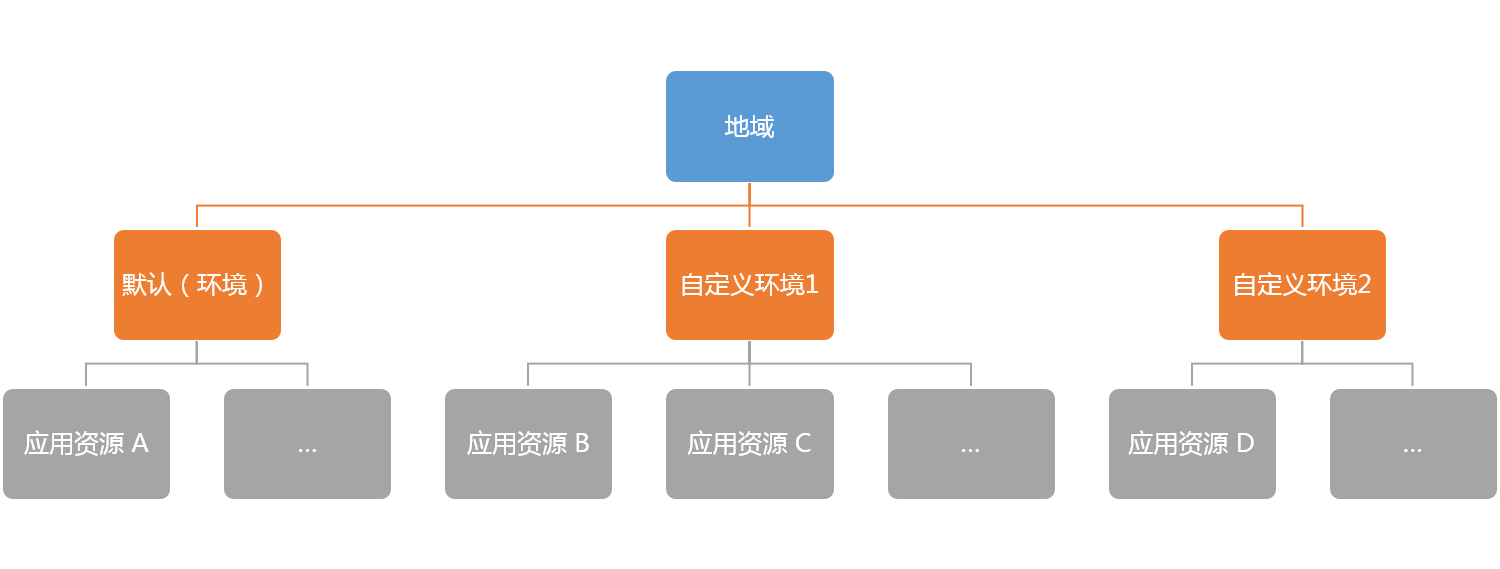
AHAS instances are organized by region. Each region has a default environment. The following diagram shows the relationship among regions, environments, and application resources:
Add an environment
In addition to the default environment, you can add custom environments within a region to isolate different application resources. Perform the following steps:
In the region list at the top of the console, select a region:
If you have Alibaba Cloud resources in a VPC in Beijing, Hangzhou, Shanghai, or Shenzhen, select the corresponding region.
Otherwise, select Public Network.
Click the drop-down list in the top-left corner of the overview page and select Add Environment.
Enter an environment name and click OK.
To switch environments, click the environment drop-down list in the upper-left corner and select another environment.
Delete an environment
You can delete custom environments. The default environment cannot be deleted.
Click the environment drop-down list in the upper-left corner of the Overview page. Next to the name of the environment that you want to delete, click the X icon.
Click Confirm to delete the environment.
Note Before you delete an environment, you must remove all of its connected application resources.