MshaSDK
This document explains how to integrate and use the MshaSDK. It covers Maven dependency configuration, JVM parameter settings, and application modifications for MySQL, PostgreSQL, Redis, and MongoDB. This guide explains the configuration requirements for a multi-active architecture, how to achieve high availability and disaster recovery, and important considerations for system stability.
1. Basic MshaSDK dependency
1.1 MshaSDK dependency
<dependency>
    <groupId>com.aliyun.msha</groupId>
    <artifactId>msha-router-all</artifactId>
    <version>x.y.z</version>
</dependency>
1.2 JVM -D parameters
Add the following JVM parameters to your application:
-Dregion-id=${region_id}
-Dzone-id=${zone_id}
-Dmsha.licence=${application_license}
-Downer-account-id=${alibaba_cloud_account_id}
-Dmsha.app.name=${application_name}
-Dmsha.namespaces=${multi_active_namespace_id}
-Dmsha.nacos.namespace=${nacos_namespace_id}
-Dmsha.nacos.server.addr=${nacos_server_address}
${region_id}: Required for hybrid cloud scenarios, including self-built IDCs or non-Alibaba Cloud environments. If omitted, MSHA automatically retrieves the region from the ECS metadata API.
${zone_id}: Required for hybrid cloud scenarios, including self-built IDCs or non-Alibaba Cloud environments. If omitted, MSHA automatically retrieves the zone from the ECS metadata API.
${application_license}: You can find your license in the Multi-active Disaster Recovery (MSHA) console. On the menu bar, navigate to to find your license.
${multi_active_namespace_id}: You can find your multi-active namespace ID on the page in the Multi-active Disaster Recovery (MSHA) console.
${application_name}: Your application name. Chinese characters are not supported.
msha.nacos.namespaceandmsha.nacos.server.addrspecify the namespace ID and server address of your Nacos configuration center. Alternatively, you can usemsha.acm.namespaceandmsha.acm.endpointfor the Application Configuration Management (ACM) configuration center. An ACM configuration center can be provisioned in Enterprise Distributed Application Service (EDAS).
1.3 Java 9+ configuration
For Java 9 and later, you must add the following configuration to enable CGLIB dynamic proxying.
--add-opens java.base/java.lang=ALL-UNNAMED
# Example: java -Dmsha.namespaces=${multi_active_namespace_id} *** --add-opens java.base/java.lang=ALL-UNNAMED -jar your-application.jar
1.4 Spring Boot 3+ configuration
For applications using Spring Boot 3 and later with a dependency on msha-bridge-servlet, add the following dependency for compatibility.
<dependency>
  <groupId>com.aliyun.unit.router</groupId>
  <artifactId>msha-springcloud-spring-boot-starter</artifactId>
  <version>1.5.13</version>
  <classifier>jakarta</classifier>
</dependency>
2. MySQL adaptation
2.1 JDBC driver
For Spring applications:
If your application configures the JDBC driver in a Spring properties file, modify the file to replace the native com.mysql.jdbc.Driver with the MSHA driver:
// Replace the native driver with the MSHA driver
// spring.datasource.driver-class-name=com.mysql.jdbc.Driver
spring.datasource.driver-class-name=com.ali.unit.router.driver.Driver
For JNDI configurations:
In the data source definition file, replace the native com.mysql.jdbc.Driver with the MSHA driver:
<Resource
  name="jdbc/mysql"
  auth="Container"
  type="javax.sql.DataSource"
  maxActive="100"
  maxIdle="30"
  maxWait="10000"
  username="root"
  password="root"
<!--   Replace the native com.mysql.jdbc.Driver with the MSHA driver -->
<!--   driverClassName="com.mysql.jdbc.Driver" -->
  driverClassName="com.ali.unit.router.driver.Driver"
<!--   Modify the URL to include primary and standby database information -->
  url="jdbc:mysql://${primary_database_url}:3306/xxxDbName?useUnicode=true&characterEncoding=UTF-8&mshaStandbyHost=${standby_database_host}&mshaStandbyPort=3306"/>
2.2 Data source configuration
For Spring applications:
If your application uses a Spring properties file for database connections, modify it to set the primary cloud's database as the default connection. Add the standby database's connection URL as a parameter.
// Format
spring.datasource.url=jdbc:mysql://${primary_database_url}:3306/xxxDbName?useUnicode=true&characterEncoding=UTF-8&mshaStandbyHost=${standby_database_host}&mshaStandbyPort=3306
For JNDI configurations:
In the data source definition file, set the default database connection URL to that of the primary cloud's database and add the standby cloud's database connection URL as a parameter.
<Resource
  name="jdbc/mysql"
  auth="Container"
  type="javax.sql.DataSource"
  maxActive="100"
  maxIdle="30"
  maxWait="10000"
  username="root"
  password="root"
<!--   Replace the native com.mysql.jdbc.Driver with the MSHA driver -->
<!--   driverClassName="com.mysql.jdbc.Driver" -->
  driverClassName="com.ali.unit.router.driver.Driver"
<!--   Modify the URL to include primary and standby database information -->
url="jdbc:mysql://${primary_database_url}:3306/xxxDbName?useUnicode=true&characterEncoding=UTF-8&mshaStandbyHost=${standby_database_host}&mshaStandbyPort=3306"/>For applications deployed across two clouds, this connection URL must be configured identically in both environments. The URL must point to the primary database, and its parameters must include the connection details for the standby database.
2.3 Druid connection pool configuration
Recommended Druid version (not mandatory): 1.2.8
When using a Druid DataSource, you must configure the following parameters.
Parameter |
Description |
validation-query: SELECT 1 |
The SQL query for testing connections. Native JDBC drivers may have a default check, but this parameter is required because you are using the MSHA driver, which uses this query to validate connections. |
test-while-idle: true |
Tests connections while they are idle. This parameter defaults to |
keep-alive: true |
Enables keep-alive, which periodically pings connections to keep them available. |
keep-alive-between-time-millis: 60000 |
The interval for performing keep-alive checks on idle connections. |
time-between-eviction-runs-millis: 5000 |
The interval at which the eviction task runs. This serves as the effective interval for connection validity checks. |
min-evictable-idle-time-millis: 300000 |
The minimum idle time a connection can have before it is eligible for eviction. If the number of idle connections exceeds |
exception-sorter-class-name |
An |
Value for MySQL: com.alibaba.druid.pool.vendor.MySqlExceptionSorter Value for ORACLE: com.alibaba.druid.pool.vendor.OracleExceptionSorter Value for OCEANBASE: com.alibaba.druid.pool.vendor.OceanBaseOracleExceptionSorter Value for POSTGRESQL/ENTERPRISEDB/POLARDB: com.alibaba.druid.pool.vendor.PGExceptionSorter Value for DB2: com.alibaba.druid.pool.vendor.DB2ExceptionSorter |
|
valid-connection-checker-class-name |
Specifies a connection checker class to validate connections for the specific database in use. By default, TCP checks are not enabled. Instead, the |
Value for MySQL: com.alibaba.druid.pool.vendor.MySqlValidConnectionChecker Value for ORACLE: com.alibaba.druid.pool.vendor.OracleValidConnectionChecker Value for OCEANBASE: com.alibaba.druid.pool.vendor.OceanBaseValidConnectionChecker Value for POSTGRESQL/ENTERPRISEDB/POLARDB: com.alibaba.druid.pool.vendor.PGValidConnectionChecker Value for SQL_SERVER: com.alibaba.druid.pool.vendor.MSSQLValidConnectionChecker |
Note the following points about Druid configuration:
Druid registers a polling task that runs at the time-between-eviction-runs-millis interval to handle connection eviction and validation. When the idle time idleMillis is greater than or equal to minEvictableIdleTimeMillis, Druid adds connections to the eviction queue. If idleMillis is greater than maxEvictableIdleTimeMillis, the connection is placed in the eviction queue regardless of other conditions.
If keepAlive is enabled and idleMillis is greater than or equal to keepAliveBetweenTimeMillis, the connection is placed in the keep-alive queue.
Consider a scenario where keepAlive is enabled, but keepAliveBetweenTimeMillis is not set (defaulting to 120 seconds), while minEvictableIdleTimeMillis is set to 60 seconds. In this case, the eviction queue might prematurely close a connection that should be kept alive, leading to connection failures.
The following is an example configuration:
spring:
  # Datasource configuration
  datasource:
    driverClassName: com.ali.unit.router.driver.Driver
    url: ${META_DB_URL:jdbc:mysql://127.0.0.1:3306/my_db?useUnicode=true&characterEncoding=UTF-8&allowMultiQueries=true&useSSL=false&serverTimezone=GMT%2B8}
    username: ${META_DB_USER:*****}
    password: ${META_DB_PWD:*****}
    type: com.alibaba.druid.pool.DruidDataSource
    druid:
      initial-size: 5 # Initial connection pool size
      max-active: 20 # Maximum number of connections
      min-idle: 5 # Minimum number of idle connections
      max-wait: 60000 # Maximum wait time
      validationQuery: SELECT 1 # Query to validate connections
      testWhileIdle: true # Enable testing of idle connections
      testOnBorrow: false # Disable testing before a connection is borrowed
      testOnReturn: false # Disable testing before a connection is returned
      timeBetweenEvictionRunsMillis: 5000 # Interval for idle connection tests if testWhileIdle is true
      minEvictableIdleTimeMillis: 300000 # Minimum lifetime for a connection in the pool
      keepAlive: true
      keep-alive-between-time-millis: 60000
2.4 ShardingSphere data source
For Shardingsphere 5.1.x and earlier, follow the modification steps in the previous sections. For Shardingsphere 5.3.x and later, if you configure your data source using url: jdbc:shardingsphere:classpath:sharding.yaml, follow the steps below to integrate the MSHA SDK.
This configuration method is supported only in SDK version 1.5.13 and later.
spring:
  datasource:
    # Replace the DriverClassName here
    driver-class-name: com.ali.unit.router.driver.Driver
    url: jdbc:shardingsphere:classpath:sharding.yaml?mshaStandbyUrl='jdbc:shardingsphere:classpath:sharding-standby.yaml'
    username: root
    password: your_password
Write sharding.yaml as you normally would.
dataSources:
  ds_master:
    dataSourceClassName: com.zaxxer.hikari.HikariDataSource
    driverClassName: com.mysql.cj.jdbc.Driver
    jdbcUrl: jdbc:mysql://x.x.x.x:3306/mydb?useUnicode=true&characterEncoding=utf8
    username: root
    password: master_password
  ds_slave_0:
    dataSourceClassName: com.zaxxer.hikari.HikariDataSource
    driverClassName: com.mysql.cj.jdbc.Driver
    jdbcUrl: jdbc:mysql://y.y.y.y:3306/mydb?useUnicode=true&characterEncoding=utf8
    username: root
    password: slave_password

rules:
  - !READWRITE_SPLITTING
    dataSources:
      readwrite_ds:
        writeDataSourceName: ds_master
        readDataSourceNames:
          - ds_slave_0
    loadBalancers:
      round_robin:
        type: ROUND_ROBIN
Add sharding-standby.yaml for the standby database configuration.
dataSources:
  ds_master:
    dataSourceClassName: com.zaxxer.hikari.HikariDataSource
    driverClassName: com.mysql.cj.jdbc.Driver
    jdbcUrl: jdbc:mysql://10.19.170.74:3306/mydb_standby?useUnicode=true&characterEncoding=utf8
    username: root
    password: standby_password

rules:
  - !READWRITE_SPLITTING
    dataSources:
      readwrite_ds:
        writeDataSourceName: ds_master
        readDataSourceNames:
          - ds_master
3. PostgreSQL adaptation
3.1 JDBC driver
If your application configures the JDBC driver in a Spring properties file, modify the file to replace the native driver with the MSHA driver:
// Replace the native driver with the MSHA driver
// spring.datasource.driver-class-name=org.postgresql.Driver
spring.datasource.driver-class-name=com.ali.unit.router.driver.Driver
3.2 Data source configuration
If your application configures database connection parameters in a Spring properties file, modify the file to use the primary cloud's database as the default connection. Add the connection URL for the standby cloud's database (the standby database) as a parameter in the URL.
// Format
spring.datasource.url=jdbc:postgresql://${primary_database_url}:5432/xxxDbName?useSSL=false&mshaStandbyHost=${standby_database_host}&mshaStandbyPort=5432
For applications deployed across two clouds, this connection URL configuration must be identical in both environments. The default database connection URL must point to the primary cloud's database, and the URL parameters must include the connection details for the standby cloud's database.
4. Redis adaptation
4.1 Spring Data Redis (Jedis)
Add the MSHA SDK dependency for Jedis.
<dependency>
  <groupId>com.aliyun.unit.router</groupId>
  <artifactId>msha-bridge-redis-jedis</artifactId>
  <version>x.y.z</version>
</dependency>
4.1.1 Standalone mode
1) Primary and standby configuration
spring.redis.host.primary=${primary_redis_host}
spring.redis.host.standby=${standby_redis_host}
spring.redis.port=${redis_port}
spring.redis.password=${redis_password}
2) Factory class replacement
Create a new configuration class to replace the default Spring factory class.
    @Configuration
    public class RedisConfig {

        @Value("${spring.redis.host.primary}")
        private String primaryHost;

        @Value("${spring.redis.host.standby}")
        private String standbyHost;

        @Value("${spring.redis.password}")
        private String password;

        @Value("${spring.redis.port}")
        private int port;

        @Bean
        JedisConnectionFactory jedisConnectionFactory() throws NoSuchFieldException, IllegalAccessException {

            Pool<Jedis> pool = new MshaJedisPool(primaryHost, port, password, standbyHost, port, password, 0);
            JedisConnectionFactory jedisConnectionFactory = new MshaJedisConnectionFactory(pool);
            Class<JedisConnectionFactory> clazz = JedisConnectionFactory.class;
            Field poolField = clazz.getDeclaredField("pool");
            poolField.setAccessible(true);
            poolField.set(jedisConnectionFactory, pool);
            return jedisConnectionFactory;
        }

        @Bean
        public RedisTemplate<String, Object> redisTemplate(JedisConnectionFactory jedisConnectionFactory) {
            RedisTemplate<String, Object> template = new RedisTemplate<String, Object>();
            template.setConnectionFactory(jedisConnectionFactory);
            template.setDefaultSerializer(new StringRedisSerializer());
            return template;
        }

    }
3) Limitations
The following features are unsupported: pub/sub commands, self-hosted servers in sentinel mode, and sessions based on spring-session-data-redis.
4) Primary site routing
Add the msha-bridge-springboot-aspect dependency.
<dependency>
  <groupId>com.aliyun.unit.router</groupId>
  <artifactId>msha-bridge-springboot-aspect</artifactId>
  <version>x.y.z</version>
</dependency>
In your code, use the @WithRedisCenter(value = true) annotation to route requests to the primary data source.
@WithRedisCenter(value = true)
public Map<String, Object> get(String key) {
    // Your code here
}
4.1.2 Cluster mode
1) Primary and standby configuration
# Required for fetching console rules. Must match the connection address configured in the console.
spring.redis.host.primary=${primary_redis_host_from_console}
spring.redis.host.standby=${standby_redis_host_from_console}
spring.redis.port=${redis_port_from_console}
# Redis nodes for the primary and standby sites
spring.redis.host.primary.nodes=${primary_node_1_host:port},${primary_node_2_host:port},...,${primary_node_n_host:port}
spring.redis.host.standby.nodes=${standby_node_1_host:port},${standby_node_2_host:port},...,${standby_node_n_host:port}
spring.redis.password=${redis_password}
The values for spring.redis.host.primary, spring.redis.host.standby, and spring.redis.port must match the push identifier configured in the console. Typically, you can use the address of any node for this identifier. The port numbers for the primary and standby Redis instances must be the same. 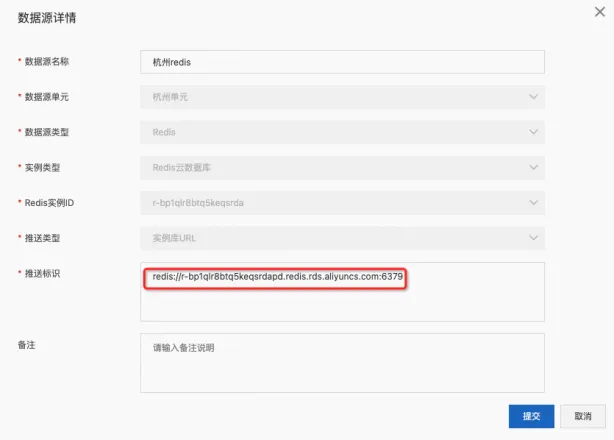
2) Factory class replacement
@Configuration
public class RedisConfig {

    @Value("${spring.redis.host.primary}")
    private String primaryHost;

    @Value("${spring.redis.host.standby}")
    private String standbyHost;

    @Value("${spring.redis.host.primary.nodes}")
    private String primaryNodesStr;

    @Value("${spring.redis.host.standby.nodes}")
    private String standbyNodesStr;

    private Set<HostAndPort> primaryNodes;

    private Set<HostAndPort> standbyNodes;

    @Value("${spring.redis.password}")
    private String password;

    @Value("${spring.redis.port}")
    private int port;

    @PostConstruct
    public void init() {
        primaryNodes = ClusterNodesUtil.getHostAndPortNodes(primaryNodesStr);
        standbyNodes = ClusterNodesUtil.getHostAndPortNodes(standbyNodesStr);
    }

    @Bean
    JedisConnectionFactory jedisConnectionFactory() {

        JedisCluster jedisCluster = getJedisCluster();
        return new MshaJedisConnectionFactory(jedisCluster);
    }

    @Bean
    public RedisTemplate<String, Object> redisTemplate(JedisConnectionFactory jedisConnectionFactory) {
        RedisTemplate<String, Object> template = new RedisTemplate<String, Object>();
        template.setConnectionFactory(jedisConnectionFactory);
        // Configure according to your existing business logic.
        template.setDefaultSerializer(new StringRedisSerializer());
        return template;
    }

    private JedisCluster getJedisCluster() {
        MetaData defaultMetaData = new RedisMetaData(null, password, primaryHost, port);
        MetaData standbyMetaData = new RedisMetaData(null, password, standbyHost, port);
        final int DEFAULT_MAX_REDIRECTIONS = 5;

        return MshaJedisFactory.getJedisCluster(primaryNodes, defaultMetaData, standbyNodes, standbyMetaData,
        Protocol.DEFAULT_TIMEOUT, Protocol.DEFAULT_TIMEOUT, DEFAULT_MAX_REDIRECTIONS, password, password,
        new GenericObjectPoolConfig());

    }
}
3) Limitations
The following features are unsupported: pub/sub commands, self-hosted servers in sentinel mode, and sessions based on spring-session-data-redis.
4.2 Spring Data Redis (Lettuce)
Add the MSHA SDK dependency for Lettuce.
<dependency>
  <groupId>com.aliyun.unit.router</groupId>
  <artifactId>msha-bridge-redis-lettuce</artifactId>
  <version>x.y.z</version>
</dependency>
4.2.1 Standalone mode
1) Primary and standby configuration
spring.redis.host.primary=${primary_redis_host}
spring.redis.host.standby=${standby_redis_host}
spring.redis.port=${redis_port}
spring.redis.password=${redis_password}
2) Factory class replacement
Create a new configuration class to replace the default Spring factory class.
	@Configuration
    public class RedisConfig {

        @Value("${spring.redis.host.primary}")
        private String primaryHost;

        @Value("${spring.redis.host.standby}")
        private String standbyHost;

        @Value("${spring.redis.password}")
        private String password;

        @Value("${spring.redis.port}")
        private int port;

        @Bean(name = "mshaRedisClient")
        public RedisClient mshaRedisClient() {
            MetaData defaultMetaData = new RedisMetaData(null, password, primaryHost, port);
            MetaData standbyMetaData = new RedisMetaData(null, password, standbyHost, port);

            return MshaLettuceClient.create(defaultMetaData, standbyMetaData);
        }

        @Bean
        public LettuceConnectionFactory lettuceConnectionFactory(RedisClient mshaRedisClient) {
            return new MshaLettuceConnectionFactory(mshaRedisClient);
        }

        @Bean
        public RedisTemplate<String, Object> redisTemplate(LettuceConnectionFactory lettuceConnectionFactory) {
            RedisTemplate<String, Object> template = new RedisTemplate<String, Object>();
            template.setConnectionFactory(lettuceConnectionFactory);
            // Configure according to your existing business logic.
            template.setDefaultSerializer(new StringRedisSerializer());
            return template;
        }
    }
// Use the default database (0)
MshaLettuceClient.create(defaultMetaData, standbyMetaData, ruleProcessService);
// Use a specific database
MshaLettuceClient.create(defaultMetaData, standbyMetaData, ruleProcessService, dbindex);3) Limitations
The following features are unsupported: pub/sub commands, self-hosted servers in sentinel mode, and sessions based on spring-session-data-redis.
Use Spring Boot version 2.1.3.RELEASE or later.
4) Primary site routing
Add the msha-bridge-springboot-aspect dependency.
<dependency>
  <groupId>com.aliyun.unit.router</groupId>
  <artifactId>msha-bridge-springboot-aspect</artifactId>
  <version>x.y.z</version>
</dependency>
In your code, use the @WithRedisCenter(value = true) annotation to route requests to the primary data source.
@WithRedisCenter(value = true)
public Map<String, Object> get(String key) {
    // Your code here
}
5) JetCache configuration
If you use JetCache, you still need to modify the Spring factory class as described above. JetCache uses the redisClient bean initialized in your configuration to ensure global uniqueness, allowing both JetCache and RedisTemplate to function correctly.
Then, modify your JetCache configuration. Change the remote section to the msha configuration. You do not need to configure a URI here; if you do, it is ignored. JetCache directly uses the existing redisClient bean. Other settings can remain consistent with your original remote configuration.
The remote and msha configurations cannot coexist.
jetcache:
  statIntervalMinutes: 15
  areaInCacheName: false
  msha:
    default:
      type: redis.lettuce
      keyConvertor: fastjson
6) Ignoring standby exceptions
Requires SDK version 1.5.11 or later.
You can add a startup parameter to suppress exceptions from the standby database. This ensures that read and write operations on the primary database can proceed normally when the standby database is unavailable. Exceptions from the standby database are printed to bridge.log. By default, the SDK throws exceptions from the standby database.
-Dmsha.standby.throw.disable=true7) Connection pool support
To use a custom connection pool, SDK version 1.5.10 or later is required.
To use the built-in connection pool, SDK version 1.5.11 or later is required.
A custom connection pool takes priority over the built-in connection pool.
In high-connection scenarios, a connection pool can significantly improve performance. The SDK provides two options for enabling a connection pool: a custom Lettuce connection pool, or the default built-in connection pool.
To use a custom Lettuce connection pool, create a new configuration class to replace the default Spring factory class.
@Configuration
public class RedisConfigDemo {
    // Configure the enabled parameter as needed
    @Value("${spring.redis.lettuce.pool.enabled}")
    private boolean poolEnabled;

    @Value("${spring.redis.host.primary}")
    private String primaryHost;

    @Value("${spring.redis.host.standby}")
    private String standbyHost;

    @Value("${spring.redis.password}")
    private String password;

    @Value("${spring.redis.port}")
    private int port;

    @Bean(name = "mshaRedisClient")
    public RedisClient mshaRedisClient() {
        MetaData defaultMetaData = new RedisMetaData(null, password, primaryHost, port);
        MetaData standbyMetaData = new RedisMetaData(null, password, standbyHost, port);

        return MshaLettuceClient.create(defaultMetaData, standbyMetaData);
    }


    @Bean
    public LettuceClientConfiguration lettuceClientConfiguration() {
        // ------------------ Start of custom parameters, configure as needed --------------------------------
        SocketOptions socketOptions = SocketOptions.builder()
                .keepAlive(SocketOptions.KeepAliveOptions.builder()
                        .idle(Duration.ofSeconds(30))
                        .interval(Duration.ofSeconds(10))
                        .count(3)
                        .enable()
                        .build())
                .tcpUserTimeout(SocketOptions.TcpUserTimeoutOptions.builder()
                        .tcpUserTimeout(Duration.ofSeconds(5))
                        .enable()
                        .build())
                .connectTimeout(Duration.ofMillis(10000))
                .build();
        ClientOptions clientOptions = ClientOptions.builder()
                .autoReconnect(true)
                .pingBeforeActivateConnection(true)
                .cancelCommandsOnReconnectFailure(false)
                .disconnectedBehavior(ClientOptions.DisconnectedBehavior.ACCEPT_COMMANDS)
                .socketOptions(socketOptions)
                .build();
        // ------------------ End of custom parameters, configure as needed --------------------------------


        LettucePoolingClientConfiguration lettuceClientConfiguration = LettucePoolingClientConfiguration.builder()
                // Connection pool configuration
                .poolConfig(lettucePoolConfig())
                // Custom parameters below
                .commandTimeout(Duration.ofMillis(3))
                .clientOptions(clientOptions)
                // TODO: *******Do not configure the ReadFrom parameter*******
//                .readFrom(ReadFrom.MASTER)
                .build();
        return lettuceClientConfiguration;
    }

    private GenericObjectPoolConfig lettucePoolConfig() {
        // ------------------ Start of custom parameters, configure as needed --------------------------------
        GenericObjectPoolConfig poolConfig = new GenericObjectPoolConfig();
        // The minimum number of connections in the pool
        poolConfig.setMinIdle(2);
        // The maximum number of idle connections in the pool
        poolConfig.setMaxIdle(5);
        // The maximum total number of connections in the pool
        poolConfig.setMaxTotal(6);
        // Whether to wait when the pool is exhausted. Default: true. setMaxWait takes effect only when this is true.
        poolConfig.setBlockWhenExhausted(true);
        // The maximum wait time for a connection when the pool is exhausted. Default: -1 (wait indefinitely).
        poolConfig.setMaxWait(Duration.ofMillis(3000));
        // Validate connections on creation (ping). Default: false.
        poolConfig.setTestOnCreate(false);
        // Validate connections on borrow (ping). Default: false. For high-traffic apps, consider setting to false to reduce overhead.
        poolConfig.setTestOnBorrow(true);
        // Validate connections on return (ping). Default: false. For high-traffic apps, consider setting to false to reduce overhead.
        poolConfig.setTestOnReturn(false);
        // Whether to enable idle connection checks. If false, idle connections are not evicted.
        poolConfig.setTestWhileIdle(true);
        // Evicts a connection if it is idle for longer than this time and the number of idle connections > minIdle.
        poolConfig.setSoftMinEvictableIdleTime(Duration.ofMillis(1000));
        // Disable eviction based on MinEvictableIdleTimeMillis.
        poolConfig.setMinEvictableIdleTime(Duration.ofMillis(-1));
        // The interval for running the idle connection eviction check. Default: 60s.
        poolConfig.setTimeBetweenEvictionRuns(Duration.ofMillis(60000));
        // ------------------ End of custom parameters, configure as needed --------------------------------
        return poolConfig;
    }

    @Bean
    public RedisConfiguration redisConfiguration() {
        // Standalone configuration, pass primary database information
        RedisStandaloneConfiguration redisStandaloneConfiguration = new RedisStandaloneConfiguration();
        redisStandaloneConfiguration.setHostName(primaryHost);
        redisStandaloneConfiguration.setPort(port);
        redisStandaloneConfiguration.setPassword(RedisPassword.of(password));
        return redisStandaloneConfiguration;
    }

    @Bean
    public LettuceConnectionFactory lettuceConnectionFactory(RedisClient mshaRedisClient, RedisConfiguration redisConfiguration, LettuceClientConfiguration lettuceClientConfiguration) {
        if (poolEnabled) {
            // Use Lettuce connection pool configuration
            return new MshaLettuceConnectionFactory(mshaRedisClient, redisConfiguration, lettuceClientConfiguration);
        } else {
            // Do not use Lettuce connection pool configuration
            return new MshaLettuceConnectionFactory(mshaRedisClient);
        }

    }


    @Bean
    public RedisTemplate<String, Object> redisTemplate(LettuceConnectionFactory lettuceConnectionFactory) {
        RedisTemplate<String, Object> template = new RedisTemplate<String, Object>();
        template.setConnectionFactory(lettuceConnectionFactory);
        // Configure according to your existing business logic.
        template.setDefaultSerializer(new StringRedisSerializer());
        return template;
    }
}
To use the built-in connection pool, add the commons-pool2 dependency.
<dependency>
  <groupId>org.apache.commons</groupId>
  <artifactId>commons-pool2</artifactId>
  <version>2.12.1</version>
</dependency>
If your application uses commons-pool2 but you do not want to enable the built-in connection pool, you can disable it with the following startup parameter:
-Dmsha.redis.pool.disable=true4.2.2 Cluster mode
1) Primary and standby configuration
# Required for fetching console rules. Must match the connection address configured in the console.
spring.redis.host.primary=${primary_redis_host_from_console}
spring.redis.host.standby=${standby_redis_host_from_console}
spring.redis.port=${redis_port_from_console}
# Redis nodes for the primary and standby sites
spring.redis.host.primary.nodes=${primary_node_1_host:port},${primary_node_2_host:port},...,${primary_node_n_host:port}
spring.redis.host.standby.nodes=${standby_node_1_host:port},${standby_node_2_host:port},...,${standby_node_n_host:port}
spring.redis.password=${redis_password}
The values for spring.redis.host.primary, spring.redis.host.standby, and spring.redis.port must match the push identifier configured in the console. Typically, you can use the address of any node for this identifier. The port numbers for the primary and standby Redis instances must be the same.
2) Factory class replacement
@Configuration
public class RedisConfig implements InitializingBean {

    @Value("${spring.redis.host.primary}")
    private String primaryHost;

    @Value("${spring.redis.host.standby}")
    private String standbyHost;

    @Value("${spring.redis.host.primary.nodes}")
    private String primaryNodesStr;

    @Value("${spring.redis.host.standby.nodes}")
    private String standbyNodesStr;

    private Set<RedisURI> primaryNodes;

    private Set<RedisURI> standbyNodes;

    @Value("${spring.redis.password}")
    private String password;

    @Value("${spring.redis.port}")
    private int port;

    @Override
    public void afterPropertiesSet() throws Exception {
        primaryNodes = ClusterNodesUtil.getNodes(primaryNodesStr);
        standbyNodes = ClusterNodesUtil.getNodes(standbyNodesStr);
    }
    @Bean
    public LettuceConnectionFactory lettuceConnectionFactory() {

        RedisClusterClient redisClient = getRedisClient();
        return new MshaLettuceConnectionFactory(redisClient, new RedisClusterConfiguration());
    }

    @Bean
    public RedisTemplate<String, Object> redisTemplate(LettuceConnectionFactory lettuceConnectionFactory) {
        RedisTemplate<String, Object> template = new RedisTemplate<String, Object>();
        template.setConnectionFactory(lettuceConnectionFactory);
        // Configure according to your existing business logic.
        template.setDefaultSerializer(new StringRedisSerializer());
        return template;
    }

    private RedisClusterClient getRedisClient() {
        MetaData defaultMetaData = new RedisMetaData(null, password, primaryHost, port);
        MetaData standbyMetaData = new RedisMetaData(null, password, standbyHost, port);


        return MshaLettuceClusterClient.create(primaryNodes, password, defaultMetaData, standbyNodes, password, standbyMetaData);
    }

}
3) Limitations
The following features are unsupported: pub/sub commands, self-hosted servers in sentinel mode, and sessions based on spring-session-data-redis.
4.3 Redisson
Add the MSHA SDK dependency for Redisson.
<dependency>
  <groupId>com.aliyun.unit.router</groupId>
  <artifactId>msha-bridge-redis-redisson</artifactId>
  <version>x.y.z</version>
</dependency>
4.3.1 Standalone mode
1) Primary and standby configuration
spring.redis.host.primary=${primary_redis_host}
spring.redis.host.standby=${standby_redis_host}
spring.redis.port=${redis_port}
spring.redis.password=${redis_password}
2) RedissonClient replacement
Replace your existing RedissonClient initialization with the initialization method in afterPropertiesSet() below.
@Configuration
public class RedissonRepository implements InitializingBean {

    @Value("${spring.redis.host.primary}")
    private String primaryHost;

    @Value("${spring.redis.host.standby}")
    private String standbyHost;

    @Value("${spring.redis.password}")
    private String password;

    @Value("${spring.redis.port}")
    private int port;

    private static RedissonClient redissonClient;

    @Override
    public void afterPropertiesSet() {
        Config defaultConfig = new Config();
        // Configure according to your existing business logic.
        defaultConfig.useSingleServer()
        .setAddress("redis://" + primaryHost + ":" + port)
        .setPassword(password)
        .setDatabase(0); // setDatabase(0) is an example. Configure as needed.

        Config standbyConfig = new Config();
        // Configure according to your existing business logic.
        standbyConfig.useSingleServer()
        .setAddress("redis://" + standbyHost + ":" + port)
        .setPassword(password)
        .setDatabase(0)// setDatabase(0) is an example. Configure as needed.
        .setTimeout(20000);// setTimeout(20000) is an example. Configure as needed.

        MetaData defaultMetaData = new RedisMetaData(null, password, primaryHost, port);
        MetaData standbyMetaData = new RedisMetaData(null, password, standbyHost, port);

        redissonClient = MshaRedissonFactory.create(defaultConfig, defaultMetaData, standbyConfig, standbyMetaData);
    }

    public static RedissonClient getRedisson() {
        return redissonClient;
    }
}
3) Limitations
The following features are unsupported: pub/sub commands, self-hosted servers in sentinel mode, and sessions based on
spring-session-data-redis.For operations that take longer than 30 seconds, do not use a distributed lock without a specified lease time. Using a non-expiring lock in this scenario can lead to lock loss during a failover, which may impact your business.
RLock lock = redissonClient.getLock(lockName);
// Lock without a lease time
lock.lock();
// Lock with a 60-second lease time
// lock.lock(60L, TimeUnit.SECONDS);
try {
    // Process business logic
} catch (InterruptedException e) {
    e.printStackTrace();
} finally {
    lock.unlock();
}
4) Primary site routing
Add the msha-bridge-springboot-aspect dependency.
<dependency>
  <groupId>com.aliyun.unit.router</groupId>
  <artifactId>msha-bridge-springboot-aspect</artifactId>
  <version>x.y.z</version>
</dependency>
In your code, use the @WithRedisCenter(value = true) annotation to route requests to the primary data source.
@WithRedisCenter(value = true)
public Map<String, Object> get(String key) {
    // Your code here
}
4.3.2 Cluster mode
1) Primary and standby configuration
# Required for fetching console rules. Must match the connection address configured in the console.
spring.redis.host.primary=${primary_redis_host_from_console}
spring.redis.host.standby=${standby_redis_host_from_console}
spring.redis.port=${redis_port_from_console}
# Redis nodes for the primary and standby sites
spring.redis.host.primary.nodes=${primary_node_1_host:port},${primary_node_2_host:port},...,${primary_node_n_host:port}
spring.redis.host.standby.nodes=${standby_node_1_host:port},${standby_node_2_host:port},...,${standby_node_n_host:port}
spring.redis.password=${redis_password}
The values for spring.redis.host.primary, spring.redis.host.standby, and spring.redis.port must match the push identifier configured in the console. Typically, you can use the address of any node for this identifier. The port numbers for the primary and standby Redis instances must be the same. 
2) RedissonClient replacement
Replace your existing RedissonClient initialization with the initialization method in afterPropertiesSet() below.
@Configuration
public class RedissonRepository implements InitializingBean {

    @Value("${spring.redis.host.primary}")
    private String primaryHost;

    @Value("${spring.redis.host.standby}")
    private String standbyHost;

    @Value("${spring.redis.host.primary.nodes}")
    private String primaryNodesStr;

    @Value("${spring.redis.host.standby.nodes}")
    private String standbyNodesStr;

    @Value("${spring.redis.password}")
    private String password;

    @Value("${spring.redis.port}")
    private int port;

    private static RedissonClient redissonClient;

    @Override
    public void afterPropertiesSet() {
        Config defaultConfig = new Config();
        // Configure according to your existing business logic.
        defaultConfig.useClusterServers().addNodeAddress(ClusterNodesUtil.getNodes(primaryNodesStr)).setPassword(password);

        Config standbyConfig = new Config();
        // Configure according to your existing business logic.
        standbyConfig.useClusterServers().addNodeAddress(ClusterNodesUtil.getNodes(standbyNodesStr)).setPassword(password);

        MetaData defaultMetaData = new RedisMetaData(null, password, primaryHost, port);
        MetaData standbyMetaData = new RedisMetaData(null, password, standbyHost, port);

        redissonClient = MshaRedissonFactory.create(defaultConfig, defaultMetaData, standbyConfig, standbyMetaData);
    }

    public static RedissonClient getRedisson() {
        return redissonClient;
    }
}
3) Limitations
The following features are unsupported: pub/sub commands, self-hosted servers in sentinel mode, and sessions based on
spring-session-data-redis.If a business logic operation takes longer than 30 seconds, do not use a distributed lock without a specified lease time. Using a non-expiring lock in this scenario can lead to lock loss during a failover, which may impact your business.
RLock lock = redissonClient.getLock(lockName);
// Lock without a lease time
lock.lock();
// Lock with a 60-second lease time
//lock.lock(60L, TimeUnit.SECONDS);
try {
    // Process business logic
} catch (InterruptedException e) {
    e.printStackTrace();
} finally {
    lock.unlock();
}
5. MongoDB adaptation
5.1 Multi-active dependency
<dependency>
  <groupId>com.aliyun.unit.router</groupId>
  <artifactId>msha-bridge-mongo-springboot-starter</artifactId>
  <version>x.y.z-SNAPSHOT</version>
</dependency>
5.2 MongoDB configuration
Configure the MongoDB data source using the URI format. If your current configuration uses separate
hostandportparameters, you must switch to the URI format.Add the
standByUriparameter. Its format is identical to theuriparameter, as shown in the example below.
The host specified in the push identifier must be the first host listed in the URI. MSHA automatically parses this host as the unique key.
spring:
  application:
    name: mongo-test
  data:
    mongodb:
      uri: mongodb://${HOST1}:${PORT1},${HOST2}:${PORT2}/${DB}?replicaSet=${rp}&authSource=${DBName}
      standByUri: mongodb://${STANDBY_HOST1}:${STANDBY_PORT1},${STANDBY_HOST2}:${STANDBY_PORT2}/${DB}?replicaSet=${rp}&authSource=${DBName}
Normally, MSHA's automatic parsing is sufficient, and you can skip the next section.
In special cases where you need to manually specify the push identifier, you can add the masterUniqueKey (primary cloud MongoDB push identifier) and standbyUniqueKey (standby cloud MongoDB push identifier) parameters:
spring:
  application:
    name: mongo-test
  data:
    mongodb:
      uri: mongodb://${HOST1}:${PORT1},${HOST2}:${PORT2}/${DB}?replicaSet=${rp}&authSource=${DBName}
      standByUri: mongodb://${STANDBY_HOST1}:${STANDBY_PORT1},${STANDBY_HOST2}:${STANDBY_PORT2}/${DB}?replicaSet=${rp}&authSource=${DBName}
      masterUniqueKey: *******
      standbyUniqueKey: *******
5.3 MongoDB notes
When configuring the MongoDB data source using the URI format with a username and password, be aware of the following password restrictions.
NoteThe password cannot contain the percent sign (
%), which is treated as an escape character. Its presence alters the password and causes authentication to fail with an error like: "Exception authenticating MongoCredential{mechanism=SCRAM-SHA-256, userName='root', source='admin', password=<hidden>, mechanismProperties=<hidden>}". For more information, see How to fix connection failures caused by special characters in the username or password?.Notes on adding MongoDB data sources in MSHA:
NoteAs shown in the figure, if a MongoDB password contains a
%, the connection stringmongodb://root:password@your-host:port/admin?authSource=adminmisinterprets it as an escape character. This alters the password and causes authentication to fail with the error: "Login failed. Check whether the username and password are correct."