Loongkit
Loongkit is an Alibaba Cloud OS extension component that delivers software-hardware co-acceleration with deep, infrastructure-level optimization for AI workloads such as text-to-image, text-to-video, image-to-video, autonomous driving, and embodied AI. It analyzes hardware resources, tunes compute resource allocation, monitors training, and optimizes operator implementations to improve model training and inference efficiency and reduce resource waste. Loongkit supports mainstream frameworks including PyTorch and MMCV.
Prerequisites
-
Python version: 3.10+
-
PyTorch version: 2.4.0+
-
Operating system: Linux
Installation
To access the https://aiext-pypi.mirrors.aliyuncs.com/aiext-pro source from an EGS or ACS environment, you must submit a ticket to be added to the allowlist.
ACS PPU
To access the https://aiext-pypi.mirrors.aliyuncs.com/aiext-pro source from an ACS environment, you must grant cluster-level authorization and modify the container YAML configuration. See Configure access to the aiext-pro source in an ACS environment.
pip install aiext-pypi-plugin -i http://mirrors.cloud.aliyuncs.com/aiext-pypi/aiext-pypi-plugin/simple --trusted-host mirrors.cloud.aliyuncs.com
pip install loongkit --extra-index-url=https://aiext-pypi.mirrors.aliyuncs.com/aiext-pro/pg1/simple/
EGS
If you useuv, runpip install pip -i https://aiext-pypi.mirrors.aliyuncs.com/aiext-pro/simple/once after you installaiext-pypi-pluginto trigger authentication. This allows uv to use the AIEXT-Pro source.
pip install aiext-pypi-plugin -i http://mirrors.cloud.aliyuncs.com/aiext-pypi/aiext-pypi-plugin/simple --trusted-host mirrors.cloud.aliyuncs.com
pip install loongkit --extra-index-url=https://aiext-pypi.mirrors.aliyuncs.com/aiext-pro/simple/
Quick start
You can load Loongkit in one of three ways: an environment variable, the launcher, or code modification.
Environment variable
PYTHONPATH=/usr/local/lib/python3.10/site-packages/loongkit/prelude/:$PYTHONPATH LOONGKIT_ALL=1 <your_training_command>-
Adding the path to the loongkit/prelude module to the
PYTHONPATHenvironment variable allows loongkit to be automatically loaded when a Python task starts, but by default, it does not enable any optimization features. -
Use the
LOONGKIT_xxxseries of environment variables to enable, disable, and configure various optimization features. For example,LOONGKIT_ALL=1enables all optimization features supported by the current environment. -
The path of the loongkit/prelude module depends on the base image and virtual environment configurations. You can obtain this path by executing
python3 -c "import site; print(site.getsitepackages()[0])"in a container. If you cannot easily determine the path, consider using a launcher or modifying the source code to load Loongkit.
Launcher
The loongkit-run launcher that comes with the Loongkit package can automatically detect the path of the loongkit/prelude module and run the training task with the modified PYTHONPATH:
LOONGKIT_ALL=1 loongkit-run <your_training_command>You can also use the LOONGKIT_xxx series of environment variables to enable, disable, and configure each optimization feature.
Code modification
Add the following statement to the beginning of your training task script to load Loongkit:
import loongkit.allThe enabling, disabling, and configuration of various optimization features are also controlled by the LOONGKIT_xxx series of environment variables.
Advanced configuration
You configure Loongkit using environment variables, which can be set in YAML files, on the command line, or by other methods to control its behavior.
Basic configuration
|
Parameter |
Type |
Default |
Description |
|
LOONGKIT_LOGLEVEL |
string |
warning |
Sets the minimum log level. Only logs at or above this level are written to the log file. Accepted values (case-insensitive):
If this environment variable is set to any other value, the default 'warning' level is still used. |
|
LOONGKIT_LOGDIR |
string |
None |
Specifies the destination for log output:
Loongkit uses the first available directory to store log files. If none of these directories are available, Loongkit writes logs to standard error (stderr). |
Optimization features
Optimization features are categorized into the following levels and can be enabled in batches by setting LOONGKIT_ALL=X, where X is 1, 2, or 3:
-
1 (Basic): Equivalent optimizations for known versions of mainstream frameworks. These features preserve functionality and typically do not cause performance degradation with default configurations.
-
2 (Advanced): Optimizations that require experience or other tools to configure correctly for different scenarios. Improper configuration may degrade performance.
-
3 (Deep): Deeper, more structural optimizations that modify the implementation of common modules. If your model implementation differs significantly from open-source versions, you may encounter functional incompatibilities or abnormal behavior.
|
Category |
Parameter |
Type |
Default |
Level |
Description |
Version |
Notes |
|
N/A |
LOONGKIT_ALL |
int |
0 |
N/A |
Enables all optimization features up to and including the specified level. |
See the version requirements for each feature. |
N/A |
|
Data preprocessing |
LOONGKIT_DATA_CONTAINER |
bool |
0 |
1 |
Enables pin_memory support for MMCV DataContainer. |
1.7.0 ≤ mmcv ≤ 1.8.0 |
Automatically enables the pin_memory feature of PyTorch DataLoader. |
|
LOONGKIT_DATA_PREFETCH |
bool |
0 |
1 |
Enables data prefetching. Depends on pin_memory support for DataContainer. |
1.7.0 ≤ mmcv ≤ 1.8.0 |
Increases peak GPU memory usage by an amount equivalent to the data size of one iteration. |
|
|
LOONGKIT_MMENGINE_DATA_PREFETCH |
bool |
0 |
1 |
Enables data prefetching compatible with MMCV 2.x. |
mmcv ≥ 2.0 and mmengine ≥ 0.8.0 |
None |
|
|
LOONGKIT_IMNORMALIZE |
bool |
0 |
3 |
Optimizes the CPU execution efficiency of the image normalization operator during data preprocessing. |
None |
Introduces a one-time just-in-time compilation overhead when the data process loads data for the first time. |
|
|
LOONGKIT_DISTORTION |
bool |
0 |
3 |
Optimizes the CPU execution efficiency of the random image distortion operator during data preprocessing. |
|||
|
LOONGKIT_PYTORCH |
bool |
0 |
1 |
Optimizes the memory management efficiency of PyTorch DataLoader during data preprocessing. |
None |
||
|
LOONGKIT_PAGE_CACHE_LIMIT |
bool |
0 |
2 |
Automatically sets a page cache limit on the root memcg of the current container to mitigate performance jitter caused by memory fragmentation. |
|||
|
Resource control |
LOONGKIT_NUMA_AFFINITY |
bool |
0 |
1 |
Enables active NUMA affinity settings to ensure the training process always runs on the same NUMA node as its GPU. |
None |
|
|
LOONGKIT_SUBCGROUPS |
bool |
0 |
2 |
Partitions training and data processes into different sub-cgroups based on NUMA affinity, allowing other resource-control tools to further adjust available resources for each process type. |
When enabled, this feature automatically disables active NUMA affinity settings ( |
||
|
LOONGKIT_CONFIG_GUARDS |
bool |
0 |
1 |
Checks configurations such as thread pool size, number of data workers, and compilation threads, and issues a warning if they are likely to exceed hardware limits. |
torch ≥ 2.1.0 |
||
|
Operator optimization and model compilation |
LOONGKIT_COMPILE_RESNET |
bool |
0 |
1 |
Compiles ResNet subnetworks. |
torch ≥ 2.6.0 and 1.0.0 ≤ mmdet ≤ 3.3.0 |
Model compilation introduces a one-time startup compilation time and additional GPU memory overhead, the amount of which depends on model complexity. |
|
LOONGKIT_FUSED_ADAMW |
bool |
0 |
1 |
Uses a fused implementation of the AdamW optimizer. |
torch ≥ 2.4.0 |
||
|
LOONGKIT_OPENVLA |
bool |
0 |
1 |
Compiles Llama2 modules. |
torch ≥ 2.6.0 |
||
|
LOONGKIT_MMDET_MODULES |
bool |
0 |
1 |
Compiles selected algorithm modules registered in |
torch ≥ 2.6.0 and 2.12.0 ≤ mmdet ≤ 2.28.3 |
By default, compiles |
|
|
LOONGKIT_DICE_LOSS |
bool |
0 |
1 |
Uses a GPU-based optimized implementation of DiceLoss. |
0.12.0 ≤ mmseg ≤ 1.0.0 |
None |
|
|
LOONGKIT_DAG |
bool |
0 |
1 |
Optimizes the Deformable Aggregation algorithm module. |
None |
None |
|
|
LOONGKIT_VOXELIZATION |
bool |
0 |
3 |
Optimizes the GPU execution efficiency of the |
None |
||
|
LOONGKIT_BEVFORMER |
bool |
0 |
1 |
Optimizes algorithm modules introduced by BEVFormer, such as SpatialCrossAttention and TemporalSelfAttention. |
Applies to models that use native BEVFormer modules. |
||
|
LOONGKIT_UNIAD |
bool |
0 |
1 |
Optimizes certain algorithm modules used in UniAD. |
None |
||
|
LOONGKIT_BEVFUSION |
bool |
0 |
3 |
Optimizes certain algorithm modules used in BEVFusion. |
Applies to models that use native BEVFusion modules. |
||
|
LOONGKIT_HF_ACC_COMPILE |
bool |
0 |
3 |
Enables |
torch = 2.10.x |
Fixes a compilation crash caused by the FA2 |
|
|
LOONGKIT_DYNAMIC_SHAPE_FIX |
bool |
0 |
1 |
Fixes a crash in PyTorch 2.9.x that occurs when compiling models with dynamic shapes. |
torch = 2.9.x |
None |
|
|
LOONGKIT_COMPILE_PI0PYTORCH |
bool |
0 |
1 |
Compiles the PyTorch policy module for pi0. |
torch ≥ 2.6.0 |
Model compilation introduces a one-time startup compilation time and additional GPU memory overhead, the amount of which depends on model complexity. |
|
|
LOONGKIT_DONATED_BUFFER_FIX |
bool |
0 |
1 |
Fixes an issue in PyTorch 2.6–2.8 where DDPOptimizer silently overwrites weights, by automatically disabling donated_buffer. |
torch 2.6.0 – torch 2.8.x |
Upstream PyTorch 2.9.0 has fixed this issue. This feature is enabled automatically only on affected versions. |
|
|
Precision control |
LOONGKIT_ALLOW_TF32 |
bool |
0 |
1 |
Uses TF32 precision for FP32 matrix multiplication and convolution operations. |
torch ≥ 2.0.0 |
TF32 has the same representable range as FP32 but only half the mantissa bits. Assess whether your model requires the higher precision of FP32. |
Forboolenvironment variables,1,on, andyesare interpreted as true;0,off, andnoare interpreted as false. Any other value is treated as undefined, causing the setting to revert to its default value.
Advanced settings for NUMA affinity
CUDA_VISIBLE_DEVICES compatibility and LOONGKIT_NUMA_AFFINITY_ALLOW_INDEX
Loongkit's NUMA affinity setting works with PyTorch 2.5.0 and later if GPUs are distributed evenly across NUMA nodes. In this scenario, it automatically adapts to the CUDA_VISIBLE_DEVICES configuration.
For PyTorch 2.4.0 and earlier, you can enable NUMA affinity settings by setting LOONGKIT_NUMA_AFFINITY_ALLOW_INDEX=1. In this case, you should avoid configuring CUDA_VISIBLE_DEVICES, as this may result in incorrect affinity settings and reduce training efficiency.
Tuning for AMD/Hygon CPUs
The microarchitecture of AMD and Hygon CPUs features segmented L3 caches, which results in varying access latencies between physical cores and L3 caches. To improve performance, set LOONGKIT_NUMA_AFFINITY_PARTITION_PER_LLC=1 to bind training processes to physical cores across different L3 caches. This setting is effective only when different L3 caches within the same NUMA node can be evenly allocated to the training processes on that node.
On L20N instances, if the overall CPU utilization of the training task does not exceed 50%, you can set LOONGKIT_NUMA_AFFINITY_SEPARATE_BY_ROLES=1 to isolate the L3 caches used by training and data processes, further reducing interference on the training process caused by data processes.
Tuning on asymmetric architectures
On platforms where GPUs are not evenly distributed across NUMA nodes, setting NUMA affinity requires careful consideration of the training task's CPU and memory requirements as well as the hardware topology. Therefore, Loongkit enables NUMA affinity settings only when LOONGKIT_NUMA_AFFINITY_ALLOW_ASYMMETRIC=1 is explicitly set. The affinity policy then supports the following configuration options:
-
LOONGKIT_NUMA_AFFINITY_TRAIN_ON_GPULESS: Allows training processes to use NUMA nodes without attached GPUs. -
LOONGKIT_NUMA_AFFINITY_DATA_WORKER_ON_GPULESS: Allows data processes to use NUMA nodes without attached GPUs. -
LOONGKIT_NUMA_AFFINITY_DATA_WORKER_GPULESS_ONLY: Restricts data processes to run only on NUMA nodes without attached GPUs.
Example: Assume the hardware topology is as shown in the figure below. For training and data processes on GPU 2, the effects of different combinations of these options are shown in the following table.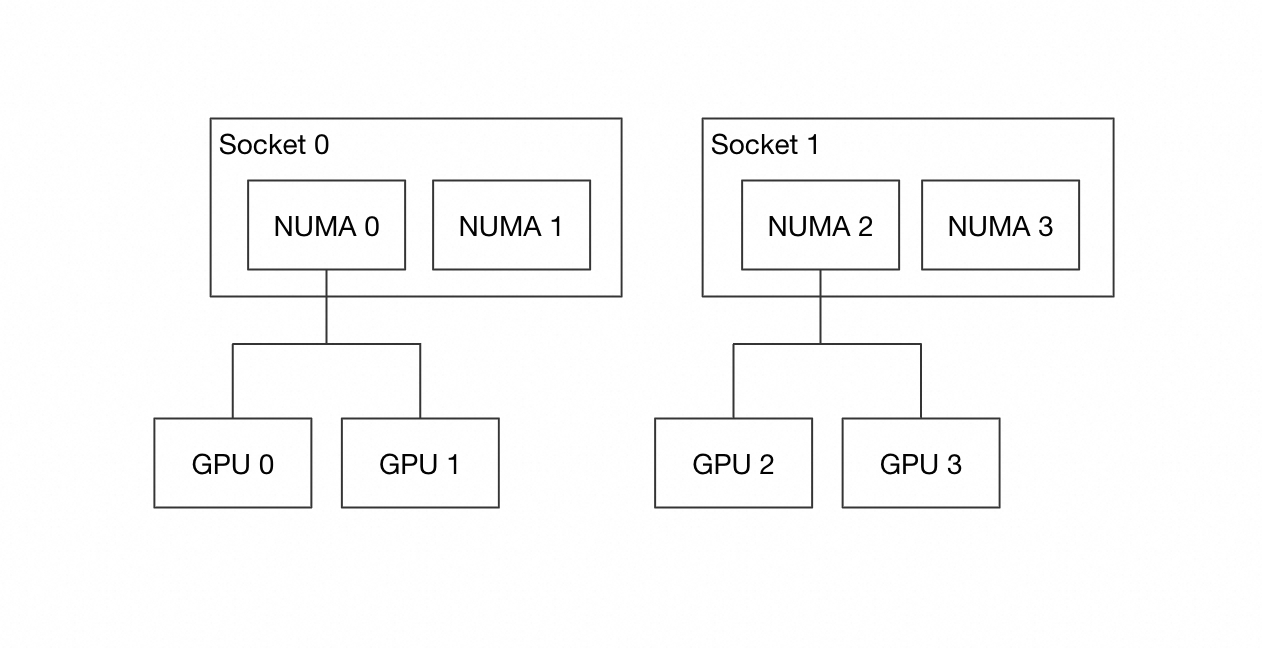
|
|
|
|
Training affinity |
Data affinity |
|
0 |
0 |
Ignored |
NUMA 2 |
NUMA 2 |
|
0 |
1 |
0 |
NUMA 2 |
NUMA 2,3 |
|
0 |
1 |
1 |
NUMA 2 |
NUMA 3 |
|
1 |
0 |
Ignored |
NUMA 2,3 |
NUMA 2 |
|
1 |
1 |
0 |
NUMA 2,3 |
NUMA 2,3 |
|
1 |
1 |
1 |
NUMA 2,3 |
NUMA 3 |
To determine the optimal configuration for your hardware and workload, submit a ticket for assistance.
Training task configuration check
When you enable LOONGKIT_CONFIG_GUARDS to check your training task's configuration, Loongkit logs any detected issues as WARNING level messages. You can configure the log path by using LOONGKIT_LOGDIR.
Loongkit also provides a feature to automatically apply related optimizations and reduce the risk of overloading the training task. To enable this, set the LOONGKIT_CONFIG_GUARDS_APPLY_FIX=1 environment variable.
Configure the page cache limit
After you enable LOONGKIT_PAGE_CACHE_LIMIT, you can use the following environment variables to further configure its behavior:
|
Environment variable |
Data type |
Default value |
Description |
|
LOONGKIT_PAGE_CACHE_LIMIT_SIZE |
string |
50% |
The upper bound on page cache usage for the current container. Supports three formats: a decimal number (byte count, e.g., 10737418240); a byte count with a unit (e.g., 8G, 512M, 1024K, case-insensitive); or a percentage (e.g., 50%, meaning that percentage of the current container's available memory). |
|
LOONGKIT_PAGE_CACHE_LIMIT_SYNC |
bool |
0 |
Whether to reclaim asynchronously or synchronously when the current memcg's page cache usage exceeds the limit. |
Hardware-aware default optimization policies
Loongkit provides default optimization policies tailored for different hardware. These policies are automatically applied when the corresponding optimization level is enabled. The specific policies are listed in the tables below.
|
CPU architecture |
Optimization policy |
|
Intel |
For |
|
AMD / Hygon |
For |
|
GPU architecture |
Optimization policy |
|
NVIDIA GPU |
The |
|
Pingtouge PPU |
The |
Feature summary
When Loongkit is enabled, it prints a feature summary to both standard output and the log file at the end of a training task. This summary lists the features enabled via environment variables and indicates whether they were active during the training process. The format is as follows:
============================ Loongkit Feature Summary ============================
Enabled Features                 Configurations
----------------------------------------------------------------------------------
data_container                 * None
data_prefetch                  * None
allow_tf32                     * None
fused_adam                       None
fused_adamw                    * None
numa_affinity                    {'allow_assymetric': False, 'allow_index': False}
==================================================================================
In this summary:
-
The first column shows all features enabled using environment variables.
-
The second column shows the advanced configuration parameters for each feature.
-
An asterisk (
*) indicates that the feature was active during the training run.
FAQ
What is the runtime overhead of Loongkit itself?
When no features are enabled, Loongkit's loading time (excluding the PyTorch import) is no more than 50 ms, and its system memory consumption is no more than 10 MB.
For the runtime overhead of each optimization feature, see Optimization features.
Are there other ways to enable Loongkit without changing the training command?
In addition to using loongkit-run, you can load Loongkit by adding the import loongkit.all statement at the beginning of your training code's entry file. The feature configuration is applied when import loongkit.all is executed. Therefore, you must set any Loongkit-related environment variables in a yaml file or by modifying the os.environ dictionary before this statement is executed.
Configure aiext-pro source access in ACS
Authorize aiext-pro source access in ACS
-
In ACS, access to the aiext-pro source for a PPU instance is authorized at the cluster level. In the ACS console, go to the cluster list, select the cluster where you need to use the PIP service, and under , click PIP password-free authorization.
-
You must generate the authorization URL and open it in a new browser tab to complete the subsequent authorization steps.
-
Note the service account name for the ACS cluster. You will need this name for later configuration steps.
-
After you enable PIP password-free authorization for the cluster,
DinD Pods,Buildah Pods, andregular PPU Podswithin this cluster can access the aiext-pro source. Then, follow the steps for your specific use case.
Install PIP packages in a PPU container
-
Modify the PPU Pod YAML file to add the
spec.serviceAccountNamefield.*** securityContext: privileged:true # Specify the service account name from the previous step. serviceAccountName: pip-default volumes: *** -
In the regular PPU container, configure the environment to use the PIP service.
# 1. Install the password-free plugin aiext-pypi-plugin.
pip install aiext-pypi-plugin -i http://mirrors.cloud.aliyuncs.com/aiext-pypi/aiext-pypi-plugin/simple --trusted-host mirrors.cloud.aliyuncs.com

# 2. Install the required PIP wheel packages. For example:
pip install loongkit --extra-index-url=https://aiext-pypi.mirrors.aliyuncs.com/aiext-pro/pg1/simple/