Create an account using a ROS template
This topic describes how to use Resource Orchestration Service to create a privileged database account for an AnalyticDB for MySQL cluster.
Prerequisites
The RAM user must have the following permissions:
-
The
AliyunROSFullAccesspermission, which grants full permissions to manage Resource Orchestration Service (ROS). -
The
AliyunADBFullAccesspermission, which grants full permissions to manage AnalyticDB for MySQL.NoteFor demonstration purposes, this example uses the
AliyunADBFullAccesspolicy. In a production environment, grant only the required permissions before you call the API operations. For more information about permission policies for AnalyticDB for MySQL, see System policy reference for AnalyticDB for MySQL.
Procedure
-
Log on to the ROS console. In the top navigation bar, select a region.
-
In the left-side navigation pane, click Stack. Choose .
-
For Specify Template, select Select an Existing Template.
-
For Template Import Method, select Input Template.
-
-
For Template Content, select ROS, enter the template code, and then click Next.
The following are sample ROS templates for creating a privileged database account. For more information, see ALIYUN::ADB::Account.
-
On the Create Stack page, set the following parameters.
Parameter
Required
Description
Example
Stack Name
Yes
The name of the stack.
ADB_test_account
DBClusterId
Yes
The cluster ID.
amv-bp12vj6gwa2j****
AccountPassword
Yes
The password of the database account.
Password****
AccountName
Yes
The name of the database account.
test
-
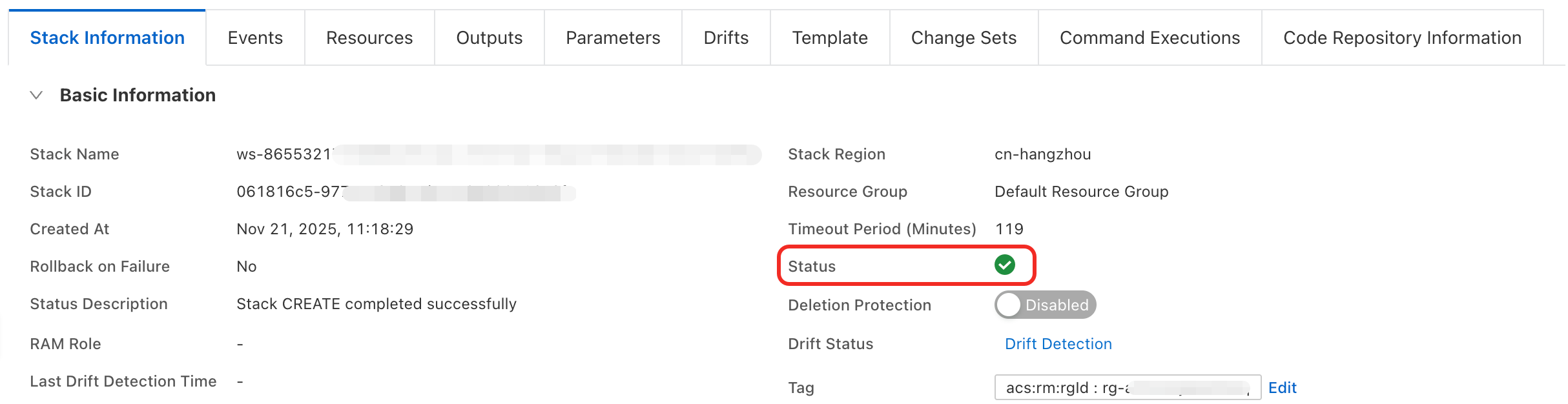
Click Create. The stack is successfully created when its Status changes to Created..
-
After the stack is created, click the Output tab to view the details of the database account. You can also view the account details in the AnalyticDB for MySQL console by following these steps:
Log on to the AnalyticDB for MySQL console. In the upper-left corner of the console, select a region. In the left-side navigation pane, click Clusters. Find the cluster that you want to manage and click the cluster ID.
-
In the left-side navigation pane, click Account Management to view the created database account.