Connections
This topic describes common connection issues in AnalyticDB for MySQL and how to fix them.
FAQ
-
Connection failed with the error message "Can't connect to MySQL server"
-
Connection failed with the error message "Unknown MySQL server host"
-
What do I do if I cannot connect to an AnalyticDB for MySQL cluster?
-
If I close a JDBC connection while a query is running, does the server-side query stop?
-
Are server resources released immediately if a JDBC client times out without closing the connection?
-
What is the maximum number of connections for an AnalyticDB for MySQL cluster?
-
How do I let others remotely connect to my AnalyticDB for MySQL cluster?
Connection error: Can't connect to MySQL server
The Can't connect to MySQL server error when connecting to AnalyticDB for MySQL is commonly caused by incorrect IP address whitelist settings.
To check your IP address whitelist, follow these steps.
-
Find your client's public IP address.
ECS
From the ECS console, find the ECS instance you use to connect to AnalyticDB for MySQL and copy its IP address.
If you use the private endpoint of the AnalyticDB for MySQL cluster, copy the private IP address. Otherwise, copy the public IP address.
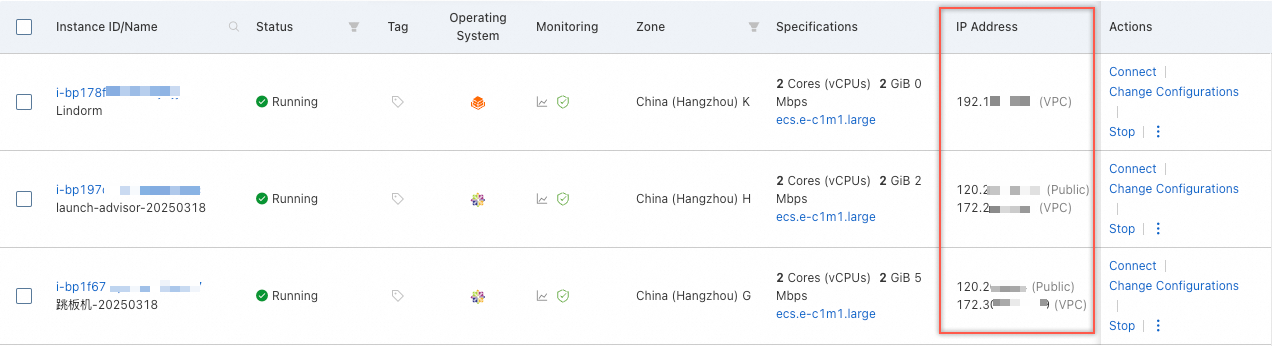
On-premises device
In a terminal or Command Prompt (CMD) window on your on-premises device, run the
curl ipinfo.io/ipcommand. The output is your public IP address.
-
Add the copied public IP address to the AnalyticDB for MySQL cluster's IP address whitelist.
-
Reconnect.
Connection error: Unknown MySQL server host
The Unknown MySQL server host error when connecting to AnalyticDB for MySQL is commonly caused by an incorrect endpoint.
First, check the endpoint for typos. If it is spelled correctly, follow these steps to check its connectivity.
-
Run
ping <AnalyticDB for MySQL endpoint>to check network connectivity.If the network is not reachable, common causes include:
-
You are using a VPC endpoint to connect from an on-premises device to AnalyticDB for MySQL. This fails because VPC endpoints only work for connections within the same VPC.
-
The connection can fail if the ECS instance and the AnalyticDB for MySQL cluster are in different VPCs.
Verify the VPC IDs in the ECS console and the AnalyticDB for MySQL console. If the IDs differ, the resources are in different VPCs. To resolve this, use a public endpoint or change the cluster's VPC.
VPC ID of the ECS instance
VPC ID of the AnalyticDB for MySQL cluster
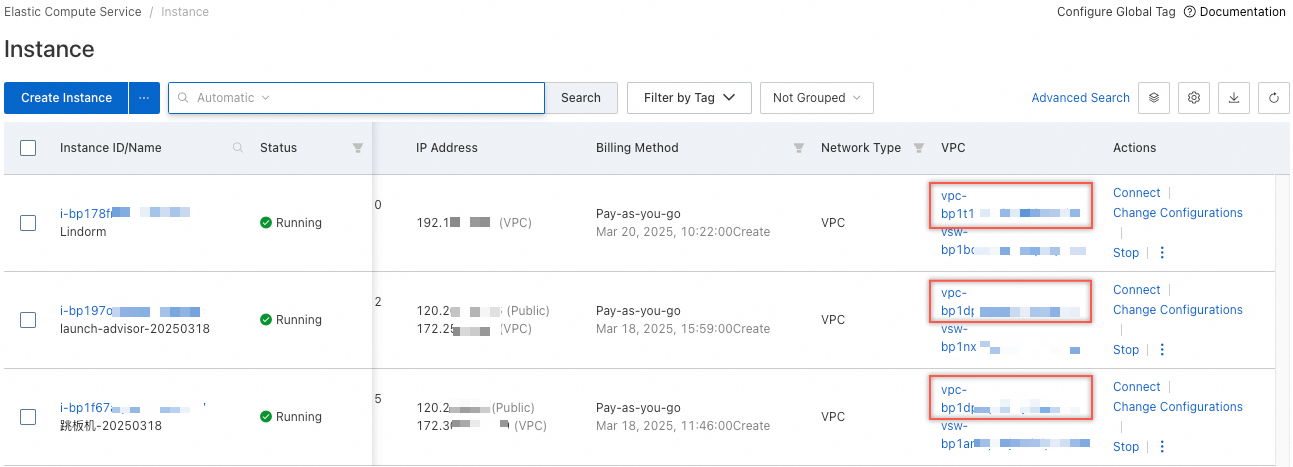
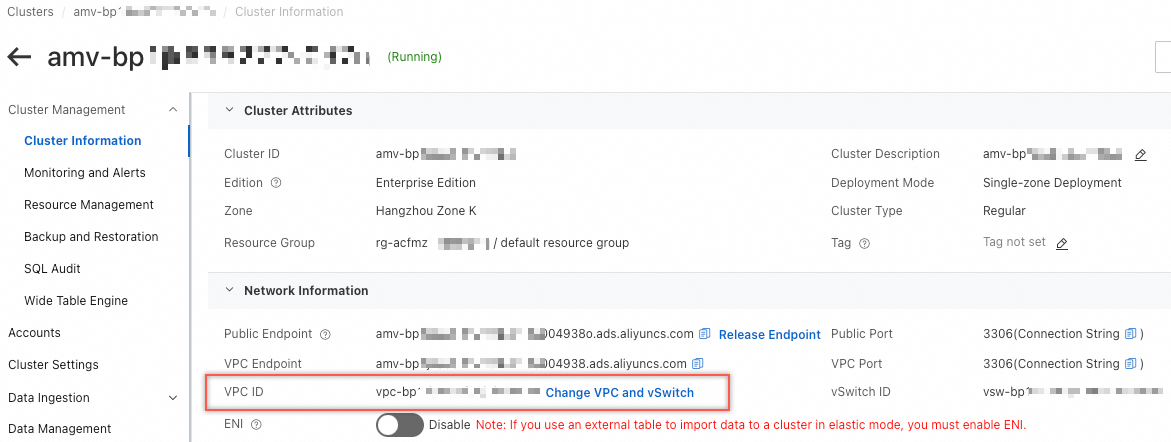
-
-
In the AnalyticDB for MySQL console, view and copy the AnalyticDB for MySQL cluster's public endpoint.
If no public endpoint is displayed in the console, a public endpoint is not enabled. Click Apply for Endpoint to apply for a public endpoint. Applying for a public endpoint is free. For more information, see Apply for or release a public endpoint.
-
Run
ping <public endpoint of your AnalyticDB for MySQL cluster>again.A successful ping confirms the endpoint is correct.
-
Switch to the public endpoint and reconnect.
What to do if a connection to AnalyticDB for MySQL fails?
If you cannot connect to an AnalyticDB for MySQL cluster, follow these troubleshooting steps.

Query behavior on connection close
Asynchronous queries submitted with SUBMIT JOB, INSERT INTO SELECT, or CREATE TABLE AS SELECT commands continue to run. All other queries are terminated.
Resource release on JDBC client timeout
Yes, the resources are released immediately.
Why can I connect to RDS but not an AnalyticDB for MySQL cluster when using the easyswoole PHP framework?
The PreparedStatement does not support SHOW statements.
Identify source of connection spikes
This feature is available only for Data Warehouse Edition and Enterprise Edition clusters.
In the AnalyticDB for MySQL console, navigate to the Diagnostics and Optimization > Connection Information tab for your Data Warehouse Edition or Enterprise Edition cluster. This tab shows statistics for the Number of User Connections and Number of Connections to Client IP Address.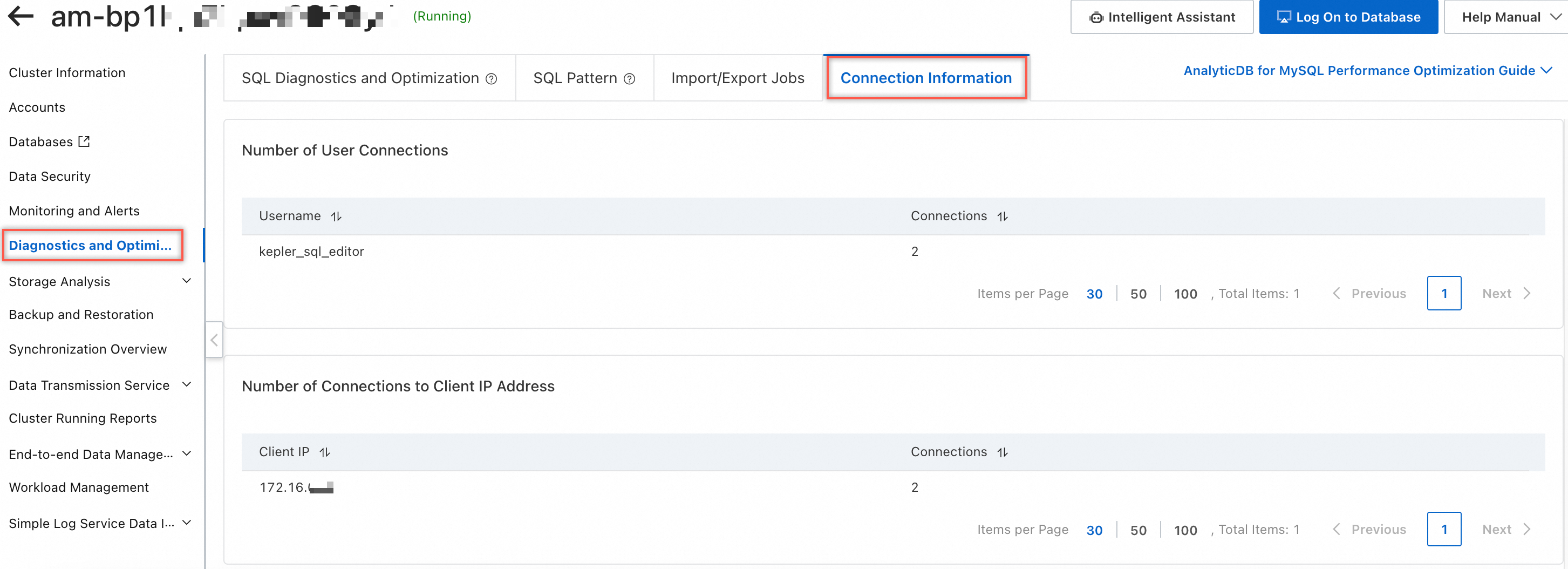
AnalyticDB for MySQLconnections
The maximum number of connections to an AnalyticDB for MySQL cluster depends on its specifications. Although there is no hard limit, we recommend keeping the total below 50,000. On smaller clusters, an excessive number of connections can exhaust resources and lead to capacity issues. For more information, see Limits.
How do I let others remotely connect to my AnalyticDB for MySQL cluster?
To let a colleague or another person remotely connect to your AnalyticDB for MySQL cluster, follow these steps:
-
Get their egress IP: Ask the person to run
curl ipinfo.io/ipin their terminal to obtain their public egress IP address. -
Configure the whitelist: Add their egress IP address to the cluster's IP address whitelist. For more information, see Configure an IP address whitelist.
-
Apply for a public endpoint: If the person connects from an on-premises device instead of an Alibaba Cloud ECS instance, apply for a public endpoint for the cluster. For more information, see Apply for a public endpoint.
-
Create a database account: We recommend that you create a dedicated database account for the person with appropriate permissions instead of sharing a privileged account. For more information, see Create a database account.
-
Provide connection details: Share the public endpoint (or VPC endpoint), port (3306), account, and password with the person. They can connect by using a MySQL CLI client or other tools. For more information, see Connect by using the mysql command-line client.