Nova vector search engine
Nova is the vector search engine for AnalyticDB for PostgreSQL 7.0. It provides two index types: Nova-Disk (Novad for short), a disk-based partitioned index, and Nova-Memory (Novam for short), an in-memory graph index. This topic describes index selection, capacity evaluation, parameter configuration, autotune, and operational procedures.
Overview
What is Nova
Nova is the vector search engine for AnalyticDB for PostgreSQL 7.0. It provides Novad (a disk-based partitioned index) and Novam (an in-memory graph index). This topic describes index selection, capacity evaluation, parameter configuration, autotune, and operational procedures.
Key capabilities
Designed for large-scale vector search, Nova provides the following enhanced capabilities:
Capability | Description |
Adaptive search | Automatically balances query speed and recall without manual tuning. |
Flexible storage | Novad stores the primary index data on disk and supports quantization methods such as RaBitQ, SQ8, and PQ, as well as vector types including halfvec, bit, sparsevec, and sq8vector, significantly reducing storage costs. |
Delta-Base write architecture | Decouples data writes from primary index building. New data is first written to in-memory Delta files and asynchronously merged into the primary index in the background. Automatic backpressure is applied when write backlogs accumulate. |
Concurrent index creation | Supports the |
INCLUDE columns | Stores additional columns in the index so that queries hitting these columns can return results directly from the index, reducing heap fetch overhead. |
PCA automatic dimensionality reduction | Supports automatic target dimension selection based on variance explained ratio, as well as manual dimension specification, to effectively reduce computation and storage overhead. |
Autotune | You only need to specify topK and target recall. The system automatically evaluates and applies the optimal search parameters. Supports providing a real query table for fine-grained tuning, or generating synthetic queries from the index data. |
Prerequisites
An AnalyticDB for PostgreSQL 7.0 instance with a minor version of 7.4.2.7 or later.
The Enable vector search engine optimization feature is enabled.
Quick start
The following example demonstrates how to create a table, build a Nova index, and run a vector query.
Create a sample table
Create a sample table with text content and a vector column.
CREATE TABLE chunks (
    id SERIAL PRIMARY KEY,
    chunk VARCHAR(1024),
    intime TIMESTAMP,
    url VARCHAR(1024),
    feature REAL[]
) DISTRIBUTED BY (id);
Sample output:
CREATE TABLECreate a Nova index
Create a vector index using the default algorithm novamr (memory-based index with RaBitQ quantization). RaBitQ quantization significantly reduces memory usage.
-- Use the default algorithm novamr. RaBitQ quantization significantly reduces memory usage.
CREATE INDEX idx_feature_novamr ON chunks
USING ann(feature)
WITH (
    dim = 1536,
    distancemeasure = cosine
);
Sample output:
CREATE INDEXNovamr is currently fixed at 7 bits. Custom rabitq_bits is not supported.
Run a vector query
Use the <=> operator to compute cosine distance and return the 10 most similar results.
SELECT id,
       chunk,
       feature <=> ARRAY[0.1, 0.2, ...]::real[] AS distance
FROM chunks
ORDER BY distance
LIMIT 10;
Sample output (actual data may vary):
 id |       chunk        | distance
----+--------------------+----------
 12 | Nova vector search |   0.0831
  7 | PostgreSQL search  |   0.1047
  ......
 31 | Hybrid search      |   0.1284
(10 rows)
Index selection and capacity
Novad vs. Novam
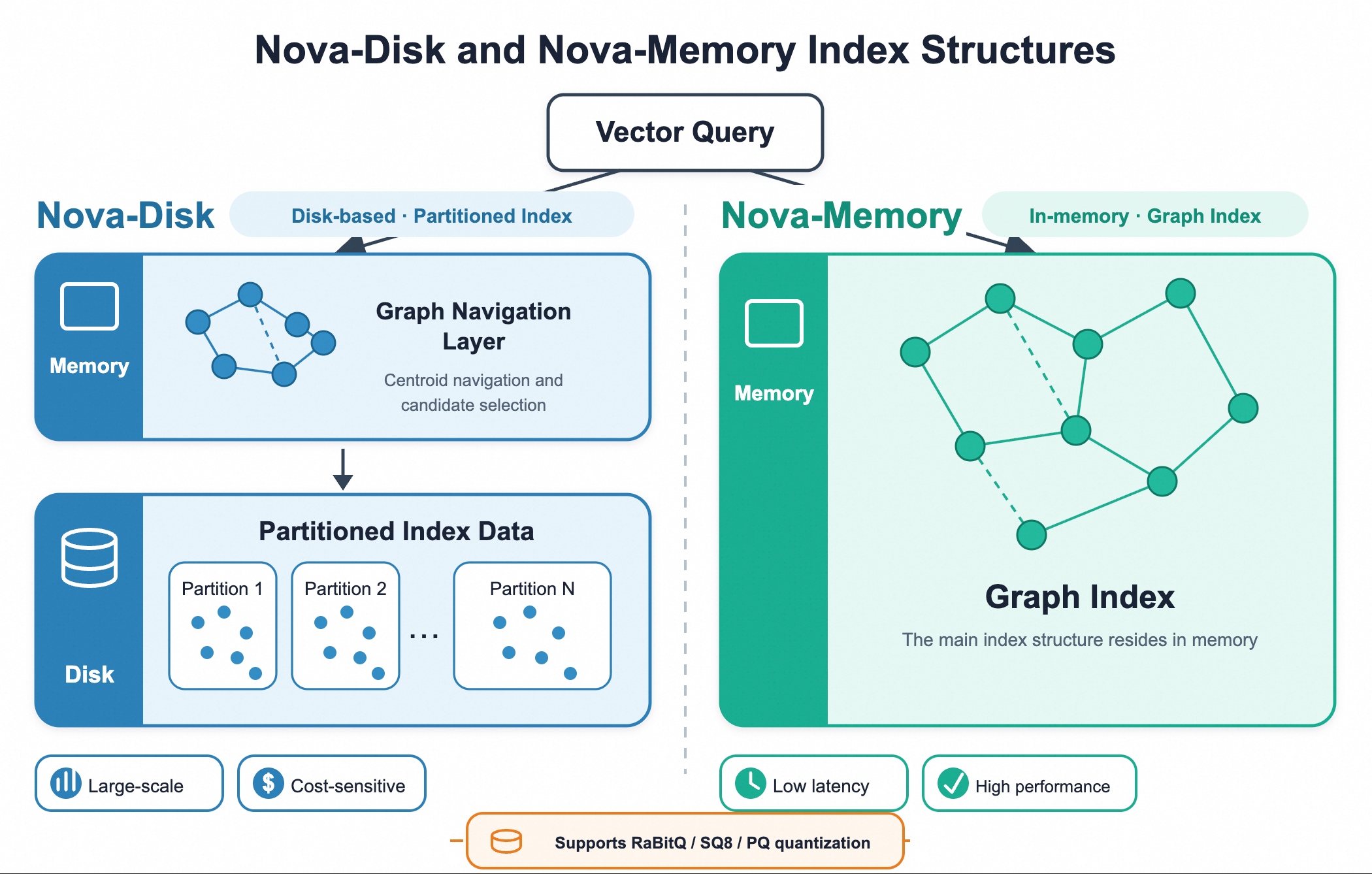
Nova provides two index types: Novad (disk-based partitioned index) and Novam (in-memory graph index).
Disk-based partitioned index (Novad): Uses graph navigation combined with partitioned storage. A small amount of navigation data resides in memory, while the main partitioned index data is stored on disk. It has low memory requirements, fast index building, and a small disk footprint. It supports RaBitQ, SQ8, and PQ quantization and is suitable for large-scale, cost-sensitive search scenarios.
In-memory graph index (Novam): Uses a graph index structure. With sufficient memory, it delivers higher query performance than Novad at the same specifications; when memory is insufficient, it accesses disk. It supports RaBitQ, SQ8, and PQ quantization and is suitable for low-latency scenarios such as real-time recommendation.
Novam index variants
Algorithm | Description |
| Graph index without quantization compression, stored in full precision |
| Graph index with RaBitQ quantization (default algorithm, fixed at 7 bits, custom rabitq_bits is not supported) |
| Graph index with SQ8 scalar quantization |
Novad index variants
Algorithm | Description |
| Partitioned index with RaBitQ quantization (rabitq_bits defaults to 1). novad and novadr require at least 32 dimensions. For dimensions below 32, use novadflat |
| Partitioned index without quantization compression |
| Partitioned index with SQ8 scalar quantization. Automatically enabled when creating a novadflat index on an sq8vector column |
Capacity evaluation
The following tables provide resource recommendations for selected vector dimensions and data volumes. Increase resources accordingly when processing larger data volumes.
Novad capacity reference
Total compute resources | 128 dimensions | 256 dimensions | 512 dimensions | 768 dimensions | 1024 dimensions | 1536 dimensions | 2048 dimensions |
8c | 320M | 160M | 80M | 50M | 40M | 26M | 20M |
16c | 640M | 320M | 160M | 100M | 80M | 60M | 40M |
32c | 1.28B | 640M | 320M | 200M | 160M | 120M | 80M |
128c | 5.12B | 2.56B | 1.28B | 800M | 640M | 480M | 320M |
Novam capacity reference
Total compute resources | 128 dimensions | 256 dimensions | 512 dimensions | 768 dimensions | 1024 dimensions | 1536 dimensions | 2048 dimensions |
8c | 32M | 16M | 8M | 5M | 4M | 2.6M | 2M |
16c | 64M | 32M | 16M | 10M | 8M | 5M | 4M |
32c | 128M | 64M | 32M | 20M | 16M | 10M | 8M |
128c | 512M | 256M | 128M | 80M | 64M | 40M | 32M |
Vector types and distance metrics
Supported vector types
Nova supports multiple vector data types, covering dense vectors, sparse vectors, and binary vectors.
Data type | Description | Maximum dimensions |
| Single-precision floating-point array | 8000 |
| pgvector-compatible dense vector type | 8000 |
| Half-precision floating-point vector type, with approximately half the storage of vector | 16000 |
| Half-precision floating-point array | 16000 |
| Binary vector, suitable for hash fingerprint scenarios | 256000 |
| pgvector-compatible sparse vector type (maximum 4000 non-zero elements) | 1000000000 |
| Sparse vector type (maximum 4000 non-zero elements) | 1000000000 |
| SQ8 compressed vector type, natively stored in int8 format to save memory | 8000 |
Supported distance metrics
Distance metric | Parameter value | SQL operator | Description | Applicable vector types |
Euclidean distance (squared) |
|
| Typically used for image similarity search | vector, halfvec, float4[ ], float2[ ], int2[ ], sparsevec, svector, sq8vector |
Negative inner product distance |
|
| Typically used as a substitute for cosine similarity after vector normalization | vector, halfvec, float4[ ], float2[ ], int2[ ], sparsevec, svector, sq8vector, bit |
Cosine distance |
|
| Typically used for text similarity search | vector, halfvec, float4[ ], float2[ ], int2[ ], sparsevec, svector, sq8vector |
Manhattan distance |
|
| L1 distance | vector, halfvec, sparsevec |
Jaccard distance |
|
| Suitable for set similarity measurement | bit |
Hamming distance |
|
| Suitable for binary encoding similarity | bit |
Special vector type usage examples
halfvec (half-precision vectors)
halfvec uses half-precision floating-point numbers, with memory usage approximately half that of vector. It is suitable for memory-sensitive high-dimensional vector scenarios.
-- Create a table with halfvec type
CREATE TABLE chunks_half (
    id SERIAL PRIMARY KEY,
    feature halfvec(1536)
) DISTRIBUTED BY (id);

-- Create an index
CREATE INDEX idx_half ON chunks_half
USING ann(feature)
WITH (
    dim = 1536,
    algorithm = novamr,
    distancemeasure = cosine
);
sq8vector (SQ8 compressed vectors)
sq8vector stores vectors in INT8 format, further compressing memory usage. Use with Novam or Novad indexes.
-- Create a table with sq8vector type
CREATE TABLE chunks_sq8 (
    id SERIAL PRIMARY KEY,
    feature sq8vector(1536)
) DISTRIBUTED BY (id);

-- Create a Novam memory-based SQ8 index
CREATE INDEX idx_sq8 ON chunks_sq8
USING ann(feature)
WITH (
    dim = 1536,
    algorithm = novam,
    distancemeasure = cosine
);

-- You can also create a Novad disk-based SQ8 index
-- sq8vector + novadflat automatically switches to novadsq8
CREATE INDEX idx_sq8_disk ON chunks_sq8
USING ann(feature)
WITH (
    dim = 1536,
    algorithm = novadflat,
    distancemeasure = cosine
);
Sparse vectors (svector)
Nova uses svector to store sparse vectors. Each vector contains two sets of data that correspond one-to-one:
indices: the dimension numbers of non-zero elements.values: the values corresponding to these dimensions.
For example, an 8-dimensional sparse vector with values 1.2, 1.1, and 0.7 at indices 2, 3, and 6 respectively, and 0 elsewhere:
SELECT '{"indices":[2,3,6],"values":[1.2,1.1,0.7]}'::svector(8);Sample output:
                       svector
------------------------------------------------------
 {"indices":[2,3,6],"values":[1.2,1.1,0.7]}
(1 row)
This vector has 8 dimensions. The values at dimensions 2, 3, and 6 are 1.2, 1.1, and 0.7 respectively. All other dimensions are 0.
svector(N) uses 0-based indexing. The valid range is [0, N-1]. For example, the valid indices for svector(8) are 0 to 7.
The indices and values arrays must have the same number of elements and correspond by position:
Dimension number in | Value in | Description |
2 | 1.2 | The value at dimension 2 is 1.2 |
3 | 1.1 | The value at dimension 3 is 1.1 |
6 | 0.7 | The value at dimension 6 is 0.7 |
Create a sparse vector sample table and an index:
DROP TABLE IF EXISTS sparse_docs;

CREATE TABLE sparse_docs (
    id         BIGINT PRIMARY KEY,
    title      TEXT NOT NULL,
    category   TEXT NOT NULL,
    publish_at TIMESTAMP NOT NULL,
    embedding  svector(8) NOT NULL
) DISTRIBUTED BY (id);

INSERT INTO sparse_docs(id, title, category, publish_at, embedding) VALUES
    (1, 'PostgreSQL full-text search', 'search',    '2024-01-01',
        '{"indices":[1,3,7],"values":[0.8,1.5,0.4]}'),
    (2, 'Nova sparse vector search',   'search',    '2024-02-01',
        '{"indices":[2,3,6],"values":[1.2,1.1,0.7]}'),
    (3, 'Vector database practice',     'vector',    '2024-03-01',
        '{"indices":[1,4,7],"values":[0.9,1.3,1.0]}'),
    (4, 'Data analysis fundamentals',   'analytics', '2024-04-01',
        '{"indices":[5,7],"values":[1.4,0.6]}'),
    (5, 'Hybrid search solution',       'search',    '2024-05-01',
        '{"indices":[2,4,6,7],"values":[0.6,1.1,1.2,0.9]}');

-- Use inner product to measure relevance and create a sparse vector index
CREATE INDEX sparse_docs_embedding_idx
ON sparse_docs
USING ann (embedding)
WITH (
    algorithm = 'novam',
    distancemeasure = 'ip'
);

ANALYZE sparse_docs;
In actual use, the total dimensions of the embedding must match the sparse vector model. Document vectors and query vectors in the same column must use compatible models and the same dimensions.
Create a sparse vector index
When using inner product to measure relevance, create the following index:
-- The index was already created in the table creation step above.
-- This is shown here for reference:
-- CREATE INDEX sparse_docs_embedding_idx
-- ON sparse_docs
-- USING ann (embedding)
-- WITH (
--     algorithm = 'novam',
--     distancemeasure = 'ip'
-- );
Parameter description:
USING ann (embedding)creates a vector index for theembeddingcolumn.algorithm = 'novam'uses the Nova memory-based index.distancemeasure = 'ip'uses inner product to measure relevance.
Use an 8-dimensional query vector to return the 3 most relevant records:
SELECT
    id,
    title,
    category,
    -(embedding <#>
        '{"indices":[2,3,6],"values":[1,1,0.5]}'::svector(8)
     ) AS score
FROM sparse_docs
ORDER BY embedding <#>
    '{"indices":[2,3,6],"values":[1,1,0.5]}'::svector(8)
LIMIT 3;
Sample output:
id | title | category | score |
2 | Nova sparse vector search | search | 2.650 |
1 | PostgreSQL full-text search | search | 1.500 |
5 | Hybrid search solution | search | 1.200 |
In this SQL statement:
<#>computes the negative inner product. A smaller negative inner product indicates a larger inner product and higher relevance between the two vectors.ORDER BY embedding <#> query vectorreturns data sorted by relevance in descending order and allows the optimizer to use the Nova index.LIMIT 3specifies that only the 3 most relevant records are returned.
Binary vectors (bit)
The bit type is used to store binary vectors, suitable for scenarios such as hash fingerprints. It supports Hamming distance and Jaccard distance.
-- Create a table with bit type
CREATE TABLE chunks_bit (
    id SERIAL PRIMARY KEY,
    feature bit(256)
) DISTRIBUTED BY (id);

-- Create an index using Hamming distance
CREATE INDEX idx_bit ON chunks_bit
USING ann(feature)
WITH (
    dim = 256,
    algorithm = novam,
    distancemeasure = hamming
);
Create indexes
Basic syntax
CREATE INDEX [CONCURRENTLY] [index_name]
ON [schema_name].[table_name]
USING ann(column_name)
WITH (dim = <dimension>,
      algorithm = <algorithm>,
      distancemeasure = <measure>,
      ...);
Create a Novad index
The following example creates a disk-based Novad index using cosine distance.
novad and novadr require at least 32 dimensions. For dimensions below 32, use novadflat.
CREATE INDEX idx_feature_novad_cosine ON chunks
USING ann(feature)
WITH (
    dim = 1536,
    algorithm = novad,
    distancemeasure = cosine,
    nlist = 2048,
    accel_m = 32
);
Create a Novam index
The following example creates a memory-based Novam full-precision index using Euclidean distance.
CREATE INDEX idx_feature_novam_l2 ON chunks
USING ann(feature)
WITH (
    dim = 1536,
    algorithm = novam,
    distancemeasure = l2,
    hnsw_m = 32,
    hnsw_ef_construction = 200
);
Concurrent index creation
Nova supports the PostgreSQL CREATE INDEX CONCURRENTLY syntax. During creation, the database remains available for reads and writes, avoiding table locks that affect online services.
CREATE INDEX CONCURRENTLY idx_chunks_feature_novad
ON chunks
USING ann(feature)
WITH (
    dim = 1536,
    algorithm = novad,
    distancemeasure = cosine,
    nlist = 2048
);CREATE INDEX CONCURRENTLY cannot be executed within an explicit transaction block.
After execution, check pg_index.indisvalid and indisready. If either is false, do not use the index. Run DROP INDEX index_name to clean up and then rebuild.
INCLUDE columns
INCLUDE stores additional columns in the index to reduce heap fetches when those columns are queried:
CREATE INDEX [index_name]
ON [schema_name].[table_name]
USING ANN(column_name) INCLUDE (col1, col2, ...)
WITH (dim = <dimension>,
      algorithm = <algorithm>,
      distancemeasure = <measure>,
      ...);
Usage example
-- Include id and url columns in the index to support Index Only Scan and Index Scan without heap fetches
CREATE INDEX idx_feature_include ON chunks
USING ann(feature) INCLUDE (id, url)
WITH (
    dim = 1536,
    algorithm = novad,
    distancemeasure = cosine
);
PCA dimensionality reduction
PCA dimensionality reduction can reduce vector dimensions while preserving the main information, reducing computation and storage overhead. It supports both automatic and manual modes.
pca_dim and auto_reduction cannot be set at the same time. For automatic dimensionality reduction, set only auto_reduction. For manual dimensionality reduction, set only pca_dim.
Automatic dimension selection: automatically selects the target dimension based on variance explained ratio (default threshold 98%).
Automatic dimension selection
CREATE INDEX idx_pca_auto ON chunks
USING ann(feature)
WITH (
    dim = 1536,
    algorithm = novamr,
    distancemeasure = cosine,
    auto_reduction = true
);
Manual dimension specification: Use pca_dim to specify the target dimension after dimensionality reduction. The target dimension must be a multiple of 64.
Manual dimension specification
CREATE INDEX idx_pca ON chunks
USING ann(feature)
WITH (
    dim = 1536,
    algorithm = novamr,
    distancemeasure = cosine,
    pca_dim = 256
);
Index build parameters
Basic parameters
Parameter | Description | Default value | Valid values |
| Vector dimension | None (required, or automatically inferred from the column type) | [1, 8192] (varies by vector type) |
| Index algorithm |
| novam, novamflat, novamr, novamsq8, novad, novadflat, novadr, hnswflat |
| Distance metric algorithm |
| L2, IP, COSINE, L1, JACCARD, HAMMING |
Novam build parameters
Parameter | Description | Default value | Valid values |
| Number of bidirectional connections per node in the graph. A larger value improves graph quality but increases build time | 16 | [2, 100] |
| Candidate set size during build. A larger value improves graph quality but increases build time. Must be >= 2 * hnsw_m | 64 | [4, 1000] |
| Novamr is fixed at 7 bits. Custom rabitq_bits is not supported | 7 | Not configurable |
Novad build parameters
Parameter | Description | Default value | Valid values |
| Number of cluster lists in the partitioned index | 1024 | [2, 1073741824] |
| Number of neighbors for each centroid in the graph navigation layer | 16 | [8, 1024] |
| Acceleration layer build candidate set size | 128 | [1, 32768] |
| RaBitQ quantization bit count (novad/novadr only) | 1 | [1, 8] |
PCA parameters
Parameter | Description | Default value | Valid values |
| Target dimension after PCA dimensionality reduction. 0 means disabled | 0 | Must be less than the original vector dimension and a multiple of 64 |
| Enable automatic dimension selection based on variance threshold. Use either this or | false | true/false |
| Enable PCA whitening | false | true/false |
| Enable PCA random rotation | false | true/false |
System-level build parameters
Parameter | Description | Default value | Valid values |
| Maximum number of parallel processes for index building | 75% of compute node resources | [1, 128] |
| Minimum number of training vectors for partitioned-index clustering | 100000 | [1, 100000000] |
| Number of K-means clustering iterations | 10 | [0, 100000] |
Query and tuning
Parameter priority
Nova search parameters can be configured in two locations:
Configuration method | Scope | Duration |
Session-level GUC | Queries in the current database connection | Expires when the connection is closed |
Index-level reloption | Queries that use the specified index | Persistent until reset or reconfigured |
The mapping between index-level reloptions and session-level GUCs:
Index-level reloption | Corresponding session-level GUC | Applicable index |
|
| Novam |
|
| Novam |
|
| Novad |
|
| Novam, Novad |
Parameter resolution rules:
Index reloption status | Effective value |
Set to a specific value | Use the index reloption |
Not set, RESET, or set to -1 | Use the corresponding session GUC |
In short, the session-level GUC serves as the default for the current connection. The index-level reloption can override this default for a specific index.
For example, if the session GUC is 80 and a specific index has a reloption of 200:
Index used by the query | Effective value |
Index with reloption set | 200 |
Other indexes without reloption | 80 |
A reloption value of -1 means inheriting the session GUC. It is not an actual search value.
Session-level query parameters
Use SET fastann.<parameter> = <value>; to configure the current session. If the index supports a same-name reloption, the session value is used only when that reloption is set to -1 or has been RESET.
Novam query parameters
Parameter | Description | Default value | Valid values |
| Dynamic candidate set size for graph search. The most critical query tuning parameter. A larger value improves recall but slows down queries | 100 | [1, 1000] |
| ef_search for sparse vector search | 200 | [1, 1000] |
| Maximum number of scan points for graph search | 2000 | [0, 10000000] |
| Rescoring candidate set amplification factor for quantized indexes (SQ/RaBitQ) | 1.0 | [0.0, 1000.0] |
Novad query parameters
Parameter | Description | Default value | Valid values |
| Number of cluster lists to probe during partitioned-index search. The most critical query tuning parameter. A larger value improves recall but increases I/O | 5 | [1, 100000] |
| ef_search for the acceleration layer during query | 128 | [1, 32768] |
| Result heap amplification factor | 1.0 | [1.0, 1000.0] |
| Rescoring amplification factor for RaBitQ quantization | 1.0 | [0.0, 1000.0] |
Common query parameters
Parameter | Description | Default value | Valid values |
| TopK amplification factor for hybrid queries (vector + filter conditions) | 10 | [1, 1000] |
| Compute node topk = topk * | 1.0 | [0.0, 1000.0] |
| 0.0 | [0.0, 1000.0] |
Index-level query parameters
When a specific index requires search parameters different from the session defaults, you can set reloptions for that index. A reloption value of -1 means using the corresponding session-level GUC parameter.
Reloption | Applicable indexes | Inherited GUC | Default value | Valid values |
| Novam |
| -1 | -1 or [1, 1000] |
| Novam |
| -1 | -1 or multiples of 500 in [0, 10000000] |
| Novad |
| -1 | -1 or [1, 100000] |
| Novam, Novad |
| -1 | -1 or [0.0, 1000.0] |
| Novam, Novad | None; records or switches Autotune configuration | 0 | 0 or [1, 1000] |
| Novam, Novad | None; records or switches Autotune configuration | 0 | 0 or [0.90, 0.99] |
nova_autotune_topk and nova_autotune_recall are not regular query parameters and must be set as a pair. They record the configuration already applied by Autotune and can also be used to manually switch between existing configurations. For details, see Autotune.
Set index-level parameters
-- Pin Novam index search parameters
ALTER INDEX idx_feature_novam_l2 SET (
    nova_ef_search = 200,
    nova_max_scan_points = 5000
);

-- Pin Novad index search parameters
ALTER INDEX idx_feature_novad_cosine SET (
    nova_nprobe = 20
);
Restore session GUC inheritance
-- Restore Novam index to inherit session GUC
ALTER INDEX idx_feature_novam_l2
RESET (nova_ef_search, nova_max_scan_points);

-- Restore Novad index to inherit session GUC
ALTER INDEX idx_feature_novad_cosine
RESET (nova_nprobe);
Configuration examples
Use index reloptions to pin search parameters for a specific index:
-- Pin Novam index parameters
ALTER INDEX idx_feature_novam_l2 SET (
    nova_ef_search = 200,
    nova_max_scan_points = 5000
);

-- Pin Novad index parameters
ALTER INDEX idx_feature_novad_cosine SET (
    nova_nprobe = 20
);
When a reloption is -1 or has been RESET, queries use the current session GUC instead:
ALTER INDEX idx_feature_novam_l2
RESET (nova_ef_search, nova_max_scan_points);

SET fastann.hnsw_ef_search = 200;
SET fastann.hnsw_max_scan_points = 5000;
Autotune
Autotune automatically tunes the search parameters for Novam and Novad. You only need to specify topK and target recall. When a test query table is available, real queries are used. Otherwise, the system generates queries from the internal index data.
The task runs asynchronously and returns a handle immediately. When multiple topK or target_recall values are provided, the system evaluates all combinations. After the asynchronous task completes, the index search parameter reloptions are automatically set to the configuration corresponding to the largest topK and largest target_recall.

Start tuning
The following example tunes topK = 10 and 100 simultaneously with a target recall of 0.99. The test query table docs_eval_queries is provided to guarantee recall on this query set. Each topK and target_recall combination saves a separate configuration. After the task completes, the index automatically applies the largest combination, i.e., topK = 100, target_recall = 0.99.
SELECT *
FROM fastann.nova_autotune(
    index_relation => 'public.docs_embedding_novam_idx'::regclass, -- Required; no default; specifies the index to tune
    topk           => ARRAY[10, 100],                                        -- Required; no default; specifies topK values to tune
    target_recall  => 0.99,                                        -- Optional; default: 0.99; specifies target recall
    n_samples      => 100,                                              -- Optional; default: 300; specifies number of sample queries
    n_trials       => 100,                                               -- Optional; default: 500; specifies number of candidate trials
    query_table    => 'public.docs_eval_queries'::regclass,           -- Optional; default: NULL; specifies the test query table
    query_column   => 'embedding'                                   -- Optional; default: NULL; specifies the query vector column
) AS result(handle);
When no test query table is available, omit query_table and query_column. The system generates queries from the internal index data and fits the parameters:
SELECT *
FROM fastann.nova_autotune(
    index_relation => 'public.docs_embedding_novam_idx'::regclass, -- Required; no default; specifies the index to tune
    topk           => ARRAY[10, 100],                                        -- Required; no default; specifies topK values to tune
    target_recall  => 0.99,                                        -- Optional; default: 0.99; specifies target recall
    n_samples      => 100,                                              -- Optional; default: 300; specifies number of sample queries
    n_trials       => 100                                                -- Optional; default: 500; specifies number of candidate trials
) AS result(handle);
Sample output:
  handle
-----------
 123456790
(1 row)When query_table is not provided, Autotune cannot guarantee recall for actual queries. To guarantee recall, provide a representative query table.
Check tuning progress
Use the handle returned by nova_autotune to check the task progress:
SELECT
    stage,
    query_count,
    work_done,
    work_total,
    updated_at
FROM fastann.nova_autotune_progress(
    handle => 123456789
);
Sample output:
   stage    | query_count | work_done | work_total |       updated_at
------------+-------------+-----------+------------+------------------------
 evaluating |         300 |       126 |        500 | 2026-07-28 14:20:42+08
(1 row)
work_done / work_total indicates the task progress percentage. When the progress function returns 0 rows, the task has ended or the handle is no longer active. This does not mean the tuning failed. You can use nova_autotune_status to view the selected configurations and read back the index reloption.
Manual parameter configuration
Autotune saves the parameters for each topK and target_recall combination. View all existing tuning results for the index:
SELECT
    topk, target_recall, achieved, autotune_recall,
    ef_search, max_scan_points, nprobe, rescore_amp, applied
FROM fastann.nova_autotune_status(
    index_relation => 'public.docs_embedding_novam_idx'::regclass
)
ORDER BY topk, target_recall;
Sample output:
 topk | target_recall | achieved | autotune_recall | ef_search | max_scan_points | nprobe | rescore_amp | applied
------+---------------+----------+-----------------+-----------+-----------------+--------+-------------+---------
   10 |          0.99 | t        |           0.992 |        80 |            3000 |      0 |         1.2 | f
  100 |          0.99 | t        |           0.991 |       240 |           12000 |      0 |         1.5 | t
(2 rows)
Each topK and target_recall combination corresponds to a set of parameters. Both must be specified together when switching:
-- Use the configuration that achieves 99% recall at topK=10
ALTER INDEX public.docs_embedding_novam_idx SET (
    nova_autotune_topk = 10,
    nova_autotune_recall = 0.99
);

-- Switch to the configuration that achieves 99% recall at topK=100
ALTER INDEX public.docs_embedding_novam_idx SET (
    nova_autotune_topk = 100,
    nova_autotune_recall = 0.99
);
Important notes:
Only one Autotune task can run on an index at a time.
Score Filter
Score filtering eliminates candidates during the ANN scan phase based on similarity or distance thresholds, reducing the data volume for subsequent sorting and return. It can be enabled through GUC or SQL Hint.
Parameter | Description | Default value |
| Enable or disable score filtering | Disabled |
| Minimum score threshold | -FLT_MAX (displayed as -3.40282e+38) |
| Maximum score threshold | FLT_MAX (displayed as 3.40282e+38) |
Enable through SET
The following query returns only topK results with a cosine similarity greater than 0.75:
SET fastann_score_filter_switch = on;
SET fastann_score_filter_min = 0.75;
RESET fastann_score_filter_max;

SELECT id,
       chunk,
       1 - (
           feature <=> ARRAY[0.1, 0.2, ...]::real[]
       ) AS score
FROM chunks
ORDER BY score
LIMIT 10;
Sample output (actual data may vary):
SET
SET
RESET
 id |       chunk        | score
----+--------------------+-------
 12 | Nova vector search | 0.921
  7 | PostgreSQL search  | 0.884
(2 rows)
To limit the score range, set both the upper and lower bounds:
SET fastann_score_filter_switch = on;
SET fastann_score_filter_min = 0.75;
SET fastann_score_filter_max = 0.95;
Enable through SQL Hint
The Hint must be placed at the very beginning of a standalone SQL statement, without any preceding SET, RESET, or other statements. It is designed to affect only the current statement. Before using it, verify in the same connection whether the current version affects subsequent queries.
/*+ SET(fastann_score_filter_switch on)
    SET(fastann_score_filter_min 0.75)
    SET(fastann_score_filter_max 0.95) */
SELECT id,
       chunk,
       1 - (
           feature <=> ARRAY[0.1, 0.2, ...]::real[]
       ) AS score
FROM chunks
ORDER BY score
LIMIT 10;
Sample output (actual data may vary):
 id |       chunk        | score
----+--------------------+-------
 12 | Nova vector search | 0.921
  7 | PostgreSQL search  | 0.884
(2 rows)
Write and operations
Delta-Base write architecture
Nova uses a Delta-Base architecture to handle real-time writes:
New vectors are first written to memory-mapped Delta files. Up to 3 Delta files can exist simultaneously.
Each Delta file stores up to max_delta_vecs vectors, which defaults to approximately 1 million.
A background flush thread periodically merges Delta data into the primary index.
You can call nova_flush_index() to manually trigger a merge.
You can call nova_delta_stats() to check the Delta file status.

Write backpressure
When Delta files approach their capacity limit, the system throttles the write speed:
Parameter | Description | Default value |
| Enable write backpressure | true |
| Soft limit threshold (Delta fill ratio). Exceeding this threshold starts adding delay | 0.1 |
| Soft limit minimum delay (milliseconds) | 5 |
| Soft limit maximum delay (milliseconds) | 15 |
| Hard limit threshold (Delta fill ratio). Exceeding this threshold blocks writes | 0.3 |
| Hard limit maximum wait time (milliseconds) | 1000 |
Index statistics
SELECT nova_delta_stats('chunks_embedding_idx');Sample output (excerpt, actual values depend on the index):
   delta_id   | num_vecs | file_size |   status
--------------+----------+-----------+------------
            0 |   500000 |    512 MB | flushing
            1 |   300000 |    307 MB | active
            2 |        0 |         0 | idle
(3 rows)
Manual flush
SELECT nova_flush_index('chunks_embedding_idx');Sample output:
 nova_flush_index
------------------
 t
(1 row)
REINDEX
Use the standard PostgreSQL REINDEX command to rebuild or concurrently rebuild Nova indexes:
REINDEX INDEX chunks_embedding_idx;

-- Concurrent rebuild
REINDEX INDEX CONCURRENTLY chunks_embedding_idx;
Sample output:
REINDEXCompatibility and limitations
pgvector compatibility mode
The pgvector compatibility mode provides the commonly used types, operators, index syntax, and parameter names of pgvector 0.8.2. Indexes are built and queried by Nova, not by the native pgvector engine. The compatibility layer and USING ann can coexist in the same database.
Enable compatibility mode
In the current version, submit a ticket to enable the pgvector compatibility mode before use. After the feature is enabled, regular users can create and use pgvector-compatible indexes.
To make <-> return Euclidean distance consistent with pgvector, set fastann.pgvector_compatibility = on in the session. This setting is not required when you only use it for TopK sorting without reading distance values or filtering by distance.
Index syntax and Nova backend
You can use the pgvector index syntax directly. The distance metric is determined by the operator class:
CREATE INDEX docs_embedding_hnsw_idx
ON docs USING hnsw (embedding vector_cosine_ops)
WITH (m = 16, ef_construction = 64);

CREATE INDEX docs_embedding_ivfflat_idx
ON docs USING ivfflat (embedding vector_cosine_ops)
WITH (lists = 1024);
pgvector syntax | Supported column types | Nova backend |
|
|
|
|
|
|
|
| Uses |
In this section, hnsw and ivfflat are pgvector-compatible syntax names. Nova supports their index creation and query interfaces, while the actual indexes are implemented by the Nova backend and are not equivalent to native HNSW or IVFFlat indexes. The pgvector-compatible access method and operator class jointly determine the Nova backend and distance metric; specifying algorithm or distancemeasure does not change the backend selection.
Supported operator classes
Access method | Column type | Supported operator classes |
|
|
|
|
|
|
|
|
|
|
|
|
|
|
|
|
|
|
Parameter mapping
pgvector parameter | Nova parameter | Default value | Description |
|
| 16 | Maximum number of graph-index node neighbors. Valid values: 2 to 100 |
|
| 64 | Build candidate set size. Valid values: 4 to 1000, and must not be less than |
|
| 1024 | Number of partitioned-index clusters. Valid values: 2 to 1073741824 |
|
| 100 | Both names refer to the same session parameter. Valid values: 1 to 1000 |
Compatible IVFFlat queries adjust the search scope through nova_nprobe; if not set, it inherits fastann.nova_nprobe with a default value of 5. ivfflat.probes and fastann.ivfflat_probes do not take effect for this compatible index.
Limitations
L1 operator classes are not supported on Nova indexes. Creating a
vector_l1_opsorhalfvec_l1_opsindex causes an error.The cosine operator class for
sparsevecis not yet supported for Nova indexes. Cosine search requires normalizing both index and query vectors and then performing an inner product search. The Nova build pipeline does not yet support normalization for sparse vectors, so index creation is explicitly rejected. Use L2 or inner product instead.ivfflatonly supports L2, inner product, and cosine distance forvectorandhalfvec.pgvector syntax is mapped to the Nova backend. The index structure, quantization method, storage footprint, recall, and performance characteristics differ from native pgvector.
svectorsupports up to 1 billion dimensions with up to 4000 non-zero values.indicesandvaluesmust contain the same number of elements.valuesmust be finite numbers and cannot containNaN,Infinity, or-Infinity.
Usage notes
Nova performs Delta merging and graph repair in the background. Resources may be consumed even when there are no business requests.