Use external tables for federated analytics of Hadoop data sources
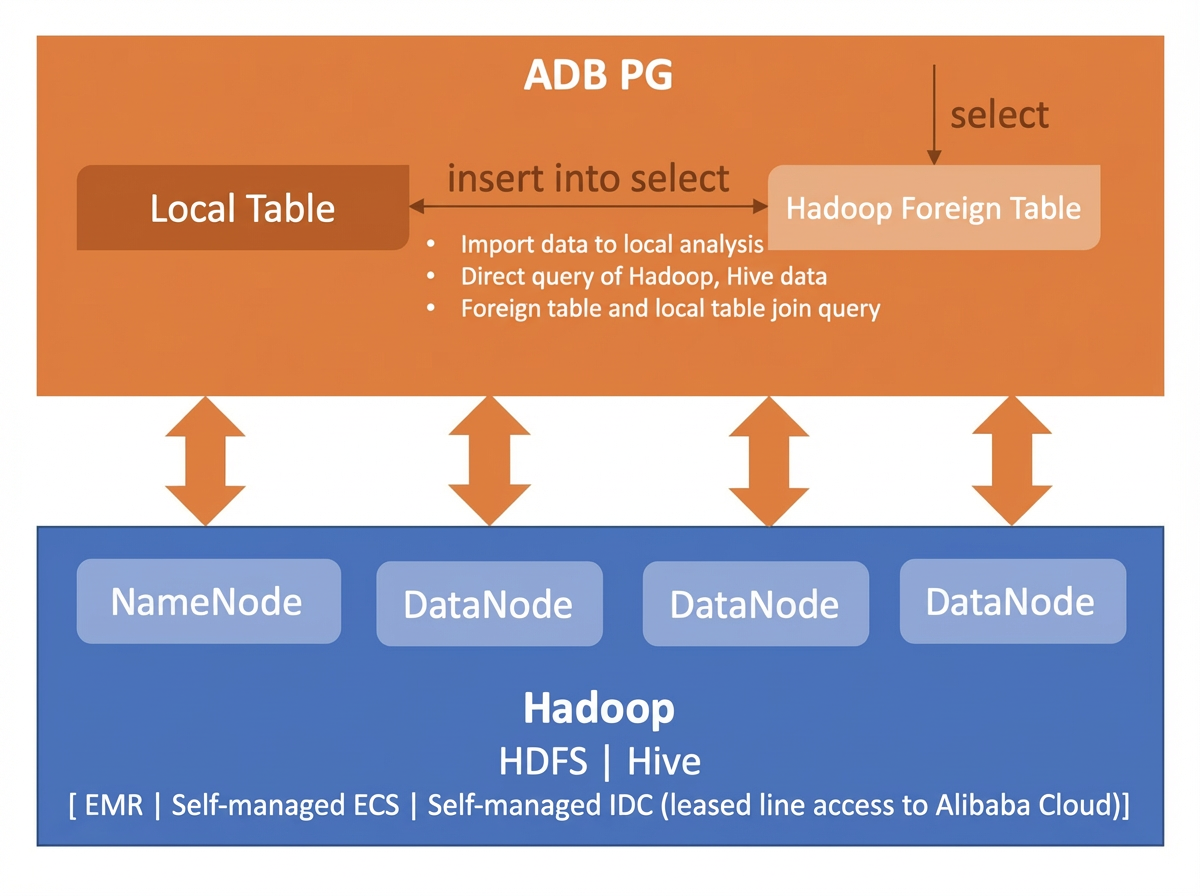
AnalyticDB for PostgreSQL lets you query Hadoop data—including Hadoop Distributed File System (HDFS) files and Hive tables—directly from SQL using external tables powered by the PXF protocol. This lets you run federated analytics against existing Hadoop clusters without moving data.
Limitations
| Constraint | Detail |
|---|---|
| Instance mode | Elastic storage mode only |
| Network | The AnalyticDB for PostgreSQL instance and the Hadoop cluster must be in the same virtual private cloud (VPC) |
| Instance age | Elastic storage mode instances created before September 6, 2020 cannot connect to external Hadoop clusters due to incompatible network architecture. Contact Alibaba Cloud technical support to provision a new instance and migrate your data. |
Prerequisites
Before you begin, ensure that you have:
-
An AnalyticDB for PostgreSQL instance in elastic storage mode, created on or after September 6, 2020
-
A running Hadoop cluster in the same VPC as the instance
-
A PXF server configured by Alibaba Cloud technical support
Configure a server
Server configuration requires assistance from Alibaba Cloud technical support. Submit a ticket and provide the following configuration files.
| External data source | Required files |
|---|---|
| Hadoop (HDFS, Hive, and HBase) | core-site.xml, hdfs-site.xml, mapred-site.xml, yarn-site.xml, hive-site.xml |
For clusters with Kerberos authentication, also providekeytabandkrb5.conf.
Technical support returns a SERVER value (for example, hdp3) that identifies the PXF server configuration directory (PXF_SERVER/hdp3/). Use this value in all LOCATION clauses.
Syntax
Enable the PXF extension once per database:
CREATE EXTENSION pxf;Create an external table:
CREATE EXTERNAL TABLE <table_name>
    ( <column_name> <data_type> [, ...] | LIKE <other_table> )
LOCATION('pxf://<path-to-data>?PROFILE=<profile>[&<custom-option>=<value>[...]][&SERVER=<server_name>]')
FORMAT '[TEXT|CSV|CUSTOM]' (<formatting-properties>);
For the full CREATE EXTERNAL TABLE syntax, see SQL syntax.
LOCATION clause parameters
| Parameter | Description |
|---|---|
pxf:// |
The PXF protocol prefix. Do not modify. |
<path-to-data> |
For HDFS: the absolute path to the file or directory. For Hive: <database>.<table> (for example, default.sales_info). |
PROFILE=<profile> |
The PXF profile that matches your data source and format. See Supported HDFS profiles and Supported Hive profiles. |
SERVER=<server_name> |
The PXF server configuration identifier. Provided by Alibaba Cloud technical support. |
Query HDFS data
Supported HDFS profiles
| Format | Profile |
|---|---|
| Text | hdfs:text |
| CSV | hdfs:text:multi, hdfs:text |
| Avro | hdfs:avro |
| JSON | hdfs:json |
| Parquet | hdfs:parquet |
| AvroSequenceFile | hdfs:AvroSequenceFile |
| SequenceFile | hdfs:SequenceFile |
Example: Read an HDFS text file
-
Create a test file on HDFS.
echo 'Prague,Jan,101,4875.33 Rome,Mar,87,1557.39 Bangalore,May,317,8936.99 Beijing,Jul,411,11600.67' > /tmp/pxf_hdfs_simple.txt # Create the target directory hdfs dfs -mkdir -p /data/pxf_examples # Upload the file hdfs dfs -put /tmp/pxf_hdfs_simple.txt /data/pxf_examples/ # Verify the upload hdfs dfs -cat /data/pxf_examples/pxf_hdfs_simple.txt -
In AnalyticDB for PostgreSQL, create an external table pointing to that file.
CREATE EXTERNAL TABLE pxf_hdfs_textsimple ( location text, month text, num_orders int, total_sales float8 ) LOCATION ('pxf://data/pxf_examples/pxf_hdfs_simple.txt?PROFILE=hdfs:text&SERVER=hdp3') FORMAT 'TEXT' (delimiter=E','); -
Query the table.
SELECT * FROM pxf_hdfs_textsimple;Expected output:
 location  | month | num_orders |    total_sales
-----------+-------+------------+--------------------
 Prague    | Jan   |        101 | 4875.3299999999999
 Rome      | Mar   |         87 | 1557.3900000000001
 Bangalore | May   |        317 | 8936.9899999999998
 Beijing   | Jul   |        411 |           11600.67
(4 rows)
Example: Write data to HDFS
To write data from AnalyticDB for PostgreSQL to HDFS, create a writable external table.
-
Create the target directory on HDFS.
You must have write permissions on this directory to run
INSERTstatements from AnalyticDB for PostgreSQL.hdfs dfs -mkdir -p /data/pxf_examples/pxfwritable_hdfs_textsimple1 -
Create a writable external table and insert data.
CREATE WRITABLE EXTERNAL TABLE pxf_hdfs_writabletbl_1 ( location text, month text, num_orders int, total_sales float8 ) LOCATION ('pxf://data/pxf_examples/pxfwritable_hdfs_textsimple1?PROFILE=hdfs:text&SERVER=hdp3') FORMAT 'TEXT' (delimiter=','); INSERT INTO pxf_hdfs_writabletbl_1 VALUES ('Frankfurt', 'Mar', 777, 3956.98); INSERT INTO pxf_hdfs_writabletbl_1 VALUES ('Cleveland', 'Oct', 3812, 96645.37); -
Verify the data was written to HDFS.
# List files in the directory
hdfs dfs -ls /data/pxf_examples/pxfwritable_hdfs_textsimple1

# Print the file contents
hdfs dfs -cat /data/pxf_examples/pxfwritable_hdfs_textsimple1/*
Expected output:
Frankfurt,Mar,777,3956.98
Cleveland,Oct,3812,96645.37
Query Hive data
Supported Hive profiles
| Format | Supported profiles |
|---|---|
| TextFile | Hive, HiveText |
| SequenceFile | Hive |
| RCFile | Hive, HiveRC |
| ORC | Hive, HiveORC, HiveVectorizedORC |
| Parquet | Hive |
The Hive profile supports all storage formats listed above. Use a specific sub-profile (HiveText, HiveRC, HiveORC, HiveVectorizedORC) when you need its particular capabilities.
Choose between HiveORC and HiveVectorizedORC
Both profiles read ORC-format Hive tables. Choose based on your query requirements:
| Capability | HiveORC | HiveVectorizedORC |
|---|---|---|
| Rows read per batch | 1 | Up to 1,024 |
| Column projection | Yes | No |
Complex types (array, map, struct, union) |
Yes | No |
timestamp data type |
Yes | No |
Example: Use the Hive profile
The Hive profile works with all Hive storage formats.
-
Generate sample data and load it into Hive.
echo 'Prague,Jan,101,4875.33
Rome,Mar,87,1557.39
Bangalore,May,317,8936.99
Beijing,Jul,411,11600.67
San Francisco,Sept,156,6846.34
Paris,Nov,159,7134.56
San Francisco,Jan,113,5397.89
Prague,Dec,333,9894.77
Bangalore,Jul,271,8320.55
Beijing,Dec,100,4248.41' > /tmp/pxf_hive_datafile.txt
-- In Hive CREATE TABLE sales_info ( location string, month string, number_of_orders int, total_sales double ) ROW FORMAT DELIMITED FIELDS TERMINATED BY ',' STORED AS textfile; LOAD DATA LOCAL INPATH '/tmp/pxf_hive_datafile.txt' INTO TABLE sales_info; SELECT * FROM sales_info; -
In AnalyticDB for PostgreSQL, enable the PXF extension and create an external table.
CREATE EXTENSION pxf; CREATE EXTERNAL TABLE salesinfo_hiveprofile ( location text, month text, num_orders int, total_sales float8 ) LOCATION ('pxf://default.sales_info?PROFILE=Hive&SERVER=hdp3') FORMAT 'custom' (formatter='pxfwritable_import'); -
Query the table.
SELECT * FROM salesinfo_hiveprofile;Expected output:
   location    | month | num_orders | total_sales
---------------+-------+------------+-------------
 Prague        | Jan   |        101 |     4875.33
 Rome          | Mar   |         87 |     1557.39
 Bangalore     | May   |        317 |     8936.99
 Beijing       | Jul   |        411 |    11600.67
 San Francisco | Sept  |        156 |     6846.34
 Paris         | Nov   |        159 |     7134.56
......
Example: Use the HiveText profile
HiveText reads TextFile-format Hive tables and uses a text delimiter instead of the pxfwritable_import formatter.
CREATE EXTERNAL TABLE salesinfo_hivetextprofile (
    location    text,
    month       text,
    num_orders  int,
    total_sales float8
)
LOCATION ('pxf://default.sales_info?PROFILE=HiveText&SERVER=hdp3')
FORMAT 'TEXT' (delimiter=E',');

SELECT * FROM salesinfo_hivetextprofile;
Expected output:
   location    | month | num_orders | total_sales
---------------+-------+------------+-------------
 Prague        | Jan   |        101 |     4875.33
 Rome          | Mar   |         87 |     1557.39
 Bangalore     | May   |        317 |     8936.99
 ......
Example: Use the HiveRC profile
-
Create an RCFile-format Hive table.
-- In Hive CREATE TABLE sales_info_rcfile ( location string, month string, number_of_orders int, total_sales double ) ROW FORMAT DELIMITED FIELDS TERMINATED BY ',' STORED AS rcfile; -- Import data from the existing table INSERT INTO TABLE sales_info_rcfile SELECT * FROM sales_info; -- Verify the data SELECT * FROM sales_info_rcfile; -
Create an external table in AnalyticDB for PostgreSQL and query it.
CREATE EXTERNAL TABLE salesinfo_hivercprofile (
    location    text,
    month       text,
    num_orders  int,
    total_sales float8
)
LOCATION ('pxf://default.sales_info_rcfile?PROFILE=HiveRC&SERVER=hdp3')
FORMAT 'TEXT' (delimiter=E',');

SELECT location, total_sales FROM salesinfo_hivercprofile;
Expected output:
   location    | total_sales
---------------+-------------
 Prague        |     4875.33
 Rome          |     1557.39
 Bangalore     |     8936.99
 ......
Example: Use the HiveORC profile
Use HiveORC when you need column projection or need to query tables with complex types (array, map, struct, union).
-
Create an ORC-format Hive table.
-- In Hive CREATE TABLE sales_info_ORC ( location string, month string, number_of_orders int, total_sales double ) STORED AS ORC; INSERT INTO TABLE sales_info_ORC SELECT * FROM sales_info; -- Verify the data SELECT * FROM sales_info_ORC; -
Create an external table in AnalyticDB for PostgreSQL and query it.
CREATE EXTERNAL TABLE salesinfo_hiveORCprofile (
    location    text,
    month       text,
    num_orders  int,
    total_sales float8
)
LOCATION ('pxf://default.sales_info_ORC?PROFILE=HiveORC&SERVER=hdp3')
FORMAT 'CUSTOM' (FORMATTER='pxfwritable_import');

SELECT * FROM salesinfo_hiveORCprofile;
Expected output:
 ......
 Prague        | Dec   |        333 |     9894.77
 Bangalore     | Jul   |        271 |     8320.55
 Beijing       | Dec   |        100 |     4248.41
(60 rows)
Time: 420.920 ms
Example: Use the HiveVectorizedORC profile
Use HiveVectorizedORC for simple queries on large ORC tables where you do not need column projection, complex type support, or the timestamp data type.
CREATE EXTERNAL TABLE salesinfo_hiveVectORC (
    location    text,
    month       text,
    num_orders  int,
    total_sales float8
)
LOCATION ('pxf://default.sales_info_ORC?PROFILE=HiveVectorizedORC&SERVER=hdp3')
FORMAT 'CUSTOM' (FORMATTER='pxfwritable_import');

SELECT * FROM salesinfo_hiveVectORC;
Expected output:
   location    | month | num_orders | total_sales
---------------+-------+------------+-------------
 Prague        | Jan   |        101 |     4875.33
 Rome          | Mar   |         87 |     1557.39
 Bangalore     | May   |        317 |     8936.99
 Beijing       | Jul   |        411 |    11600.67
 San Francisco | Sept  |        156 |     6846.34
 ......
Example: Query a Parquet-format Hive table
-
Create a Parquet-format Hive table.
-- In Hive CREATE TABLE hive_parquet_table ( location string, month string, number_of_orders int, total_sales double ) STORED AS parquet; INSERT INTO TABLE hive_parquet_table SELECT * FROM sales_info; SELECT * FROM hive_parquet_table; -
Create an external table in AnalyticDB for PostgreSQL and query it.
CREATE EXTERNAL TABLE pxf_parquet_table (
    location         text,
    month            text,
    number_of_orders int,
    total_sales      double precision
)
LOCATION ('pxf://default.hive_parquet_table?profile=Hive&SERVER=hdp3')
FORMAT 'CUSTOM' (FORMATTER='pxfwritable_import');

SELECT month, number_of_orders FROM pxf_parquet_table;
Expected output:
 month | number_of_orders
-------+------------------
 Jan   |              101
 Mar   |               87
 May   |              317
 Jul   |              411
 Sept  |              156
 Nov   |              159
 ......