Access MaxCompute data with foreign tables
The MaxCompute foreign data wrapper (FDW) is a feature of AnalyticDB for PostgreSQL developed based on the PostgreSQL Foreign Data Wrapper (FDW) framework to access AnalyticDB for PostgreSQL in MaxCompute. You can create foreign tables in AnalyticDB for PostgreSQL to query and analyze data from MaxCompute.
The following figure shows an overview.
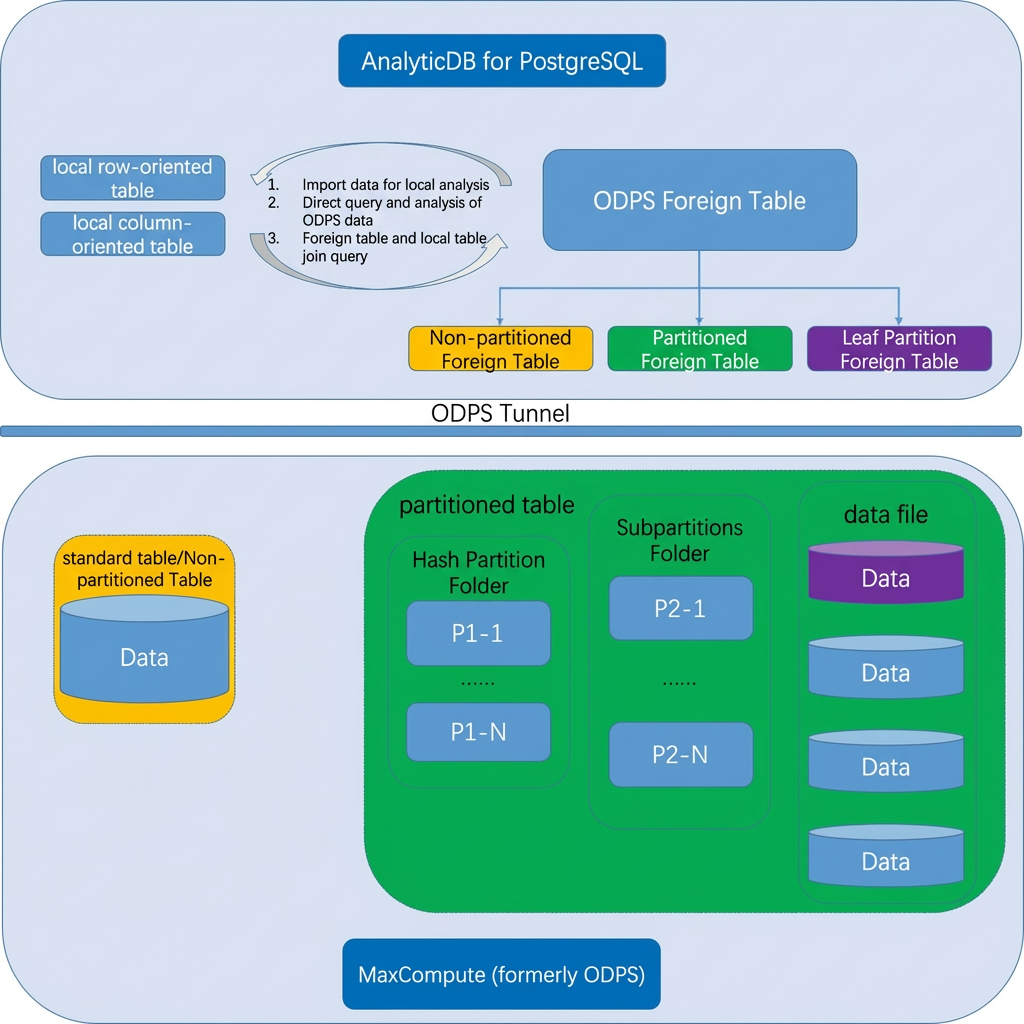
The MaxCompute FDW enables data synchronization between AnalyticDB for PostgreSQL and MaxCompute. You can use the MaxCompute FDW to create three types of MaxCompute foreign tables.
-
Non-partitioned foreign tables: Map to non-partitioned MaxCompute tables.
-
Lowest-level partitioned foreign tables: Map to the lowest-level partitions of partitioned MaxCompute tables.
-
Partitioned foreign tables: Map to entire partitioned MaxCompute tables.
Enable the MaxCompute FDW extension
-
In your AnalyticDB for PostgreSQL database, create the MaxCompute FDW extension.
CREATE EXTENSION odps_fdw; -
Grant usage permissions on the foreign data wrapper to all users. For example:
GRANT USAGE ON FOREIGN DATA WRAPPER odps_fdw TO PUBLIC;
-
For new instances, the MaxCompute FDW extension is created by default. You do not need to perform these steps.
-
For existing instances, connect to the target database with a Initial Account and run the preceding commands to create the MaxCompute FDW extension.
Use a MaxCompute foreign table
To use a MaxCompute foreign table, you must create the following three components in order:
-
Server: Specifies the connection endpoint for MaxCompute.
-
User Mapping: Specifies the credentials for accessing MaxCompute.
-
Foreign Table: Defines the specific table to access in MaxCompute.
1. Create a server
1.1 Syntax
CREATE SERVER odps_serv -- Name of the server
  FOREIGN DATA WRAPPER odps_fdw
  OPTIONS (
    tunnel_endpoint '<odps_tunnel_endpoint>' -- The MaxCompute Tunnel endpoint
  );
1.2 Parameters
When you create a server in AnalyticDB for PostgreSQL, you need to specify either the tunnel_endpoint or odps_endpoint option.
|
Option |
Required |
Description |
|
tunnel_endpoint |
Optional. Recommended. |
The endpoint of the MaxCompute Tunnel service. |
|
odps_endpoint |
Optional |
The endpoint of the MaxCompute service. |
-
When you create the server, you can specify one or both options. The
tunnel_endpointoption takes precedence. Iftunnel_endpointis not specified,odps_endpointis used to route requests to the appropriate Tunnel endpoint. -
We recommend you use a Tunnel endpoint in a classic network or a VPC. If you use a VPC endpoint, ensure that your AnalyticDB for PostgreSQL instance and MaxCompute project are in the same zone.
-
Accessing MaxCompute data over the Internet by using a public Tunnel endpoint costs .
For more information about MaxCompute endpoints, see Configure Endpoint.
2. Create a user mapping
2.1 Syntax
CREATE USER MAPPING FOR { username | USER | CURRENT_USER | PUBLIC }
  SERVER odps_serv -- Name of the server
  OPTIONS (
    id '<access_key_id>', -- The AccessKey ID
    key '<access_key_secret>' -- The AccessKey secret
);-
username: The name of an existing user to map to the foreign server.
-
CURRENT_USER and User: Match the name of the current user.
-
PUBLIC: Includes all current and future roles in the system.
2.2 Parameters
To define an account in AnalyticDB for PostgreSQL to access an ODPS Server, you must specify its TYPE, ID, and KEY.
|
Option |
Required |
Description |
|
|
Yes |
The AccessKey ID of the account. |
|
|
Yes |
The AccessKey secret of the account. |
3. Create a foreign table
3.1 Syntax
CREATE FOREIGN TABLE IF NOT EXISTS table_name ( -- Name of the foreign table
    column_name data_type [, ... ]
)
  SERVER odps_serv -- Name of the server
  OPTIONS (
    project '<mc_project_name>', -- Name of the MaxCompute project
    table '<mc_table_name>' -- Name of the MaxCompute table
);
3.2 Parameters
After creating a server and a user mapping, you can create a MaxCompute foreign table with the following options:
|
Option |
Required |
Description |
|
|
Yes |
A project is the basic organizational unit in MaxCompute. It is similar to a Database or Schema in a traditional database and serves as the primary boundary for multi-user isolation and access control. For more information, see Project. |
|
|
Yes |
The name of the MaxCompute table. A table is a data storage unit in MaxCompute. For more information, see Table. |
|
|
No |
In MaxCompute, a partition divides the data storage of a table based on partition fields, which consist of one or more fields. In other words, if a table does not have partitions, data is stored directly in the table's directory. If a table has partitions, each partition corresponds to a directory under the table, and data is stored separately in these partition directories. For more information about partitions, see Partitions. |
3.3 Types of foreign tables
Based on the types of MaxCompute tables, you can define the following three types of MaxCompute foreign tables.
-
Non-partitioned foreign tables
A non-partitioned foreign table maps to a non-partitioned MaxCompute table. When you create the foreign table, you only need to specify the project and table options. You do not need to specify the partition option, or you can set the partition option to an empty string. Example:
CREATE FOREIGN TABLE odps_lineitem ( -- Name of the foreign table l_orderkey bigint, l_partkey bigint, l_suppkey bigint, l_linenumber bigint, l_quantity double precision, l_extendedprice double precision, l_discount double precision, l_tax double precision, l_returnflag char(1), l_linestatus char(1), l_shipdate date, l_commitdate date, l_receiptdate date, l_shipinstruct char(25), l_shipmode char(10), l_comment varchar(44) ) SERVER odps_serv -- Name of the server OPTIONS ( project 'odps_fdw', -- Name of the MaxCompute project table 'lineitem_big' -- Name of the MaxCompute table ); -
Lowest-level partitioned foreign tables
A lowest-level partitioned foreign table maps to the lowest-level partition of a partitioned MaxCompute table. You must correctly set the partition option. For tables with multi-level partitions, this type of foreign table maps only to the lowest-level partition. Therefore, the partition option must specify the complete path of the target partition.
For example, create a two-level partitioned table in MaxCompute:
-- Create a two-level partitioned table.
-- 'pt' is the level-1 partition key (by date).
-- 'region' is the level-2 partition key (by region).
CREATE TABLE src (key string, value bigint) PARTITIONED BY (pt string, region string);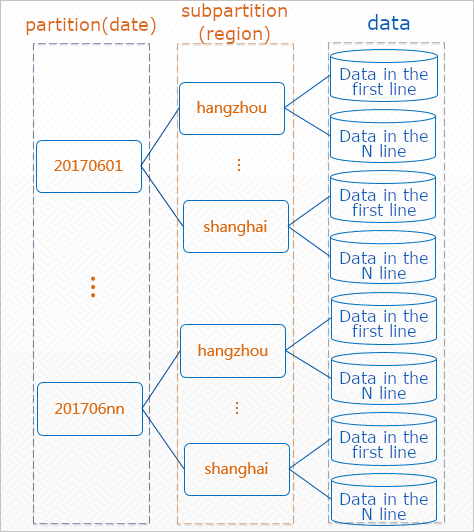
To create a foreign table in AnalyticDB for PostgreSQL that maps to the subpartition where the level-1 partition is
20170601and the level-2 partition ishangzhou, set thepartitionoption to'pt=20170601,region=hangzhou'.CREATE FOREIGN TABLE odps_src_20170601_hangzhou ( -- Name of the foreign table key string, value bigint ) SERVER odps_serv -- Name of the server OPTIONS ( project 'odps_fdw', -- Name of the MaxCompute project table 'src', -- Name of the MaxCompute table partition 'pt=20170601,region=hangzhou' -- Full path of the lowest-level partition );Note-
Specify the partition in
key=valueformat. For multi-level partitions, separate key-value pairs with commas (,) and do not include extra spaces. -
You cannot map a foreign table to a non-lowest-level partition. For example, you cannot set the option to only the level-1 partition path:
partition 'pt=20170601'. -
You must specify the full multi-level partition path. For example, you cannot set the option to only the lowest-level partition path:
partition 'region=hangzhou'.
-
-
Partitioned foreign tables
A partitioned foreign table maps to an entire partitioned MaxCompute table. Using the same two-level partitioned MaxCompute table
srcfrom the previous example, you can create a corresponding partitioned foreign table. For more information, see Defining table partitions.CREATE FOREIGN TABLE odps_src( -- Name of the foreign table key text, value bigint, pt text, -- Level-1 partition key region text -- Level-2 partition key ) SERVER odps_serv OPTIONS ( project 'odps_fdw', -- Name of the MaxCompute project table 'src' -- Name of the MaxCompute table ) PARTITION BY LIST (pt) -- Partition by the 'pt' field SUBPARTITION BY LIST (region) -- Subpartition by the 'region' field SUBPARTITION TEMPLATE ( -- Define a subpartition template SUBPARTITION hangzhou VALUES ('hangzhou'), SUBPARTITION shanghai VALUES ('shanghai') ) ( PARTITION "20170601" VALUES ('20170601'), PARTITION "20170602" VALUES ('20170602'));NoteThe definition for a partitioned foreign table in AnalyticDB for PostgreSQL differs from a partitioned table definition in MaxCompute:
-
The partition key columns must be defined after all other columns. For multi-level partitions, the definition order of the partition key columns must match the partition level order in the MaxCompute table.
-
You must specify partition key values. Use LIST partitioning.
-
Do not specify the partition option. This option is used only for lowest-level partitioned foreign tables and logically conflicts with partitioned foreign table definitions.
-
If a partition defined in the foreign table does not exist in MaxCompute, the system reports a warning when you query the table. You can then delete the non-existent subpartition as described in the "Deleting a subpartition" section.
postgres=# select count(1) from odps_tt_err;
WARNING: RequestId=202006101759108531f60b0b108613, ErrorCode=NoSuchPartition, ErrorMessage=Error: The specified partition does not exist. from:http://dt.cn-hangzhou.maxcompute.aliyun.com
CONTEXT: table=odps_tt_err_1_prt_20200621_2_prt_hangzhou, partition="pt=20200621,region=hangzhou"
WARNING: RequestId=20200610175910c231f60b0b107670, ErrorCode=NoSuchPartition, ErrorMessage=Error: The specified partition does not exist. from:http://dt.cn-hangzhou.maxcompute.aliyun.com
CONTEXT: table=odps_tt_err_1_prt_20200621_2_prt_shanghai, partition="pt=20200621,region=shanghai"
 count
-------
  4000
(1 row)
Time: 4587.069 ms
postgres=# alter table odps_tt_err drop partition "20200621";
NOTICE: dropped partition "20200621" for relation "odps_tt_err" and its children
ALTER TABLE
Time: 59.416 ms
postgres=# select count(1) from odps_tt_err;
 count
-------
  4000
(1 row)
Time: 3429.979 ms
postgres=#
-
3.4 Adding a subpartition
This example uses the odps_src partitioned foreign table.
-- Add a level-1 subpartition.
-- Level-2 subpartitions are created automatically based on the template.
ALTER TABLE odps_src ADD PARTITION "20170603" VALUES ('20170603');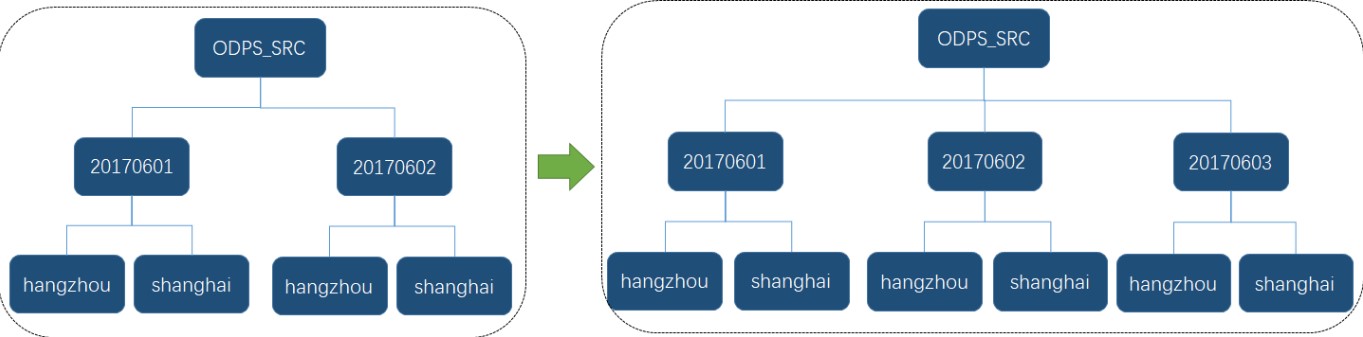
-- Add a level-2 subpartition.
ALTER TABLE odps_src ALTER PARTITION "20170603" ADD PARTITION "nanjing" VALUES ('nanjing');
3.5 Deleting a subpartition
This example uses the odps_src partitioned foreign table.
-- Delete a level-1 subpartition.
-- This also deletes its cascaded level-2 subpartitions.
ALTER TABLE odps_src DROP PARTITION "20170602";
-
Delete a level-2 subpartition
-- Delete a level-2 subpartition.
ALTER TABLE odps_src ALTER PARTITION "20170601" DROP PARTITION "hangzhou";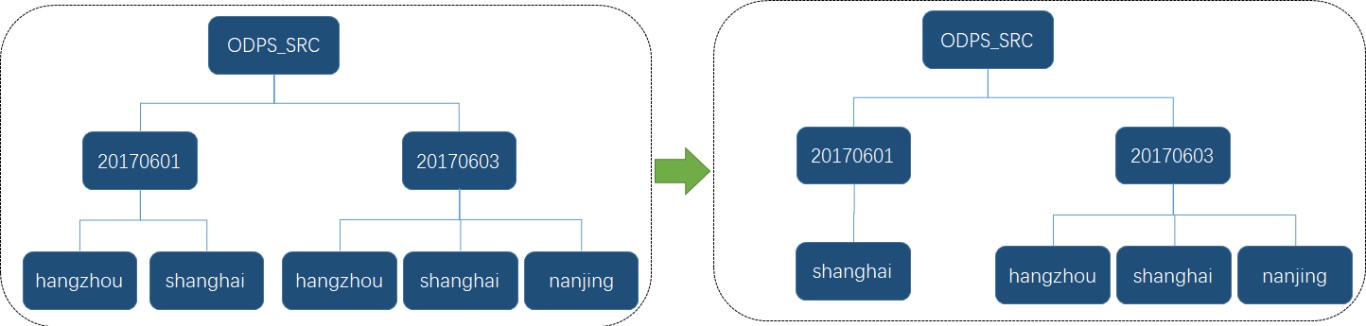
Use cases
Queries on MaxCompute foreign tables use the Foreign Scan operator in AnalyticDB for PostgreSQL. Therefore, the process is similar to querying a regular table. The following sections use TPC-H queries to illustrate common use cases.
Query a MaxCompute foreign table
TPC-H Query Q1 is a typical example of single-table aggregation and filtering. This example runs a Q1 query on the odps_lineitem MaxCompute foreign table.
-- Define the MaxCompute foreign table odps_lineitem.
CREATE FOREIGN TABLE odps_lineitem (
    l_orderkey bigint,
    l_partkey bigint,
    l_suppkey bigint,
    l_linenumber bigint,
    l_quantity double precision,
    l_extendedprice double precision,
    l_discount double precision,
    l_tax double precision,
    l_returnflag CHAR(1),
    l_linestatus CHAR(1),
    l_shipdate DATE,
    l_commitdate DATE,
    l_receiptdate DATE,
    l_shipinstruct CHAR(25),
    l_shipmode CHAR(10),
    l_comment VARCHAR(44)
) server odps_serv
    options (
        project 'odps_fdw', table 'lineitem'
    );
-- TPC-H Q1
SELECT
    l_returnflag,
    l_linestatus,
    sum(l_quantity) as sum_qty,
    sum(l_extendedprice) as sum_base_price,
    sum(l_extendedprice * (1 - l_discount)) as sum_disc_price,
    sum(l_extendedprice * (1 - l_discount) * (1 + l_tax)) as sum_charge,
    avg(l_quantity) as avg_qty,
    avg(l_extendedprice) as avg_price,
    avg(l_discount) as avg_disc,
    count(*) as count_order
FROM
    odps_lineitem
WHERE
    l_shipdate <= date '1998-12-01' - interval '88' day
GROUP BY
    l_returnflag,
    l_linestatus
ORDER BY
    l_returnflag,
    l_linestatus;
Import data from MaxCompute
To import data, perform the following steps:
-
Create a MaxCompute foreign table in AnalyticDB for PostgreSQL.
-
Run one of the following statements to import data in parallel.
-- Use INSERT INTO...SELECT
INSERT INTO <local_destination_table> SELECT * FROM <maxcompute_foreign_table>;
-- Use CREATE TABLE AS SELECT
CREATE TABLE <local_destination_table> AS SELECT * FROM <maxcompute_foreign_table>;-
Example 1: Use an
INSERTstatement to import data fromodps_lineitemto a local columnar table.
-- Create a local columnar table.
CREATE TABLE aocs_lineitem (
    l_orderkey bigint,
    l_partkey bigint,
    l_suppkey bigint,
    l_linenumber bigint,
    l_quantity double precision,
    l_extendedprice double precision,
    l_discount double precision,
    l_tax double precision,
    l_returnflag CHAR(1),
    l_linestatus CHAR(1),
    l_shipdate DATE,
    l_commitdate DATE,
    l_receiptdate DATE,
    l_shipinstruct CHAR(25),
    l_shipmode CHAR(10),
    l_comment VARCHAR(44)
) WITH (APPENDONLY=TRUE, ORIENTATION=COLUMN, COMPRESSTYPE=ZSTD, COMPRESSLEVEL=5)
DISTRIBUTED BY (l_orderkey);
-- Import data from odps_lineitem to the local columnar table.
INSERT INTO aocs_lineitem SELECT * FROM odps_lineitem;-
Example 2: Use a
CREATE TABLE ASstatement to import data fromodps_lineitemto a local heap table.
CREATE TABLE heap_lineitem AS SELECT * FROM odps_lineitem DISTRIBUTED BY (l_orderkey);Join a foreign table with a local table
This example uses TPC-H Query Q19 to join a local columnar table, aocs_lineitem, with a MaxCompute foreign table, odps_part.
-- TPC-H Q19
SELECT
    sum(l_extendedprice * (1 - l_discount)) as revenue
FROM
    aocs_lineitem, -- A local columnar table
    odps_part -- A MaxCompute foreign table
WHERE
    (
        p_partkey = l_partkey
        and p_brand = 'Brand#32'
        and p_container in ('SM CASE', 'SM BOX', 'SM PACK', 'SM PKG')
        and l_quantity >= 8 and l_quantity <= 8 + 10
        and p_size between 1 and 5
        and l_shipmode in ('AIR', 'AIR REG')
        and l_shipinstruct = 'DELIVER IN PERSON'
    )
    OR
    (
        p_partkey = l_partkey
        and p_brand = 'Brand#41'
        and p_container in ('MED BAG', 'MED BOX', 'MED PKG', 'MED PACK')
        and l_quantity >= 15 and l_quantity <= 15 + 10
        and p_size between 1 and 10
        and l_shipmode in ('AIR', 'AIR REG')
        and l_shipinstruct = 'DELIVER IN PERSON'
    )
    OR
    (
        p_partkey = l_partkey
        and p_brand = 'Brand#44'
        and p_container in ('LG CASE', 'LG BOX', 'LG PACK', 'LG PKG')
        and l_quantity >= 22 and l_quantity <= 22 + 10
        and p_size between 1 and 15
        and l_shipmode in ('AIR', 'AIR REG')
        and l_shipinstruct = 'DELIVER IN PERSON'
    );
Write data to MaxCompute
Example: Write data from the heap_lineitem local table created in Example 2 to the odps_lineitem foreign table.
INSERT INTO odps_lineitem SELECT * FROM heap_lineitem;Recommendations
-
Accessing MaxCompute foreign tables is a network-bound operation. Performance depends on local server resources and MaxCompute Tunnel's network bandwidth. We recommend the following:
-
Limit concurrent queries on foreign tables to five or fewer.
-
When joining multiple MaxCompute foreign tables, import the larger tables into local tables first. Then, join the local tables with the smaller foreign tables to improve performance.
-
-
The number of small files in MaxCompute affects query performance on foreign tables. Too many small files can degrade performance. You can run commands in MaxCompute to check for and merge them. For best results, you may need to run the merge command multiple times.
Run the following command in MaxCompute to check the number of files in a table:
DESC EXTENDED <table_name> [PARTITION (<pt_spec>)];Run the following command in MaxCompute to merge small files:
ALTER TABLE <table_name> [PARTITION (<pt_spec>)] MERGE SMALLFILES;Parameters
-
table_name: Required. The name of the table that you want to view.
-
pt_spec: Optional. The partition of the partitioned table that you want to view. Format:
(partition_col1 = partition_col_value1, partition_col2 = partition_col_value2, ...).
-
For more information, see Merge small files.
Data type mappings
The following table describes the mappings between MaxCompute and AnalyticDB for PostgreSQL data types. Define column types in your foreign table according to these mappings.
The STRUCT, MAP, and ARRAY data types in MaxCompute are not currently supported.
|
MaxCompute type |
AnalyticDB for PostgreSQL type |
|
BOOLEAN |
BOOL |
|
TINYINT |
INT2 |
|
SMALLINT |
INT2 |
|
INTEGER |
INT4 |
|
BIGINT |
INT8 |
|
FLOAT |
FLOAT4 |
|
DOUBLE |
FLOAT8 |
|
DECIMAL |
NUMERIC |
|
BINARY |
BYTEA |
|
VARCHAR(n) |
VARCHAR(n) |
|
CHAR(n) |
CHAR(n) |
|
STRING |
TEXT |
|
DATE |
DATE |
|
DATETIME |
TIMESTAMP |
|
TIMESTAMP |
TIMESTAMP |
|
Array<SMALLINT | INT | BIGINT | BOOLEAN | FLOAT | DOUBLE | TEXT | VARCHAR | TIMESTAMP> (The ARRAY data type is not supported when you write data to a MaxCompute foreign table.) |
INT2[], INT4[], INT8[], BOOLEAN[], FLOAT4[], FLOAT8[], TEXT[], VARCHAR[], TIMESTAMP[] |