Use partitioned OSS foreign tables
AnalyticDB for PostgreSQL supports partitioned OSS foreign tables (OSS FDW). When a partition column is included in the WHERE clause of a query, this feature can significantly reduce the amount of data scanned from OSS, improving query performance.
Usage notes
The partitioned OSS foreign table feature requires that objects in OSS follow a specific directory structure. The directory path must be in the format oss://bucket/partcol1=partval1/partcol2=partval2/, where partcol1 and partcol2 are partition columns, and partval1 and partval2 are the corresponding values for the partition.
For example, if a partitioned table is partitioned by the year column and subpartitioned by the month column, the objects for a specific partition, such as year=2022 and month=07, must be stored in the oss://bucket/year=2022/month=07/ directory.
Create an OSS server, OSS user mapping, and OSS FDW
Before you use OSS FDW, you must create an OSS server, OSS user mapping, and OSS FDW in advance.
-
For information about how to create an OSS server, see Create an OSS server.
-
For information about how to create an OSS user mapping, see Create an OSS user mapping.
-
For information about how to create an OSS FDW, see Create an OSS foreign table.
Create a partitioned table
You can use the CREATE FOREIGN TABLE statement to create a partitioned OSS foreign table. The syntax is the same as for creating a standard partitioned table. For more information, see Defining partitioned tables.
For more information about the CREATE FOREIGN TABLE syntax, see Create an OSS foreign table.
OSS foreign tables currently support only list partitioning.
-
Create a partitioned table named
ossfdw_parttablewith a partition template:CREATE FOREIGN TABLE ossfdw_parttable( key text, value bigint, pt text, -- Partition key region text -- Subpartition key ) SERVER oss_serv OPTIONS (dir 'PartationDataDirInOss/', format 'jsonline') PARTITION BY LIST (pt) -- Partition the table by the pt column. SUBPARTITION BY LIST (region) -- Subpartition the table by the region column. SUBPARTITION TEMPLATE ( -- Subpartition template SUBPARTITION hangzhou VALUES ('hangzhou'), SUBPARTITION shanghai VALUES ('shanghai') ) ( PARTITION "20170601" VALUES ('20170601'), PARTITION "20170602" VALUES ('20170602')); -
Create a partitioned table named
ossfdw_parttable1without a partition template:CREATE FOREIGN TABLE ossfdw_parttable1( key text, value bigint, pt text, -- Partition key region text -- Subpartition key ) SERVER oss_serv OPTIONS (dir 'PartationDataDirInOss/', format 'jsonline') PARTITION BY LIST (pt) -- Partition the table by the pt column. SUBPARTITION BY LIST (region) -- Subpartition the table by the region column. ( -- The following two partitions can contain different subpartitions. VALUES('20181218') ( VALUES('hangzhou'), VALUES('shanghai') ), VALUES('20181219') ( VALUES('nantong'), VALUES('anhui') ) );
Modify a partitioned OSS foreign table
Use the ALTER TABLE statement to modify a partitioned OSS foreign table. AnalyticDB for PostgreSQL supports adding and dropping partitions on a partitioned OSS foreign table.
Add a partition
-
Add a partition
-
To add a partition to the
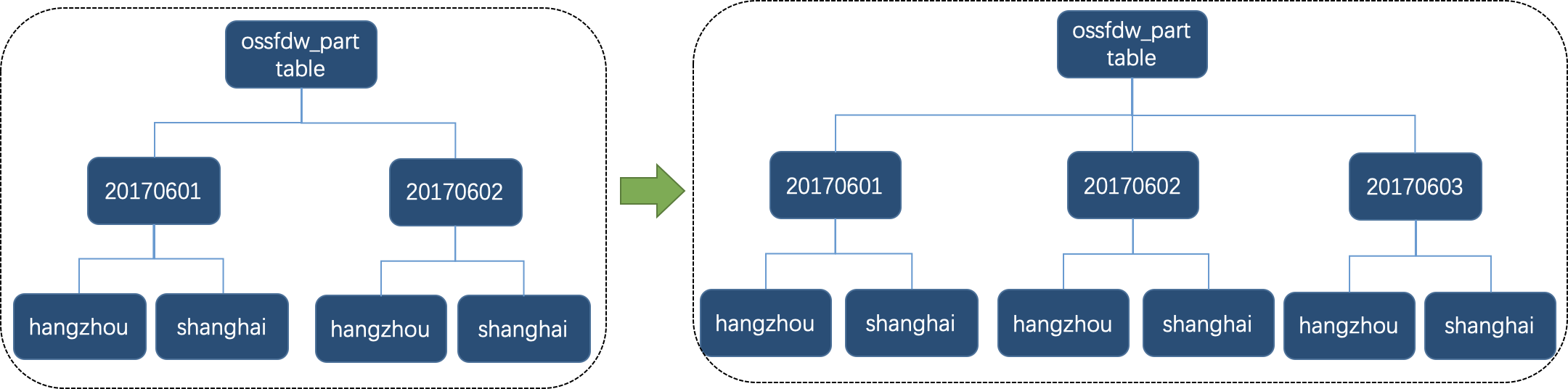
ossfdw_parttabletable, run the following statement. Because this table uses a partition template, the system automatically creates the corresponding subpartitions.ALTER TABLE ossfdw_parttable ADD PARTITION VALUES ('20170603');The schema is updated as follows:
-
To add a partition to the
ossfdw_parttable1table, run the following statement. Because this table does not use a partition template, you must explicitly specify the subpartitions.ALTER TABLE ossfdw_parttable1 ADD PARTITION VALUES ('20181220') ( VALUES('hefei'), VALUES('guangzhou') );
-
-
Add a subpartition
To add a subpartition to the
20170603partition of theossfdw_parttabletable, run the following statement:ALTER TABLE ossfdw_parttable ALTER PARTITION FOR ('20170603') ADD PARTITION VALUES('nanjing');The schema is updated as follows:

Drop a partition
-
To drop a partition, run the following statement:
ALTER TABLE ossfdw_parttable DROP PARTITION FOR ('20170601'); -
To drop a subpartition, run the following statement:
ALTER TABLE ossfdw_parttable ALTER PARTITION FOR ('20170602') DROP PARTITION FOR ('hangzhou');
Drop a partitioned table
Use the DROP FOREIGN TABLE statement to drop a partitioned table.
Example:
DROP FOREIGN TABLE ossfdw_parttable;Access SLS data with an OSS foreign table
Accessing data shipped from Log Service (SLS) is a common use case for partitioned OSS foreign tables. If SLS writes data to OSS using a compatible directory structure, you can define a partitioned table to query that data.
For more information about Log Service (SLS), see What is Log Service.
-
Create an OSS shipping task (old version).
In the OSS LogShipper panel, when you configure the shipping task, we recommend that you set Partition format to
date=%Y%m/userlogin. An example of the generated OSS directory structure is shown below:oss://testBucketName/adbpgossfdw ├── date=202002 │ ├── userlogin_158561762910654****_647504382.csv │ └── userlogin_158561784923220****_647507440.csv └── date=202003 └── userlogin_158561794424704****_647508762.csv -
Create a partitioned OSS foreign table with a schema that matches the log data from SLS:
CREATE FOREIGN TABLE userlogin ( uid integer, name character varying, source integer, logindate timestamp without time zone, "date" int ) SERVER oss_serv OPTIONS ( dir 'adbpgossfdw/', format 'text' ) PARTITION BY LIST ("date") ( VALUES ('202002'), VALUES ('202003') ) -
View the execution plan for a query on the log data.
For example, to analyze the number of user logins in February 2020, run the following statement:
EXPLAIN SELECT uid, count(uid) FROM userlogin WHERE "date" = 202002 GROUP BY uid;The following output is returned:
 QUERY PLAN
-------------------------------------------------------------------------------------------------------------------------------------------------------------------
 Gather Motion 3:1 (slice2; segments: 3) (cost=5135.10..5145.10 rows=1000 width=12)
   -> HashAggregate (cost=5135.10..5145.10 rows=334 width=12)
         Group Key: userlogin_1_prt_1.uid
         -> Redistribute Motion 3:3 (slice1; segments: 3) (cost=5100.10..5120.10 rows=334 width=12)
               Hash Key: userlogin_1_prt_1.uid
               -> HashAggregate (cost=5100.10..5100.10 rows=334 width=12)
                     Group Key: userlogin_1_prt_1.uid
                     ->t; Append (cost=0.00..100.10 rows=333334 width=4)
                           -> Foreign Scan on userlogin_1_prt_1 (cost=0.00..100.10 rows=333334 width=4)
                                 Filter: (date = 202002)
                                 Oss Url: endpoint=oss-cn-hangzhou-zmf-internal.aliyuncs.com bucket=adbpg-regress dir=adbpgossfdw/date=202002/ filetype=plain|text
                                 Oss Parallel (Max 4) Get: total 0 file(s) with 0 bytes byte(s).
 Optimizer: Postgres query optimizer
(13 rows)
The execution plan shows that the query only scans objects from the date=202002 directory in OSS. Scanning less data significantly improves query performance.