Use a dynamic inventory
You can use an Alibaba Cloud dynamic inventory to retrieve host information that matches specific filter conditions. Like other inventories, the Alibaba Cloud dynamic inventory can be used in two ways: specified explicitly or by default.
Prepare the environment
The Alibaba Cloud dynamic inventory is being integrated into the official Ansible repository. To use it, you must first install the ansible_alicloud_module_utils dependency. This component enables the inventory to make OpenAPI calls.
The installation process automatically installs Ansible and its dependencies, such as footmark and the Alibaba Cloud Python software development kit (SDK).
Run the following command to install the
ansible_alicloud_module_utilsdependency.sudo pip install ansible_alicloud_module_utilsAfter the installation is successful, run the following command to check the footmark version.
pip show footmarkIf the footmark version is earlier than 1.9.0, run the following command to upgrade it.
sudo pip install footmark --upgrade
Specify explicitly
To explicitly specify the inventory, use the -i parameter for the dynamic inventory file when you run an Ansible command.
Complete the following steps to specify and configure the Alibaba Cloud inventory:
Run the following commands to download the latest version of the Alibaba Cloud dynamic inventory file and grant it executable permissions.
wget https://raw.githubusercontent.com/alibaba/ansible-provider/master/contrib/inventory/alicloud.py
chmod +x alicloud.py
Download the alicloud.ini configuration file for the Alibaba Cloud dynamic inventory. Place it in the same folder as the alicloud.py file.
wget https://raw.githubusercontent.com/alibaba/ansible-provider/master/contrib/inventory/alicloud.iniConfigure your AccessKey pair.
Configure the AccessKey pair in the alicloud.ini file.
alicloud_access_key = Abcd1234
alicloud_secret_key = Abcd2345
Alternatively, configure the AccessKey pair using environment variables.
export ALICLOUD_ACCESS_KEY=Abcd1234
export ALICLOUD_SECRET_KEY=Abcd2345
Execute the verification for the inventory file.
./alicloud.py --listAfter the configuration is authenticated, inventory information for all regions is returned. If you want to retrieve information for only specific regions, edit the alicloud.ini file and specify the destination regions. You can also use
instance_filtersin the alicloud.ini file to filter host information.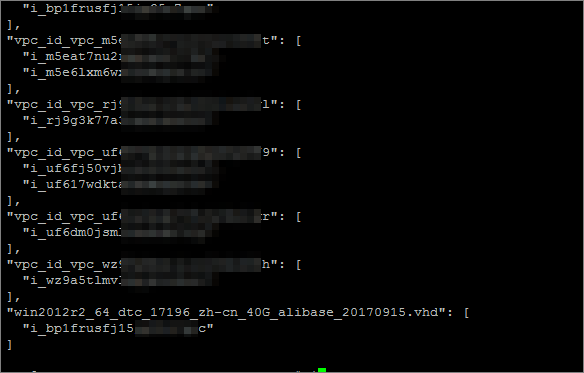
Specify by default
Instead of explicitly specifying the Alibaba Cloud inventory file, you can configure the dynamic inventory as the default inventory. After you install Ansible, the default Ansible inventory is /etc/ansible/hosts.
Complete the following steps to configure the Alibaba Cloud dynamic inventory as the default inventory:
Download the latest version of the Alibaba Cloud dynamic inventory file, grant it executable permissions, and then use it to replace the default inventory.
wget https://raw.githubusercontent.com/alibaba/ansible-provider/master/contrib/inventory/alicloud.py
chmod +x alicloud.py
sudo cp alicloud.py /etc/ansible/hosts
Download the configuration file for the Alibaba Cloud dynamic inventory and move it to the /etc/ansible folder, where the default inventory is located.
wget https://raw.githubusercontent.com/alibaba/ansible-provider/master/contrib/inventory/alicloud.ini
sudo cp alicloud.ini /etc/ansible
Run the following command to verify.
ansible alicloud -m ping
Alibaba Cloud inventory groups
The Alibaba Cloud dynamic inventory provides a mapping from multiple groups to instances:
Global
All instances belong to the
alicloudgroup. For example:"alicloud": { "children": [ "i_bp1i1aitghkkq*******", "i_bp171m264ryt9*******" ] },Instance ID
The ID of an ECS instance. For example:
"i-bp171m264ryt9******": [
    "i_bp171m264ryt9******"
],
"i-bp1i1aitghkkq******": [
    "i_bp1i1aitghkkq*****"
],
Region
A group that consists of all instances that belong to an Alibaba Cloud region. For example:
"cn-hangzhou": [
  "i_bp1i1aitghkkq*******",
  "i_bp171m264ryt9*******"
],
Zone
A group that consists of all instances that belong to the same zone. For example:
"cn-hangzhou-g": [
  "i_bp1i1aitghkkq*******",
  "i_bp171m264ryt9c******"
],
Security group
An instance can belong to one or more security groups. The prefix for each group is
security_group_. For example:"security_group_sg_bp1cp0behw74aa******": [ "i_bp1i1aitghkkqp******" ], "security_group_sg_bp1dtemf7bv5******": [ "i_bp171m264ryt9******" ],Tag
Each instance has multiple key-value pairs called tags. Each key-value pair forms a group. The group name is created from the tag by converting special characters to underscores, using the format
tag_KEY_VALUE. For example:"tag_acsversion_1_0": [ "i_t4nd1ehd9umu5******", "i_t4n6v8wv6jue5******" ], "tag_env_dev": [ "i_bp171m264ryt9******" ],
Other properties are also used to group hosts, such as VPC ID, VSwitch ID, and image ID.
Scenarios
After you confirm that the Alibaba Cloud inventory is running, you can use alicloud.py as an inventory in specific Ansible scenarios.
The Alibaba Cloud dynamic inventory file caches the results of each execution to avoid repeated API calls. You can configure this cache by editing the cache_path parameter in the alicloud.ini file. To explicitly clear the cache, add the --refresh-cache option when you run the inventory file.
./alicloud.py --refresh-cacheThe following example shows a scenario for the Alibaba Cloud inventory.
ansible -i alicloud.py alicloud -m ping
47.93.xx.xx | SUCCESS => {
    "changed": false,
    "ping": "pong"
}
47.93.xx.xx | SUCCESS => {
    "changed": false,
    "ping": "pong"
}
If you encounter the following problem during runtime:
47.93.xx.xx| UNREACHABLE! => {
    "changed": false,
    "msg": "Failed to connect to the host via ssh: Permission denied (publickey,gssapi-keyex,gssapi-with-mic,password).\r\n",
    "unreachable": true
}
47.93.xx.xx | UNREACHABLE! => {
    "changed": false,
    "msg": "Failed to connect to the host via ssh: Permission denied (publickey,gssapi-keyex,gssapi-with-mic,password).\r\n",
    "unreachable": true
}
You must specify the username and password of the host instance at runtime:
ansible -i alicloud.py alicloud -m ping -u root -k
SSH password:

47.93.xx.xx | SUCCESS => {
    "changed": false,
    "ping": "pong"
}
47.93.xx.xx | SUCCESS => {
    "changed": false,
    "ping": "pong"