MCP Gateway Management
MCP Gateway lets you create and manage MCP (Model Context Protocol) services. MCP is an open-source protocol that standardizes how applications provide context to Large Language Models. It acts as a "USB-C interface" for AI applications, allowing models to flexibly and securely connect to various data sources and tools through SSE or Streamable HTTP.
How it works
MCP service management enables RESTful API migration to MCP services, SSE (Server-Sent Events) and Streamable HTTP access, and consumer identity-based authentication for enterprise API governance.
Direct proxy mode forwards requests to services that natively support MCP. It enables efficient streaming and context preservation for high concurrency and long-connection scenarios such as AI inference and multi-model collaboration.
MCP integrates with Nacos Registry through the MCP Router for service registration, discovery, and automatic protocol conversion. Existing HTTP services can upgrade to MCP with zero modification. Combined with Higress AI gateway, this enables dynamic administration and intelligent routing.
Create an MCP service
-
On the Instances page of the AI Gateway console, select the region where your instance is located.
-
Click on the instance ID, then select MCP Management from the left-side navigation pane.
-
Click Create MCP Service. AI Gateway provides the following two service protocols to create MCP services:
-
If the backend is an MCP Server, select the MCP Service Direct Proxy.
-
If the backend is an HTTP Server, select the HTTP to MCP.
MCP Service Direct Proxy
Configure the MCP service protocol:
-
Backend Services
-
Select a Service Name and set Terms of Service to MCP.
-
Select an MCP Transport: SSE or Streamable HTTP.
-
Enter the backend MCP server path. For example, if the endpoint is
xxx.com/sse, enter/sse. If it isxxx.com/test/sse, enter/test/sse.
-
-
MCP Access Point
-
Select one or more domain names for accessing the MCP service.
-
The MCP endpoint path is: /mcp-servers/{service name}/{backend path}. After creation, view the endpoint address in the Step 1. Generate URL section of the basic information page of the current MCP service.
-
After creation, a direct proxy identifier appears on the MCP service card.
HTTP to MCP
Configure the HTTP service protocol:
-
Backend Services
-
Select a Service Name and set Terms of Service to HTTP. If no service exists, create one. Use FC or DNS services for testing.
-
Enter a description (required). This describes the tool's function to improve API comprehensibility and AI processing accuracy.
-
-
MCP Access Point
-
Select one or more domain names for accessing the MCP service.
-
The SSE endpoint path is: /mcp-servers/{service name}/sse.
-
The Streamable HTTP endpoint path is: /mcp-servers/{service name}.
-
After creation, a direct proxy or HTTP to MCP identifier appears on the MCP service card.
Add tools to MCP services
After creating the service, add tools:
-
Click the target service card, and then click Add Tool.
-
MCP services support two methods to add tools:
Swagger File (recommended)
-
Import Swagger: Upload an OpenAPI file from your local computer or paste the API definition into the edit box, and then click Generate Now.
-
Confirm the update: Review and modify the generated MCP tool description file.
-
(Optional) Enable backend service authentication. Supported methods:
Parameter
Description
Basic
Username and password are base64-encoded in username:password format and sent in the Authorization header.
Bearer
The client obtains a token (typically JWT) from the login endpoint and includes it in the Authorization header of subsequent requests. Tokens are temporary with configurable expiration.
API Key
The server assigns a unique key to the client. The client includes this key in the header or query parameter of each request.
Custom YAML
-
You can manually create MCP tools through custom YAML. For more information, see HTTP to MCP configuration field reference.
-
Click YAML Example. You can modify the generated YAML example.
-
(Optional) Enable backend service authentication. Supported methods:
Parameter
Description
Basic
Username and password are base64-encoded in username:password format and sent in the Authorization header.
Bearer
The client obtains a token (typically JWT) from the login endpoint and includes it in the Authorization header of subsequent requests. Tokens are temporary with configurable expiration.
API Key
The server assigns a unique key to the client. The client includes this key in the header or query parameter of each request.
-
-
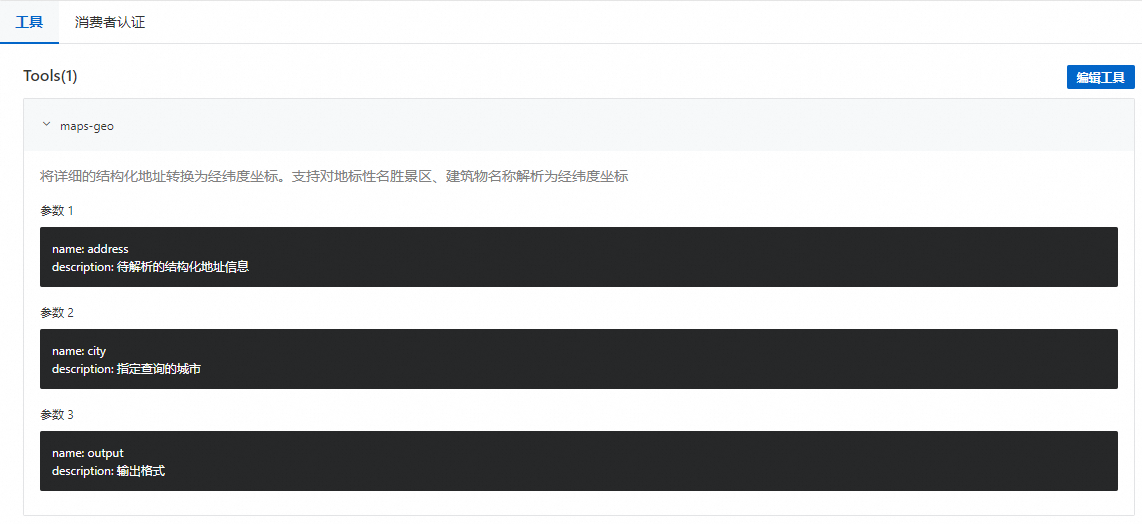
Click Confirm. View the tool list and descriptions on the Tools tab.
-