Tool refinement reranks the tool list and optionally rewrites the user query before the request reaches a large language model (LLM), improving response time and selection accuracy while reducing token costs in large-toolset scenarios.
Use cases
-
Large-scale toolset management: When you build a complex agent with tens or hundreds of tools, you must ensure the model can select tools efficiently and accurately.
-
Intent recognition in multi-turn conversations: In an ongoing conversation, the user's core intent may be spread across the dialogue history. Relying only on the latest input to match tools can lead to inaccurate selections.
-
Optimization under token limits: When the combined length of all tool names and descriptions (excluding parameters) exceeds the input token limit of the rerank model, you need an effective filtering or sorting strategy to ensure the feature works correctly.
How it works
Tool refinement executes before an API request reaches the backend LLM service:
-
Request reception: AI Gateway receives an API request that contains a query and the original tool list.
-
Query rewrite (optional): If enabled, this module analyzes the conversation context to optimize and rewrite the original query. It generates a more specific query to improve subsequent tool matching accuracy.
-
Tool rerank: This module receives the query (which may have been rewritten) and the complete tool list, and then uses a rerank model to calculate a relevance score between the query and each tool.
-
Tool filtering: Based on a predefined filtering strategy, such as Top-N or Top-K, this step selects an optimal subset from the reranked tool list. This step discards tools with a relevance score below a specified threshold.
-
Request forwarding: AI Gateway replaces the original tool list in the request with the filtered and refined tool list, and then forwards the request to the backend large language model (LLM).
This strategy applies only to Function Calling requests where the tool information is in the tools field of the request body.
Performance
On the Salesforce open-source dataset, evaluations with toolsets of 50, 100, 200, 300, 400, and 500 tools show:
-
Improved accuracy: After query rewrite and tool rerank, tool and parameter selection accuracy increases by up to 6%.
-
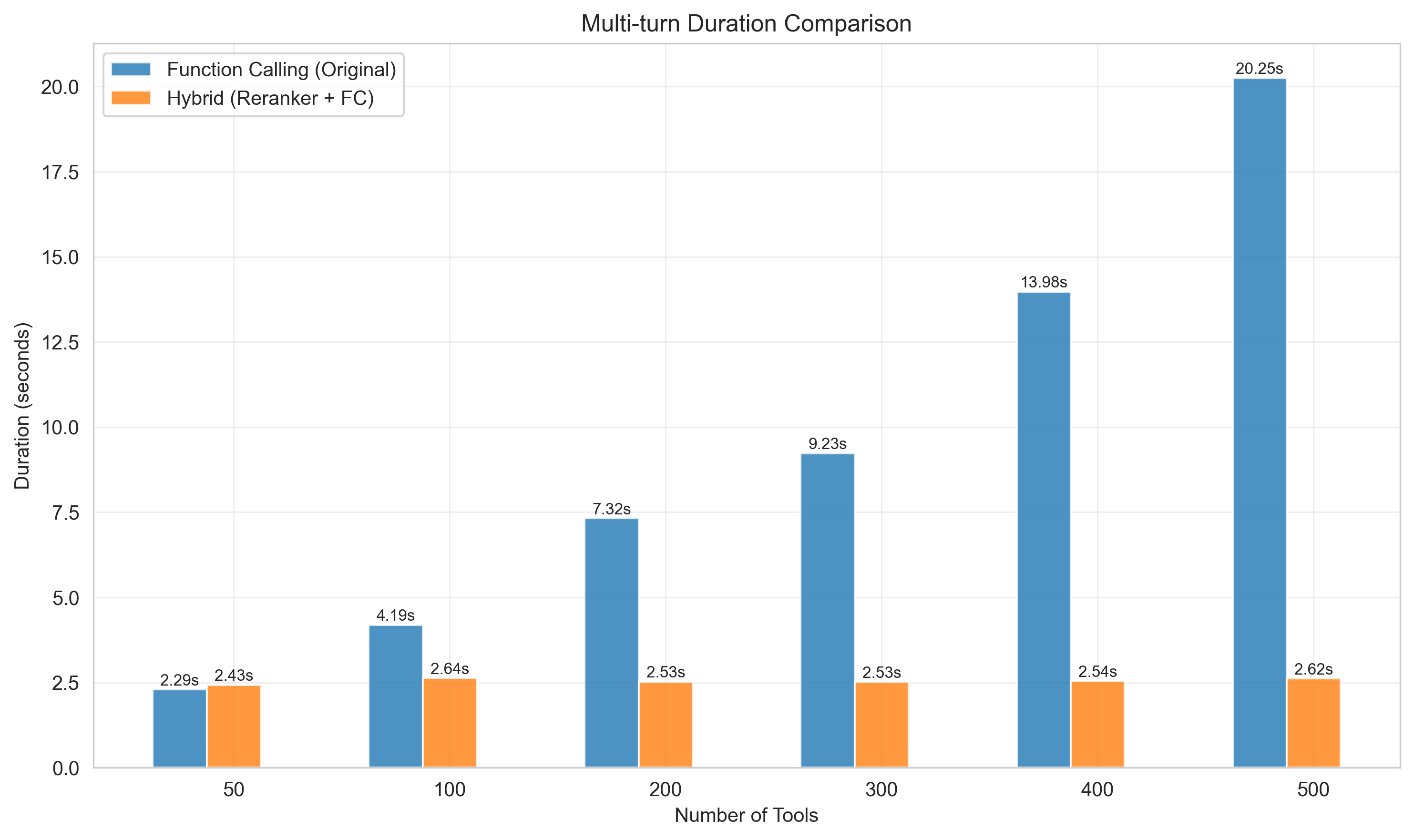
Improved response time: When the toolset size exceeds 50, the response time (RT) decreases significantly. In a test scenario with 500 tools, response time is reduced by up to 7x.
-
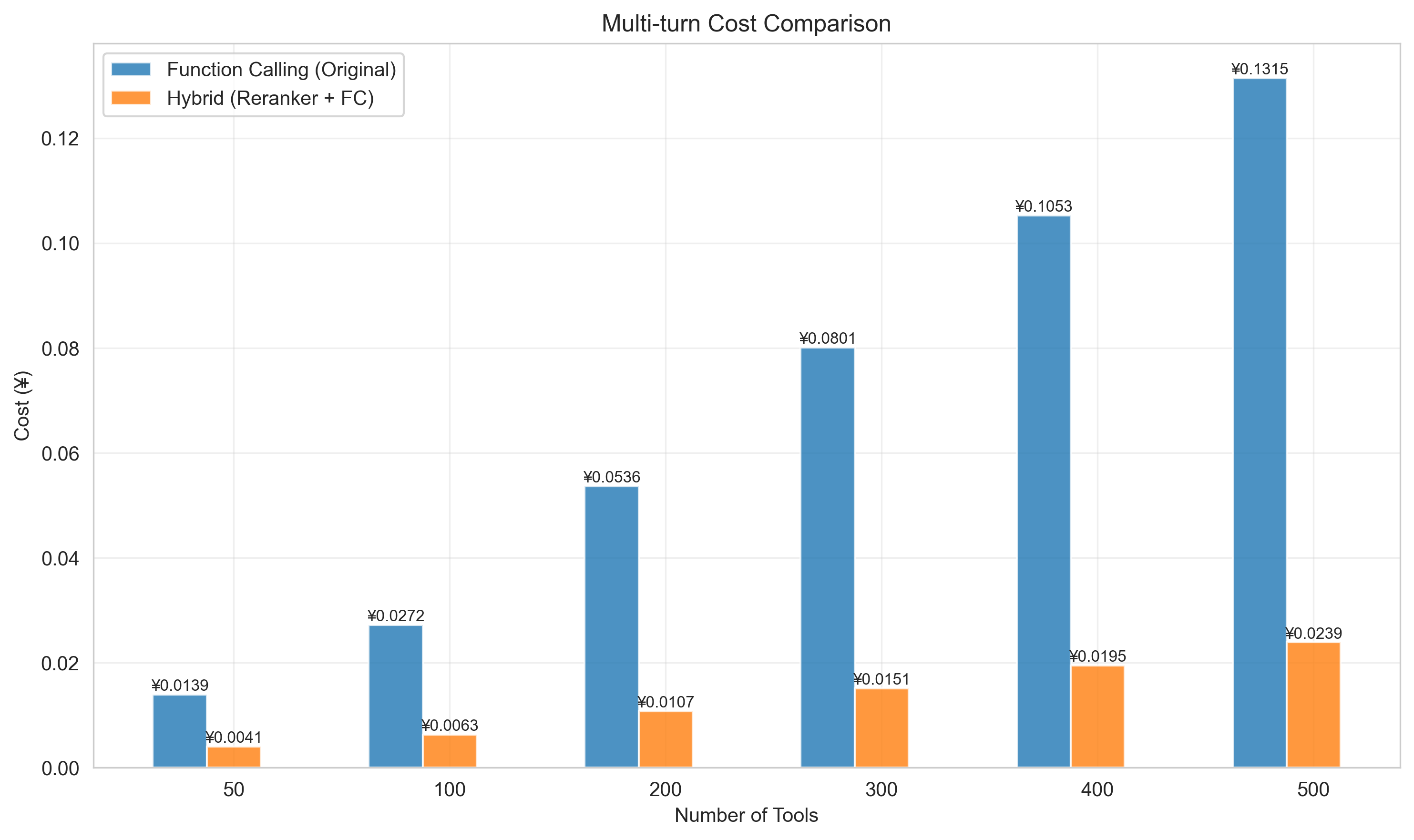
Lower cost: Token consumption, and therefore cost, can be reduced by 4 to 6 times.
Models used in the evaluation:
-
Large language model:
qwen3-235b-a22b-instruct-2507 -
Rerank model:
gte-rerank-v2 -
Query rewrite model:
qwen3-30b-a3b-instruct-2507
Evaluation results
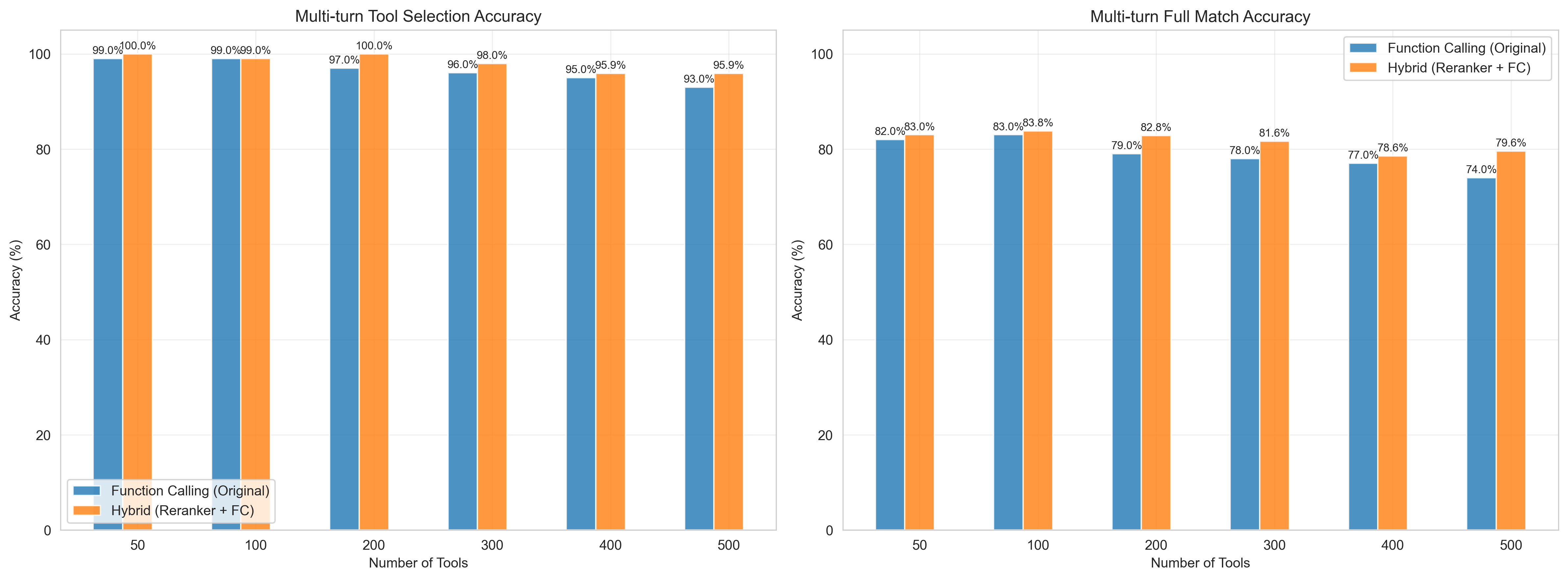
-
The blue bars represent direct Function Calling by the model.
-
The orange bars represent using tool refinement, which includes query rewrite, rerank, and Function Calling.
-
The x-axis represents the number of tools, and the y-axis represents the accuracy rate (%).
-
The left chart shows tool selection accuracy. The right chart shows the combined accuracy of tool selection and parameter selection.
-
The blue bars represent direct Function Calling by the model.
-
The orange bars represent using tool refinement, which includes query rewrite, rerank, and Function Calling.
-
The x-axis represents the number of tools, and the y-axis represents the latency per call.
-
As the number of tools increases, the tool refinement solution shows almost no increase in latency, while the latency of direct Function Calling with an LLM increases linearly.
-
The blue bars represent direct Function Calling by the model.
-
The orange bars represent using tool refinement, which includes query rewrite, rerank, and Function Calling.
-
The x-axis represents the number of tools, and the y-axis represents the total cost per tool call, calculated based on standard token billing in Alibaba Cloud Model Studio.
-
As the number of tools increases, the tool refinement solution does not cause a significant increase in token costs. It provides substantial cost savings compared to direct Function Calling with a large language model.
Procedure
-
Go to the instance page in the AI Gateway console. In the top menu bar, select the region of your target instance, and then click the target instance ID.
-
In the left-side navigation pane, choose Model API, and then click the target API Name to go to the API Details page.
-
Click Policies and Plug-ins, enable the Featured tools switch, and configure the settings. For details, see the parameter descriptions below.
-
Confirm the configuration and click Save.
Parameters
Global configuration
|
Parameter |
Description |
|
Enable tool refinement |
The master switch for tool refinement. When enabled, the related configurations take effect. When disabled, the gateway passes the original request through without filtering. |
|
Trigger condition |
The minimum number of tools required to activate tool refinement. The feature triggers only when the tool count in the request meets or exceeds this value. |
Tool rerank
Scores each tool's relevance to the query and filters the list before the request reaches the LLM, improving response time and selection accuracy.
|
Parameter |
Description |
|
Rerank model service |
|
|
Filtering method |
|
|
Relevance score threshold |
The value ranges from 0.0 to 1.0. The gateway discards tools with a rerank score below this threshold, even if they are within the Top-K or Top-N range. A value of 0 disables this feature. |
|
Failure handling strategy |
Specifies the action to take if the rerank model call fails: skip reranking and use the original tools, or interrupt the request and report an error. |
Query rewrite
For multi-turn conversations, this module summarizes dialogue history and refines the user query before tool rerank to improve matching accuracy. We recommend enabling it for multi-turn scenarios.
|
Parameter |
Description |
|
Enable query rewrite |
Enables or disables query rewrite. |
|
Rewrite model service |
|
|
Rewrite prompt |
You can use a built-in, optimized prompt template or create a custom prompt. |
|
Max output tokens |
Controls the maximum length of the rewritten query. |
|
Trigger condition |
Enables query rewrite when the number of conversation turns exceeds this value. Set to 0 to disable this condition. |
|
Context selection |
Defines the scope of the context to be used for the rewrite. |
|
Failure handling strategy |
Specifies the action to take if the rewrite model call fails:
|
FAQ
-
Q1: Why is tool rerank more accurate than vector retrieval?
The core difference lies in how they process information, which directly determines the accuracy of each approach.
Traditional vector retrieval (less accurate): This method typically converts the user query and tool descriptions into mathematical vectors (embeddings) separately, and then calculates the similarity between these vectors to rank them. Limitation: This process is "isolated," meaning there is no deep interaction between the query and the tools. This is like judging the relevance of two books by comparing their summaries. This process loses many details, contextual nuances, and complex logical relationships, leading to an incomplete understanding of the user's true intent.
AI Gateway's rerank model with a cross-encoder (more accurate): The rerank model uses a more advanced architecture. Instead of processing them separately, it pairs the user query and a tool description together, feeding them as a single input to the model for analysis. Advantage: This approach enables "deep interaction." The model can directly and meticulously analyze the relationship between every word in the query and every word in the tool description. This is like reading two books side-by-side, page-by-page, which allows it to capture complex intent, negations, and specific conditions. Result: Therefore, the rerank model's evaluation criterion shifts from "are they semantically similar?" to "are they functionally a true match?" This allows the model to more accurately understand the user's task requirements and select the most appropriate tools.
-
Q2: Should I enable query rewrite?
For business scenarios that involve multi-turn conversations, we strongly recommend enabling this feature.
Benefit: Query rewrite can transform ambiguous, context-dependent user questions into standalone queries with complete information. This greatly improves the accuracy of the subsequent tool rerank and the final tool selection by the LLM.
Drawback: It introduces an additional model call, which slightly increases the response time. However, for multi-turn conversation scenarios, the accuracy gain typically outweighs the slight latency increase. If your application involves only single-turn conversations, you can disable this feature.
-
Q3: How to troubleshoot unexpected tool selection results?
You can troubleshoot and optimize in the following ways:
Optimize tool descriptions: Ensure that the name and description of each tool are clear, accurate, and distinct. Both the rerank model and the LLM heavily rely on this information to understand each tool's function.
Customize the query rewrite prompt: If the built-in rewrite logic does not fully meet your business needs, try using a custom prompt. You can design a rewrite strategy tailored to your scenario to guide the rewrite model in generating more precise queries.
Adjust filtering parameters: Tune the Top-N/Top-K values based on your results. If you find that the correct tools are often filtered out, you can increase the values; if irrelevant tools are consistently included, you can lower them.
Adjust the relevance score threshold: Increasing the relevance score threshold, for example to 0.3, can filter out tools with low relevance. This further improves the tool list's signal-to-noise ratio.