Blue-green deployment, A/B testing, and canary release shift traffic to a new service version with different tradeoffs in blast radius, resource overhead, and release speed.
| Strategy | Traffic shift | Resource overhead | Blast radius | Rollback speed |
|---|---|---|---|---|
| Blue-green deployment | All at once | High (2x environments) | Full | Instant |
| A/B testing | Rule-based (headers, cookies) | Medium-high | Limited to matched requests | Fast |
| Canary release | Weight-based (gradual) | Low | Proportional to weight | Fast |
Blue-green deployment
Blue-green deployment runs two identical environments: one active (blue) and one on hot standby (green). To release, deploy to the standby environment and switch all traffic at once.
How it works
-
Deploy v1 and v2 with the same instance types and quantities.
-
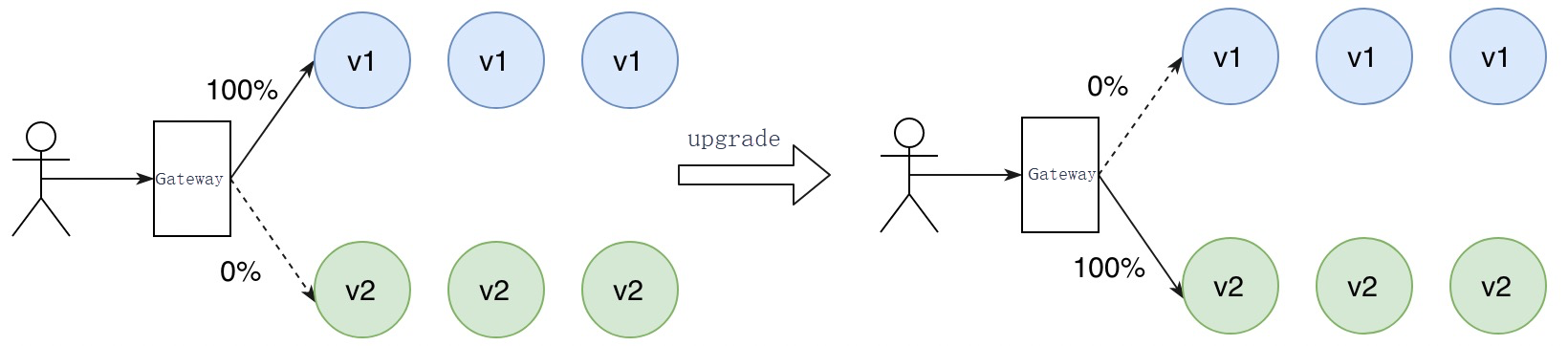
v1 handles all production traffic. v2 waits on hot standby.
-
Switch traffic to v2. v1 becomes the standby.
-
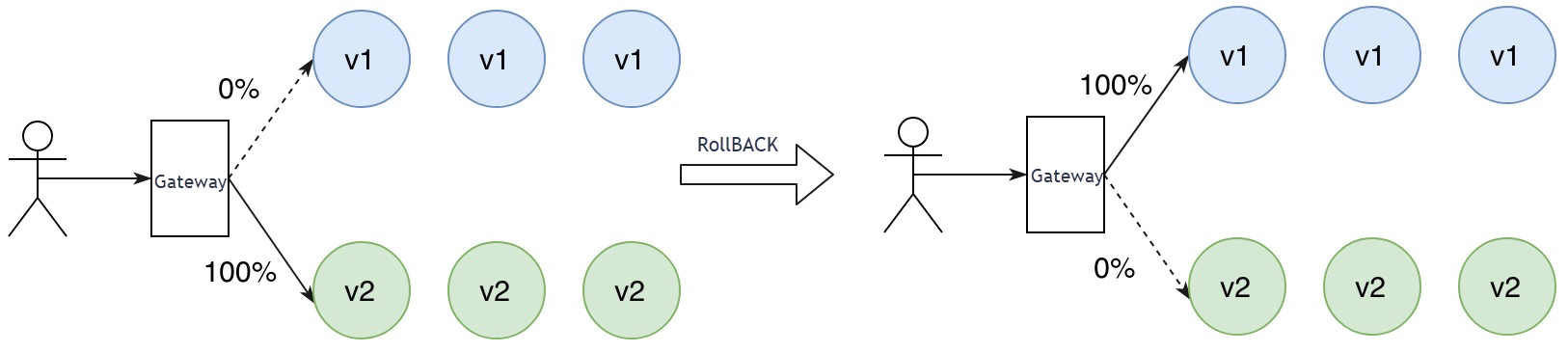
If v2 has issues, switch traffic back to v1 immediately.
-
After v2 is verified stable, decommission v1.
v1 handles traffic while v2 is on hot standby. To upgrade, switch traffic to v2.
If v2 has issues, roll back by switching traffic to v1.
When to use blue-green deployment
-
Zero-downtime upgrades with instant rollback are required.
-
You can run two full production environments simultaneously.
-
An all-or-nothing traffic switch is acceptable.
Pros and cons
| Details | |
|---|---|
| Pros | Simple to implement and maintain. |
| Near-instantaneous traffic switch. | |
| Instant rollback: switch traffic back to v1 if v2 fails. | |
| Cons | Requires 2x resources: two identical environments run in parallel. |
| High blast radius: if v2 has a defect, all traffic is affected until you roll back. |
A/B testing
A/B testing routes specific requests to the new version based on HTTP headers, cookies, or other request metadata. All other requests stay on the current version.
How it works
-
Deploy v1 and v2 side by side.
-
Define routing rules based on HTTP headers, cookies, or other request metadata.
-
Only matching requests reach v2. All other requests stay on v1.
-
Monitor the success rate and response time (RT) of both versions.
-
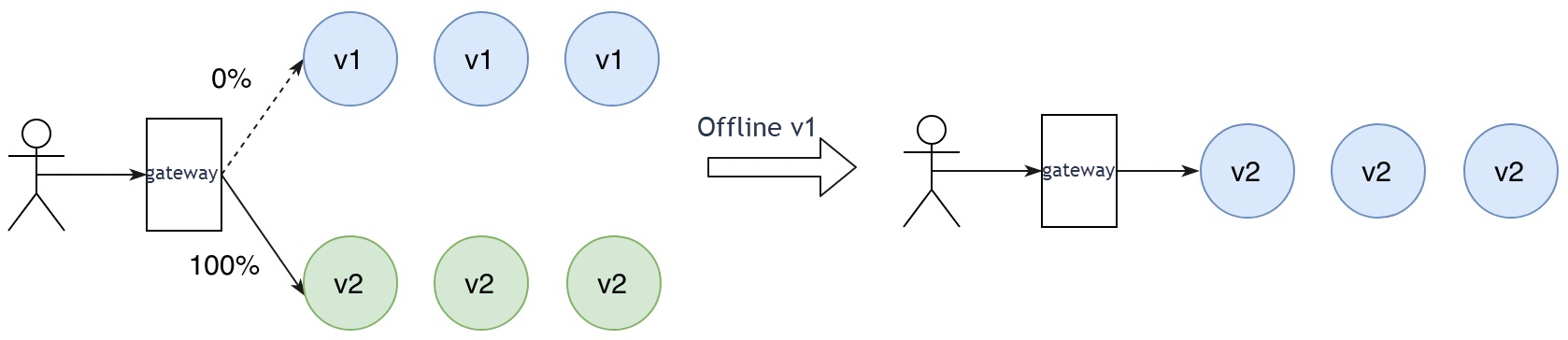
If v2 meets expectations, switch all traffic to v2 and phase out v1.
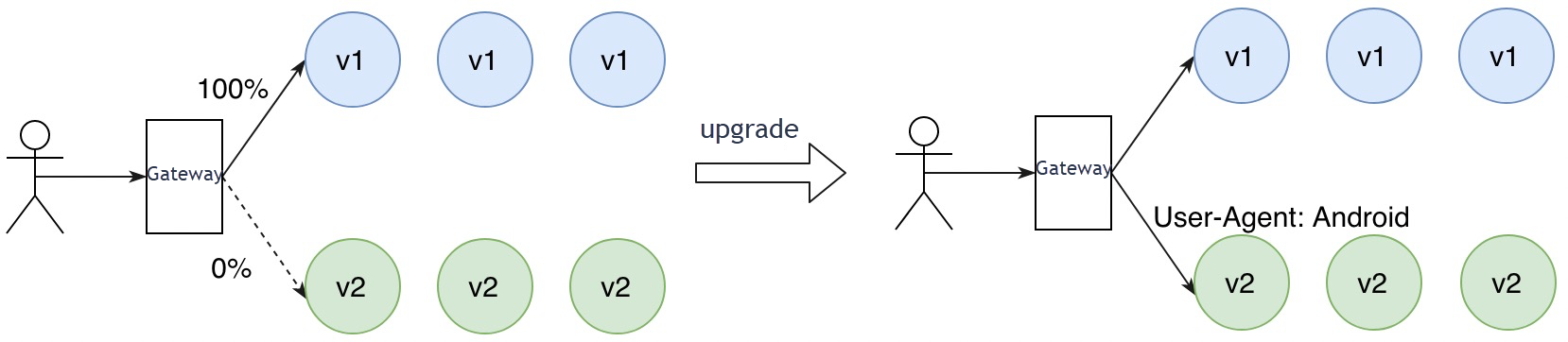
Example -- header-based routing: Route requests whose User-Agent header is Android to v2. Non-Android users continue accessing v1.
Example -- cookie-based routing: Use cookies with business-level data to target user segments. Route regular users to v2 while VIP users stay on v1.
Android users are routed to v2 while others continue accessing v1.
Once monitoring confirms v2 is stable, switch all traffic to v2 and phase out v1.
When to use A/B testing
-
You want to validate the new version with a specific user segment before full rollout.
-
You need fine-grained control over which users or request types reach the new version.
-
You have a monitoring platform that can compare metrics across versions.
Pros and cons
| Details | |
|---|---|
| Pros | Low blast radius: only targeted requests reach v2. |
| Controlled validation with real production traffic. | |
| Requires a monitoring platform to compare success rates and response times across versions. | |
| Cons | Hard to estimate request capacity for v2, so resource planning relies on redundancy. |
| Long release cycle: validating across user segments takes time. |
Canary release
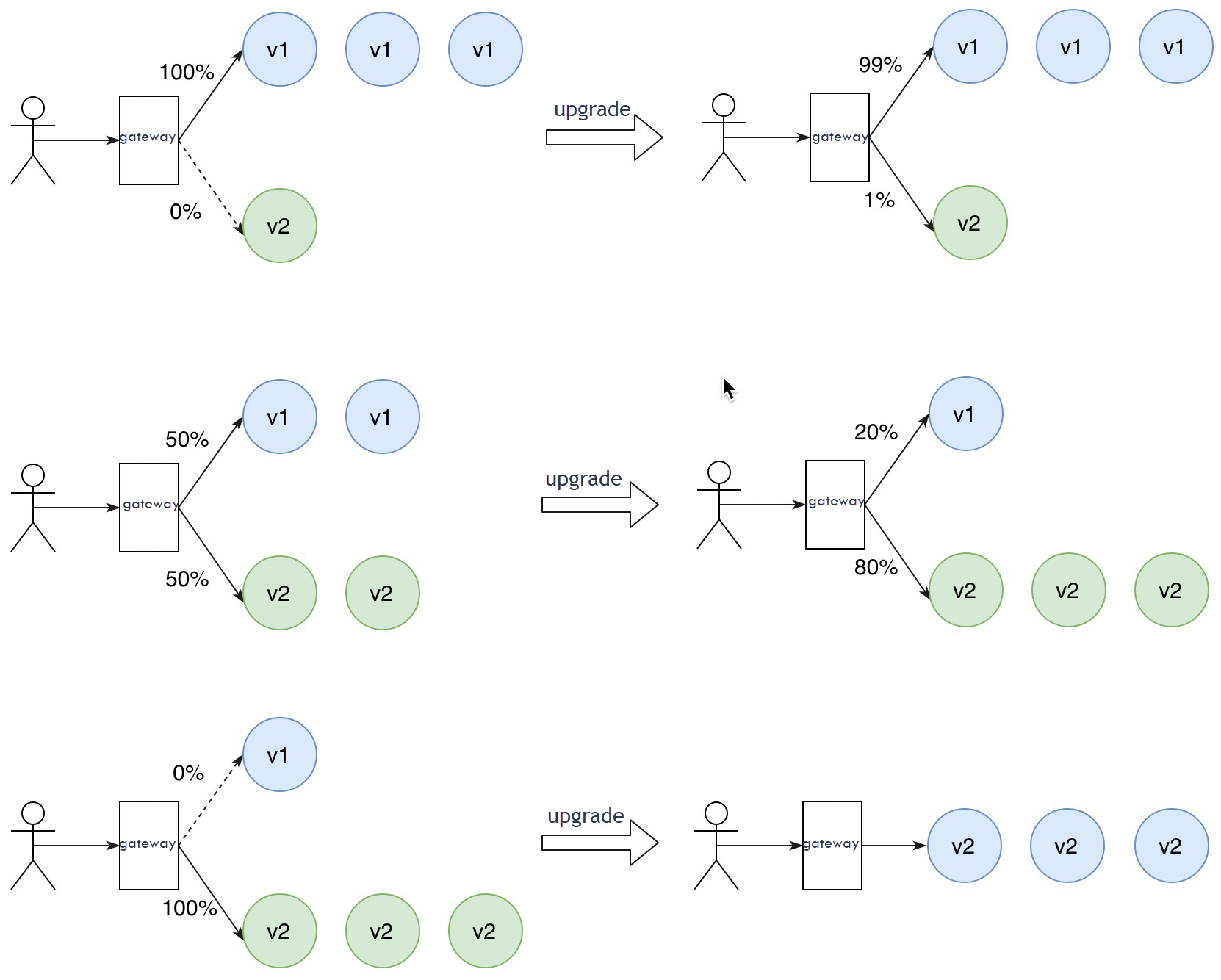
Canary release sends a small percentage of traffic to the new version first, then gradually increases the weight as the version proves stable.
How it works
-
Deploy v2 alongside v1. Only a few v2 instances are needed at first.
-
Route a small percentage of traffic to v2 by adjusting traffic weights.
-
Monitor v2 performance. If stable, gradually increase the v2 traffic weight.
-
As v2 scales out, scale in v1 to maximize resource utilization.
-
When v2 handles 100% of traffic, decommission v1.
Traffic shifts gradually from v1 to v2 for a lossless upgrade.
When to use canary release
-
You want to minimize risk by testing with real traffic at small scale first.
-
You want to reduce resource costs by scaling incrementally rather than running two full environments.
-
Your traffic is not segmented by user type, so weight-based routing is more practical than rule-based routing.
Pros and cons
| Details | |
|---|---|
| Pros | Low blast radius: only a small, weight-based portion of traffic reaches v2 initially. |
| Higher resource utilization: scale v2 out and v1 in gradually. | |
| Fast rollback: shift all traffic back to v1 by resetting the weight. | |
| Cons | No user targeting: VIP users may hit v2 during the rollout. |
| Slower release: gradual migration takes longer than an instant switch. |
Strategy comparison
Choose a strategy based on risk tolerance, resource budget, and rollout requirements.
| Criteria | Blue-green deployment | A/B testing | Canary release |
|---|---|---|---|
| Traffic control | All-or-nothing switch | Rule-based (headers, cookies) | Weight-based (percentage) |
| Resource cost | High (2x environments) | Medium-high (hard to predict capacity) | Low (incremental scale-out) |
| Blast radius | All users | Only matched requests | Proportional to traffic weight |
| Rollback | Instant (switch back) | Fast (remove routing rules) | Fast (reset weight to 0%) |
| User targeting | No | Yes (by request metadata) | No (random sampling) |
| Release speed | Fast | Slow | Slow |
| Best for | Services that need instant switchover and can afford 2x resources | Validating changes with specific user segments | Minimizing risk with gradual rollout and efficient resource use |