Cross-origin resource sharing (CORS)
Security risks and browser restrictions for cross-domain access
A cross-origin HTTP request occurs when a resource requests another resource from a different domain or port. For example, an HTML page from the site http://www.aliyun.com might request an image from http://www.alibaba.com/image.jpg using the src attribute of an <img> tag. Many web pages load resources such as CSS style sheets, images, and scripts from different domains.
For security reasons, browsers restrict cross-origin requests that are initiated from scripts. Some browsers do not restrict sending the request but block the response. This means that web applications that use these APIs can load resources only from the same domain, unless they use the cross-origin resource sharing (CORS) mechanism to obtain authorization from the target server.
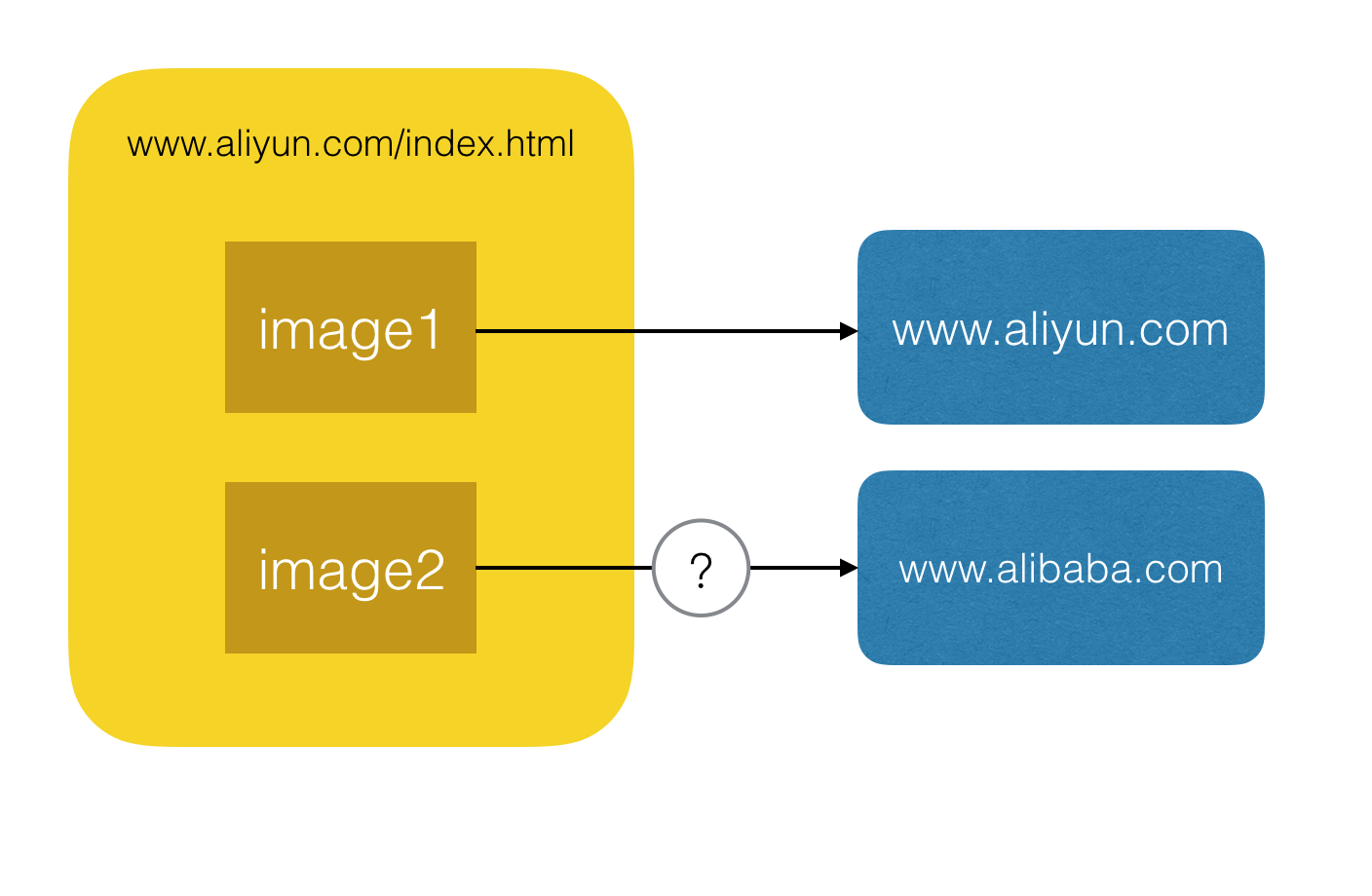
The preceding figure shows a typical cross-domain scenario. For user security, most modern browsers block cross-domain access by default. However, they support the CORS mechanism that is recommended by the World Wide Web Consortium (W3C). A server can work with a browser to implement the CORS mechanism. This process overcomes the browser's restrictions on cross-domain resource access and enables cross-origin requests.
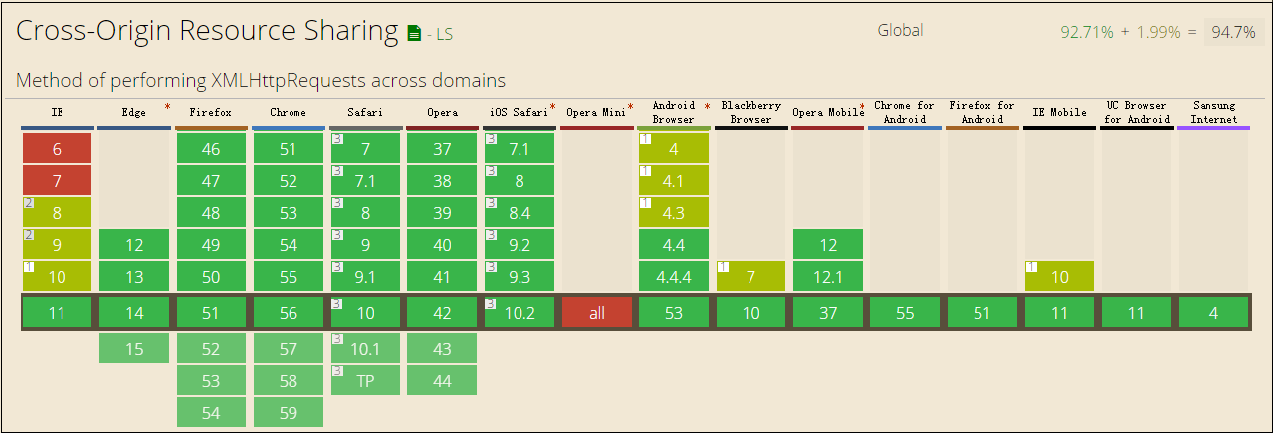
CORS overview
Two validation modes
The CORS validation mechanism has two modes: simple request and preflight request.
If a request meets all of the following three conditions, the CORS mechanism processes it using the simple request mode. Otherwise, the mechanism uses the preflight request mode.
1. The request method is one of the following:
GET
HEAD
POST
2. The value of the Content-Type request header is one of the following:
application/x-www-form-urlencoded
multipart/form-data
text/plain
3. The Fetch specification defines a set of CORS-safelisted request-headers. Custom headers in a cross-origin request must be from this set. The set is:
Accept
Accept-Language
Content-Language
Content-Type (note the additional restrictions)
DPR
Downlink
Save-Data
Viewport-Width
Width
1. Simple request mode
In simple request mode, the browser sends the cross-origin request directly. The request includes an `Origin` header to indicate that it is a cross-origin request. After the server receives the request, it returns the validation result in the `Access-Control-Allow-Origin` and `Access-Control-Allow-Methods` response headers based on its cross-domain rules.
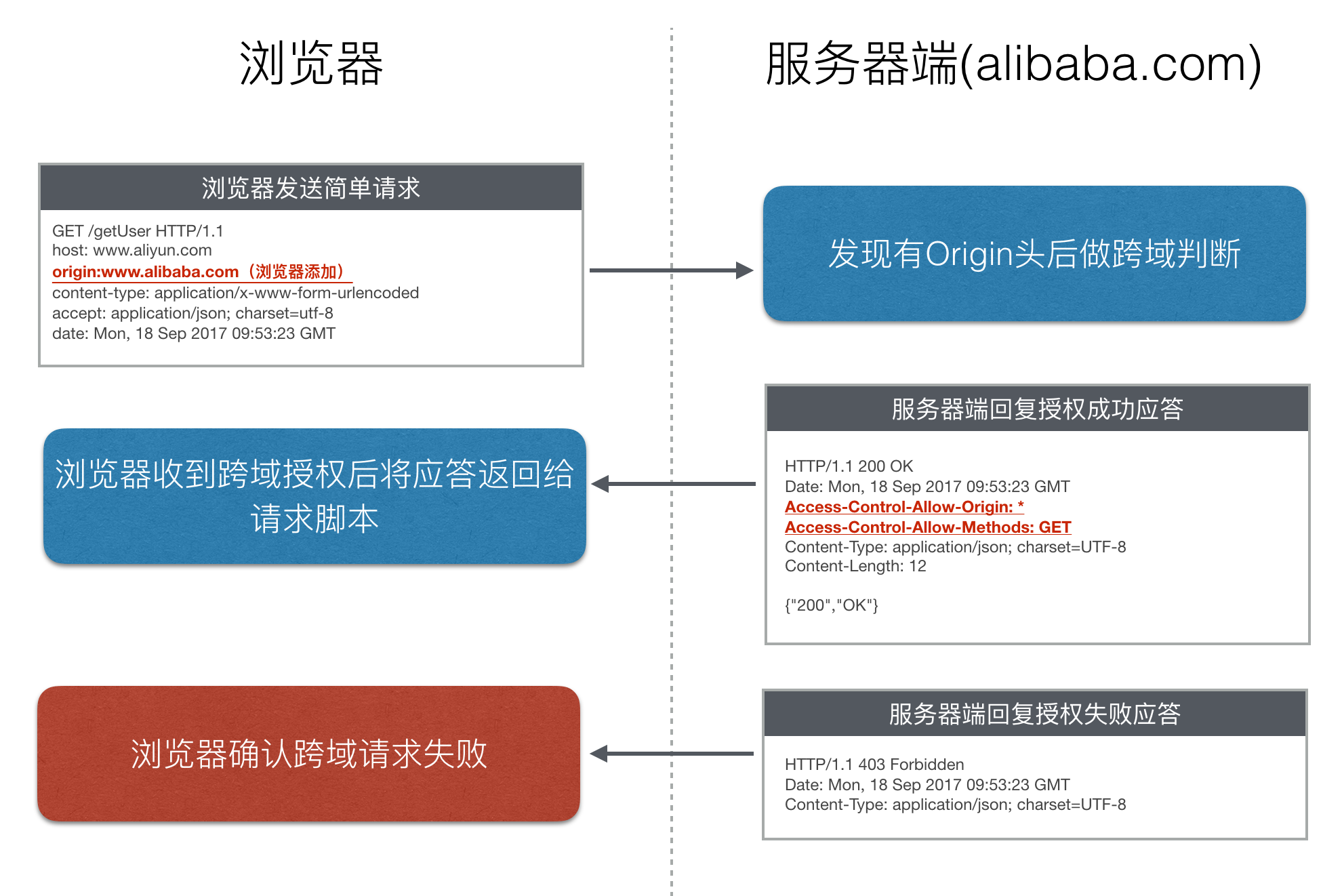
The response contains the `Access-Control-Allow-Origin` cross-domain header. You can use the `Origin` and `Access-Control-Allow-Origin` headers to perform basic access control. In this example, the server returns `Access-Control-Allow-Origin: *`. This value indicates that the resource can be accessed by any external domain. If the server allows access only from http://www.aliyun.com, the header field is as follows:
Access-Control-Allow-Origin: http://www.aliyun.comNow, only the http://www.aliyun.com domain can access the resource.
2. Preflight request mode
When a browser detects that a page is making a non-simple request, the browser does not execute the request code immediately. Instead, the browser triggers the preflight request mode. In preflight request mode, the browser first sends a preflight request. A preflight request is an `OPTIONS` request that asks the server whether it allows a cross-origin request from the current domain. The browser sends the actual HTTP request only after it receives cross-domain authorization from the server.
The `OPTIONS` request includes the following headers: `Origin`, `Access-Control-Request-Method`, and `Access-Control-Request-Headers`. When the server receives the `OPTIONS` request, it sets the `Access-Control-Allow-Origin`, `Access-Control-Allow-Method`, `Access-Control-Allow-Headers`, and `Access-Control-Max-Age` headers to communicate with the browser and determine whether to allow the request. If the preflight request passes validation, the browser sends the actual cross-origin request.
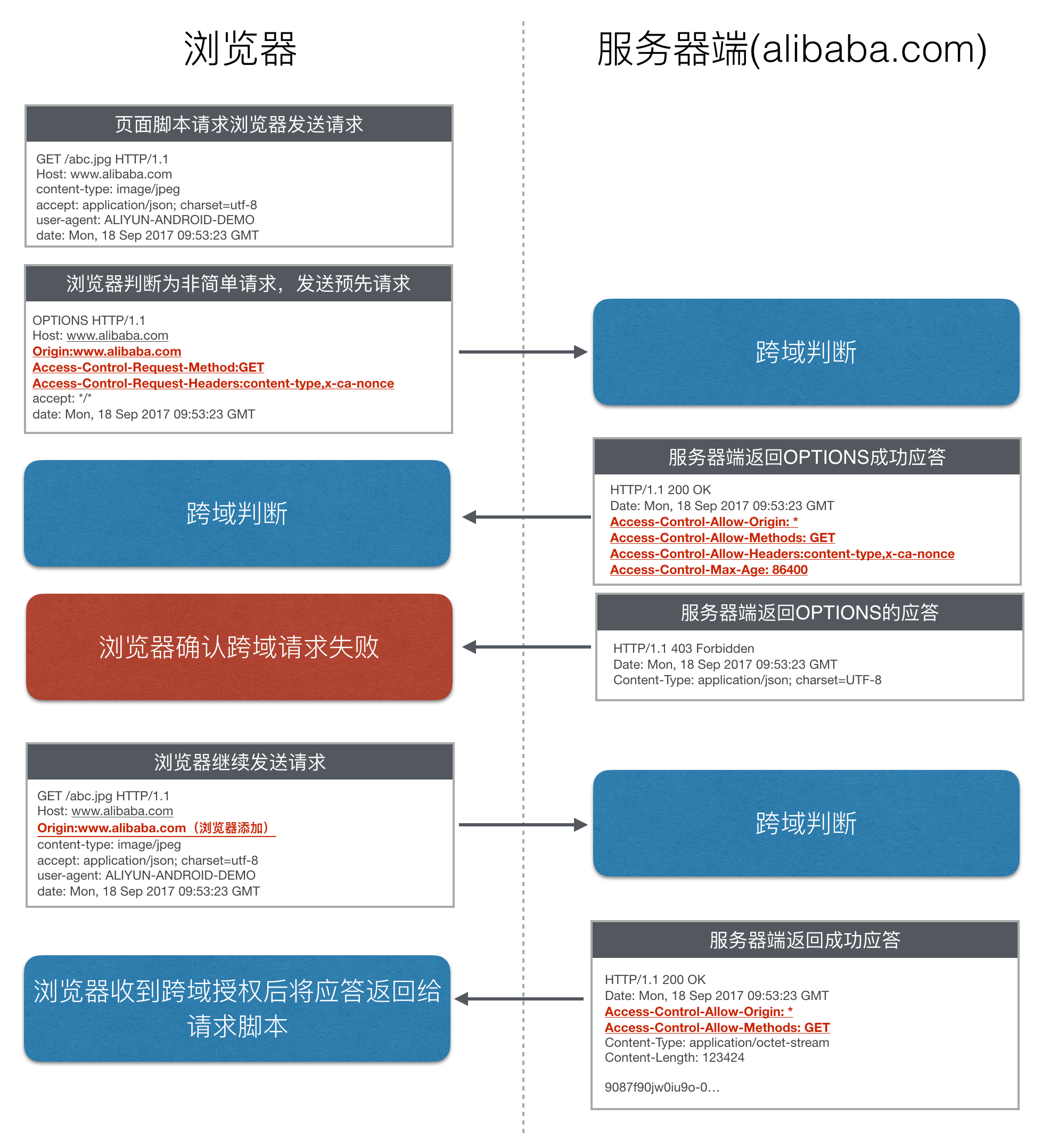
The `Access-Control-Request-Method` cross-domain header in the request informs the server that the actual request uses the `GET` method. The `Access-Control-Request-Headers` cross-domain header in the request informs the server that the actual request carries two custom request header fields: `x-ca-nonce` and `content-type`. Based on this information, the server decides whether to allow the actual request.
The `Access-Control-Allow-Methods` cross-domain header in the response indicates that the server allows the client to initiate a request using the `GET` method. The value is a comma-separated list.
The `Access-Control-Allow-Headers` cross-domain header in the response indicates that the server allows the request to carry the `x-ca-nonce` and `content-type` fields. Similar to `Access-Control-Allow-Methods`, the value of `Access-Control-Allow-Headers` is a comma-separated list.
The `Access-Control-Max-Age` cross-domain header in the response indicates that the response is valid for 86,400 seconds (24 hours). Within this validity period, the browser does not need to send another preflight request for the same request. Note that the browser maintains its own maximum validity period. If the value of this header exceeds the browser's maximum, the header value does not take effect.
Implement CORS in API Gateway
By default, API Gateway allows cross-domain access from all domains. If the backend service response does not handle CORS in a specific way, API Gateway returns `Access-Control-Allow-Origin: *`. To limit the domains that can access your API, return cross-domain headers such as `Access-Control-Allow-Origin` in the backend service response to overwrite the default policy of API Gateway.
If no CORS-related API is configured, API Gateway automatically adds the following CORS headers to all responses:
Access-Control-Allow-Origin: *
Access-Control-Expose-Headers: Content-MD5,Server,Date,Latency,X-Ca-Request-Id,X-Ca-Error-Code,X-Ca-Error-Message
Access-Control-Max-Age: 172800
API Gateway automatically handles `OPTIONS` preflight requests and returns a complete set of CORS preflight response headers, such as `Access-Control-Allow-Methods` and `Access-Control-Allow-Headers`. Error responses, such as 404, also contain the preceding CORS headers.
1. Implement the simple request mode
By default, API Gateway allows cross-domain access for all APIs. Therefore, if the response from your API's backend service does not include specific response headers, API Gateway returns headers that allow cross-domain access from all domains. The following is an example:
API request from the client:
GET /simple HTTP/1.1
Host: www.alibaba.com
origin: http://www.aliyun.com
content-type: application/x-www-form-urlencoded; charset=utf-8
accept: application/json; charset=utf-8
date: Mon, 18 Sep 2017 09:53:23 GMT
Backend service response:
HTTP/1.1 200 OK
Date: Mon, 18 Sep 2017 09:53:23 GMT
Content-Type: application/json; charset=UTF-8
Content-Length: 12
{"200","OK"}
API Gateway response:
HTTP/1.1 200 OK
Date: Mon, 18 Sep 2017 09:53:23 GMT
Access-Control-Allow-Origin: *
X-Ca-Request-Id: 104735BD-8968-458F-9929-DBFA43F324C6
Content-Type: application/json; charset=UTF-8
Content-Length: 12
{"200","OK"}
As shown in the preceding messages, API Gateway modifies the response from your backend service by adding a cross-domain header:
Access-Control-Allow-Origin: * This cross-domain header indicates that this API allows access from any domain.
To customize the cross-domain header for a simple request response, you can add the `Access-Control-Allow-Origin` header to the backend service response. The header in the backend service response overwrites the header that is added by API Gateway. The following example shows an API that allows access only from the http://www.aliyun.com domain.
API request from the client:
GET /simple HTTP/1.1
Host: www.alibaba.com
origin: http://www.aliyun.com
content-type: application/x-www-form-urlencoded; charset=utf-8
accept: application/json; charset=utf-8
date: Mon, 18 Sep 2017 09:53:23 GMT
Response from the backend service:
HTTP/1.1 200 OK
Access-Control-Allow-Origin: http://www.aliyun.com
Date: Mon, 18 Sep 2017 09:53:23 GMT
Content-Type: application/json; charset=UTF-8
Content-Length: 12
{"200","OK"}
API Gateway response:
HTTP/1.1 200 OK
Access-Control-Allow-Origin: http://www.aliyun.com
X-Ca-Request-Id: 104735BD-8968-458F-9929-DBFA43F324C6
Date: Mon, 18 Sep 2017 09:53:23 GMT
Content-Type: application/json; charset=UTF-8
Content-Length: 12
{"200","OK"}
2. Implement the preflight request mode
API Gateway lets you create an API with the `OPTIONS` method and passes the `OPTIONS` response from the backend service through to the client. When you create an API with the `OPTIONS` method, the other definitions are the same as those for a normal API. Note the following two points:
When you define the API authentication method, select No Authentication.
When you define the API request, set the path to `/` and match all subpaths. If you select `OPTIONS` as the method, the API Gateway console sets the request mode to pass-through by default. This setting cannot be changed. You do not need to define request parameters.
You can create an API with the `OPTIONS` method in each API group to define the cross-domain resource policy for the domain names that are attached to that group. You can use the `curl` command to test the response of your cross-domain API. The following is an example of how to access a defined `OPTIONS` API.
sudo curl -X OPTIONS -H "Access-Control-Request-Method:POST" -H "Access-Control-Request-Headers:X-CUSTOM-HEADER" http://ec12ac094e734544be02c928366b7b26-cn-qingdao.alicloudapi.com/optinstest -i
HTTP/1.1 200 OK
Server: Tengine
Date: Sun, 02 Sep 2018 15:32:19 GMT
Connection: keep-alive
Access-Control-Allow-Origin: *
Access-Control-Allow-Methods: GET,POST,PUT,DELETE,HEAD,OPTIONS,PATCH
Access-Control-Allow-Headers: X-CUSTOM-HEADER
Access-Control-Max-Age: 172800
X-Ca-Request-Id: 1016AC86-E345-405C-8049-A6C24078F65F
When you implement an API with the `OPTIONS` method, note that API Gateway modifies the response from your backend service. API Gateway adds four cross-domain headers: `Access-Control-Allow-Origin`, `Access-Control-Allow-Methods`, `Access-Control-Allow-Headers`, and `Access-Control-Max-Age`. The backend service response must return all cross-domain headers to overwrite the default headers that are added by API Gateway.
The following is a complete example of a request and response in preflight request mode.
API request from the client with the OPTIONS method:
OPTIONS /simple HTTP/1.1
Host: www.alibaba.com
origin: http://www.aliyun.com
Access-Control-Request-Method: POST
Access-Control-Request-Headers: X-PINGOTHER, Content-Type
accept: application/json; charset=utf-8
date: Mon, 18 Sep 2017 09:53:23 GMT
Backend service response:
HTTP/1.1 200 OK
Access-Control-Allow-Origin: http://www.aliyun.com
Access-Control-Allow-Methods: GET,POST
Access-Control-Allow-Headers: X-CUSTOM-HEADER
Access-Control-Max-Age: 10000
Date: Mon, 18 Sep 2017 09:53:23 GMT
Content-Type: application/json; charset=UTF-8
API Gateway response:
HTTP/1.1 200 OK
Access-Control-Allow-Origin: http://www.aliyun.com
Access-Control-Allow-Methods: GET,POST
Access-Control-Allow-Headers: X-CUSTOM-HEADER
Access-Control-Max-Age: 10000
X-Ca-Request-Id: 104735BD-8968-458F-9929-DBFA43F324C6
Date: Mon, 18 Sep 2017 09:53:23 GMT
Content-Type: application/json; charset=UTF-8
Normal business request from the client:
GET /simple HTTP/1.1
Host: www.alibaba.com
origin: http://www.aliyun.com
content-type: application/x-www-form-urlencoded; charset=utf-8
accept: application/json; charset=utf-8
date: Mon, 18 Sep 2017 09:53:23 GMT
Backend service response:
HTTP/1.1 200 OK
Date: Mon, 18 Sep 2017 09:53:23 GMT
Content-Type: application/json; charset=UTF-8
Content-Length: 12
{"200","OK"}
API Gateway response:
HTTP/1.1 200 OK
Access-Control-Allow-Origin: *
Access-Control-Allow-Methods: GET,POST,PUT,DELETE,HEAD,OPTIONS,PATCH
Access-Control-Allow-Headers: X-Requested-With,X-Sequence,X-Ca-Key,X-Ca-Secret,X-Ca-Version,X-Ca-Timestamp,X-Ca-Nonce,X-Ca-API-Key,X-Ca-Stage,X-Ca-Client-DeviceId,X-Ca-Client-AppId,X-Ca-Signature,X-Ca-Signature-Headers,X-Forwarded-For,X-Ca-Date,X-Ca-Request-Mode,Authorization,Content-Type,Accept,Accept-Ranges,Cache-Control,Range,Content-MD5
Access-Control-Max-Age: 172800
X-Ca-Request-Id: 104735BD-8968-458F-9929-DBFA43F324C6
Date: Mon, 18 Sep 2017 09:53:23 GMT
Content-Type: application/json; charset=UTF-8
Content-Length: 12
{"200","OK"}