Configure TCP connection timeout
Overview
When a client calls API Gateway, the gateway relays the request to your backend service over a TCP connection. Incorrect timeout settings for these connections can cause request failures or even system-wide outages. This guide explains how to configure TCP timeouts to ensure reliable communication and prevent potential issues.
For TCP connections over HTTP, the following timeout settings are common:
-
ConnectionTimeout -
WriteTimeout -
ReadTimeout
You should configure ConnectionTimeout and WriteTimeout based on your network conditions. Public network communication generally requires a longer timeout. For example, you might set both ConnectionTimeout and WriteTimeout to 10 seconds. For internal network communication, you can use a shorter timeout.
However, ReadTimeout must be configured based on the processing time of your backend service. In gateway scenarios that involve multiple read timeouts, you must follow specific rules.
Principles for configuring TCP connection timeouts
The following diagram shows a simple request path where a client calls API Gateway. The client sends a request to API Gateway, which forwards it to your backend service. After the backend service processes the request and returns a response, API Gateway relays this response back to the client.
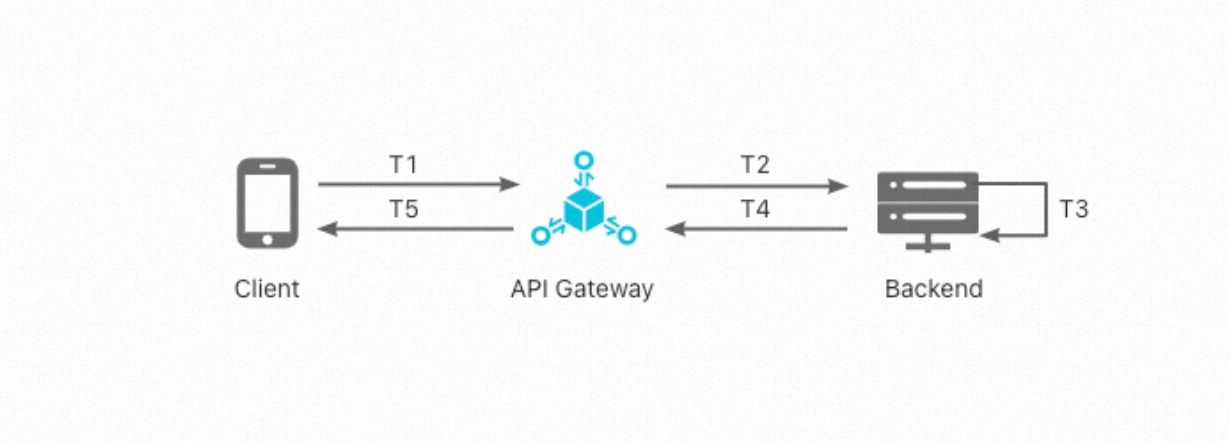
Two timeout settings are critical to this process:
-
The timeout for the client to receive a response from API Gateway (
ClientReadTimeout), which is configured on the client side. -
The timeout for API Gateway to receive a response from the backend service (
APIGatewayBackendTimeout), which is configured in the API Gateway console.
As the diagram illustrates:
ClientReadTimeout = T2 + T3 + T4 + T5
APIGatewayBackendTimeout = T2 + T3 + T4
Therefore, when you configure ClientReadTimeout and APIGatewayBackendTimeout, you must follow two rules:
-
APIGatewayBackendTimeoutmust be greater than the processing time of your backend service. -
ClientReadTimeoutmust be greater thanAPIGatewayBackendTimeout.
For example, if your backend service typically processes a request in under 10 seconds, you should set APIGatewayBackendTimeout to 10 seconds and ClientReadTimeout to 15 seconds. This ensures that the TCP connection remains open long enough for the backend to respond.
If you do not follow these rules, a long-running backend service can cause the client to close the connection prematurely before API Gateway can send a response. This results in an N502RE error because API Gateway cannot find an available TCP connection. Under heavy traffic, this can lead to an avalanche failure. Pay close attention to these settings.
Configuration
The minimum value for the APIGatewayBackendTimeout setting in API Gateway is 300 ms. If you set a value less than 300 ms, it defaults to 300 ms.
Configure ClientReadTimeout in your client's HttpClient connection pool initialization code. The following example shows how to configure it using an API Gateway SDK:
public class CommonTest  extends ApacheHttpClient {
    public final static String HOST = "www.aliyun.com";
    static CommonTest instance = new CommonTest();
    public static CommonTest getInstance(){return instance;}
    public void init(HttpClientBuilderParams httpClientBuilderParams){
        httpClientBuilderParams.setScheme(Scheme.HTTP);
        httpClientBuilderParams.setHost(HOST);
        httpClientBuilderParams.setAppKey("test");
        httpClientBuilderParams.setAppSecret("test");
        httpClientBuilderParams.setReadTimeout(15000);
        super.init(httpClientBuilderParams);
    }
}
Configure APIGatewayBackendTimeout in the API Gateway console when you define the API's backend service.
In the Define API backend service step, under basic backend definitions, set the backend timeout field to your desired value. The default is 10,000 ms.
APIGatewayBackendTimeout priority
You can configure the APIGatewayBackendTimeout setting in several locations within the API Gateway console:
-
Backend services
-
API backend
-
Route plugins
If you configure APIGatewayBackendTimeout in multiple locations, the following priority order applies: Route plugins > API backend > Backend services