Third-party authentication plug-in
Configure your own authentication service to authenticate API access.
1. Overview
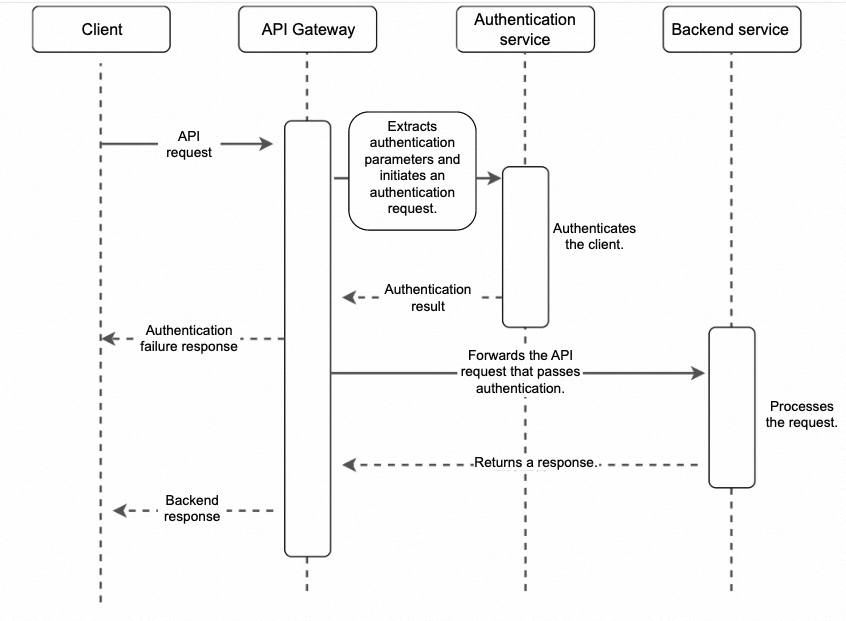
Before calling a backend service, API Gateway calls your authentication service. It proceeds to call the backend service only after receiving a success response. Otherwise, API Gateway returns an authentication failure response to the client. The third-party authentication plug-in supports the following features:
-
Customize the request parameters sent to the authentication service.
-
Cache authentication responses in API Gateway for a specified period to maintain service availability.
-
Customize the response returned for authentication failures.
2. Plug-in configuration
If the configurations do not take effect on a dedicated instance that was purchased before May 9, 2023, submit a ticket to contact us to upgrade your instance version.
2.1 When the authentication service uses an Internet endpoint
---
parameters:                           # The definitions of parameters used in authentication result expressions.
  statusCode: "StatusCode"            # The HTTP response code.
authUriType: "HTTP"                   # The type of the authentication service. HTTP: an endpoint on the Internet. HTTP-VPC: an authorized address in a VPC.
authUri:                              # The definition of the authentication service.
  address: "http://auth.com:8080"     # The endpoint of the authentication service, including the port number.
  path: "/auth"                       # The path of the authentication service.
  timeout: 7000                       # The timeout period for the authentication service. The maximum value is 10 seconds.
  method: POST                        # The HTTP method of the authentication service.
passThroughBody: false                # Specifies whether to pass through the request body to the authentication service.
passThroughPath: true                 # If this parameter is set to true, the request path is placed in the X-Ca-Remote-Auth-Raw-Path header and sent to the authentication service.
cachedTimeBySecond: 10                # The period of time for which API Gateway caches the authentication response. The maximum period is 10 minutes. Currently, the cache uses a combination of the API UID and all authentication parameters as the primary key.
trimAuthorizationHeaderPrefix: true   # If the authentication parameter is in the Authorization header, this feature intelligently skips the prefix to extract the parameter value. For example, if you extract the value from the "Authorization: bearer hello" header, the extracted value is "hello", not "bearer hello".
authParameters:                       # The mappings of parameters sent to the authentication service.
  - targetParameterName: x-userId     # The name of the parameter sent to the authentication service.
    sourceParameterName: userId       # The name of the parameter in the original request.
    targetLocation: query             # The location of the parameter sent to the authentication service.
    sourceLocation: query             # The location of the parameter in the original request.
  - targetParameterName: x-password   # The name of the parameter sent to the authentication service.
    sourceParameterName: password     # The name of the parameter in the original request.
    targetLocation: query             # The location of the parameter sent to the authentication service.
    sourceLocation: query             # The location of the parameter in the original request.
  - targetParameterName: token
    sourceParameterName: Authorization
    targetLocation: query
    sourceLocation: header
successCondition: "${statusCode} = 200"  # The expression that determines whether the authentication is successful based on the response. If the expression evaluates to True, the authentication is successful.
errorMessage: "auth failed"           # The value of the x-ca-errormessage header that the client receives when authentication fails.
errorStatusCode : 401                 # The HTTP status code that the client receives when authentication fails.
errorPassThroughHeaderList: auth-result1,auth-result2           # The specified headers from the authentication response to pass through to the client when authentication fails.
errorPassThroughBody: true            # Specifies whether to pass through the body of the authentication response to the client when authentication fails.
ignoreAuthException: true             # If an exception, such as a timeout or connection error, occurs during authentication, the authentication result is ignored and the backend service is accessed directly.
When API Gateway processes a request for an API bound to this plug-in, it assembles an authentication request based on the plug-in configuration and sends it to "http://auth.com:8080". API Gateway then determines whether the authentication is successful based on the response. If authentication fails, you can customize the failure response returned to the client.
2.2 If the authentication service is in a VPC
---
parameters:                           # The definitions of parameters used in authentication result expressions.
  statusCode: "StatusCode"            # The HTTP response code.
authUriType: "HTTP-VPC"               # The type of the authentication service. HTTP: an endpoint on the Internet. HTTP-VPC: an authorized address in a VPC.
authUri:                              # The definition of the authentication service.
  vpcAccessName: "slbAccessForVip"    # The name of the VPC authorization for the authentication service.
  vpcTargetHostName: "a.b.com"        # The host of the authentication service.
  path: "/auth"                       # The path of the authentication service.
  timeout: 7000                       # The timeout period for the authentication service. The maximum value is 10 seconds.
  method: POST                        # The HTTP method of the authentication service.
passThroughBody: false                # Specifies whether to pass through the request body to the authentication service.
cachedTimeBySecond: 10                # The period of time for which API Gateway caches the authentication response. The maximum period is 10 minutes. Currently, the cache uses a combination of the API UID and all authentication parameters as the primary key.
authParameters:                       # The mappings of parameters sent to the authentication service.
  - targetParameterName: x-userId     # The name of the parameter sent to the authentication service.
    sourceParameterName: userId       # The name of the parameter in the original request.
    targetLocation: query             # The location of the parameter sent to the authentication service.
    sourceLocation: query             # The location of the parameter in the original request.
  - targetParameterName: x-password   # The name of the parameter sent to the authentication service.
    sourceParameterName: password     # The name of the parameter in the original request.
    targetLocation: query             # The location of the parameter sent to the authentication service.
    sourceLocation: query             # The location of the parameter in the original request.
successCondition: "${statusCode} = 200"  # The expression that determines whether the authentication is successful based on the response. If the expression evaluates to True, the authentication is successful.
errorMessage: "auth failed"           # The value of the x-ca-errormessage header that the client receives when authentication fails.
errorStatusCode : 401                 # The HTTP status code that the client receives when authentication fails.
errorPassThroughHeaderList: auth-result1,auth-result2           # The specified headers from the authentication response to pass through to the client when authentication fails.
errorPassThroughBody: true            # Specifies whether to pass through the body of the authentication response to the client when authentication fails.
ignoreAuthException: true             # If an exception, such as a timeout or connection error, occurs during authentication, the authentication result is ignored and the backend service is accessed directly.
2.3 Extract fields from the JSON body of an authentication response
---
parameters:                           # The definitions of parameters used in authentication result expressions.
  clientId: "BodyJsonField:$.clientId"# The parameter named clientId in the JSON structure of the authentication response body.
authUriType: "HTTP-VPC"               # The type of the authentication service. HTTP: an endpoint on the Internet. HTTP-VPC: an authorized address in a VPC.
authUri:                              # The definition of the authentication service.
  vpcAccessName: "slbAccessForVip"    # The name of the VPC authorization for the authentication service.
  vpcScheme: "https"                  # The protocol of the authentication service. If you do not specify this parameter, HTTP is used by default.
  path: "/auth"                       # The path of the authentication service.
  timeout: 7000                       # The timeout period for the authentication service. The maximum value is 10 seconds.
  method: POST                        # The HTTP method of the authentication service.
passThroughBody: false                # Specifies whether to pass through the request body to the authentication service.
cachedTimeBySecond: 10                # The period of time for which API Gateway caches the authentication response. The maximum period is 10 minutes. Currently, the cache uses a combination of the API UID and all authentication parameters as the primary key.
authParameters:                       # The mappings of parameters sent to the authentication service.
  - targetParameterName: x-userId     # The name of the parameter sent to the authentication service.
    sourceParameterName: userId       # The name of the parameter in the original request.
    targetLocation: query             # The location of the parameter sent to the authentication service.
    sourceLocation: query             # The location of the parameter in the original request.
  - targetParameterName: x-password   # The name of the parameter sent to the authentication service.
    sourceParameterName: password     # The name of the parameter in the original request.
    targetLocation: query             # The location of the parameter sent to the authentication service.
    sourceLocation: query             # The location of the parameter in the original request.
successCondition: "${clientId} = 10086"  # The expression that determines whether the authentication is successful based on the response. If the expression evaluates to True, the authentication is successful.
errorMessage: "auth failed"           # The value of the x-ca-errormessage header that the client receives when authentication fails.
errorStatusCode : 401                 # The HTTP status code that the client receives when authentication fails.
errorPassThroughHeaderList: auth-result1,auth-result2           # The specified headers from the authentication response to pass through to the client when authentication fails.
errorPassThroughBody: true            # Specifies whether to pass through the body of the authentication response to the client when authentication fails.
ignoreAuthException: true             # If an exception, such as a timeout or connection error, occurs during authentication, the authentication result is ignored and the backend service is accessed directly.
If the value of the clientId field in the response returned by the authentication service is 10086, the authentication is successful.
{"code":200,"clientId":10086}2.4 Use a plug-in dataset for identity authentication and dynamic whitelisting
You can store a whitelist in a plug-in dataset. API Gateway extracts the user identity field from the third-party authentication response and checks whether the user is in the whitelist. Authentication succeeds only for whitelisted users.
---
parameters:                           # The definitions of parameters used in authentication result expressions.
  statusCode: "StatusCode"            # The HTTP response code.
  clientId: "BodyJsonField:$.clientId"# The parameter named clientId in the JSON structure of the authentication response body.
authUriType: "HTTP-VPC"               # The type of the authentication service. HTTP: an endpoint on the Internet. HTTP-VPC: an authorized address in a VPC.
authUri:                              # The definition of the authentication service.
  vpcAccessName: "slbAccessForVip"    # The name of the VPC authorization for the authentication service.
  path: "/auth"                       # The path of the authentication service.
  timeout: 7000                       # The timeout period for the authentication service. The maximum value is 10 seconds.
  method: POST                        # The HTTP method of the authentication service.
passThroughBody: false                # Specifies whether to pass through the request body to the authentication service.
cachedTimeBySecond: 10                # The period of time for which API Gateway caches the authentication response. The maximum period is 10 minutes. Currently, the cache uses a combination of the API UID and all authentication parameters as the primary key.
authParameters:                       # The mappings of parameters sent to the authentication service.
  - targetParameterName: x-userId     # The name of the parameter sent to the authentication service.
    sourceParameterName: userId       # The name of the parameter in the original request.
    targetLocation: query             # The location of the parameter sent to the authentication service.
    sourceLocation: query             # The location of the parameter in the original request.
  - targetParameterName: x-password   # The name of the parameter sent to the authentication service.
    sourceParameterName: password     # The name of the parameter in the original request.
    targetLocation: query             # The location of the parameter sent to the authentication service.
    sourceLocation: query             # The location of the parameter in the original request.
successCondition: "${statusCode} = 200"  # The expression that determines the authentication response.
accessParameterName: clientId         # The name of the parameter to compare with the data in the dataset.
accessByDataSet: dataset_test         # The dataset used for authentication. If the data in the dataset contains the value of clientId, the authentication is successful.
errorMessage: "auth failed"           # The value of the x-ca-errormessage header that the client receives when authentication fails.
errorStatusCode : 401                 # The HTTP status code that the client receives when authentication fails.
errorPassThroughHeaderList: auth-result1,auth-result2           # The specified headers from the authentication response to pass through to the client when authentication fails.
errorPassThroughBody: true            # Specifies whether to pass through the body of the authentication response to the client when authentication fails.
ignoreAuthException: true             # If an exception, such as a timeout or connection error, occurs during authentication, the authentication result is ignored and the backend service is accessed directly.
If the value of the clientId field in the authentication service response exists in the plug-in dataset named dataset_test, the authentication is successful.
2.5 Integrate with app authentication
---
parameters:                           # The definitions of parameters used in authentication result expressions.
  statusCode: "StatusCode"            # The HTTP response code.
authUriType: "HTTP-VPC"               # The type of the authentication service. HTTP: an endpoint on the Internet. HTTP-VPC: an authorized address in a VPC.
authUri:                              # The definition of the authentication service.
  vpcAccessName: "slbAccessForVip"    # The name of the VPC authorization for the authentication service.
  path: "/auth"                       # The path of the authentication service.
  timeout: 7000                       # The timeout period for the authentication service. The maximum value is 10 seconds.
  method: POST                        # The HTTP method of the authentication service.
cachedTimeBySecond: 10                # The period of time for which API Gateway caches the authentication response. The maximum period is 10 minutes. Currently, the cache uses a combination of the API UID and all authentication parameters as the primary key.
authParameters:                       # The mappings of parameters sent to the authentication service.
  - targetParameterName: x-password   # The name of the parameter sent to the authentication service.
    sourceParameterName: password     # The name of the parameter in the original request.
    targetLocation: query             # The location of the parameter sent to the authentication service.
    sourceLocation: query             # The location of the parameter in the original request.
successCondition: "${statusCode} = 200"  # The expression that determines the authentication response.
errorMessage: "auth failed"           # The value of the x-ca-errormessage header that the client receives when authentication fails.
errorStatusCode : 401                 # The HTTP status code that the client receives when authentication fails.
errorPassThroughHeaderList: auth-result1,auth-result2           # The specified headers from the authentication response to pass through to the client when authentication fails.
errorPassThroughBody: true            # Specifies whether to pass through the body of the authentication response to the client when authentication fails.
ignoreAuthException: true             # If an exception, such as a timeout or connection error, occurs during authentication, the authentication result is ignored and the backend service is accessed directly.
orAppAuth: true						  # If either app authentication or third-party authentication succeeds, the overall authentication is successful.
With orAppAuth: true configured, authentication succeeds if either app authentication or third-party authentication passes.
2.6 Extract fields from the authentication service response and send them to the backend service
To extract fields from the authentication service response and send them to the backend service, use the authResultPassThrough parameter to configure the parameter mappings.
Parameters can be extracted from the following locations in the response: StatusCode, Header, and JsonBody.
Supported target locations in the backend service request include Header, Query, and Formdata.
---
parameters:                         # The definitions of parameters used in authentication result expressions.
  statusCode: "StatusCode"          # The HTTP response code.
  clientId: "BodyJsonField:$.Body"  # The JSON body returned by the authentication service.
authUriType: "HTTP"                 # The type of the authentication service. HTTP: an endpoint on the Internet. HTTP-VPC: an authorized address in a VPC.
authUri:                            # The definition of the authentication service.
  address: "http://127.0.0.1:8080"  # The endpoint of the authentication service, including the port number.
  path: "/web"                      # The path of the authentication service.
  timeout: 7000                     # The timeout period for the authentication service, in milliseconds (ms). The maximum value is 10s.
  method: POST                      # The HTTP method of the authentication service.
passThroughBody: true               # Specifies whether to pass through the request body to the authentication service.
cachedTimeBySecond: 10              # The period of time for which API Gateway caches the authentication response. The maximum period is 10 minutes. Currently, the cache uses a combination of the API UID and all authentication parameters as the primary key.
authResultPassThrough:              # The mappings of parameters sent to the backend service.
  - targetParameterName: x-echo-header-client-id  # The name of the parameter sent to the backend service.
    targetLocation: header                        # The location of the parameter in the backend service request.
    sourceParameterName: clientId                 # The parameter extracted from the authentication service response.
  - targetParameterName: x-echo-header-status-code
    targetLocation: query
    sourceParameterName: statusCode
successCondition: "${statusCode} = 200"  # The expression that determines the authentication response.
errorMessage: "auth failed"              # The value of the x-ca-errormessage header that the client receives when authentication fails.
errorStatusCode: 401                     # The HTTP status code that the client receives when authentication fails.
errorPassThroughHeaderList: auth-result1,auth-result2   # The specified headers from the authentication response to pass through to the client when authentication fails.
errorPassThroughBody: true # Specifies whether to pass through the body of the authentication response to the client when authentication fails.Parameters extracted from the authentication service response can be used as parameters for other plug-ins. The following code provides an example:
parameters:                    # A list of parameters that can be used for features such as throttling.
  clientId: "Parameter:x-echo-header-client-id"  # The name of the parameter sent to the backend service.
2.7 Cache authentication responses
To improve service availability and reduce the load on your authentication service, API Gateway can cache authentication responses. The cache uses a combination of the API UID and all authentication parameters as the primary key and the authentication response as the value. The maximum cache duration is 10 minutes.
2.8 Skip third-party authentication based on parameter values
If the configurations do not take effect on a dedicated instance that was purchased before May 26, 2025, submit a ticket to contact us to upgrade your instance version.
You can conditionally skip third-party authentication based on request parameter values, dynamically selecting an authentication policy based on predefined rules. This is useful when some requests require third-party authentication and others require app authentication.
The skipRemoteAuthOnRequestParametersCondition configuration block is used to skip third-party authentication. Third-party authentication is skipped when all parameter conditions are met. For the sourceParameterConditionValues parameter, you can specify a list of values. The sub-condition is met if the request field matches any value in the list. If sourceParameterConditionValues is set to null, the sub-condition is met only if the field is missing. If sourceParameterConditionValues is set to *, the sub-condition is met for any value of the field. The following code provides a configuration example.
parameters:
  statusCode: "StatusCode"
  userId: "BodyJsonField:$.Headers.tokenUserId"
authUriType: "HTTP"
authUri:
  address: "https://auth.com"
  path: "/auth"
  timeout: 7000
  method: POST
passThroughBody: false
cachedTimeBySecond: 1
authParameters:
  - targetParameterName: tokenUserId
    sourceParameterName: userId
    targetLocation: Header
    sourceLocation: Query
successCondition: "${userId} = 'admin'"
skipRemoteAuthOnRequestParametersCondition:    // Skips third-party authentication if all the following conditions are met.
  - sourceParameterName: userId   // The name of the request parameter.
    sourceLocation: Query   // The location of the request parameter.
    sourceParameterConditionValues: admin1,admin2   // A list of parameter values. The sub-condition is met if the value of this request parameter is in the list.
  - sourceParameterName: password  // The name of the request parameter.
    sourceLocation: Query  // The location of the request parameter.
    sourceParameterConditionValues: null  // The sub-condition is met if this request parameter is missing.
2.9 Send constant parameters to the third-party authentication service
If the configurations do not take effect on a dedicated instance that was purchased before March 22, 2025, submit a ticket to contact us to upgrade your instance version.
You can inject constant parameters into requests sent to the third-party authentication service. When configuring an authentication parameter, if you set the targetParameterValue property directly without specifying sourceLocation and sourceParameterName, the system treats this parameter as a constant parameter.
parameters:
  userId: "BodyJsonField:$.Headers.tokenUserId"
authUriType: "HTTP"
authUri:
  address: "https://auth.com"
  path: "/auth"
  timeout: 7000
  method: POST
passThroughBody: false
cachedTimeBySecond: 1
authParameters:
  - targetParameterName: tokenUserId
    sourceParameterName: userId
    targetLocation: Header
    sourceLocation: Query
  - targetParameterName: constantParam1  // An authentication constant parameter. You only need to set the parameter value. You do not need to configure the source parameter.
    targetParameterValue: "test"
    targetLocation: Header
successCondition: "${userId} = 'A101' and ${constantParam} = 'test'"
3. Logs
In the logs delivered to Simple Log Service (SLS), the `plugin` field indicates the third-party authentication result. `"authSuccess":"0"` indicates authentication failure. `"authSuccess":"1"` indicates authentication success.
plugin:[{"context":{"authSuccess":"0"},"pluginName":"remoteAuth"}]