Interactive live streaming: FAQ
This topic answers frequently asked questions about integrating AUI Kits, a low-code integration tool, on Android.
Build issues
Minimum supported version for AUI Kits
The minimum supported version is Android 5.0 (API level 21). Your app must support Android 5.0 or later.
Obfuscation configuration
-
Enable obfuscation. In the
buildTypesblock of yourbuild.gradlefile, setminifyEnabledtotrue. -
Add AUI Kits obfuscation rules. Add the following rules to your proguard-rules.pro file:
-keep class com.alivc.** { *; }
-keep class com.aliyun.** { *; }
-keep class com.aliyun.rts.network.* { *; }
-keep class org.webrtc.** { *; }
-keep class com.alibaba.dingpaas.** { *; }
-keep class com.dingtalk.mars.** { *; }
-keep class com.dingtalk.bifrost.** { *; }
-keep class com.dingtalk.mobile.** { *; }
-keep class org.android.spdy.** { *; }
-keep class com.alibaba.dingpaas.interaction.** { *; }
-keep class com.cicada.**{*;}
C++ native build system error
-
Check if the NDK is correctly configured in your local.properties file.
ndk.dir=/Users/xx/Library/Android/ndk -
Your Gradle plugin version might be too low. We recommend using version 4.0.2.
dependencies{
	classpath 'com.android.tools.build.gradle:4.0.2'
}
Beauty filter integration issues
Beauty filters not working
Verify that you have an active Beauty Effects license. If not, you must apply for one before proceeding. For more information, see Manage License.
Some beauty filter modules are unavailable
AUI Kits projects use the Ultimate Edition of Beauty Effects. Check if your license is for a lower edition, such as the Basic Edition.
Large app package size
Stickers and related assets for beauty filters can increase your package size. To reduce the size, you can configure your app to download these resources on demand based on your Beauty Effects edition. The following examples show how to use the 'tiny' package for this purpose.
-
Ultimate Edition
api 'com.aliyunsdk.components:queen_menu:2.4.1-official-menu-ultimate-tiny' -
Pro Edition
api 'com.aliyun.maliang.android:queen_menu:2.5.0-official-pro-tiny'
API usage issues
Server-side APIs
public interface ApiService {

    @POST("live/login")
    // Log in to the app server.
    ApiInvoker<AppServerToken> login(@Body LoginRequest request);
    // Get a token to verify its validity.
    @POST("live/token")
    ApiInvoker<Token> getToken(@Body TokenRequest request);
    // Create a live room.
    @POST("live/create")
    ApiInvoker<LiveModel> createLive(@Body CreateLiveRequest request);
     // Update live room information, such as the notice.
    @POST("live/update")
    ApiInvoker<LiveModel> updateLive(@Body UpdateLiveRequest request);
    // Get live room information for display when entering a room.
    @POST("live/get")
    ApiInvoker<LiveModel> getLive(@Body GetLiveRequest request);
    // After stream publishing succeeds, call this to update the server status to "live".
    @POST("live/start")
    ApiInvoker<Void> startLive(@Body StartLiveRequest request);
    // After stream publishing stops, call this to update the server status to "stopped".
    @POST("live/stop")
    ApiInvoker<Void> stopLive(@Body StopLiveRequest request);
    // Get the list of live rooms.
    @POST("live/list")
    ApiInvoker<List<LiveModel>> getLiveList(@Body ListLiveRequest request);
    // Used by the host to update the list of link-mic users on the AppServer.
    @POST("live/updateMeetingInfo")
    ApiInvoker<MeetingInfo> updateMeetingInfo(@Body UpdateMeetingInfoRequest request);
    // Get information about users in a link-mic session.
    @POST("live/getMeetingInfo")
    ApiInvoker<MeetingInfo> getMeetingInfo(@Body GetMeetingInfoRequest request);
}
IM SDK message interfaces
public interface AUIMessageService {
/**
 * Sends a barrage comment.
 *
 * @param content  The message content.
 * @param callback The callback function.
 */
void sendComment(String content, Callback<String> callback);

/**
 * Starts the live stream.
 *
 * @param callback The callback function.
 */
void startLive(Callback<String> callback);

/**
 * Stops the live stream.
 *
 * @param callback The callback function.
 */
void stopLive(Callback<String> callback);

/**
 * Updates the notice.
 *
 * @param notice   The notice content.
 * @param callback The callback function.
 */
void updateNotice(String notice, Callback<String> callback);

/**
 * Applies for link-mic. Called by a viewer.
 *
 * @param receiveId The ID of the recipient, which is the host's ID in this case.
 * @param callback  The callback function.
 */
void applyJoinLinkMic(String receiveId, Callback<String> callback);

/**
 * Handles a link-mic application. Called by the host.
 *
 * @param agree       true to approve, false to reject.
 * @param applyUserId The ID of the applicant.
 * @param rtcPullUrl  The host's RTC stream pulling URL.
 * @param callback    The callback function.
 */
void handleApplyJoinLinkMic(boolean agree, String applyUserId, String rtcPullUrl, Callback<String> callback);

/**
 * Notifies that a user has joined the link-mic session.
 *
 * @param rtcPullUrl The RTC stream pulling URL of the user who joined.
 */
void joinLinkMic(String rtcPullUrl, Callback<String> callback);

/**
 * Notifies that a user has left the link-mic session.
 *
 * @param reason The reason for leaving.
 */
void leaveLinkMic(String reason, Callback<String> callback);

/**
 * Kicks a user from the link-mic session. Called by the host.
 *
 * @param userId   The ID of the user to kick.
 * @param callback The callback function.
 */
void kickUserFromLinkMic(String userId, Callback<String> callback);

/**
 * Updates the microphone status.
 *
 * @param opened true for on, false for off.
 */
void updateMicStatus(boolean opened, Callback<String> callback);

/**
 * Updates the camera status.
 *
 * @param opened true for on, false for off.
 */
void updateCameraStatus(boolean opened, Callback<String> callback);

/**
 * Cancels a link-mic application. Called by a viewer.
 *
 * @param receiveId The ID of the recipient, which is the host's ID in this case.
 */
void cancelApplyJoinLinkMic(String receiveId, Callback<String> callback);

/**
 * Commands a user to change their microphone status.
 *
 * @param receiveId The ID of the recipient.
 * @param open      true to turn on, false to turn off.
 * @param callback  The callback function.
 */
void commandUpdateMic(String receiveId, boolean open, Callback<String> callback);

/**
 * Commands a user to change their camera status.
 *
 * @param receiveId The ID of the recipient.
 * @param open      true to turn on, false to turn off.
 * @param callback  The callback function.
 */
void commandUpdateCamera(String receiveId, boolean open, Callback<String> callback);

/**
 * Adds a message listener.
 *
 * @param messageListener The message listener.
 */
void addMessageListener(AUIMessageListener messageListener);

/**
 * Removes a message listener.
 *
 * @param messageListener The message listener.
 */
void removeMessageListener(AUIMessageListener messageListener);

/**
 * Removes all message listeners.
 */
void removeAllMessageListeners();
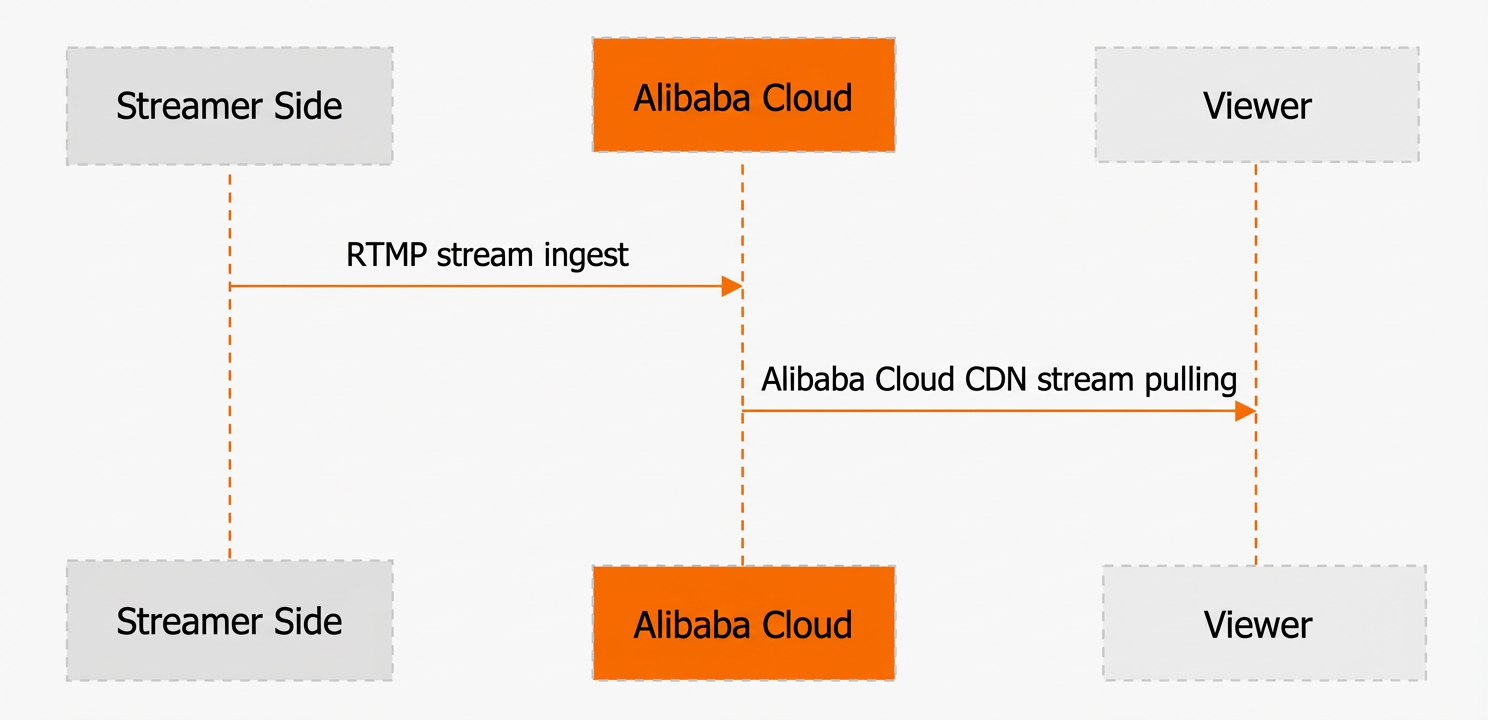
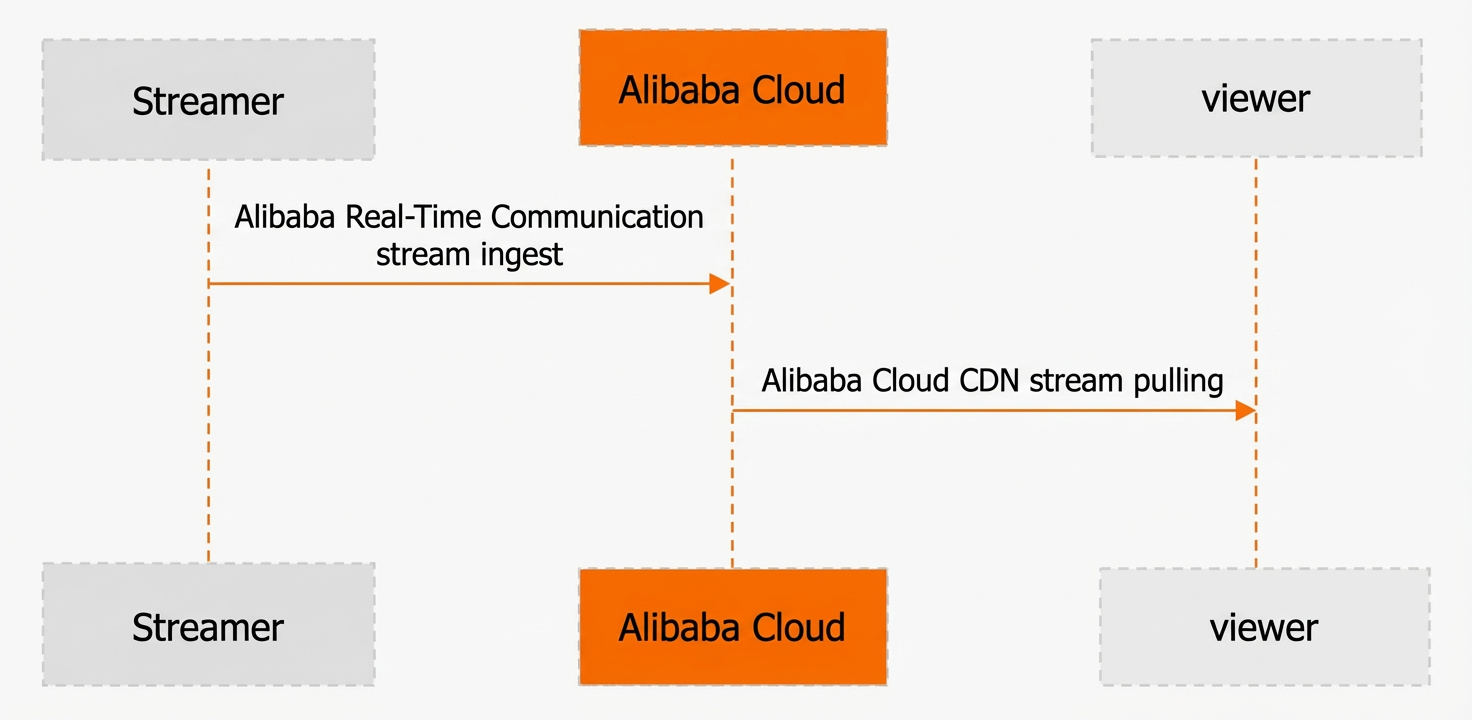
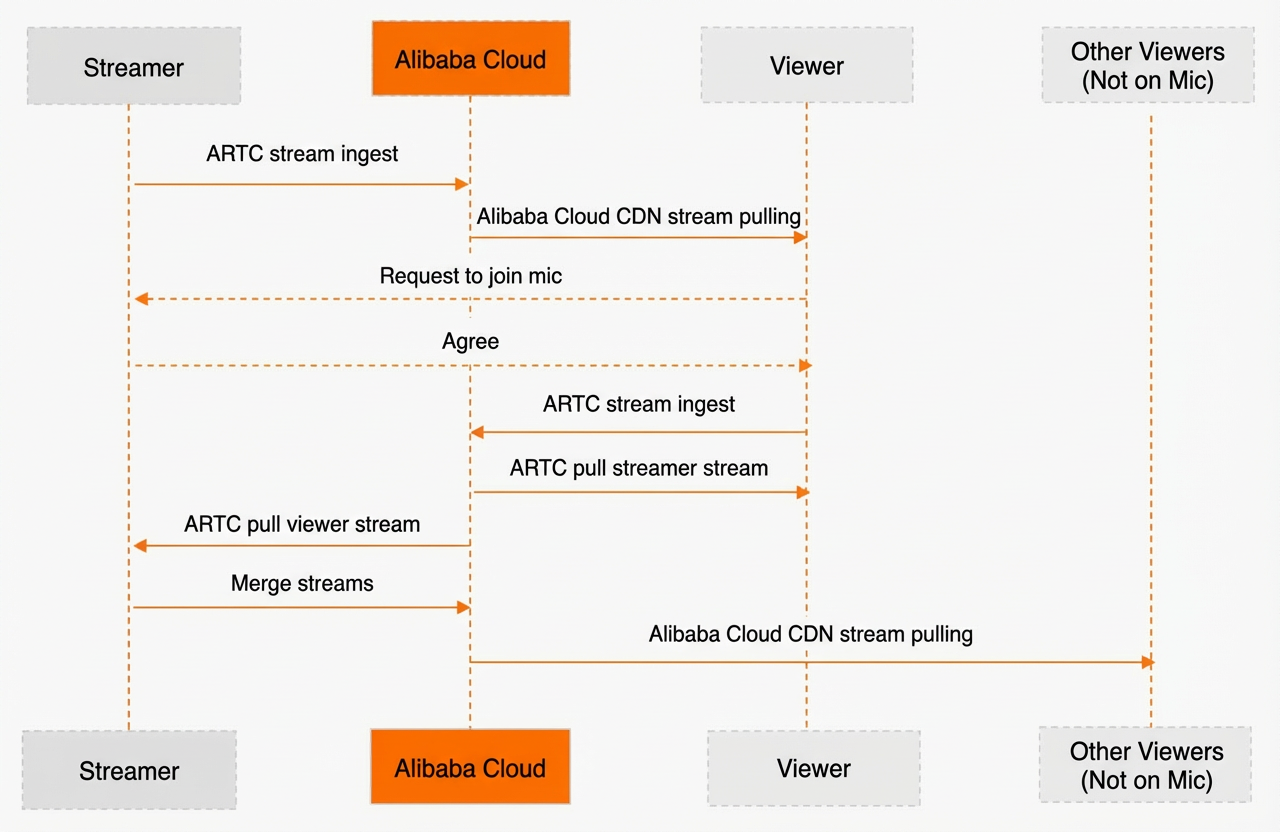
Standard and link-mic streaming workflows
Standard live streaming
Link-mic live streaming
Without a link-mic user
With a link-mic user
Switching between standard and link-mic rooms
For maximum flexibility, create a link-mic room from the start. You can hide its link-mic features to use it as a standard live room, which simplifies enabling this functionality later.
Link-mic billing
Link-mic uses a pay-as-you-go billing model. There are no upfront fees, and you are charged only for usage during a stream. For more information, see Audio and Video Call Pricing.
AUI component customization issues
Demonstration-only components
AUI Kits do not provide the backend logic for these features; to make them functional, you must integrate them with your own business systems.
Demo-only components include: Viewer Count, Exit Live Room, Notice, Chat Area, Apply for Link-mic, Share, Like, Replay Entry, Replay Countdown, Replay Card, and Gift. In the live room UI, these components appear at the top (Viewer Count, Exit), middle (Notice, Chat Area), and bottom (Apply for Link-mic, Share, Like) of the screen.
Creating and using custom components
AUI Kits follow a component-based design with high cohesion and low coupling. Each component is a self-contained class that manages the logic for a specific view. In a live room, every visual element—from an entire information panel to a single Share icon—is managed by an AUI component.
You can configure components flexibly through the XML resource file passed to setContentView. This file defines the layout and positional relationships between components.
The following example shows how to create a custom component that listens for barrage comment messages:
-
Create a new component. In this example, we create a custom component named
CustomMessageView.public class CustomMessageView extends AppCompatTextView implements ComponentHolder { private final Component component = new Component(); public CustomMessageView(Context context, @Nullable AttributeSet attrs) { super(context, attrs); setTextColor(Color.RED); setTextSize(TypedValue.COMPLEX_UNIT_SP, 24); } @Override public IComponent getComponent() { return component; } private class Component extends BaseComponent { @Override public void onInit(LiveContext liveContext) { super.onInit(liveContext); // Set a callback to listen for barrage comment events. getMessageService().addMessageListener(new SimpleOnMessageListener() { @Override public void onCommentReceived(Message<CommentModel> message) { setText(String.format("%s: %s", message.senderInfo.userNick, message.data.content)); } }); } } } -
Configure the component. Add the custom message component to the end of the
LiveContentLayernode in your layout file, for example,ilr_activity_live.xml. The updated code looks like this:<!-- The newly added barrage comment listener component --> <com.aliyun.aliinteraction.liveroom.view.CustomMessageView android:layout_width="wrap_content" android:layout_height="wrap_content" android:layout_centerInParent="true" /> -
Run and install the app. When a barrage comment is received, its content is displayed in the center of the screen in large, red text (24sp). The format is User Nickname: Comment Content.
Project issues despite working demo
Comment keyboard not working
-
Check if your
AndroidManifest.xml,build.gradle, and other configuration files match the recommended settings. -
Remove the
android:hardwareAccelerated="false"setting.
"Device identifiers" access error
If your project targets API level 28 or higher, you must update your method for retrieving the device ID. The following example shows how to do this:
private String deviceCode;
  if (Build.VERSION.SDK_INT>28){
    	  deviceCode=Settings.System.getString(
             this.getContentResolver(),Settings.Secure.ANDROID_ID));
  }else{
     	deviceCode=DeviceUtils.getDeviceId(getContext());
  }
PiP support in WeChat Mini Programs
No. This feature is not supported out of the box and requires custom implementation.