Try PolarDB-X transparent distribution
This topic describes how to try the transparent distribution feature of PolarDB-X for free.
Background
PolarDB-X introduces a suite of transparent distribution features that emulates the user experience of a standalone MySQL, from connection and development to management. This approach significantly shortens the migration cycle to a distributed system and allows your development and operations teams to retain their existing technology stacks.
PolarDB-X enables a smooth evolution from a standalone setup to a distributed architecture. You can use DDL statements to dynamically convert a large table into a distributed partitioned table. Combined with distributed transactions and MySQL binlog-compatible data backflow, this enables a rapid migration. This trial demonstrates the transparent distribution capabilities of PolarDB-X by focusing on two key features: Auto Partitioning and MySQL binlog-compatible CDC.
Auto Partitioning and online DDL enable a smooth transition from a standalone MySQL to a distributed system.
Global binlog data backflow to a standalone MySQL enables easy migration to and from the distributed system.
Alibaba Cloud provides the Apsara Solution Experience Center, which offers a free, live PolarDB-X instance with pre-configured tests. You can quickly experience the transparent distribution capabilities of PolarDB-X online.
Impact
This trial does not involve deployment in a production environment and will not affect your business.
Billing
This is a free trial. The resources used in this trial do not belong to your account, so you will not be charged.
Lab overview
Lab environment
For this free trial, Alibaba Cloud provides a pre-configured environment. The environment includes the following resources:
A PolarDB-X instance with the following specifications:
Kernel version: V5.4.18-17034692
Compute node specifications: 4 vCPUs, 16 GB memory
Number of compute nodes: 2
Storage node specifications: 4 vCPUs, 16 GB memory
Number of storage nodes: 2
Compatibility: MySQL 5.7
A benchmark testing machine with the Sysbench tool installed to run benchmark tasks on the PolarDB-X instance. The benchmark test details are as follows:
Test mode:
oltp_point_select_k, which performs point-select queries on thekfield, filtered only by the partition key.NoteThe Sysbench test mode used in this trial is a modified version of the standard
oltp_point_selectmode. The standard mode performs point lookups on the ID field, whereas theoltp_point_select_kmode performs point lookups on thekfield.Benchmark table: One table with 10,000 rows.
Concurrent threads: 4
Test duration: 1 minute
Key metrics
Observe the physical distribution of the table, which is partitioned by its primary key.
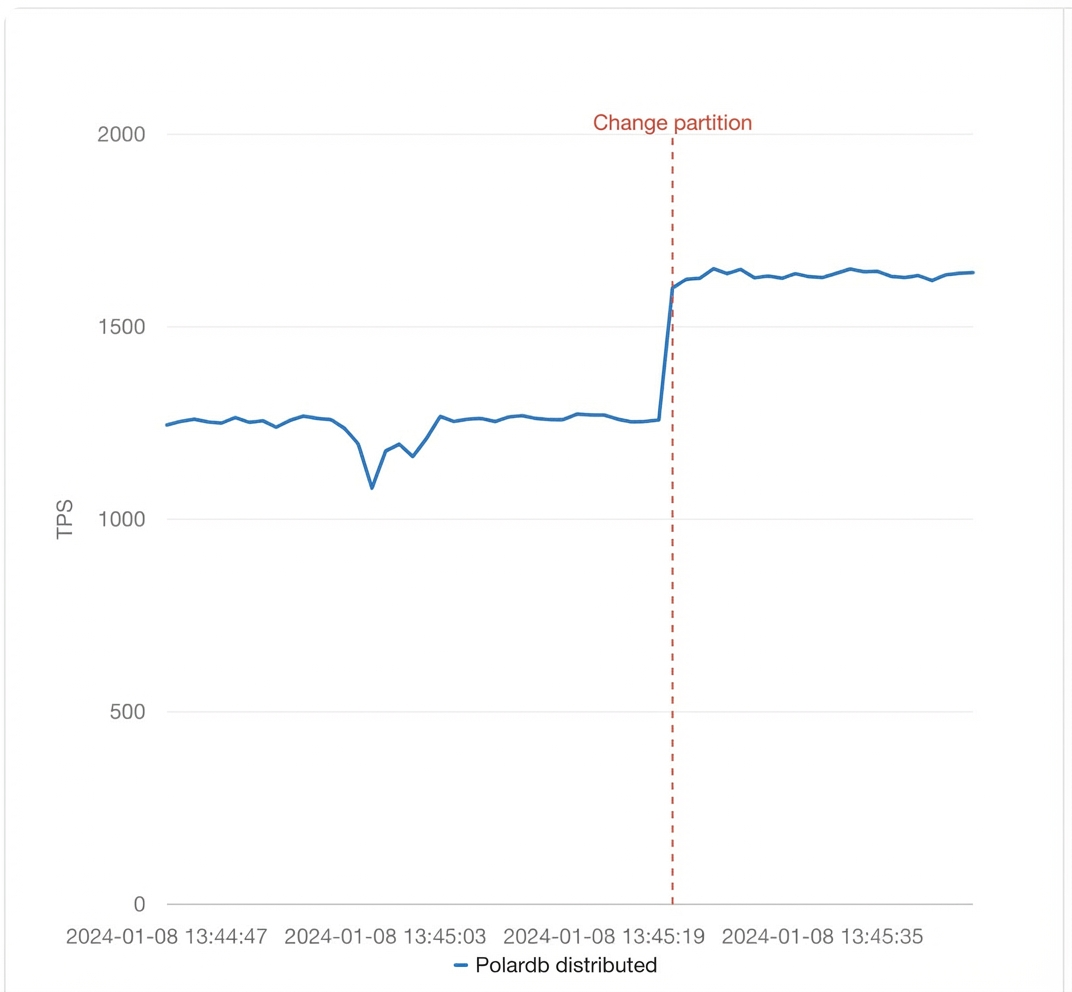
Compare the performance before and after changing the partition key. The key metric is TPS (Transactions Per Second), which measures transactions per second based on successful COMMITs. This metric is used to monitor the performance of the cluster.
Observe data consistency after CDC.
Procedure
Go to the Apsara Solution Experience Center.
Click Core Feature Experience, and then click Transparent Distributed Feature Experience > Free Trial to open the following page:
This page contains the Feature Introduction and Architecture Preview sections. The left side shows the transparent distribution architecture of PolarDB-X, where
CREATE TABLEstatements are automatically partitioned and routed to data nodes, and binlogs are aggregated in the CDC node cluster before being sent to downstream systems like MySQL, Kafka, Canal, or DTS via compute nodes. The right side is the task management panel, which displays statistics for the current trial task and provides an entry point to your trial history. At the bottom of the page, you can find an orange Create Free Trial Task button and a Buy Now link. The entire trial is expected to take 5 to 10 minutes.Click the Create Free Trial Task button at the bottom of the page.
After a moment, click the refresh icon
 to update the task list. You will see that the trial task you created has started.
Click View Details to go to the Real-time Query Status page, and then click Start Task.
On the right side of the page, you can switch between two data sources: PolarDB-X and Self-managed MySQL (replica database).
NoteFollow the on-screen prompts and click the buttons to perform each step manually. If you do not click a button before the countdown ends, the system automatically performs the corresponding action.
First, let's explore the Auto Partitioning feature of PolarDB-X.
Click Switch to Benchmark DB to switch to the primary PolarDB-X database,
mydb.use mydb;Click View Benchmark Table. The system automatically runs the following command to view the
CREATE TABLEstatement for the benchmark tablesbtest1.show create table sbtest1;The output is as follows:
+---------+-----------------------------------------------------+
| Table   | Create Table                                        |
+---------+-----------------------------------------------------+
| sbtest1 | CREATE TABLE `sbtest1` (
	`id` int(11) NOT NULL AUTO_INCREMENT,
	`k` int(11) NOT NULL DEFAULT '0',
	`c` char(120) NOT NULL DEFAULT '',
	`pad` char(60) NOT NULL DEFAULT '',
	PRIMARY KEY (`id`)
) ENGINE = InnoDB AUTO_INCREMENT = 10001 DEFAULT CHARSET = utf8 |
+---------+-----------------------------------------------------+
1 row in set (0.01 sec)
Click View Physical DNs. The system automatically runs the following command to view how the table is distributed across storage nodes.
show storage;The output is as follows:
+------------------------------+--------------------+------------+-----------+----------+-------------+--------+-----------+-------+--------+
| STORAGE_INST_ID              | LEADER_NODE        | IS_HEALTHY | INST_KIND | DB_COUNT | GROUP_COUNT | STATUS | DELETABLE | DELAY | ACTIVE |
+------------------------------+--------------------+------------+-----------+----------+-------------+--------+-----------+-------+--------+
| pxc-xdb-m-hzrth7pjc07vyb5509 | 11.197.3.159:3406  | true       | META_DB   | 2        | 2           | 0      | false     | 1     | 10     |
| pxc-xdb-s-hzrth7pjc07vyb3208 | 11.197.8.96:3247   | true       | MASTER    | 3        | 4           | 0      | false     | 0     | 10     |
| pxc-xdb-s-hzrth7pjc07vyb44da | 10.127.205.70:3039 | true       | MASTER    | 3        | 3           | 0      | true      | 0     | 10     |
+------------------------------+--------------------+------------+-----------+----------+-------------+--------+-----------+-------+--------+
3 rows in set (0.02 sec)
Click View Table Distribution. The system automatically runs the following command:
show topology from sbtest1;The output is as follows:
+------+-------------------+--------------------+----------------+-------------------+-------------+------------------------------+-------------------+
| ID   | GROUP_NAME        | TABLE_NAME         | PARTITION_NAME | SUBPARTITION_NAME | PHY_DB_NAME | DN_ID                        | STORAGE_POOL_NAME |
+------+-------------------+--------------------+----------------+-------------------+-------------+------------------------------+-------------------+
|    0 | MYDB_P00000_GROUP | sbtest1_R8tg_00000 | p1             |                   | mydb_p00000 | pxc-xdb-s-hzrth7pjc07vyb3208 |                   |
|    1 | MYDB_P00001_GROUP | sbtest1_R8tg_00001 | p2             |                   | mydb_p00001 | pxc-xdb-s-hzrth7pjc07vyb44da |                   |
|    2 | MYDB_P00000_GROUP | sbtest1_R8tg_00002 | p3             |                   | mydb_p00000 | pxc-xdb-s-hzrth7pjc07vyb3208 |                   |
|    3 | MYDB_P00001_GROUP | sbtest1_R8tg_00003 | p4             |                   | mydb_p00001 | pxc-xdb-s-hzrth7pjc07vyb44da |                   |
|    4 | MYDB_P00000_GROUP | sbtest1_R8tg_00004 | p5             |                   | mydb_p00000 | pxc-xdb-s-hzrth7pjc07vyb3208 |                   |
|    5 | MYDB_P00001_GROUP | sbtest1_R8tg_00005 | p6             |                   | mydb_p00001 | pxc-xdb-s-hzrth7pjc07vyb44da |                   |
|    6 | MYDB_P00000_GROUP | sbtest1_R8tg_00006 | p7             |                   | mydb_p00000 | pxc-xdb-s-hzrth7pjc07vyb3208 |                   |
|    7 | MYDB_P00001_GROUP | sbtest1_R8tg_00007 | p8             |                   | mydb_p00001 | pxc-xdb-s-hzrth7pjc07vyb44da |                   |
|    8 | MYDB_P00000_GROUP | sbtest1_R8tg_00008 | p9             |                   | mydb_p00000 | pxc-xdb-s-hzrth7pjc07vyb3208 |                   |
|    9 | MYDB_P00001_GROUP | sbtest1_R8tg_00009 | p10            |                   | mydb_p00001 | pxc-xdb-s-hzrth7pjc07vyb44da |                   |
|   10 | MYDB_P00000_GROUP | sbtest1_R8tg_00010 | p11            |                   | mydb_p00000 | pxc-xdb-s-hzrth7pjc07vyb3208 |                   |
|   11 | MYDB_P00001_GROUP | sbtest1_R8tg_00011 | p12            |                   | mydb_p00001 | pxc-xdb-s-hzrth7pjc07vyb44da |                   |
|   12 | MYDB_P00000_GROUP | sbtest1_R8tg_00012 | p13            |                   | mydb_p00000 | pxc-xdb-s-hzrth7pjc07vyb3208 |                   |
|   13 | MYDB_P00001_GROUP | sbtest1_R8tg_00013 | p14            |                   | mydb_p00001 | pxc-xdb-s-hzrth7pjc07vyb44da |                   |
|   14 | MYDB_P00000_GROUP | sbtest1_R8tg_00014 | p15            |                   | mydb_p00000 | pxc-xdb-s-hzrth7pjc07vyb3208 |                   |
|   15 | MYDB_P00001_GROUP | sbtest1_R8tg_00015 | p16            |                   | mydb_p00001 | pxc-xdb-s-hzrth7pjc07vyb44da |                   |
+------+-------------------+--------------------+----------------+-------------------+-------------+------------------------------+-------------------+
16 rows in set (0.00 sec)
Click View Benchmark Table Data Distribution. The system automatically runs the following command:
select TABLE_SCHEMA,TABLE_NAME,STORAGE_INST_ID,PHYSICAL_TABLE,PARTITION_NAME as p_name,TABLE_ROWS as row
from information_schema.TABLE_DETAIL
where table_schema='mydb' and table_name= 'sbtest1' ;
The output is as follows:
+--------------+------------+------------------------------+--------------------+--------+------+
| TABLE_SCHEMA | TABLE_NAME | STORAGE_INST_ID              | PHYSICAL_TABLE     | p_name | row  |
+--------------+------------+------------------------------+--------------------+--------+------+
| mydb         | sbtest1    | pxc-xdb-s-hzrth7pjc07vyb3208 | sbtest1_MXlT_00000 | p1     |  610 |
| mydb         | sbtest1    | pxc-xdb-s-hzrth7pjc07vyb44da | sbtest1_MXlT_00001 | p2     |  632 |
| mydb         | sbtest1    | pxc-xdb-s-hzrth7pjc07vyb3208 | sbtest1_MXlT_00002 | p3     |  680 |
| mydb         | sbtest1    | pxc-xdb-s-hzrth7pjc07vyb44da | sbtest1_MXlT_00003 | p4     |  686 |
| mydb         | sbtest1    | pxc-xdb-s-hzrth7pjc07vyb3208 | sbtest1_MXlT_00004 | p5     |  576 |
| mydb         | sbtest1    | pxc-xdb-s-hzrth7pjc07vyb44da | sbtest1_MXlT_00005 | p6     |  682 |
| mydb         | sbtest1    | pxc-xdb-s-hzrth7pjc07vyb3208 | sbtest1_MXlT_00006 | p7     |  627 |
| mydb         | sbtest1    | pxc-xdb-s-hzrth7pjc07vyb44da | sbtest1_MXlT_00007 | p8     |  609 |
| mydb         | sbtest1    | pxc-xdb-s-hzrth7pjc07vyb3208 | sbtest1_MXlT_00008 | p9     |  633 |
| mydb         | sbtest1    | pxc-xdb-s-hzrth7pjc07vyb44da | sbtest1_MXlT_00009 | p10    |  632 |
| mydb         | sbtest1    | pxc-xdb-s-hzrth7pjc07vyb3208 | sbtest1_MXlT_00010 | p11    |  593 |
| mydb         | sbtest1    | pxc-xdb-s-hzrth7pjc07vyb44da | sbtest1_MXlT_00011 | p12    |  606 |
| mydb         | sbtest1    | pxc-xdb-s-hzrth7pjc07vyb3208 | sbtest1_MXlT_00012 | p13    |  586 |
| mydb         | sbtest1    | pxc-xdb-s-hzrth7pjc07vyb44da | sbtest1_MXlT_00013 | p14    |  598 |
| mydb         | sbtest1    | pxc-xdb-s-hzrth7pjc07vyb3208 | sbtest1_MXlT_00014 | p15    |  609 |
| mydb         | sbtest1    | pxc-xdb-s-hzrth7pjc07vyb44da | sbtest1_MXlT_00015 | p16    |  641 |
+--------------+------------+------------------------------+--------------------+--------+------+
16 rows in set (0.02 sec)
Although no partitioning rules (such as a partition key or strategy) are defined in the
CREATE TABLEstatement forsbtest1, PolarDB-X automatically selects a partition key (the primary key by default) and horizontally partitions the table and its indexes.
Click Start Benchmark Test and wait for 30 seconds before proceeding.
After starting the benchmark test, let's compare the performance of PolarDB-X before and after changing the partition key.
Click Modify Partition Key. The system automatically runs the following command to change the partitioning method to use the
kcolumn:alter table sbtest1 partition by hash(k) partitions 8;Click View Table Distribution Again. The system automatically runs the following command:
show topology from sbtest1;The output is as follows:
+------+-------------------+-------------------------+----------------+-------------------+-------------+------------------------------+-------------------+
| ID   | GROUP_NAME        | TABLE_NAME              | PARTITION_NAME | SUBPARTITION_NAME | PHY_DB_NAME | DN_ID                        | STORAGE_POOL_NAME |
+------+-------------------+-------------------------+----------------+-------------------+-------------+------------------------------+-------------------+
|    0 | MYDB_P00000_GROUP | sbtest1_mewg_qpne_00000 | p1             |                   | mydb_p00000 | pxc-xdb-s-hzrth7pjc07vyb3208 |                   |
|    1 | MYDB_P00001_GROUP | sbtest1_mewg_qpne_00001 | p2             |                   | mydb_p00001 | pxc-xdb-s-hzrth7pjc07vyb44da |                   |
|    2 | MYDB_P00000_GROUP | sbtest1_mewg_qpne_00002 | p3             |                   | mydb_p00000 | pxc-xdb-s-hzrth7pjc07vyb3208 |                   |
|    3 | MYDB_P00001_GROUP | sbtest1_mewg_qpne_00003 | p4             |                   | mydb_p00001 | pxc-xdb-s-hzrth7pjc07vyb44da |                   |
|    4 | MYDB_P00000_GROUP | sbtest1_mewg_qpne_00004 | p5             |                   | mydb_p00000 | pxc-xdb-s-hzrth7pjc07vyb3208 |                   |
|    5 | MYDB_P00001_GROUP | sbtest1_mewg_qpne_00005 | p6             |                   | mydb_p00001 | pxc-xdb-s-hzrth7pjc07vyb44da |                   |
|    6 | MYDB_P00000_GROUP | sbtest1_mewg_qpne_00006 | p7             |                   | mydb_p00000 | pxc-xdb-s-hzrth7pjc07vyb3208 |                   |
|    7 | MYDB_P00001_GROUP | sbtest1_mewg_qpne_00007 | p8             |                   | mydb_p00001 | pxc-xdb-s-hzrth7pjc07vyb44da |                   |
+------+-------------------+-------------------------+----------------+-------------------+-------------+------------------------------+-------------------+
8 rows in set (0.00 sec)
Click View Benchmark Table Data Distribution Again. The system automatically runs the following command:
select TABLE_SCHEMA,TABLE_NAME,STORAGE_INST_ID,PHYSICAL_TABLE,PARTITION_NAME as p_name,TABLE_ROWS as row
from information_schema.TABLE_DETAIL
where table_schema='mydb' and table_name= 'sbtest1' ;
The output is as follows:
+--------------+------------+------------------------------+-------------------------+--------+------+
| TABLE_SCHEMA | TABLE_NAME | STORAGE_INST_ID              | PHYSICAL_TABLE          | p_name | row  |
+--------------+------------+------------------------------+-------------------------+--------+------+
| mydb         | sbtest1    | pxc-xdb-s-hzrth7pjc07vyb3208 | sbtest1_mewg_qpne_00000 | p1     |  937 |
| mydb         | sbtest1    | pxc-xdb-s-hzrth7pjc07vyb44da | sbtest1_mewg_qpne_00001 | p2     |  847 |
| mydb         | sbtest1    | pxc-xdb-s-hzrth7pjc07vyb3208 | sbtest1_mewg_qpne_00002 | p3     | 1338 |
| mydb         | sbtest1    | pxc-xdb-s-hzrth7pjc07vyb44da | sbtest1_mewg_qpne_00003 | p4     | 1296 |
| mydb         | sbtest1    | pxc-xdb-s-hzrth7pjc07vyb3208 | sbtest1_mewg_qpne_00004 | p5     | 1917 |
| mydb         | sbtest1    | pxc-xdb-s-hzrth7pjc07vyb44da | sbtest1_mewg_qpne_00005 | p6     |  986 |
| mydb         | sbtest1    | pxc-xdb-s-hzrth7pjc07vyb3208 | sbtest1_mewg_qpne_00006 | p7     | 1297 |
| mydb         | sbtest1    | pxc-xdb-s-hzrth7pjc07vyb44da | sbtest1_mewg_qpne_00007 | p8     | 1423 |
+--------------+------------+------------------------------+-------------------------+--------+------+
8 rows in set (0.02 sec)
The benchmark data has been redistributed.
Observe the changes in the TPS performance of the instance on the left panel.
Next, let's explore the MySQL binlog-compatible CDC capability and verify data consistency after CDC.
Click Switch to Sync DB. The system automatically runs the following command:
use cdc_db;Click Confirm test_11 Table Does Not Exist. The system automatically runs the following command:
show create table test_11 ;The output is as follows:
ERROR 1146 (42S02): Table 'cdc_db.test_11' doesn't existClick Create Table in PolarDB-X. The system automatically runs the following
CREATE TABLEstatement on the primary database to create thetest_11table:CREATE TABLE `test_11` ( `id` int(11) NOT NULL, `t` date NOT NULL, PRIMARY KEY (`id`) ) ENGINE=InnoDB DEFAULT CHARSET=utf8 ;Click Add Column test_column. The system automatically runs the following command to add a column to the table you just created in the primary database:
alter table test_11 add column test_column INT NOT NULL DEFAULT 0;Click Insert Data into Primary DB. The system automatically runs the following command to insert a row of data into the test_11 table on the primary database:
insert into test_11(id,t,test_column) values (1111,now(),2);Click Check test_11 Table Status on Replica DB. The system automatically runs the following command on the replica database:
select * from test_11;The output is as follows:
+------+------------+-------------+
| id   | t          | test_column |
+------+------------+-------------+
| 1111 | 2024-01-08 |           2 |
+------+------------+-------------+
1 row in set (0.01 sec)
Actions on the primary database, such as creating a table, adding a column, and inserting data (DML), are automatically synchronized to the replica database.
Click Drop test_11 Table on Distributed Node. The system automatically runs the following command on the primary database:
drop table test_11;Click View test_11 Table Structure. The system automatically runs the following command on the replica database:
show create table test_11 ;The output is as follows:
ERROR 1146 (42S02): Table 'cdc_db.test_11' doesn't existThis confirms that the
DROP TABLEstatement (DDL) executed on the primary database was also automatically synchronized to the replica database.
Result analysis
Automatic partitioning
PolarDB-X supports automatic partitioning, using the primary key as the default partition key. This allows data and applications migrated to PolarDB-X to operate without needing a pre-defined partition key, allowing for a smooth transition from a standalone MySQL to a distributed system.
Specifying a partition key can further improve performance.
Data backflow and data consistency
Transactional distributed databases must not only handle high-concurrency writes for online services but also synchronize data to downstream systems for disaster recovery, data aggregation, or data warehousing. These downstream systems require strict transaction log consistency, such as no out-of-order transactions, transaction atomicity, and support for DDL synchronization.
This trial demonstrates that PolarDB-X can synchronize data in real-time to a downstream MySQL while maintaining data consistency.