Send and Receive Messages
Sending and receiving messages is a core feature of ApsaraMQ for MQTT. ApsaraMQ for MQTT allows terminals and cloud services to connect to the ApsaraMQ for MQTT server, which enables message communication between terminals, and between terminals and cloud services. This topic describes common scenarios and provides sample code for sending and receiving messages.
Background information
In ApsaraMQ for MQTT messaging scenarios, message senders and receivers can be either terminals or cloud services. Both terminals and cloud services must use an ApsaraMQ for MQTT software development kit (SDK) to connect to the ApsaraMQ for MQTT server for message communication.
ApsaraMQ for MQTT provides the following SDKs.
Terminal SDK: An open source SDK for Message Queuing Telemetry Transport (MQTT). It supports MQTT 3.1.1 and is suitable for developing applications for terminals.
Server-side SDK: An SDK developed by Alibaba Cloud. It is suitable for developing cloud-based business applications. It supports sending messages, subscribing to messages, and receiving online and offline event messages from the terminal SDK.
Terminal-to-terminal communication
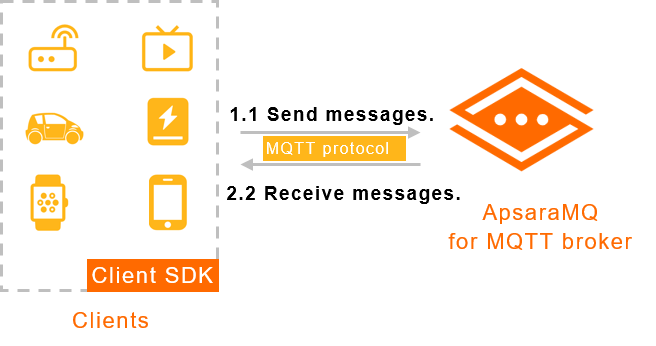
In this scenario, both the message sender and consumer are mobile terminals. They connect to ApsaraMQ for MQTT using the MQTT protocol. The devices use the open source terminal SDK to connect to ApsaraMQ for MQTT to send and receive messages.
Example scenarios
Instant messaging: For example, two mobile phones with a chat application installed can send and receive chat messages directly through the ApsaraMQ for MQTT server.
Smart device management: For example, an application on a mobile phone sends an instruction to a shared power bank that is connected to the ApsaraMQ for MQTT server. After the power bank receives the instruction message, it automatically ejects.
Terminal-to-cloud communication
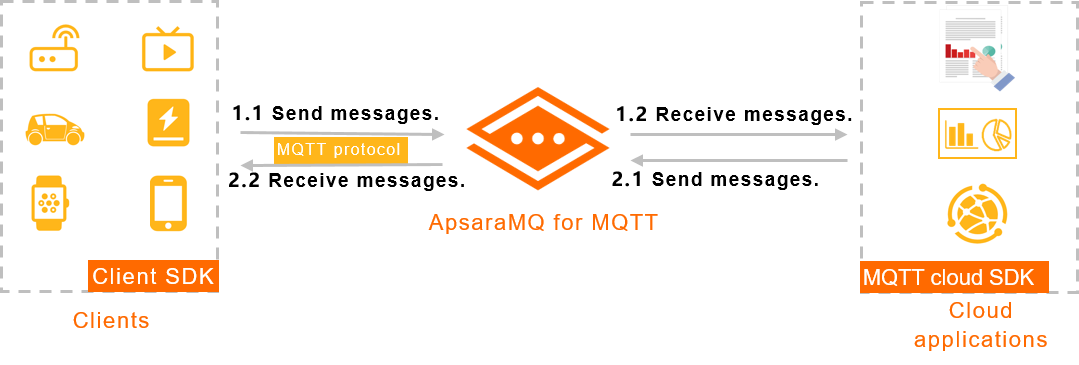
In this scenario, the message sender is a mobile terminal and the consumer is a business application deployed on Alibaba Cloud. ApsaraMQ for MQTT enables message exchange between the terminal and the cloud. The mobile terminal connects to the ApsaraMQ for MQTT server using the terminal SDK. The cloud application connects to the ApsaraMQ for MQTT server using the server-side SDK.
Example scenarios
Device status reporting: The message sender is a terminal, and the consumer is a cloud-based business application. For example, many digital price tags in a terminal environment periodically report their display status and battery levels. A management application on the cloud analyzes the reported data to check the status of online digital price tags and makes adjustments as needed.
System message push: The message sender is a cloud-based business application, and the consumers are terminals. For example, a game application deployed on the cloud sends an announcement about a service update. The ApsaraMQ for MQTT server pushes the announcement to all mobile terminals that have the game downloaded. A mobile notification then alerts all game users.
Message receiving: The subscription mode of the server-side SDK supports clustering consumption. This means different consumers receive different messages.
Terminal SDK sample code
The languages that are used in the sample code in this topic do not represent all supported languages for each scenario. Refer to the Java sample code for guidance on how to configure the parameters for other languages.
Send and receive messages
Client authentication
When a terminal connects to the ApsaraMQ for MQTT server to send and receive messages, you can use one of the following methods to authenticate the client. For more information, see Authentication overview.
Server-side SDK sample code
The server-side SDK currently supports only Java and Go.