Transactional messages
ApsaraMQ for RocketMQ provides distributed transactional messages for scenarios that require eventual data consistency. This topic describes the concepts, benefits, a typical scenario, the interaction flow, usage rules, and sample code for ApsaraMQ for RocketMQ transactional messages.
Concepts
Transactional message: ApsaraMQ for RocketMQ provides a distributed transaction feature similar to XA or Open XA, which uses the transactional messages of ApsaraMQ for RocketMQ to achieve eventual consistency for distributed transactions.
Half-transactional message: A message that is marked as "temporarily undeliverable". This state occurs when a producer sends a message to the ApsaraMQ for RocketMQ server, but the ApsaraMQ for RocketMQ server does not receive a second confirmation from the producer for the message.
Message checkback: A second confirmation for a transactional message may be lost due to a transient disconnection or a producer application restart. If the ApsaraMQ for RocketMQ server finds that a message remains in the half-transactional state for a long time, it proactively queries the producer for the final state of the message (Commit or Rollback). This query process is called a message checkback.
Benefits of distributed transactional messages
Distributed transactional messages in ApsaraMQ for RocketMQ decouple applications and ensure eventual data consistency. You can break down large, traditional transactions into smaller ones. This improves efficiency and prevents a full rollback if an associated application becomes unavailable, which maximizes the availability of the core system. In extreme cases, if an associated application consistently fails to process a transaction, you only need to compensate for or correct the data for that specific application. You do not need to roll back the entire business process.
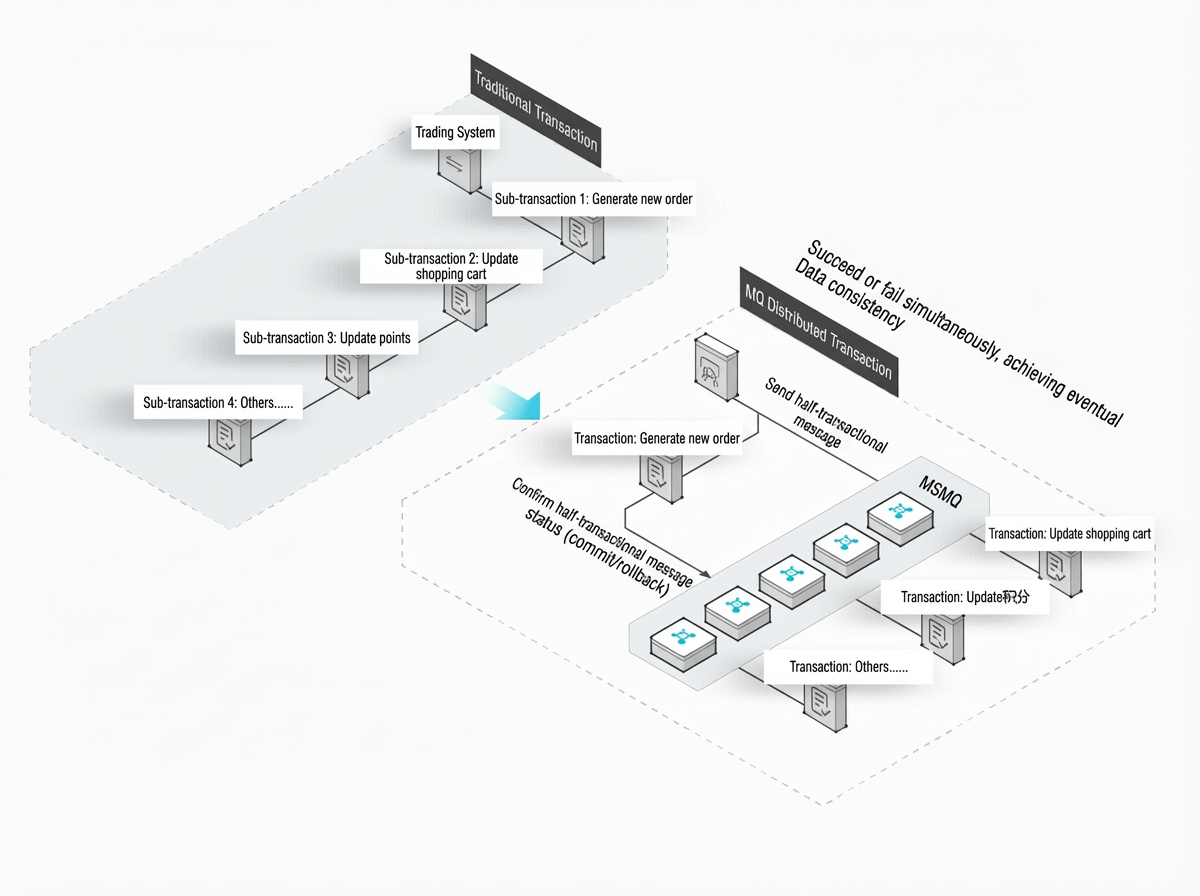
Typical scenario
When a customer places an order from a shopping cart on an e-commerce platform, both the shopping cart system and the order system are involved. The eventual data consistency between these two systems can be achieved through the asynchronous processing of distributed transactional messages. In this scenario, the order system is the core system and must ensure that orders are successfully placed. The shopping cart system only needs to subscribe to the order transaction messages from ApsaraMQ for RocketMQ and perform the corresponding business logic. This ensures eventual data consistency.
Interaction flow
The following figure shows the interaction flow for transactional messages.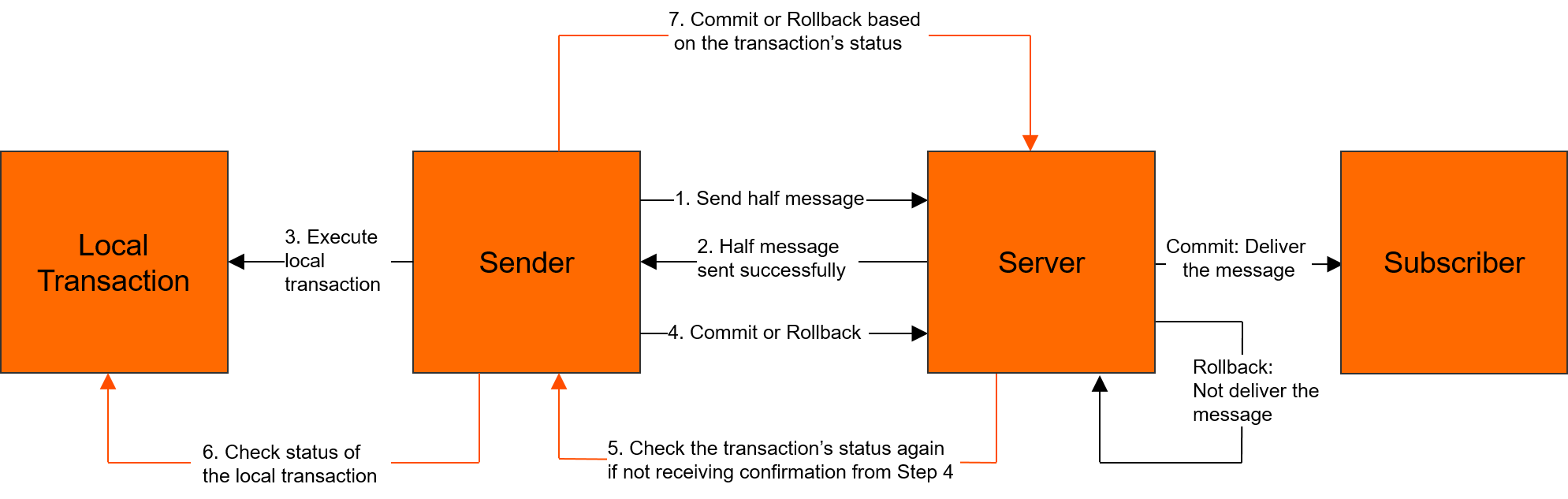
The steps to send a transactional message are as follows:
The producer sends a half-transactional message to the ApsaraMQ for RocketMQ server.
After the ApsaraMQ for RocketMQ server successfully persists the message, it returns an acknowledgement (ACK) to the producer to confirm that the message was sent. At this point, the message becomes a half-transactional message.
The producer starts to execute its local transaction logic.
The producer submits a second confirmation (Commit or Rollback) to the server based on the local transaction result. After the server receives the confirmation, it processes the message as follows:
Commit: The server marks the half-transactional message as deliverable and delivers it to the consumer.
Rollback: The server rolls back the transaction and does not deliver the half-transactional message to the consumer.
In cases such as a network disconnection or a producer application restart, the server may not receive the second confirmation. The server may also receive an Unknown status. After a specified period, the server initiates a message checkback to any producer instance in the producer cluster.
The steps for a message checkback are as follows:
After the producer receives the message checkback request, it checks the final result of the corresponding local transaction.
The producer submits the second confirmation again based on the final state of the local transaction. The server then processes the half-transactional message as described in Step 4.
Usage rules
Rules for producing messages
After the local transaction is complete, the
executemethod can return one of the following three states:TransactionStatus.CommitTransaction: Commit the transaction. This allows consumers to consume the message.TransactionStatus.RollbackTransaction: Roll back the transaction. The message is discarded and cannot be consumed.TransactionStatus.Unknown: The state cannot be determined. After a fixed period, the ApsaraMQ for RocketMQ server initiates a message checkback to the producer based on the checkback rules.
When you create a transactional message producer using
ONSFactory.createTransactionProducer, you must specify an implementation forLocalTransactionChecker. This implementation handles message checkbacks when exceptions occur.Checkback rules: After a local transaction is executed, the ApsaraMQ for RocketMQ server may receive a
TransactionStatus.Unknownstate. A producer application may also exit before it submits a state for the local transaction. In these cases, the ApsaraMQ for RocketMQ server initiates a transaction checkback to the producer. If the transaction state is not retrieved after the first checkback, subsequent checkbacks are performed at specified intervals.Checkback interval: By default, the system initiates a scheduled task every 30 seconds to check back on uncommitted half-transactional messages. This continues for 12 hours.
Minimum time for the first checkback: You can customize this parameter. If the specified minimum time for a message has not elapsed, the default scheduled checkback task (every 30 seconds) does not check that message.
For example, in Java, the following setting indicates that the minimum time for the first checkback is 60 seconds.
Message message = new Message(); message.putUserProperties(PropertyKeyConst.CheckImmunityTimeInSeconds,"60");NoteBecause of the default system checkback interval, the actual time of the first message checkback may be delayed by 0 to 30 seconds.
For example, you set the minimum time for the first checkback of a message to 60 seconds. The system's scheduled checkback task runs at the 58-second mark. Because the 60-second period has not elapsed, the message is not included in this checkback. After another 30-second interval, the next system checkback task runs at the 88-second mark. The message then meets the condition for its first checkback. This results in a 28-second delay from the configured minimum time.
Rules for consuming messages
The Group ID of transactional messages cannot be shared with the Group IDs of other message types. This is because transactional messages have a unique checkback mechanism. During a checkback, the ApsaraMQ for RocketMQ server queries the producer client based on the Group ID.
Sample code
The following sample code shows how to send and receive transactional messages:
TCP protocol
Java SDK: Send and receive transactional messages
C/C++ SDK: Send and receive transactional messages
.NET SDK: Send and receive transactional messages
HTTP protocol (multiple languages)
Python SDK: Send and receive transactional messages
Node.js SDK: Send and receive transactional messages
Java SDK: Send and receive transactional messages