Consumption Retry
If a consumer encounters an exception, ApsaraMQ for RocketMQ redelivers the message based on the consumption retry policy to perform fault recovery. This topic describes the use cases, working mechanism, version compatibility, and usage recommendations of the consumption retry feature.
Scenarios
ApsaraMQ for RocketMQ consumption retry primarily addresses message consumption completeness issues caused by failures in business processing logic. It is a fallback strategy for your business and should not be used for business flow control.
-
Use message retry in the following scenarios:
-
Business processing fails, and the failure is related to the current message content—for example, the transaction resolution for this message has not yet been obtained, but success is expected after a short delay.
-
The cause of consumption failure is non-systemic—meaning the current message fails due to a rare event rather than consistent failure—and subsequent messages are likely to succeed. In this case, retrying the current message avoids blocking the process.
-
-
Avoid message retry in the following scenarios:
-
Using consumption failure as a conditional branch in processing logic is unreasonable because the logic already anticipates frequent occurrences of this branch.
-
Using consumption failure to implement rate limiting is inappropriate. Rate limiting aims to temporarily queue excess traffic for peak shaving—not to route messages into the retry path.
-
Purpose
When message-oriented middleware is used for asynchronous decoupling, a challenge that needs to be overcome is how to ensure the integrity of the invocation chain if the downstream service fails to process messages. ApsaraMQ for RocketMQ, as a financial-grade reliable business message-oriented middleware, is inherently designed to support a reliable transmission strategy in its message delivery processing mechanism, ensuring every message is processed as expected by the business through complete acknowledgment and retry mechanisms.
Understanding the message acknowledgment mechanism and consumption retry policies of ApsaraMQ for RocketMQ can help you analyze the following issues:
-
How to guarantee complete message processing: Knowing the retry policy helps you design consumer logic that ensures every message is fully processed, preventing ignored messages and inconsistent business states.
-
How to recover message state during system failures: This clarifies how in-flight message states are restored during system anomalies (such as breakdowns) and whether state inconsistency may occur.
Consumption Retry Policy
The consumption retry policy defines the retry interval and maximum retry count after a consumer fails to process a message.
Retry Triggers
-
Consumption failure, including returning a failure status or throwing an unexpected exception.
-
Message processing timeout, including queue timeout in PushConsumer.
Main Retry Behaviors
-
Retry state machine: Controls message states and transitions during retry.
-
Retry interval: The time between a consumption failure (or timeout) and when the message becomes available for re-consumption.
-
Maximum retry count: The maximum number of times a message can be retried.
Message retry policy differences
Retry mechanisms and configuration methods differ by consumer type as follows:
|
Consumer type |
Retry state machine |
Retry interval |
Maximum retry count |
|
PushConsumer |
|
Controlled by metadata at consumer group creation.
|
Set via console or OpenAPI |
|
SimpleConsumer |
|
Set invisible duration when fetching messages via API. |
Set via console or OpenAPI |
For detailed retry policies, see PushConsumer consumption retry policy and SimpleConsumer consumption retry policy.
PushConsumer Consumption Retry Policy
Retry State Machine
When PushConsumer processes messages, messages transition through the following states: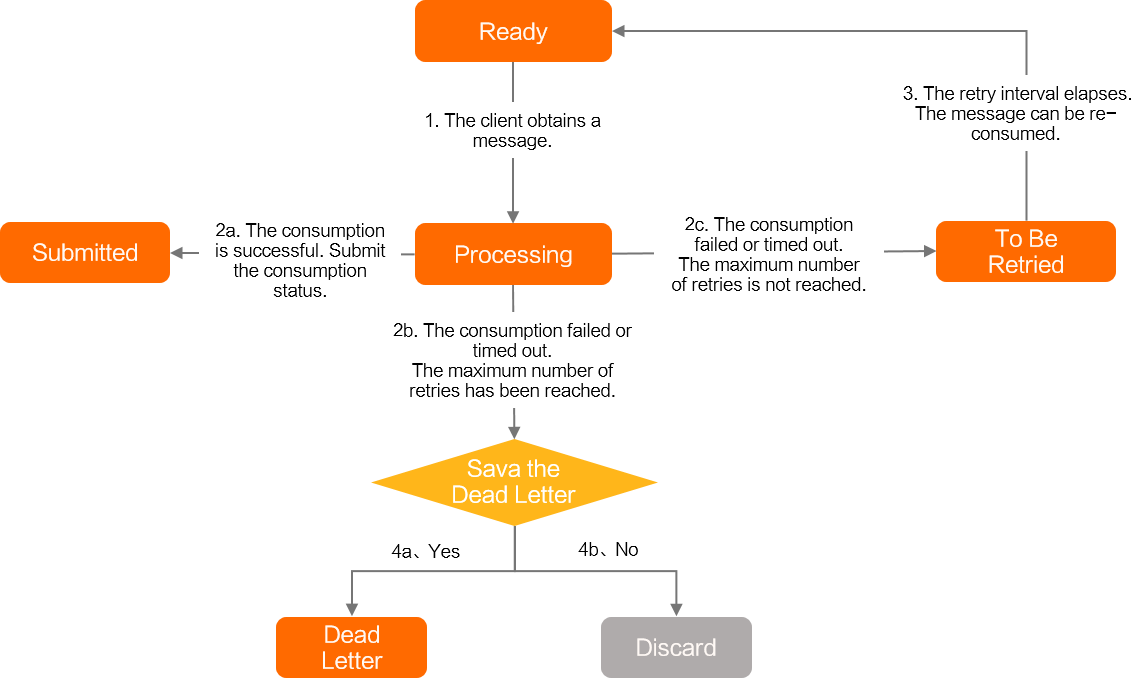
Ready: Ready state.
The message is ready on the ApsaraMQ for RocketMQ server and can be consumed by consumers.
Inflight: The processing state.
Inflight: The message has been fetched by the consumer client and is being processed but has not yet returned a consumption result.
WaitingRetry: the pending retry state, a state unique to push consumers.
WaitingRetry: A PushConsumer-specific state triggered when message processing fails or times out. If the current retry count hasn’t reached the maximum, the message enters WaitingRetry. After the retry interval, it returns to Ready for re-consumption. Retry intervals increase over attempts to prevent high-frequency retries on persistent failures.
Commit: the commit state.
Commit: Indicates successful consumption. The message state machine ends when the consumer returns a success response.
DLQ: dead-letter queue.
DLQ: Dead-letter state—the final fallback. If retries exceed the maximum count and dead-letter message retention is enabled, the failed message is sent to a dead-letter topic. You can consume messages from this topic to restore business operations. For details, see Dead-letter messages.
Discard: Discard.
Discard: If retries exceed the maximum count and dead-letter retention is disabled, the message is discarded.

Example: In the diagram above, assume a message stays in Ready for 5 seconds and takes 6 seconds to process.
Each retry cycle follows Ready → Inflight → WaitingRetry. The retry interval is the time between a failure (or timeout) and when the message becomes Ready again. The actual time between two consumption attempts also includes processing time and Ready duration. For example:
-
At 0 s, the message enters Ready.
-
Due to consumer processing speed, consumption starts at 5 s. After 6 seconds (at 11 s), an exception occurs and the client returns failure.
-
Retry cannot start immediately—it must wait for the retry interval.
-
At 21 s, the message becomes Ready again.
-
The client begins re-consuming 5 seconds later.
Thus, the actual interval between two consumption attempts is: processing time + retry interval + Ready duration = 21 s.
Retry Intervals
-
Unordered messages (non-ordered messages): The retry interval uses a stepped time approach, as follows:
Retry attempt
Retry interval
Retry attempt
Retry interval
1
10 seconds
9
7 minutes
2
30 seconds
10
8 minutes
3
1 minute
11
9 minutes
4
2 minutes
12
10 minutes
5
3 minutes
13
20 minutes
6
4 minutes
14
30 minutes
7
5 minutes
15
1 hour
8
6 minutes
16
2 hours
NoteIf retry attempts exceed 16, all subsequent retries use a 2-hour interval.
-
Ordered messages: Use a fixed retry interval. For specific values, see Parameter limits.
Maximum Retry Count
Default value: 16.
Maximum: 1,000.
For PushConsumer, the maximum retry count is controlled by consumer group metadata. To modify it, see Modify maximum retry count.
For example, if the maximum retry count is 3, the message is delivered up to 4 times: once originally and three times via retry.
Usage Example
To trigger retry in PushConsumer, simply return a consumption failure status code. Unexpected exceptions are automatically caught by the SDK.
SimpleConsumer simpleConsumer = null;
        // Consumption example: Use PushConsumer to consume normal messages. Return an error on failure to trigger retry.
        MessageListener messageListener = new MessageListener() {
            @Override
            public ConsumeResult consume(MessageView messageView) {
                System.out.println(messageView);
                // Return FAILURE to trigger automatic retry until the maximum retry count is reached.
                return ConsumeResult.FAILURE;
            }
        };
View Consumption Retry Logs
For ordered messages, PushConsumer performs retries on the client side. The server cannot access detailed retry logs. If message trace shows delivery failure for an ordered message, check the consumer client logs for maximum retry count and client information.
For the client log path, see Log configuration.
Search for these keywords in client logs to quickly locate consumption failure details:
Message listener raised an exception while consuming messages
Failed to consume fifo message finally, run out of attempt times
SimpleConsumer Consumption Retry Policy
Retry State Machine
When SimpleConsumer processes messages, messages transition through the following states: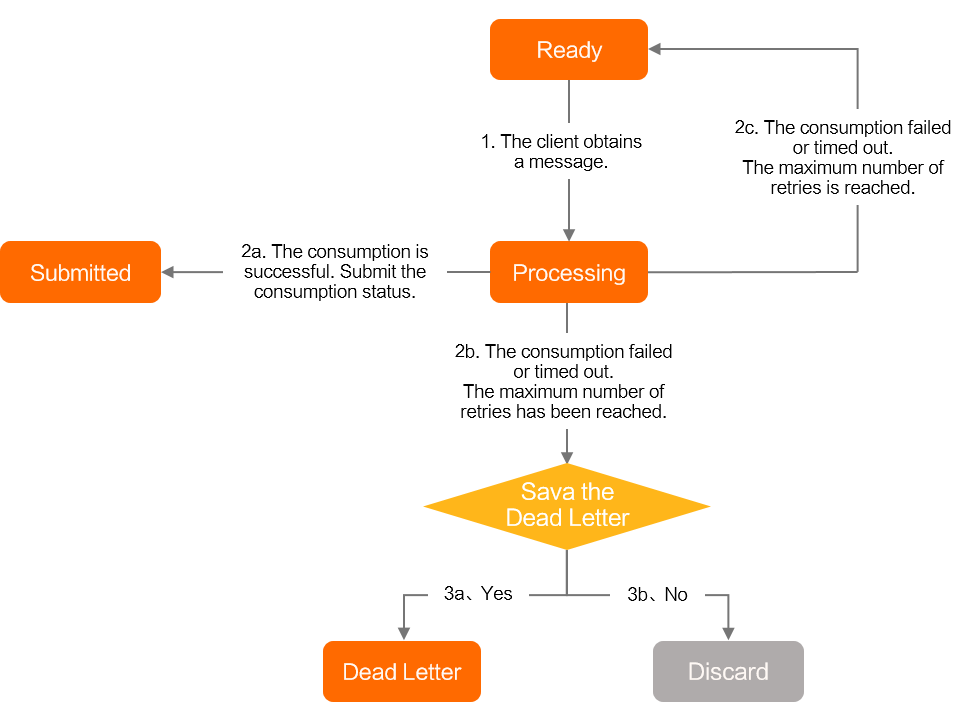
Ready: Ready state.
The message is ready on the ApsaraMQ for RocketMQ server and can be consumed by consumers.
Inflight: The processing state.
Inflight: The message has been fetched by the consumer client and is being processed but has not yet returned a consumption result.
Commit: the commit state.
Commit: Indicates successful consumption. The message state machine ends when the consumer returns a success response.
DLQ: dead-letter queue.
DLQ: Dead-letter state—the final fallback. If retries exceed the maximum count and dead-letter message retention is enabled, the failed message is sent to a dead-letter topic. You can consume messages from this topic to restore business operations. For details, see Dead-letter messages.
Discard: Discard.
Discard: If retries exceed the maximum count and dead-letter retention is disabled, the message is discarded.
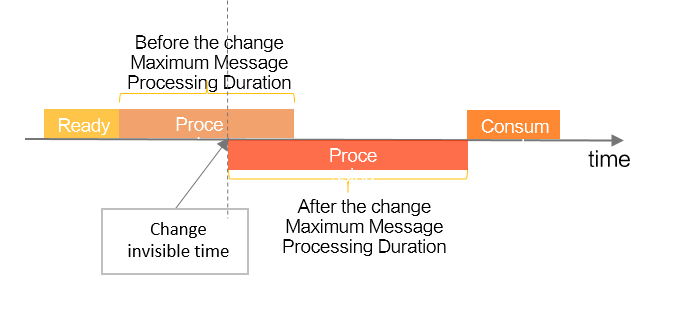
Unlike PushConsumer, SimpleConsumer uses a pre-allocated retry interval. When fetching a message, the consumer sets an InvisibleDuration parameter—the maximum allowed processing time. On failure, the next retry interval reuses this value without additional configuration.

Because InvisibleDuration is pre-allocated, it may differ significantly from actual processing time. You can modify it via API.
For example, if you initially set processing time to 20 ms but actual processing exceeds this, extend InvisibleDuration to avoid premature retries.
To modify InvisibleDuration, these conditions must be met:
-
Message processing has not timed out.
-
Consumption status has not been committed.
As shown below, the new InvisibleDuration takes effect immediately—restarting the invisibility timer from the API call moment.
Retry Interval
Retry interval = InvisibleDuration − Actual processing time
SimpleConsumer controls retry intervals via InvisibleDuration. For example, if InvisibleDuration is 30 ms and processing fails after 10 ms, the next retry occurs after 20 ms. If processing doesn’t finish within 30 ms and no result is returned, the message times out and retries immediately (0 ms interval).
Maximum Retry Count
Default value: 16.
Maximum: 1,000.
For SimpleConsumer, the maximum retry count is controlled by consumer group metadata at creation. To modify it, see Modify maximum retry count.
For example, if the maximum retry count is 3, the message is delivered up to 4 times: once originally and three times via retry.
Usage Example
To trigger retry in SimpleConsumer, simply wait.
 // Consumption example: Use SimpleConsumer to consume normal messages. To trigger retry, remain silent and let the message time out. The server will automatically retry.
        List<MessageView> messageViewList = null;
        try {
            messageViewList = simpleConsumer.receive(10, Duration.ofSeconds(30));
            messageViewList.forEach(messageView -> {
                System.out.println(messageView);
                // On failure, ignore the message. It will become visible again and be retried.
            });
        } catch (ClientException e) {
            // If pull fails due to throttling or other system issues, retry the receive request.
            e.printStackTrace();
        }
Modify Maximum Retry Count
Use the following methods to change the maximum retry count for PushConsumer and SimpleConsumer.
1. If your client uses the Remoting protocol, the actual maximum retry count follows the client-side setting, and this configuration has no effect. If your client uses gRPC, the setting here applies.
2. Retry strategies (exponential backoff or fixed interval) only apply to gRPC clients and have no effect on Remoting clients.
gRPC SDK
-
Modify via OpenAPI: Update consumer group
-
Modify via console:
To access the setting:
-
On the Instances page, click the target instance name.
-
In the navigation pane on the left, click Groups. On the Groups page, click Create Group.
In the Create Group dialog, set Group ID (1–60 characters), Delivery Order (Concurrent Delivery or Ordered Delivery), and Description. Expand Advanced Settings to configure the retry policy as Exponential Backoff, set Maximum Retry Count (default: 16), and toggle Retain Dead-letter Messages (default: off; if off, messages exceeding retry count are discarded).
-
Remoting SDK
-
Modify via Remoting SDK parameter: Set the maxReconsumeTimes property of the consumer.
Best Practices
Retry Reasonably—Avoid Using Retry for Rate Limiting
As noted in Scenarios, message retry suits rare business failures—not systemic or continuous failures like rate limiting.
-
Incorrect example:
If consumption rate triggers throttling, return failure and wait for retry.
-
Correct example:
If consumption rate triggers throttling, delay message fetching and consume later.
Frequently Asked Questions About Message Retry
How to Set Message Consumption Timeout?
gRPC Protocol
-
SimpleConsumer: Timeout range is 10 seconds to 12 hours.
Code example:
private long minInvisiableTimeMillsForRecv = Duration.ofSeconds(10).toMillis(); private long maxInvisiableTimeMills = Duration.ofHours(12).toMillis(); -
PushConsumer: Default is 230 minutes and cannot be modified.
Remoting Protocol
consumer.setConsumeTimeout(15); // Unit: minutes. Range: 1–180 minutes