After you add an ingress gateway to your ASM instance, you can deploy applications to the associated cluster. This topic describes how to deploy the Bookinfo sample application to an ACK cluster that is associated with an ASM instance.
Bookinfo application
This topic uses a sample book review application named Bookinfo. The following figure shows its microservice architecture: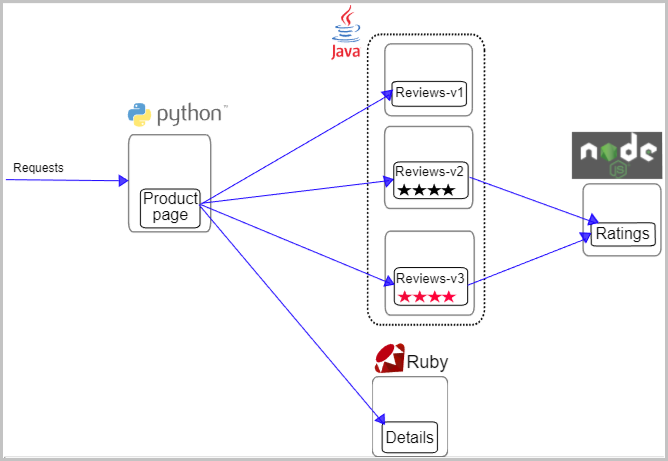
The application consists of the following four microservices:
-
Productpage: This microservice calls the Details and Reviews microservices to generate the page.
-
Details: This microservice contains book information.
-
Reviews: This microservice contains book reviews and calls the Ratings microservice.
-
Ratings: This microservice contains rating information from book reviews.
The Reviews microservice has three versions:
-
Version v1 does not call the Ratings service.
-
Version v2 calls the Ratings service and displays ratings as 1 to 5 black stars.
-
Version v3 calls the Ratings service and displays ratings as 1 to 5 red stars.
Procedure
-
Enable automatic sidecar proxy injection for the default namespace. For more information, see Enable automatic injection.
-
Create bookinfo.yaml with the following contentbookinfo.yaml。
Expand to viewYAMLYAML content
apiVersion: v1
kind: Service
metadata:
  name: details
  labels:
    app: details
    service: details
spec:
  ports:
  - port: 9080
    name: http
  selector:
    app: details
---
apiVersion: v1
kind: ServiceAccount
metadata:
  name: bookinfo-details
  labels:
    account: details
---
apiVersion: apps/v1
kind: Deployment
metadata:
  name: details-v1
  labels:
    app: details
    version: v1
spec:
  replicas: 1
  selector:
    matchLabels:
      app: details
      version: v1
  template:
    metadata:
      labels:
        app: details
        version: v1
    spec:
      serviceAccountName: bookinfo-details
      containers:
      - name: details
        image: registry-cn-hangzhou.ack.aliyuncs.com/ack-demo/examples-bookinfo-details-v1:1.20.1
        imagePullPolicy: IfNotPresent
        ports:
        - containerPort: 9080
---
##################################################################################################
# Ratings service
##################################################################################################
apiVersion: v1
kind: Service
metadata:
  name: ratings
  labels:
    app: ratings
    service: ratings
spec:
  ports:
  - port: 9080
    name: http
  selector:
    app: ratings
---
apiVersion: v1
kind: ServiceAccount
metadata:
  name: bookinfo-ratings
  labels:
    account: ratings
---
apiVersion: apps/v1
kind: Deployment
metadata:
  name: ratings-v1
  labels:
    app: ratings
    version: v1
spec:
  replicas: 1
  selector:
    matchLabels:
      app: ratings
      version: v1
  template:
    metadata:
      labels:
        app: ratings
        version: v1
    spec:
      serviceAccountName: bookinfo-ratings
      containers:
      - name: ratings
        image: registry-cn-hangzhou.ack.aliyuncs.com/ack-demo/examples-bookinfo-ratings-v1:1.20.1
        imagePullPolicy: IfNotPresent
        ports:
        - containerPort: 9080
---
##################################################################################################
# Reviews service
##################################################################################################
apiVersion: v1
kind: Service
metadata:
  name: reviews
  labels:
    app: reviews
    service: reviews
spec:
  ports:
  - port: 9080
    name: http
  selector:
    app: reviews
---
apiVersion: v1
kind: ServiceAccount
metadata:
  name: bookinfo-reviews
  labels:
    account: reviews
---
apiVersion: apps/v1
kind: Deployment
metadata:
  name: reviews-v1
  labels:
    app: reviews
    version: v1
spec:
  replicas: 1
  selector:
    matchLabels:
      app: reviews
      version: v1
  template:
    metadata:
      labels:
        app: reviews
        version: v1
    spec:
      serviceAccountName: bookinfo-reviews
      containers:
      - name: reviews
        image: registry-cn-hangzhou.ack.aliyuncs.com/ack-demo/examples-bookinfo-reviews-v1:1.20.1
        imagePullPolicy: IfNotPresent
        env:
        - name: LOG_DIR
          value: "/tmp/logs"
        ports:
        - containerPort: 9080
        volumeMounts:
        - name: tmp
          mountPath: /tmp
        - name: wlp-output
          mountPath: /opt/ibm/wlp/output
      volumes:
      - name: wlp-output
        emptyDir: {}
      - name: tmp
        emptyDir: {}
---
apiVersion: apps/v1
kind: Deployment
metadata:
  name: reviews-v2
  labels:
    app: reviews
    version: v2
spec:
  replicas: 1
  selector:
    matchLabels:
      app: reviews
      version: v2
  template:
    metadata:
      labels:
        app: reviews
        version: v2
    spec:
      serviceAccountName: bookinfo-reviews
      containers:
      - name: reviews
        image: registry-cn-hangzhou.ack.aliyuncs.com/ack-demo/examples-bookinfo-reviews-v2:1.20.1
        imagePullPolicy: IfNotPresent
        env:
        - name: LOG_DIR
          value: "/tmp/logs"
        ports:
        - containerPort: 9080
        volumeMounts:
        - name: tmp
          mountPath: /tmp
        - name: wlp-output
          mountPath: /opt/ibm/wlp/output
      volumes:
      - name: wlp-output
        emptyDir: {}
      - name: tmp
        emptyDir: {}
---
apiVersion: apps/v1
kind: Deployment
metadata:
  name: reviews-v3
  labels:
    app: reviews
    version: v3
spec:
  replicas: 1
  selector:
    matchLabels:
      app: reviews
      version: v3
  template:
    metadata:
      labels:
        app: reviews
        version: v3
    spec:
      serviceAccountName: bookinfo-reviews
      containers:
      - name: reviews
        image: registry-cn-hangzhou.ack.aliyuncs.com/ack-demo/examples-bookinfo-reviews-v3:1.20.1
        imagePullPolicy: IfNotPresent
        env:
        - name: LOG_DIR
          value: "/tmp/logs"
        ports:
        - containerPort: 9080
        volumeMounts:
        - name: tmp
          mountPath: /tmp
        - name: wlp-output
          mountPath: /opt/ibm/wlp/output
      volumes:
      - name: wlp-output
        emptyDir: {}
      - name: tmp
        emptyDir: {}
---
##################################################################################################
# Productpage services
##################################################################################################
apiVersion: v1
kind: Service
metadata:
  name: productpage
  labels:
    app: productpage
    service: productpage
spec:
  ports:
  - port: 9080
    name: http
  selector:
    app: productpage
---
apiVersion: v1
kind: ServiceAccount
metadata:
  name: bookinfo-productpage
  labels:
    account: productpage
---
apiVersion: apps/v1
kind: Deployment
metadata:
  name: productpage-v1
  labels:
    app: productpage
    version: v1
spec:
  replicas: 1
  selector:
    matchLabels:
      app: productpage
      version: v1
  template:
    metadata:
      annotations:
        prometheus.io/scrape: "true"
        prometheus.io/port: "9080"
        prometheus.io/path: "/metrics"
      labels:
        app: productpage
        version: v1
    spec:
      serviceAccountName: bookinfo-productpage
      containers:
      - name: productpage
        image: registry-cn-hangzhou.ack.aliyuncs.com/ack-demo/examples-bookinfo-productpage-v1:1.20.1
        imagePullPolicy: IfNotPresent
        ports:
        - containerPort: 9080
        volumeMounts:
        - name: tmp
          mountPath: /tmp
      volumes:
      - name: tmp
        emptyDir: {}
---
-
Run the following command to deploy the Bookinfo application.
kubectl apply -f bookinfo.yaml
-
Verify the Bookinfo deployment.
-
Log on to the ACK console. In the left navigation pane, click Clusters.
-
On the Clusters page, click the name of your cluster. In the left navigation pane, click .
-
On the Pods page, select default from the Namespace drop-down list to view the pods for the Bookinfo application.
Note
To view pod details, click Details in the Actions column.
What to do next
You can create a Gateway and a virtual service to access services through the ASM gateway. You can also create a destination rule to route traffic to different versions of a service based on a specified ratio. For more information, see Use Istio resources to implement version-based traffic routing.