Service Mesh maintenance windows
This topic introduces the features, use cases, usage notes, and configuration of Service Mesh maintenance windows.
Features and use cases
Service Mesh (ASM) performs Service Mesh tasks on the managed control plane as needed.
-
Based on the versioning mechanism, the system automatically applies hot updates for patch versions to the managed control plane at irregular intervals to provide security patches and bug fixes.
-
The system periodically rotates the managed control plane's Service Mesh for data plane clusters. This ensures the secure and stable operation of Service Mesh.
The Service Mesh maintenance window feature allows you to control the timing of automatic maintenance on the managed control plane. This can mitigate the brief delays that may occur during configuration updates. Maintenance windows are suitable for the following scenarios:
-
Schedule automatic maintenance during off-peak hours, when traffic is low or no release tasks are in progress, to minimize the impact on your business.
-
Schedule automatic maintenance during business hours to ensure that personnel are available to monitor and respond to any unexpected issues.
Usage notes
During an automatic maintenance task on the managed control plane, you may experience a few seconds of latency when starting a new sidecar proxy in a data plane cluster or updating Service Mesh configurations.
Maintenance windows have the following properties:
-
You can configure only one maintenance window per Service Mesh. If you configure a new maintenance window, it overwrites the previous one.
-
When you configure or view a maintenance window, times are displayed in the UTC+8 time zone.
Maintenance window configuration
-
Log on to the ASM console. In the left-side navigation pane, choose .
-
On the Mesh Management page, click the name of the ASM instance. In the left-side navigation pane, choose .
-
On the Basic Information page, in the Config Info section, click Edit next to Maintenance Window.
-
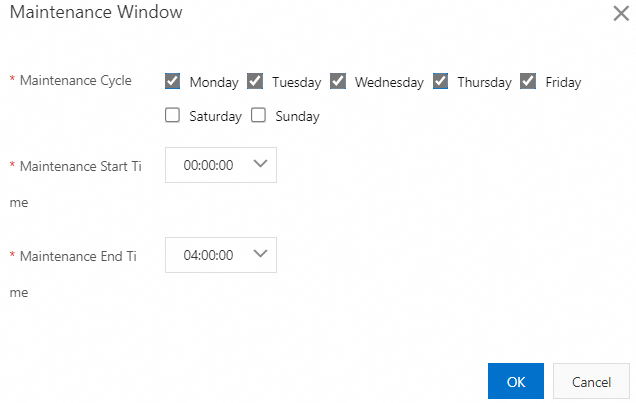
In the Maintenance Window dialog box, configure the Maintenance Cycle, start time, and end time, and then click OK.
The Service Mesh enters a brief updating state. The update is complete when its Status changes to Running.
The following figure shows an example of automatic maintenance scheduled to run from 00:00:00 to 04:00:00, Monday through Friday.