This topic describes how to obtain the BizWorks Application Framework (BWAF) developer package.
Background information
The BizWorks Application Framework (BWAF) is published in a private repository provided by BizWorks. To obtain the framework, you must configure the settings.xml file in your Maven project.
A Maven project for a BizWorks Managed Application has the following three types of Maven repositories: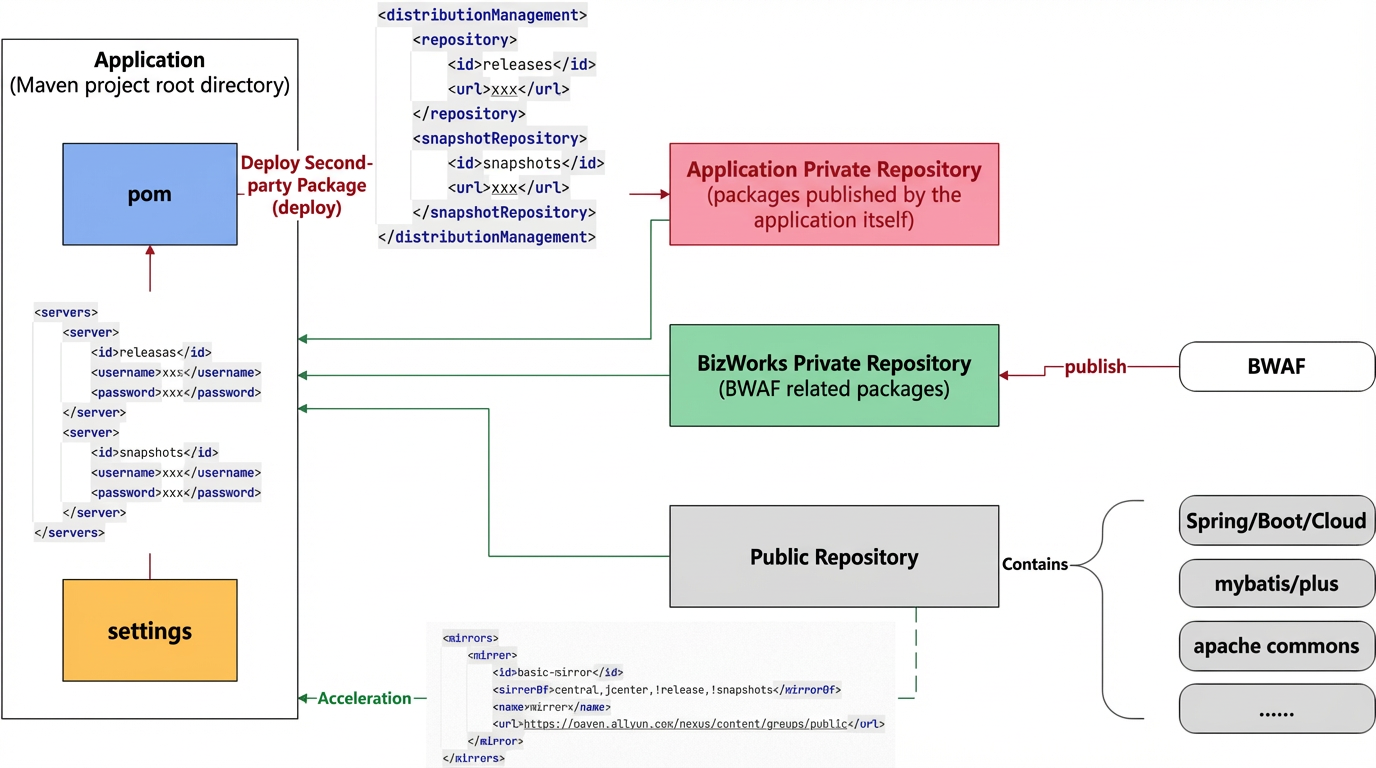
Public repository: Pulls third-party packages, such as Spring, that are published on the Internet. In an Apsara Stack environment, you can access the repository by opening a specific public network egress or using a proxy. In a public cloud environment, Alibaba Cloud provides an acceleration proxy.
Application private repository: The target repository for the application's
mvn deploycommand. This repository is typically used to store second-party packages published by the application.BizWorks private repository: A dedicated repository for BWAF, a third-party package provided by BizWorks. Because BWAF is not published on the Internet, you pull it from this private repository.
Prerequisites
Maven projects generated by the scaffolding feature of BizWorks include a pre-configured settings.xml file and require no additional configuration.
You must manually configure the settings.xml file to obtain the BWAF developer package in the following situations:
You do not use a Maven project generated by the BizWorks scaffolding feature.
You use a Maven project generated by a version of BizWorks earlier than 1.11.0 and need to upgrade BWAF to version 1.11.0 or later.
NoteBeginning with version 1.11.0, BizWorks migrated the repository where the BWAF developer package is published.
Procedure
Add a profile configuration that points to the BWAF repository.
The following code provides an example:
    <profiles>
        <!-- Keep other existing profiles ... Add the following: -->
        <profile>
            <id>bizworks-profile</id>
            <repositories>
                <repository>
                    <id>bizworks-repo-release</id>
                    <url>https://packages.aliyun.com/maven/repository/2270952-release-TB0Rsb/</url>
                    <releases>
                        <enabled>true</enabled>
                        <updatePolicy>never</updatePolicy>
                    </releases>
                    <snapshots>
                        <enabled>false</enabled>
                    </snapshots>
                </repository>
            </repositories>
            <pluginRepositories>
                <pluginRepository>
                    <id>bizworks-repo-release</id>
                    <url>https://packages.aliyun.com/maven/repository/2270952-release-TB0Rsb/</url>
                    <releases>
                        <enabled>true</enabled>
                        <updatePolicy>never</updatePolicy>
                    </releases>
                    <snapshots>
                        <enabled>false</enabled>
                    </snapshots>
                </pluginRepository>
            </pluginRepositories>
        </profile>
    </profiles>
<activeProfiles> <!-- Keep other existing activeProfiles ... Add the following: --> <activeProfile>bizworks-profile</activeProfile> </activeProfiles>Add a server configuration that points to the BWAF repository.
The following code provides an example:
    <servers>
                <!-- Keep other existing servers ... Add the following: -->
        <server>
            <id>bizworks-repo-release</id>
            <username>630c5cc22b16b2e74182afd2</username>
            <password>5fOu8lBhzz6m</password>
        </server>
    </servers>
Modify the
mirrorconfiguration.If you have the following
mirrorOf *configuration that points to http://bw-nexus.console.bizworks.cn/repository/maven-public/, delete it.<mirrors> <mirror> <id>maven-public</id> <mirrorOf>*</mirrorOf> <name>maven-public</name> <url>http://bw-nexus.console.bizworks.cn/repository/maven-public/</url> </mirror> </mirrors>Add the following recommended
mirrorconfiguration, or use any other method to access the public Maven repository.<mirrors> <mirror> <id>basic-mirror</id> <mirrorOf>central,jcenter,!release,!snapshots</mirrorOf> <name>mirror</name> <url>https://maven.aliyun.com/nexus/content/groups/public</url> </mirror> </mirrors>
Local verification
After you complete the configuration, you can run the following Maven build command locally to verify that the configuration is correct.
mvn clean package -DskipTests -s settings.xml -X -Dmaven.repo.local=./repository