Deploy CAPTCHA 2.0 and Fraud Detection
In marketing scenarios, your business is constantly exposed to risks such as cheating, promotion abuse, and arbitrage. We recommend that you integrate your business with both Fraud Detection and CAPTCHA 2.0 to enable marketing fraud detection and CAPTCHA verification for your business. This helps protect your key business activities such as marketing from frauds and reduce your losses. This topic describes how to deploy both CAPTCHA 2.0 and Fraud Detection in marketing scenarios.
Background information
Fraud Detection is a risk control service that is developed by Alibaba Cloud. It provides one-stop business risk management capabilities to help you resolve a series of risks that may occur in account registration, platform logon, marketing, and financial scenarios.
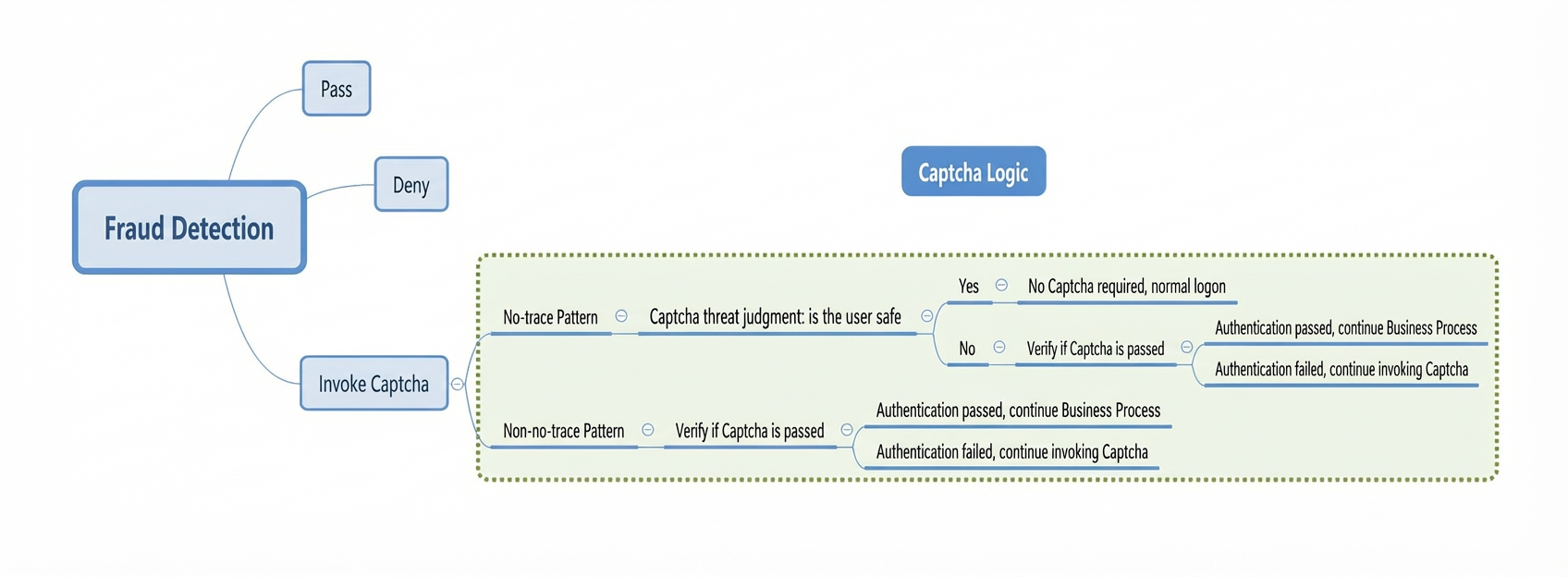
Fraud Detection identifies risks in each request, scores the request and adds tags to the request. You can trigger a CAPTCHA challenge for requests whose scores fall within a specific range. Only requests that pass the CAPTCHA verification are allowed. This enhances your business security.

Example scenario
Business scenario
In this example, your website is about to carry out a marketing campaign, and you need to prevent issues such as cheating to protect your business from frauds.
Solution
Integrate your business with both Fraud Detection and CAPTCHA 2.0. After Fraud Detection scores requests and returns the scores, you can configure a handling solution for requests in each score range.
NoteIn this example, the score ranges specified in the principles of deploying both Fraud Detection and CAPTCHA 2.0 are used, and the corresponding handling solutions are provided. You can configure handling solutions based on your business requirements.
Principles

Verification sequence diagram

The following list describes the sequence diagram:
A user completes registration and logon on the website, and participates in the marketing campaign. After the business client receives the user request, the business client sends the business information to the business server.
The business server initiates a request to the Fraud Detection server.
The Fraud Detection server determines the risks in the request.
The Fraud Detection server returns the score and tags of the request to the business server.
The business server handles the request based on the following solutions:
Reject the request if it is at high risk.
Allow the request if it is at low risk.
Trigger a CAPTCHA challenge for the request if it is at medium- or medium-high-risk.
The user completes the CAPTCHA challenge on the business page, and the business client sends the CAPTCHA information returned by the callback function to the business server.
The business server sends a verification request to the CAPTCHA 2.0 server.
The CAPTCHA 2.0 server performs risk verification.
The CAPTCHA 2.0 server returns the verification result (verified or failed) to the business server.
The business server returns the verification result (verified or failed) to the business client. A notification message indicating the verification result is displayed on the business client, and the business client starts business process.
Procedure
Activate CAPTCHA 2.0 and Fraud Detection.
Integrate your business with Fraud Detection. For more information, see Use an SDK or Make native HTTPS calls.
For more information about the parameters in this example, see Features and parameters of Marketing Fraud Detection and Common parameters.
Configure the handling solutions for requests in different score ranges on the business server.
Integrate CAPTCHA 2.0 with your business client and business server. For more information, see Integration guide.
This way, when a user initiates a request to the business client, Fraud Detection scores the request. After the business server receives the score, the business server handles the request based on the handling solutions that you configure. If the score of the request falls within the range of [40,85), a CAPTCHA challenge is triggered for CAPTCHA verification. If the verification is passed, the request is allowed. Otherwise, the request is rejected.
FAQ
What CAPTCHA types are supported when I deploy both CAPTCHA 2.0 and Fraud Detection?
The following CAPTCHA types provided by CAPTCHA 2.0 are supported: invisible CAPTCHA, slider CAPTCHA, puzzle CAPTCHA, and visual reasoning CAPTCHA.
What is the difference between invisible CAPTCHA and the deployment of both CAPTCHA 2.0 and Fraud Detection?
After you deploy both CAPTCHA 2.0 and Fraud Detection, Fraud Detection first determines whether to trigger a CAPTCHA challenge. If a CAPTCHA challenge is required and the CAPTCHA type is invisible CAPTCHA, the invisible verification logic is carried out. For example, if Fraud Detection determines that a user is a low-risk user, no CAPTCHA challenge is triggered and the further verification logic is not carried out.