Front-end SDK integration
This guide shows you how to embed the agent workbench into a third-party system, enabling features like single sign-on and call handling. You can also implement screen pops by listening for methods in the SDK. This work needs to be performed by your company's frontend engineer. We update this documentation in sync with SDK releases, so we recommend checking it regularly for the latest information.
SDK version 3.x is available. See Front-end SDK Integration (3.x) for integration details. To upgrade from version 2.x, see Upgrade from version 2.x. Version 2.x will no longer receive new features.
Frontend resources
After updating frontend resources, be sure to test them thoroughly in your local environment before deploying to the production environment.
<!-- IM SDK stylesheet. Do not load this file if you do not use the IM plugin. -->
<link rel="stylesheet" type="text/css" href="https://g.alicdn.com/code/npm/@ali/cc-im-sdk/{version-im-sdk}/index.css">
<!-- softphone SDK stylesheet -->
<link rel="stylesheet" type="text/css" href="//g.alicdn.com/cloudcallcenter/web-workbench-sdk/{version-workbench}/main.min.css">

<!-- IM SDK JavaScript file. Do not load this file if you do not use the IM plugin. -->
<script type="text/javascript" src="//g.alicdn.com/code/npm/@ali/cc-im-sdk/{version-im-sdk}/index.js"></script>
<!-- softphone SDK JavaScript file -->
<script type="text/javascript" src="//g.alicdn.com/cloudcallcenter-voip/web-agentbar-sdk/{version-agentbar}/index.js"></script>
<script type="text/javascript" src="//g.alicdn.com/cloudcallcenter/web-workbench-sdk/{version-workbench}/workbenchSdk.min.js"></script>
These JS files are interdependent and must be loaded in the specified order. You can omit the IM SDK files if you only use the softphone SDK. However, using only the IM SDK requires loading all files.
To ensure compatibility with Android, iOS, and the Safari browser, add a WebRTC polyfill such as Adapter.js. Load it before web-agentbar-sdk.
Initialize the SDK
Before you integrate the SDK, complete the following prerequisites:
Use the Chrome browser, version 58 or later. Cloud Call Center handles calls using WebRTC, and Chrome provides the most stable support. This ensures high call quality and security.
Applications that embed the softphone SDK must use the HTTPS protocol. Modern browsers, starting with Chrome 47, require a secure context (HTTPS) to grant microphone access. Calls will fail if the application uses the http protocol.
When using the softphone SDK in an iframe tag, add the
allow="microphone"attribute to that tag. This allows the iframe to access the system microphone.
Initialize the SDK:
window.workbench = new WorkbenchSdk(config)config: Required parameters
dom
The ID of the mounting element.instanceId
The ID of the Cloud Call Center instance. This is the string between 'workbench/' and '/agentdest' in the console's access URL (https://ccc.console.aliyun.com/AccV2Instance). For example, in the path '.../workbench/xxx/agentdest', 'xxx' is the instance ID. See the figure below: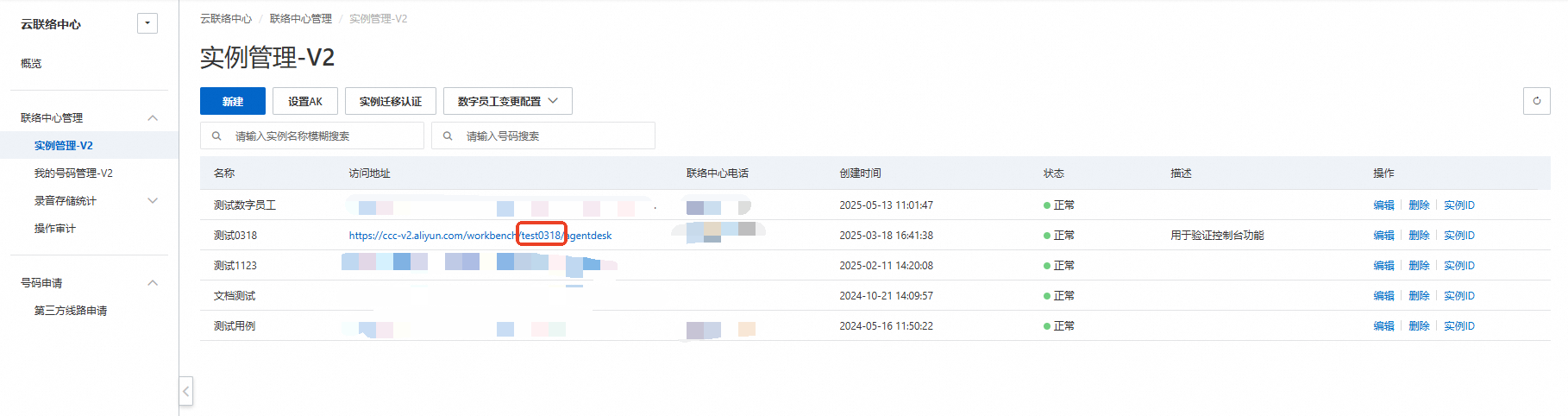
regionId
The ID of the region where the Cloud Call Center instance is deployed. The default value is 'cn-shanghai'.
Optional config
header
Specifies whether to display the header, which contains controls for actions such as taking a break, going offline, or using the off-site work mode. Default: true. Type: Boolean.width
The width of the panel, in pixels. Default: 320. Type: Number.height
The height of the panel, in pixels. To ensure the UI displays correctly, a minimum height of 580 pixels is recommended. Default: 580. Type: Number.defaultVisible
Specifies whether the panel is visible by default. Default: true. Type: Boolean.defaultMainContentVisible
Specifies whether the softphone panel is expanded by default. Default: true. Type: Boolean.offlineImage
The URL of the static image to display when the agent is offline. Type: String.breakImage
The URL of the static image to display when the agent is on a break. Type: String.afterCallRule
The delay in seconds before an agent enters the ready state after a call. Set this to 'manual' to require the agent to manually switch from after call work to the ready state. Default: 15. Type: Number.autoAnswerCall
The time in seconds before an incoming call is automatically answered. If this parameter is not set, agents must answer calls manually. Type: Number.isLoggedKeepBreak
If `true`, the agent remains on a break after logging in, preventing them from immediately receiving calls. By default (`false`), the agent's status changes to the ready state upon login. Type: Boolean.isLoggedInvisibility (version-workbench: 2.12.2)
If `true`, the agent remains in an invisible state after logging in. By default (`false`), the agent becomes visible and available for calls upon login. Type: Boolean.isOutboundNotReceivedToBeProcessed
If `true`, the agent enters after call work even if an outbound call is not answered. By default (`false`), when an outbound call is not answered, the agent enters after call work only briefly and then automatically transitions to the ready state. Type: Boolean.exportErrorOfApi
Specifies whether to display API error details (such as ApiName, ErrorCode, and RequestId) in a toast notification. This can help with backend troubleshooting. Default: false. Type: Boolean.moreActionList
Specifies the action buttons available in the header. Possible values include "online" (go online), "ready" (become ready), "onlyCall" (become invisible), "break" (take a break), "offline" (go offline), "adjustVolume" (adjust volume), and "changeWorkMode" (change to off-site work mode). Default: ["break", "offline", "adjustVolume", "changeWorkMode"]. Type: Array.NoteWhen the panel is collapsed, all specified buttons are displayed. When the panel is expanded, the "online" and "ready" buttons are hidden, as these actions can be performed from within the main panel.
useLocalStorageToCall
Specifies whether to allow making outbound calls from multiple browser tabs. See section 9 for more details. Default: false. Type: Boolean.pollFrequenceWithoutWS
The polling frequency in milliseconds for agent status via the REST API when the WebSocket connection is unavailable. The cloud contact center uses a dual-channel system (WebSocket push and REST API polling) to ensure real-time, accurate agent status. Default: 1000. Type: Number.pollFrequenceWithWS
The polling frequency in milliseconds for agent status via the REST API when the WebSocket connection is active. This polling serves as a backup to the primary WebSocket channel. Default: 10000. Type: Number.pollSaveWebRtcInfoFrequence
The frequency in milliseconds for calling the `SaveWebRtcInfo` API, which stores call information. Minimum: 2000. Default: 10000. Type: Number.sideNavList
Customizes the items displayed in the side navigation panel. If not set, all items are displayed. Possible values: "inbound", "outbound", "internal call", "call history", "transfer", "conference", "call monitoring", "my work", "device check", and "settings". Type: Array.disableSaveStats
Specifies whether to disable the collection of agent-side call data, which is used for voice troubleshooting and network analysis. We strongly recommend keeping this feature enabled, as disabling it can hinder engineers' ability to diagnose issues. Default: false (data collection is enabled). Type: Boolean.reducePanel
Specifies whether to display the minimize icon for the SDK panel. Default: true. Type: Boolean.isEnableSwitchAdapter
Enables the use of multiple dedicated voice access points to improve agent call quality. Set to `false` if the agent needs to connect directly to the cloud call center server. Default: true. Type: Boolean.customizedNotification
If `true`, the default incoming call notification is disabled, allowing you to implement a custom one. By default (`false`), the default notification is used. Type: Boolean.allowCalleeEncryption
If `true`, the callee number can be transmitted in an encrypted format. This removes data type restrictions on the `callee` parameter in the `call` method. Type: Boolean.defaultLastSelectedCallerNumber (version-workbench: 2.12.2)
Specifies whether to store the last selected caller number in the browser's cache. If stored, it becomes the default caller number the next time the agent goes online. Type: Boolean.imConfig
Configuration for IM chat. You must load the corresponding CSS and JS files.

{
  /**
   * Agent information. By default, the nickname and avatar configured in the workbench settings are used.
   */
  user?: {
        /**
         * Display name
         */
        nickname?: string;
        /**
         * Avatar URL
         */
        avatarUrl?: string;
    };

  /**
   * The HTML element where the IM interface is rendered.
   */
  getContainer: () => HTMLElement;

  /**
   * Fired when the active conversation changes. The parameter is `null` if no conversation is active.
   * @param conv
   * @returns
   */
  onConvChange?: (conv) => void;

  /**
   * Fired when a conversation invitation is received.
   */
  onConvInvite?: (event) => void;

  /**
   * Fired when a conversation invitation is canceled.
   */
  onConvCancelInvite?: (event) => void;

  /**
   * Fired when a conversation ends.
   */
  onConvReleased?: (event) => void;

  /**
   * Fired when a message is added to the conversation.
   */
  onMessageAdd?: (message) => void;

  /**
   * Fired when a message is added to the claim queue.
   */
  onClaimQueueAdd?: (event) => void;
}
Use the following to configure the API endpoint and request parameters for API calls from the frontend to the backend:
Request URL: ${ajaxOrigin}${ajaxPath}?${ajaxApiParamName}=${apiName}&product=CloudCallCenter&version=2020-07-01®ion=${regionId}
ajaxOrigin
The request source. Defaults to the current origin (location.origin) if omitted. Type: String.ajaxPath
The request path. Defaults to /data/api.json. Type: String.withCredentials
Whether to send credentials, such as a cookie, with cross-origin requests. Type: Boolean.ajaxApiParamName
The parameter name that specifies the API action when ajaxType is param. Defaults to action. Type: String.ajaxMethod
Specifies the request method. Valid values: post and get. Defaults to post. Type: String.ajaxOtherParams
An object of custom parameters to include at the same level as the request object. Type: Object.ajaxHeaders
An object of custom request headers. Type: Object.apiAxiosFunc
A custom function for making API requests. It must return a Promise object that resolves with a data structure matching the Cloud Contact Center public API format.
apiAxiosFunc: (apiName, params) => {
   console.log(apiName, params);
   let promise = axios({
      method: 'post',
      url:/aliyun/ccc/api?action=${apiName},
      headers: {
         'Content-Type': 'application/x-www-form-urlencoded',
      },
      data: Qs.stringify({ request: JSON.stringify(params)}),
    });
    return promise;
}

Note:
Cloud Contact Center uses the Axios library internally for requests, which by default returns a data structure like this:
{
  data: {
    code:xxx,
    data: xxx,
    httpStatusCode: xxx,
    requestId: xxxx
  }
}
If you do not use Axios, wrap the returned data in an outer data object to match this structure.
You have now configured the API request parameters.
Hook function
Hook functions are callback functions of type function that are triggered by specific events.
onInit()
Triggered when the SDK object is instantiated.onRegister(config)
Triggered when the SIP service registers successfully.onLogIn()
Triggered when an agent signs in.onLogOut()
Triggered when an agent signs out.onBreak()
Triggered when an agent goes on break.onReady()
Triggered when an agent becomes ready.onAgentOutboundScenario
Triggered only for outbound calls.onCallComing(callDetail)
Triggered when an inbound call is received. This function provides a `callDetail` object with the following parameters: caller: The caller's number. callee: The callee's number. call type: The call type. jobId: The ID of the current call. callContext: Detailed information about the current call.ImportantTo improve the connection rate, if an incoming call is not answered within 30 seconds, the agent's status is automatically set to break. The call is then returned to the manual queue and assigned to another ready agent.
onBeforeCallDialing(payload)
Triggered before the `call` method is called. If you configure this hook, you must call the `callback` method to place the call. The `payload` object contains the following parameters:
callee: The callee's number.
userId: The user's ID.
callback: The callback function to be executed after conditions are met. You can pass a `callee` parameter (prefix + callee number) to it. If this parameter is not provided, the callee number from the panel or the `call` method is used.
onCallDialing(callDetail)
Triggered when an outbound call is dialing. This function provides a `callDetail` object with the following parameters:
caller: The caller's number.
callee: The callee's number.
call type: The call type.
jobId: The ID of the current call.
callContext: Detailed information about the current call.
onHangUp(type)
Triggered when a call is hung up. The `type` parameter can have the following values:
`ringing`: The incoming call was hung up before being answered.
`dialing`: The outbound call was hung up before being answered.
`inbound`: An active inbound call was hung up.
`outbound`: An active outbound call was hung up.
`internalcall`: An active internal call was hung up.
`agentHeld`: An active consultation call was hung up.
`meeting`: A conference call was hung up, or the agent's status changed during the conference.
`consulted`: A passive consultation call (where the agent was consulted) was hung up.
`monitored`: An active monitored call was hung up.
`monitoring`: A monitoring call was hung up before it connected.
`bargedIn`: An active barge-in call was hung up.
`coached`: An active coaching session was hung up.
onBeforeCallHangup(payload)
Triggered before the `hangUp` method is called. If you configure this hook, you must call the `callback` method to hang up the call. The `payload` object contains the following parameters:
callback: The callback method.
jobId: The ID of the current call.
channelId: The channel ID for this agent's call.
userId: `loginInfo.userId`.
onCallEstablish(callDetail)
Triggered when a call connects. This function provides a `callDetail` object with the following parameter:
callContext: Detailed information about the current call.
onCallRelease(callDetail)
Triggered when a call ends. This function provides a `callDetail` object with the following parameter:
callContext: Detailed information about the current call.
onErrorNotify(error)
Triggered when an error occurs. You can access the `error` object, which contains the following parameters: errorCode: The error code. errorMsg: The error message from the response. errorMsgTip: A custom error message. requestId: The request ID. apiCode: The error code from the API request.NoteDuring development, we recommend logging the
errorobject to capture detailed error information.onStatusChange(codeDetail)
Triggered whenever the agent's status changes. You can use this function to monitor status transitions. See the status code table in Section 8 for descriptions of each status code. This function provides a `codeDetail` object with the following parameters:
code: The current status code.
lastCode: The previous status code.
context: Contextual information.
onWorkModeChange(workMode)
By default, agents have two work modes: on-site mode and off-site mode. If a SIP phone is configured for the agent, an additional office phone mode is available.
on-site mode: Answer and place calls through the browser.
off-site mode: Answer calls on a mobile phone. This is equivalent to the "Answer with Mobile" feature in version 1.0.
office phone mode: Answer and place calls through a SIP phone without interacting with the browser.
The `workMode` parameter can have the following values:
"ON_SITE": on-site mode.
"OFF_SITE": off-site mode.
"OFFICE_PHONE": office phone mode.
onDeviceTypeChange(deviceType)
If a SIP phone is configured, the agent can choose which device to use when signing in through a browser: WebRTC softphone or SIP phone.
The `deviceType` parameter is a `Number`:
0: WebRTC softphone.
1: SIP phone.
onGetStatsData(payload)
For details on the underlying concepts, see RTCPeerConnection.getStats().
Subscribe to this hook function to receive voice quality metrics for the active call. It returns data once per second.
The `payload` object contains:
callId: The ID of the current call.
sender: Sender-side metrics.
receiver: Receiver-side metrics.

Example usage:
sender && sender.forEach(report => {
 console.log('sender', report);
}
onSelectOutboundNumber(number)
/**
 * Triggered when a caller ID is selected in the panel.
 *
 * @param {string} number The selected caller ID.
 */
onSelectOutboundNumber(number: string): void
onSelectCurrentCallRecord(payload)
For the payload.record parameters, see the List recent agent call records interface.
/**
 * Fires when a call record is selected.
 */
onSelectCurrentCallRecord?(payload: {record: object}): void
onAfterEarlyMediaRecognized(payload)
/**
 * A hook function for the intelligent hang-up of outbound calls that returns early media recognition information.
 */
onAfterEarlyMediaRecognized?(payload: {
                             /**
                              * The state of the early media.
                              */
                             earlyMediaState: string,
                             /**
                              * The timestamp when early media started, used for calculating the countdown.
                              */
                             earlyMediaTime: number,
                             /**
                              * A description of the early media state.
                              */
                             earlyMediaText: string,
                             /**
                              * The duration of the hang-up countdown, as specified in the settings.
                              */
                             releaseAfterEarlyMediaRecognized: number
                             })
Configuration
window.workbench = new window.WorkbenchSdk({
  dom: "workbench-container",
  regionId: "cn-shanghai",
  width: "320px",
  height: "552px",
  instanceId: "XXX",
  ajaxPath: "/aliyun/ccc/api",
  ajaxMethod: "post",
  afterCallRule: 15, // Duration of after-call work, in seconds.
  header: true,
  autoAnswerCall: 8, // The number of seconds to wait before auto-answering a call.
  exportErrorOfApi: true,
  onInit() {
    // window.workbench.register() // Uncomment to automatically go online upon initialization.
  },
  imConfig: {
    getContainer() {
      return document.getElementById('im-container');
    },
  },
  onLogIn() {
    // window.workbench.renderIM(); // Render the IM component.
  },
  onLogOut() {
    // window.workbench.unmountIM(); // Unmount the IM component.
  },
  onErrorNotify(error) {
    console.warn(error);
  },
  onCallComing(callDetail) {
    console.log(callDetail);
  },
  onCallDialing(callDetail) {
    console.log(callDetail);
  },
  onStatusChange(codeDetail) {
    console.log(codeDetail);
  },
  onCallEstablish(callDetail) {
    console.log("Fired when a call is established.", callDetail);
  },
  onCallRelease(callDetail) {
    console.log("Fired when a call is released.", callDetail);
  },
  onHangUp(type) {
    console.log(`onHangUp event fired. Type: ${type}`);
  },
});
SDK method
Call the method as follows: window.workbench.methodName(parameters).
Ensure the global variable name defined during SDK initialization matches the one specified in the document.
isAvailBrowser()
Checks whether the current browser supports the softphone. If the browser is incompatible, a notification is displayed for 3 seconds and an error message is returned to the `onErrorNotify` hook. If the browser is compatible, this method returns nothing.checkNetwork()
Checks connectivity to the softphone service and detects if a local firewall is blocking the connection.changeVisible(visible)
Shows or hides the softphone panel. The `visible` parameter is a `Boolean`.changeMainPaneVisible(visible)
Expands or collapses the softphone panel. The `visible` parameter is a `Boolean`.changeWidth(width)
Sets the width of the softphone panel. The default value is 320px. The `width` parameter is a `Number`.unloadWorkbench
Destroys the current Workbench instance so you can create a new one.reRender()
Remounts the SDK. This is primarily used in Single Page Applications (SPAs) when navigating away from and then returning to the agent workbench while a call is in progress or while the agent is online.register(loginSkillGroupArray, accessPoint, deviceType, mode, breakReason)
/**
 * Performs the initial login, which includes SIP service registration, agent login, and setting the agent state to idle.
 * This method should be called for the initial login after the page loads. After this method runs, the agent's state changes to idle.
 * This method must be called after the `onInit` hook is executed.
 *
 * @param loginSkillGroupArray The list of the agent's skill groups, obtained from the `ListSkillGroupsOfUser` API.
 * @param accessPoint The `region` from the array object returned by the `GetTurnServerList` API.
 * This must match the `region` in the API call; otherwise, the switch will fail. Pass `default` to have the SDK automatically select the nearest access point.
 * @param deviceType An optional parameter for the device type. When an agent has a registered SIP phone, set this parameter to `1` to log in with the SIP phone.
 * @param mode The log in mode.
 * @param breakReason The reason for the break when logging in in break mode.
 */
function register(
    loginSkillGroupArray?: any[],
    accessPoint?: string,
    deviceType?: number,
    mode?: LoginMode,
    breakReason?: string,
  ): void;

 /**
  * The state after logging in.
  * `normal`: Normal log in state.
  * `invisibility`: Invisible log in state.
  * `break`: Break state.
  */
 type LoginMode = 'normal' | 'invisibility' | 'break';
logIn(loginSkillGroupArray)
/**
 * Logs the agent in. This method can be called when the agent is logged out (state `1`) to bring the agent online.
 *
 * @param loginSkillGroupArray The list of the agent's skill groups, obtained from the `ListSkillGroupsOfUser` API.
 * @param mode The log in mode.
 * @param breakReason The reason for the break when logging in in break mode.
 */
logIn(loginSkillGroupArray?: any[], mode?: LoginMode, breakReason?: string): void;
logOut()
Logs the agent out, taking them offline.ready()
Sets the agent state to idle, allowing them to receive and place calls.applyForBreak(breakReason, callback)
/**
 * Puts the agent into the break state. Incoming calls are routed to other idle agents instead.
 *
 * @param breakReason The reason for the break. Defaults to `default`. You can specify a custom reason to track different types of breaks.
 * @param callback An optional callback executed upon success.
 */
applyForBreak(breakReason?: string, callback?: (e?: any) => void): void;
applyForCallOnly(isCallOnly)
/**
 * Sets the agent to outbound-only mode. If `true`, the agent will not receive inbound calls. (We recommend using `changeVisibility` instead.)
 *
 * @param isCallOnly Specifies whether the agent is in outbound-only mode.
 */
applyForCallOnly(isCallOnly: boolean): void;
changeVisibility(invisible) (version-workbench: 2.12.2)
/**
 * Toggles invisible mode. If `true`, the agent will not receive inbound calls (this has the same effect as outbound-only mode).
 *
 * @param invisible Specifies whether to enable invisible mode.
 */
changeVisibility(invisible: boolean): void;
applyForOnSite()
Sets the work mode to on-site. When the agent is in off-site mode, call this method to switch to on-site mode before calling `logIn`.applyForOffSite()
Sets the work mode to off-site. When the agent is idle, call this method to switch to off-site mode, where calls are answered on a mobile phone.applyForOffSiteDirectly()
Sets the work mode to off-site without a confirmation prompt. When the agent is idle, call this method to switch to off-site mode, where calls are answered on a mobile phone.getStatusCode()
/**
 * Gets the agent's current status code.
 */
getStatusCode(): {
  /**
   * The current state.
   */
  code: number;
  /**
   * The previous state.
   */
  lastCode: number;
};
hangUp(releaseJobId, releaseChannelId, callback)
/**
 * Hangs up a call.
 *
 * @param releaseJobId The ID of a specific call to hang up. If not provided, the current active call is hung up.
 * @param releaseChannelId The ID of a specific party to disconnect from the call. If not provided, the entire current call is hung up.
 * @param callback An optional callback executed upon success.
 */
hangUp(releaseJobId?: string, releaseChannelId?: string, callback?: (e?: any) => void): void;
answer(callback)
Answers an inbound call.
callback: An optional callback executed upon success.
call(callee, caller, callback, otherParams)
Places an outbound call.
callee: The number to call. This is a required parameter. Type: `String`.
caller: The number to display as the caller ID. You can specify a number, or pass an empty string (`''`) or `'auto'`. If `'auto'` is used, the system attempts to select a caller number with the same area code as the callee. If no such number is available, a random number from the agent's assigned outbound numbers is used.
callback: An optional callback executed upon success.
otherParams: Optional parameters that can be added when placing an outbound call. The supported parameters are:
  {
    TimeoutSeconds: The time in seconds before the call is automatically hung up if it is not answered. Type: `Number`.
    Tags: Attached data for the call. This corresponds to the concept of "Tags" in some systems. Type: `String`.
    MaskedCallee: A masked version of the callee's number, for example, "1318888****". Type: `String`.
  }
stayAfterCall
Keeps the agent in the after-call work state. This has the same effect as clicking the After-call Work button after a call ends.sendDtmf(number, jobId, channelId, callback)
This method is overloaded. If `jobId` and `channelId` are not provided, the `callback` is the second parameter.
/**
 * Sends a DTMF tone.
 *
 * @param number A digit from `0` to `9`, an asterisk (`*`), or a pound sign (`#`).
 * @param callback An optional callback executed upon success.
 */
sendDtmf(number: string|number, callback?:(e:any) => void)

/**
 * Sends a DTMF tone.
 * During a conference call, `jobId` and `channelId` are required.
 *
 * @param number A digit from `0` to `9`, an asterisk (`*`), or a pound sign (`#`).
 * @param jobId The ID of the current call.
 * @param channelId The ID of the channel to which the DTMF tone should be sent. This can be obtained from `callContext`.
 * @param callback An optional callback executed upon success.
 */
sendDtmf(number: string|number, jobId?: string, channelId?: string, callback?:(e:any) => void)
callHold(callback)
Puts the current call on hold. The customer hears hold music, and the agent is muted.
callback: An optional callback executed upon success.
callRetrieve(callback)
Retrieves a held call, reconnecting the agent with the customer.
callback: An optional callback executed upon success.
muteAgent()
Mutes the agent during a call.unMuteAgent()
Unmutes the agent during a call.changeVolumeInCall(volumeInCall)
/**
 * Changes the in-call volume.
 *
 * @param volumeInCall A number in the range [0, 1].
 */
changeVolumeInCall(volumeInCall: number): void;
changeRingToneVolume(volumeInCall)
/**
 * Changes the ringtone volume for incoming calls.
 *
 * @param volumeInCall A number in the range [0, 1].
 */
changeRingToneVolume(volumeInCall: number): void;
thirdCallTransfer(callee, caller, callback) (version-workbench: <2.13.1)
thirdCallTransfer(params) (Workbench version: >=2.13.1)
/**
 * Performs a blind transfer during a call. If agent A is on a call with customer B, this method transfers the call directly to a third party C.
 *
 * @param params.callee The number or skill group ID to transfer to.
 * @param params.caller The caller ID to display for the transfer.
 * @param params.callPriority The transfer priority when transferring to a skill group. The value can be from `0` to `9`, where `0` is the highest priority. Defaults to `0`.
 * @param params.strategyName The name of the agent assignment strategy to use when transferring to a skill group queue.
 * @param params.strategyParams The parameters for the agent assignment strategy.
 * @param params.timeoutSeconds The timeout in seconds for the blind transfer. If the destination does not answer within this time, the call is hung up. This is an optional field. Defaults to `30`.
 * @param params.callback An optional callback executed upon success.
 *
 * @description
 * ```text
 * Transfer to an agent
 * callee: Agent extension
 * caller: ''
 *
 * Transfer to an external phone number
 * callee: Mobile number
 * caller: 'auto'
 *
 * Transfer to a specific skill group
 * callee: Skill group ID
 * caller: ''
 * ```
 */
thirdCallTransfer(params: {
    callee: string;
    caller?: string;
    callPriority?: number;
    strategyName?: string;
    strategyParams?: string;
    timeoutSeconds?: number;
    callback?: Callback;
  }): void;
initiateAttendedTransfer(callee, caller, callback)(workbench version: <2.13.1)
initiateAttendedTransfer(params) Workbench version: >=2.13.1
/**
 * Initiates an attended transfer during a call. If agent A is on a call with customer B, this method allows agent A to consult with a third party C while customer B is put on hold.
 *
 * @param params.callee The number or skill group ID to transfer to.
 * @param params.caller The caller ID to display for the transfer.
 * @param params.callPriority The transfer priority when transferring to a skill group. The value can be from `0` to `9`, where `0` is the highest priority. Defaults to `0`.
 * @param params.strategyName The name of the agent assignment strategy to use when transferring to a skill group queue.
 * @param params.strategyParams The parameters for the agent assignment strategy.
 * @param params.timeoutSeconds The timeout in seconds for the attended transfer. If the destination does not answer within this time, the call is hung up. This is an optional field. Defaults to `30`.
 * @param params.callback An optional callback executed upon success.
 *
 * @description
 *
 * Transfer to an agent
 * callee: Agent extension
 * caller: ''
 *
 * Transfer to an external phone number
 * callee: Mobile number
 * caller: 'auto'
 *
 * Transfer to a specific skill group
 * callee: Skill group ID
 * caller: ''
 */
initiateAttendedTransfer(params: {
    callee: string;
    caller?: string;
    callPriority?: number;
    strategyName?: string;
    strategyParams?: string;
    timeoutSeconds?: number;
    callback?: Callback;
  }): void;
thirdCallRetrieve(callback)
Retrieves the original call after a consultation. If agent A was on a call with customer B and consulted with C, this method ends the consultation, reconnecting A with B.
callback: An optional callback executed upon success.
thirdCallTransferFinished(callback)
Completes an attended transfer. If agent A is on a call with customer B and has consulted with party C, this method connects customer B with party C and disconnects agent A.
callback: An optional callback executed upon success.
switchToConference(jobId)
/**
 * Converts an attended transfer into a conference call.
 *
 * @param jobId The call ID.
 */
switchToConference(jobId?: string): void;
startConference(participantListJson, otherParams)
/**
 * Initiates a conference call.
 *
 * @param participantListJson A JSON string representing the other two parties in the conference. For agents, use their extensions. For example: `JSON.stringify(['1234567', '7654321'])`.
 * @param otherParams Other parameters.
 *
 * @example
 * ```js
 * startConference(JSON.stringify(['1234567', '7654321']))
 * ```
 */
startConference(participantListJson: string, otherParams?: Record<string, any>): void;
monitor(userId, callback)
/**
 * Monitors an agent's call.
 *
 * @param userId The ID of the agent to monitor.
 * @param callback An optional callback executed upon success.
 */
monitor(userId: string, callback?: (result?: any) => void): void;
bargeIn(userId, jobId, callback)
/**
 * Barges in on an agent's call. On success, this creates a three-way conference call.
 *
 * @param userId The ID of the agent whose call to barge-in on.
 * @param jobId The ID of the call to barge-in on.
 * @param callback An optional callback executed upon success.
 */
bargeIn(userId: string, jobId?: string, callback?:(result?: any) => void): void;
intercept(userId, jobId, callback)
/**
 * Intercepts an agent's call. On success, the original agent is disconnected, and the intercepting agent is connected to the customer.
 *
 * @param userId The ID of the agent whose call to intercept.
 * @param jobId The ID of the call to intercept.
 * @param callback An optional callback executed upon success.
 */
intercept(userId: string, jobId?: string, callback?: (e?:any) => void): void;
coach(userId, jobId, callback)
/**
 * Coaches an agent during a call. This allows a supervisor or skill group leader to assist an agent.
 * During a coaching session: the customer hears only the agent; the agent hears both the customer and the coach; the coach hears both the customer and the agent.
 *
 * @param userId The ID of the agent to coach.
 * @param jobId The ID of the call to coach.
 * @param callback An optional callback executed upon success.
 */
coach(userId: string, jobId?: string, callback?: (e?:any) => void): void;
agentToAgent(userDN, callback)
/**
 * Initiates an internal call to another agent.
 *
 * @param userDN The 8-digit extension of the agent to call.
 * @param callback An optional callback executed upon success.
 */
agentToAgent(userDN: string, callback?: (e:any) => void): void;
transferStatisfic(contactFlowId)
/**
 * Transfers the call to a voice satisfaction survey or another IVR flow.
 *
 * @param contactFlowId If not provided, the call is transferred to the configured voice satisfaction survey flow. You can also provide a specific IVR flow ID to transfer the call to that flow. After the transfer, the agent is disconnected from the call.
 */
transferStatisfic(contactFlowId?: string): void;
launchShortMessageAppraise()
Sends an SMS satisfaction survey. This method is only available during the after-call work state.launchShortMessageMissedCall()
Sends a missed call notification via SMS. This method is only available during the dialing state.
launchAuthentication(contactFlowId, contactFlowVariables, callback)
/**
 * Launches a contact flow for authentication without disconnecting the current agent.
 *
 * @param contactFlowId The unique identifier of the contact flow.
 * @param contactFlowVariables Key-value pairs passed to the contact flow. These values are accessible in the start node via variables with the same names.
 * @param callback Called after the authentication flow launches successfully.
 */
launchAuthentication(
  contactFlowId: string,
  contactFlowVariables?: Record<string, string | number>,
  callback?: (e: any) => void,
): void;
forceToPrepareSignIn()
If you receive a 7001 error during registration, indicating a device is already online, call this method to force the sign-in. A successful call forces the other device offline.testTurnServers(args)
Tests the latency to the agent access points. The `args` parameter has the following properties:
accessPoint: Specifies a single access point to test. If omitted, all current access points are tested.
currentFrequence: The number of test iterations. Defaults to `1`. Type: `Number`.
callback: A callback function that receives the test results: `(res) => { /* Access point results are returned here. */ }`.
switchAccessPoint(accessPoint)
Switches the agent access point. The `accessPoint` parameter is the `region` value from an object in the `turnServerListConfig` array, returned by the `GetTurnServerList` API. This value must match the `region` from the API; otherwise, the switch will fail, and `'default'` will be used automatically.getSoftPhoneDeviceId()
Gets the ID of the current softphone. You can use this ID to call the `MakeCall` API.getAudioDeviceList(callbackFunction)
Gets the list of available microphones and headsets.setAudioInputDevice(device_id)
Sets the microphone.setAudioOutputDevice(device_id)
Sets the headset.cancelAutomaticCallRelease
Cancels the automatic call release. You can configure this feature in **Settings** > **Agent Workbench** > **Agent Answering** > **Smart Outbound Hang-up**.getRemoteMediaStream
/**
 * Gets the remote media stream. You can use it to build a custom media player.
 */
getRemoteMediaStream(): Promise<MediaStream>;
getSkillGroups
/**
 * Gets skill groups.
 */
getSkillGroups(): {
  /**
   * The list of skill groups selected when the agent goes online.
   */
  chooseSkillGroupList:  ListSkillLevelsOfUser[]
  /**
   * The list of all skill groups the agent is assigned to, returned by the `ListSkillLevelsOfUser` API.
   */
  allSkillGroupList:  ListSkillLevelsOfUser[]
}

interface ListSkillLevelsOfUser {
  /**
   * The ID of the skill group.
   */
  skillGroupId: string;

  /**
   * The name of the skill group.
   */
  skillGroupName: string;

  /**
   * The skill level within the group.
   */
  skillLevel: number;
}
renderIM
Renders the IM component. You must load the component's corresponding CSS and JavaScript files. Call this method in the `onLogin` hook function or a subsequent hook.unmontIM
Unmounts the IM component. Call this method in the `onLogOut` hook function.
Server-side prerequisites
When embedded in your business system, the softphone SDK sends multiple requests to your server. You can configure the request endpoint using the ajax-related settings in the optional configuration. Your server must proxy requests from the softphone SDK to the Alibaba Cloud Contact Center server. To do this, your server calls the Alibaba Cloud Contact Center OpenAPI and sends the response back to the softphone SDK via passthrough. The procedure is as follows:
Use an access key/secret key or OAuth 2.0 to make API requests.
Forward requests from the softphone SDK to the Contact Center server, call the corresponding OpenAPI as described in the Introduction, and pass the response back to the softphone SDK. The response must be in JSON format.
Agents, skill groups, and other resources must be configured in the Contact Center console for the softphone SDK to work correctly.
Type | API | Description |
General APIs | GetLoginDetails | Retrieves the login details for an agent. |
GetUser | Retrieves information about an agent. | |
ListSkillLevelsOfUser | Lists the skill group information for an agent. | |
ListOutboundNumbersOfUser | Lists the outbound numbers assigned to an agent. | |
ListConfigItems | Lists the configuration items for the agent console. | |
GetTurnServerList | Retrieves the TURN service access points provided by Alibaba Cloud CCC. | |
ListPrivilegesOfUser | Lists the permissions of an agent. | |
GetTurnCredentials | Retrieves credentials for the TURN service. | |
ListDevices | Lists information about logged-in devices. | |
PickOutboundNumbers | Automatically selects an outbound number. | |
GetNumberLocation | Queries the location of a phone number. | |
ListRealtimeAgentStates | Lists real-time agent states for call transfer. | |
ListAgentStates | Lists current agent states for call monitoring. | |
ResetAgentState | Resets the state of an agent. | |
ListRecentCallDetailRecords | Lists recent call detail records. | |
ListSkillGroups | Lists all skill groups. This action requires admin permissions. | |
ListBriefSkillGroups | Lists skill groups available for call transfer. | |
ListHistoricalAgentReport | Retrieves the historical performance report for an agent. | |
SaveTerminalLog | Uploads error logs from the terminal to the server. | |
SignInGroup | Signs an agent into a skill group. | |
PollUserStatus | Polls the service for the current user status. | |
LaunchAuthentication | Launches an identity verification process. | |
ChangeVisibility | Changes the visibility state of an agent. | |
Call Control APIs | SignOutGroup | Signs an agent out of a skill group. |
TakeBreak | Sets the agent's state to break. | |
ReadyForService | Sets the agent's state to ready. | |
MakeCall | Places an outbound call. | |
AnswerCall | Answers an incoming call. | |
ReleaseCall | Releases a call. | |
HoldCall | Puts a call on hold. | |
RetrieveCall | Retrieves a held call. | |
BlindTransfer | Performs a blind transfer. | |
InitiateAttendedTransfer | Initiates an attended transfer. | |
CompleteAttendedTransfer | Completes an attended transfer. | |
CancelAttendedTransfer | Cancels an attended transfer. | |
SendDtmfSignaling | Sends DTMF signaling. | |
MonitorCall | Initiates call monitoring. | |
BargeInCall | Barges in on a monitored call. | |
InterceptCall | Intercepts a monitored call. | |
Coach | Coaches an agent during a monitored call. | |
MuteCall | Mutes the call. | |
UnmuteCall | Unmutes the call. | |
LaunchSurvey | Launches a post-call voice survey. | |
ChangeWorkMode | Changes the agent's work mode. | |
RedialCall | Redials a call using its |
Development and logic errors
The SDK throws two types of errors: development errors and operational logic errors. Configuring the onErrorNotify hook during development to log its parameters simplifies troubleshooting and helps you surface relevant errors to customers for faster triage.
Development errors are reproducible issues that you can resolve by correcting your code. These errors typically occur when you provide an incorrect data type for a configuration parameter or call an SDK method in an invalid state. For example, if the
onInitconfiguration parameter requires a function but you provide a string, the SDK throws an error that interrupts JavaScript execution. You must fix these errors to proceed.Operational logic errors: These errors are often intermittent and result from improper user actions or environmental issues while using the cloud contact center. Common examples include failing to grant the browser audio device permissions for the domain, the agent's account being signed in on another device, the agent not being assigned to any skill group, or a network error within the cloud contact center. For these errors, the SDK calls the
onErrorNotifymethod to notify the external system. TheonErrorNotifyhook function handles the following cases:5001: 'Outbound call failed.' 5002: 'You are not in a skill group. Please contact a call center administrator to be assigned to one.' 5003: 'Invalid skill group information.' 5004: 'Check if the agent is in a call and a voice satisfaction survey flow is configured.' 5005: 'The current WebSocket connection is slow. Please wait, or refresh the page and sign in again.' 5006: 'Ensure the agent is in a call and an IVR flow ID is provided.' 6001: 'No call channel information.' 6002: 'No call channel ID.' 6010: 'SIP session not established.' 7001: 'Device already registered, softphone not initialized.' // A device was detected before SIP initialization. You can prompt the user to choose whether to sign in. 7002: 'Device already registered, softphone initialization failed. Please refresh the page.' // This error occurs after SIP initialization if the registered device and SIP do not match. 7003: 'Failed to retrieve access point information.' 7004: 'Access point speed test failed.' 7005: 'Please use the HTTP protocol.' 7006: 'Unsupported browser.' 7007: 'A new device has connected. Please check.' 7008: 'SIP phone is offline.' 9001: 'Cannot perform this action in the current state.' 9002: 'Invalid parameter.' 9003: 'Execution failed.' 9004: 'Softphone has already been initialized.' 9005: 'Please call the PrepareSignIn method first.' 9006: 'Sign-out failed.' 9007: 'Network connection failed.' 9008: 'Missing login information.' 9009: 'Caller is not specified.' 9010: 'No available caller.' 9012: 'Callee is not specified.' 8001: 'Please check audio device permissions.' // Shows the device error page. 8002: 'Please check audio device permissions.' // Shows the device error page. 8003: 'Already in a call.' 8011: 'The network connection for the call was lost. Please check your network and try again.' /* The following are migrated event notifications */ stream_local_refused: 'The browser does not have microphone permission. Please refresh the page.' get_lo_failed: 'Failed to get local media stream. Please switch the access point to Shanghai.' PollUserStatusErrorNotify: 'Failed to retrieve agent status. Please sign in again.'
Note:
Example return value for error code 7001:
{
  errorCode: 7001,
  errorMsg: {
     callId: '7089e388-b2db-e3b2-e4c2-572faf77c4d7',
     contact: 'sips:80001012@100.104.xx.xxx:15646;rtcweb-breaker=yes;transport=wss',
     deviceId: 'CCC-30.240.xx.xxx-chrome99-bs82ea17f7804263c',
     extension: '80001010',
     instanceId: 'ABC',
     userId: 'abc@ABC',
     userState: 'DIALING',
  },
  errorMsgTip: 'A device is already registered. The softphone is not initialized.'
}
Parameters:
deviceId: The ID of the currently logged-in device.
userState: The state of the logged-in user. Supported values include:
{
  TALKING: 'In a call',
  DIALING: 'Dialing',
  RINGING: 'Ringing',
  WORKING: 'After-call work',
  READY: 'Ready',
  BREAK: 'On break',
  OFFLINE: 'Offline',
}
If you receive error code 7001, call forceToPrepareSignIn to continue registration and remove the original device.
For error 5001, the `errorMsg` field contains the SIP code of the failed outbound call, while `errorMsgTip` provides its human-readable description.
SIP codes can vary by carrier. The following list explains common SIP codes:
{
  100: 'Trying',
  180: 'Ringing',
  181: 'Call Forwarded',
  182: 'Queued',
  183: 'Processing',
  200: 'Success',
  300: 'Multiple Choices. The requested address has multiple options.',
  301: 'Moved Permanently. The address is no longer available, and the call is redirected.',
  302: 'Moved Temporarily. The address is temporarily unavailable, and the call is redirected.',
  305: 'Use Proxy. The requested resource must be accessed through the proxy server specified in the Contact header field.',
  380: 'Alternative Service. The call failed, but an alternative service is available.',
  400: 'Bad Request. The request is malformed or has a syntax error.',
  401: 'Unauthorized. User authentication is required.',
  402: 'Payment Required. Payment is required to complete the dialog.',
  403: 'Forbidden. The server has refused to provide the service.',
  404: 'Not Found. The user does not exist on the server specified in the Request-URI.',
  405: 'Method Not Allowed. The requested method is not allowed for the resource.',
  406: 'Not Acceptable. The resource cannot generate a response acceptable to the client.',
  407: 'Proxy Authentication Required. The client must first authenticate with the proxy.',
  408: 'Request Timeout. The server failed to respond within the allotted time.',
  409: 'Conflict. The request conflicts with the current state of the resource and cannot be processed.',
  410: 'Gone. The requested resource no longer exists on the server and cannot be forwarded.',
  411: 'Length Required. The server will not accept the request without a valid Content-Length header.',
  413: 'Request Entity Too Large. The request is larger than the server can process.',
  414: 'Request-URI Too Long. The server refuses the request because its URI is too long.',
  415: 'Unsupported Media Type. The server refuses to process the request because the message body is in an unsupported format.',
  416: 'Unsupported URI Scheme.',
  420: 'Bad Extension. The server did not understand the extension protocol specified in a header.',
  421: 'Extension Required. The request is missing a specific extension required by the server.',
  423: 'Interval Too Brief. The resource refresh time (or expiration time) set in the request is too short.',
  480: 'Temporarily Unavailable. The callee was contacted but is currently unavailable.',
  481: 'Call/Transaction Does Not Exist. The server received the request but could not match it to an existing dialog or transaction.',
  482: 'Loop Detected. The server detected a loop in the request path.',
  483: 'Too Many Hops. The request contains a Max-Forwards header field with a value of 0.',
  484: 'Address Incomplete. The Request-URI in the request is incomplete.',
  485: 'Ambiguous. The Request-URI is not specific enough to be processed.',
  486: 'Busy Here. The callee was contacted but is busy and cannot take additional calls at this time.',
  487: 'Request Terminated. The request was terminated by a BYE or CANCEL request. This typically occurs when the caller hangs up.',
  488: 'Not Acceptable Here. The callee cannot accept the request, often due to a media negotiation failure.',
  491: 'Request Pending. The server has a pending request for the same dialog.',
  493: 'Undecipherable. The request contains an encrypted MIME body for which the server does not have a suitable decryption key.',
  500: 'Server Internal Error. The carrier server encountered an internal error.',
  501: 'Not Implemented. The carrier server does not support the functionality required to fulfill the request.',
  502: 'Bad Gateway. The carrier server received an invalid response from a downstream server.',
  503: 'Service Unavailable. The carrier server is temporarily unable to process the request due to overload or maintenance.',
  504: 'Server Timeout. The carrier server timed out while waiting for a response.',
  505: 'Version Not Supported. The carrier server does not support the SIP protocol version used in the request.',
  513: 'Message Too Large. The carrier server cannot process the request because the message is too long.',
  600: 'Busy Everywhere. The callee was contacted but is busy and does not wish to take the call at this time.',
  603: 'Decline. The callee was contacted but explicitly declined the call. This commonly occurs when the callee has blocked the caller.',
  604: 'Does Not Exist Anywhere. The callee cannot be found on the network.',
  606: 'Not Acceptable. The callee was contacted, but some aspects of the session description are not acceptable, often resulting in a media negotiation failure.',
}
Agent states
Status code | Description | Actions | Allowed APIs |
-1 | unregistered | The only available action is to register. |
|
0 | registering |
| |
1 | offline | Log in |
|
2 | on break | Go ready, Switch to outbound only, Log out |
|
3 | ready | Log out, Make call, Answer, Monitor, Start conference |
|
4 | outbound only | Log out, Make call, Answer, Monitor, Start conference, Go ready |
|
5 | after-call work | Go ready |
|
6 | ringing | Answer |
|
7 | Busy with IM | ||
8 | dialing | Hang up |
|
9 | inbound call | Hang up |
|
10 | outbound call | Hang up |
|
11 | internal call | Hang up |
|
12 | on hold | Retrieve call |
|
16 | initiating conference | Retrieve original call, Cancel conference |
|
17 | consultation call | Cancel consultation, Complete transfer |
|
19 | conference | Hang up |
|
20 | receiving assistance | Hang up |
|
21 | monitoring | Hang up |
|
24 | Initiating monitoring; not yet connected. | ||
25 | barge-in (conference) | Hang up |
|
26 | coach (conference) | Hang up |
|
30 | Agent state change in conference | Hang up |
|
Make outbound calls from multiple tabs
Use case
Users with a CRM system integration may need to make outbound calls from pages other than the main SDK interface, such as a contact list or user details page. Since the SDK supports registration in only one tab, this workaround allows other tabs to trigger an outbound call by writing to localstorage. The tab where the SDK is registered monitors these changes to initiate the call.Procedure
Set the
useLocalStorageToCallconfiguration option totrue.Ensure all tabs are open in the same browser. WorkbenchSdk must be registered in only one tab, and you must remain logged in on that tab.
To make a call from another tab, set the
workbenchSdkCallkey inlocalstorage. The value must be a stringified JSON object containing call parameters, such as{callee: ‘1558888****’, caller: ‘05712823****’, random: 0.234234234}. (This action fails in the tab where the SDK is registered because a tab cannot listen to its ownlocalstoragechanges.) Thecallervalue must follow the rules for thecallerparameter in thecall(callee, caller)method. After you set the value, the tab where WorkbenchSdk is registered detects this change and automatically makes the outbound call:const value = { callee: "1558888****", caller: "05712823****", publicKey: "", useVirNumCall: true, random: Math.random(), }; localStorage.setItem("workbenchSdkCall", JSON.stringify(value));To hang up the call from another tab, set the
workbenchSdkHangupkey inlocalstorageto a random number. The SDK then automatically hangs up the call.localStorage.setItem('workbenchSdkHangup', Math.random())Use
localStorage.getItem('workbenchSdkStatus')to check the current workbench status code. You can make an outbound call only when the status is 3, 4, or 5, and hang up only when it is 8, 9, 10, 11, 12, or 21.
Changes from v1.0 SDK
Frontend resource URLs have changed.
Required configuration options:
The source for
instanceIdis now the unique domain name for your call center.The
regionIdconfiguration option is new, and theuseOpenApiSdkparameter has been removed.
Optional configuration options:
The path for frontend resource requests is now:
${ajaxOrigin}${ajaxPath}?${ajaxApiParamName}=${apiName}&product=CloudCallCenter&version=2020-07-01®ion=${regionId}.The
onCallComing,onBeforeCallDialing,onCallDialing,onBeforeCallHangup,onCallEstablish,onErrorNotify, andonStatusChangecallback functions now return parameters as a single object. See the documentation for details.The
enableRecordconfiguration option has been removed.
SDK methods:
The option to set an agent's mobile phone for offline use has moved from the frontend SDK to a backend interface in agent management. The agent's work mode is now configured through this interface.
Server-side preparation: New telephony-related interfaces have been added. See the documentation for details.
Error codes:
There are now fewer error codes for concurrent login. When a concurrent login is detected, a prompt informs the agent that a device is already online and displays the device ID for confirmation.
Agent states:
The status code for break is now 2.
Changelog
2024-08-01
Workbench: 2.16.0 (Version 3.x is now available. To use new features, upgrade by following the Frontend SDK Access (3.x) documentation.)
Agentbar: 2.4.0
Bug fixes
Adjusted parameters for the flash message API.
2024-05-16
Workbench: 3.0.4 (Updates for Workbench 3.x and later are in the Frontend SDK Access (3.x) documentation. To migrate from v2.x, see Upgrade from v2.x.)
Features
Upgraded the UI style for a more modern look and feel.
The interface now supports multiple ways to go online: Go Online, Go Online in Break, and Go Online in Stealth Mode.
Added new features including work order creation, session summaries, speech-to-text, and an AI assistant. (These features require switching to the new Alibaba Cloud Contact Center and must be enabled on the allowlist. Contact us on DingTalk at 89s-otl5n7mfg for activation.)
Added a developer log debugging feature to customize log collection from the SDK.
Performance improvements
Simplified the integration process, reduced resource size, and improved system stability.
Optimized the separate login processes for voice and network services.
Optimized the underlying logic for going online, simplifying the process and improving efficiency.
2024-05-15
Workbench: 2.15.0
Agentbar: 2.4.0
Features
Added a flash message feature, which can be toggled in the Settings tab. To use it, you must first add a provider in Settings > Flash Message Configuration in the Workbench.
IM SDK: 0.5.8
Features
Added support for quoting messages in conversations.
You can now recall messages sent within the last two minutes.
You can now send satisfaction surveys.
Performance improvements
Optimized the go online and auto-reconnect logic.
2024-03-01
Workbench: 2.14.1
Agentbar: 2.3.1
Bug fixes
Fixed an issue where an agent's status would not automatically change to Idle after completing after-call work.
Fixed an issue where clicking a browser notification did not bring the current work page into focus.
Features
Renamed Cloud Call Center to Alibaba Cloud Contact Center.
You can now block numbers from call records. To enable this action, you must enable the Allow agents to block numbers setting in Settings > Agent Workbench > Agent Configuration.
Missed call SMS notifications now support selecting a template from multiple options.
Added the IM component. This includes the new
imConfigconfiguration option and therenderIMandunmountIMmethods. See the documentation above for usage details.Added status
7, which indicates that the agent is handling an IM session.
2024-01-09
Workbench: 2.13.1
Agentbar: 2.2.0
Bug fixes
Added the
internalcallvalue for thetypeparameter in theonHangUphook function.
Features
Enhanced the
thirdCallTransferandinitiateAttendedTransfermethods by adding thestrategyName,strategyParams, andtimeoutSecondsparameters.You can show or hide the predictive dialing variable fields on the user interface in Agent Console > Settings > Agent Workbench Configuration.
2023-11-08
Workbench: 2.12.2
Agentbar: 2.1.2
Bug fixes
Fixed an issue where calling
registerin theonInithook failed to correctly set the agent's mode to on-site if they were previously in off-site mode.
Features
Added the
defaultLastSelectedCallerNumberconfiguration parameter to automatically select the previously used caller ID.Outbound Only mode has been renamed to Stealth mode. Agents can now toggle stealth mode in any state except Offline. Stealth mode functions identically to the former Outbound Only mode. (Note: Data reports still refer to this state as "Outbound Only". This will be updated in a future release.)
Added the
ChangeVisibilityAPI to toggle stealth mode.Added the
changeVisibilitySDK instance method to programmatically toggle stealth mode.The new
isLoggedInvisibilityconfiguration parameter allows you to remain invisible after you log in.The
registermethod now includes themodeandbreakReasonparameters. For more information, see the description of theregistermethod.logInmethod now includes themodeandbreakReasonparameters. For more information, see thelogInmethod description.
2023-09-20
Workbench: 2.11.0
Agentbar: 2.0.3
Bug fixes
Fixed an issue where a SIP WebSocket auto-reconnect would interrupt an active call.
2023-08-21
Workbench: 2.11.0
Agentbar: 2.0.2 (Starting with this version, SIPml resources are no longer required.)
Performance improvements
Optimized the underlying SIP connection logic, removing the need to load SIPml JavaScript resources.
2023-06-30
Workbench: 2.11.0
Agentbar: 1.15.1
SIPml: 0.6.2
Bug fixes
Limited the number of selectable skill groups at login to 36 to maintain consistency with the backend.
Features
You can now select a transfer strategy when transferring a call to a skill group.
Added error handling for ICE negotiation failures (error code 8011).
2023-05-25
Workbench: 2.10.1
Agentbar: 1.14.4
SIPml: 0.6.1
Bug fixes
Fixed a login failure on some mobile devices where the
HTMLMediaElement.setSinkIdmethod is not available.Ensured the Audio element is removed when the softphone is unmounted, fixing an issue where device settings were not applied after logging out and back in.
Change
umMuteAgenttounMuteAgent.umMuteAgentis still available but will be removed in a future version.
Features
The
changeVolumeInCallmethod can now set the volume to 0 or 1.Added the
getRemoteMediaStreammethod to get the remote media stream during a call.Optimized the access point speed test logic.
2023-04-11
Workbench: 2.10.0
Agentbar: 1.14.2
SIPml: 0.6.1
Bug fixes
Fixed an issue where the log configuration file failed to load automatically in specific environments, such as micro-frontends.
Fixed an issue where barge-in could fail to connect in certain scenarios.
Optimized the SIP code and message for hang-up events.
Improved the SIP token refresh mechanism to resolve login failures after an agent has been offline for an extended period.
Fixed an issue where retrieving a call from hold failed if the call was being monitored.
Limited the number of selectable skill groups at login to 36, ensuring consistency with the backend.
Reduced the occurrence of repeated, mutual logouts when multiple tabs are open in the same browser.
Features
Added priority selection when transferring calls to a skill group.
2023-03-21
Workbench: 2.8.3
Agentbar: 1.12.1
SIPml: 0.6.0
Bug fixes
Fixed an issue where the
onErrorNotifyhook function incorrectly passed an object instead of a string for theerrorMsganderrorMsgTipparameters. This bug, which was introduced in v2.7.0, is resolved in this version.
Features
Optimized the logging system to reduce network bandwidth usage by eliminating unnecessary log uploads.
2023-02-28
Workbench: 2.8.1
Agentbar: 1.12.0
SIPml: 0.5.0
Features
Added detailed SIP code display for unanswered outbound calls.
2022-12-13
Workbench: 2.8.0
Agentbar: 1.12.0
SIPml: 0.5.0
Features
An outbound intelligent hang-up feature is added. You can enable this feature in the Contact Center console under Settings > Workbench > Agent Answering > Outbound Intelligent Hang-up. After this feature is enabled, calls are automatically released after a configured countdown. Information from the intelligent recognition of the ringing tone is returned in the
errorMsgTipfield of the5001error. TheonAfterEarlyMediaRecognizedhook method obtains early media information, andcancelAutomaticCallReleasemanually cancels the automatic call release.You can add custom call hold music by navigating to Settings > Agent Workbench > Agent Answering > Call Hold Music in the Contact Center console.
The
applyForCallOnlymethod can now be called while in the break state.
Performance improvements
Optimized the
reRendermethod to prevent old mounted components from remaining in some cases.
2022-11-18
Workbench: 2.7.0
Agentbar: 1.11.0
SIPml: 0.5.0
Bug fixes
Fixed an issue where attempting to go online after being automatically signed out by the backend would result in a 9004 error.
Fixed a registration failure for usernames containing Chinese characters.
Features
Added the feature that allows agents to reject incoming calls. You can enable the
Allow Rejecting Incoming Callsoption in the Cloud Call Center console underSettings>Agent Workbench>Agent Call Answering.Improved error messages for some API request failures.
Performance improvements
Reduced the overall project size to improve loading efficiency.
2022-10-10
Workbench: 2.6.1
Agentbar: 1.10.0
SIPml: 0.5.0
Bug fixes
Fixed an issue where call duration was lost if the browser tab was switched during after-call work.
Features
To add detailed break statuses for agents to select in the panel, you can configure "Break Status Subdivision Configuration" in the Cloud Call Center console under "Settings > Agent Workbench > Agent Configuration".
Added skill group selection when switching to off-site mode.
Performance improvements
Provided a fallback mechanism for number selection. If the automatic number selection API fails, a random number is selected to ensure the dialing operation is not interrupted.
The AnswerCall API is enhanced with fault tolerance and is decoupled from the SIP call answering process. As a result, when you log in without using a SIP phone, a failure of the AnswerCall API call does not affect your ability to answer calls.
2022-08-31
Workbench: 2.5.0
Agentbar: 1.9.0
SIPml: 0.5.0
Features
Added the
changeRingToneVolumemethod to adjust the ringtone volume for incoming calls.Added a dial pad for consultation calls.
Optimized styles and fixed several minor display issues.
Breaking changes
When you enable number masking for outbound or incoming calls in the Cloud Call Center console under Settings > Agent Workbench > Agent Answering, for data security, the backend API returns masked numbers to agents. As a result, clicking the dial button in call records calls the RedialCall API instead of the MakeCall API. Please upgrade to this version or a later version as soon as possible. Users who do not upgrade may experience call failures.
2022-07-27
Workbench: 2.4.4
Agentbar: 1.8.1
SIPml: 0.4.1
Bug fixes
Fixed an issue where the selected caller ID in the Outbound tab would disappear after switching tabs in the left navigation bar.
Features
Added the
onSelectCurrentCallRecordhook function, which returns information about a call record when it is clicked in the call history.Added the
isOutboundNotReceivedToBeProcessedconfiguration parameter, which allows an unanswered outbound call to proceed to the after-call work state.Added the
stayAfterCallinstance method to keep the agent in the after-call work state, which is equivalent to clicking the after-call work button when a call ends.Improved the
unloadWorkbenchinstance method.
2022-06-29
Workbench: 2.4.3
Agentbar: 1.8.1
SIPml: 0.4.0
Bug fixes
Fixed an error that occurred for the consulting agent when transferring an inbound call to an external number after a consultation.
2022-06-28
Workbench: 2.4.2
Agentbar: 1.8.1
SIPml: 0.4.0
Bug fixes
Improved the browser version detection logic.
Fixed an issue in some scenarios where hook functions would not trigger when switching users without a page refresh.
Features
Added the
isLoggedKeepBreakconfiguration parameter to keep the agent in a break state upon login.
2022-06-21
Workbench: 2.4.1
Agentbar: 1.8.0
SIPml: 0.4.0
Bug fixes
Added a tooltip to display the full name of a skill group if it is too long to fit in the UI.
Fixed an issue where parameters were not updated correctly when switching from off-site mode and immediately going online in on-site mode.
Fixed several issues related to call duration calculation.
Fixed an error that occurred when unsupported parameters were provided for
moreActionList.Fixed a delay in updating caller and callee numbers when the panel was collapsed.
Updated the style of the collapsed panel to better handle long callee numbers.
Fixed several display issues during consultation transfers, including missing callee location, inbound call count, and call time.
Fixed an error in IVR Tracking that occurred when a variable node was set.
Fixed an issue in Device Detection where the microphone and headset selection boxes were not displayed.
Fixed an issue where the status icon was obscured by a scrollbar on incoming calls.
Fixed an issue where a device selection prompt still appeared when the
deviceTypeparameter was set to0in theregistermethod.Fixed a parameter error when clicking the answer button while the panel was minimized.
Improved browser version detection logic for compatibility with Chrome 100.
Improved UI display for a better user experience.
Features
Add the
contactFlowVariablesvariable and thecallbacksuccess callback method to thelaunchAuthenticationidentity verification method.Exposed the
jobIdandchannelIdparameters for thesendDtmfmethod.Added a loading indicator when sending a voice satisfaction survey.
Added a field to the incoming call UI to display the skill group.
Added configuration for outbound only mode.
Added a configuration to determine if agents in outbound only mode can receive transferred or internal calls.
Added more detailed logs to SIPml to facilitate troubleshooting.
Performance improvements
Optimized the Agentbar size, reducing the JS file size by 55% to improve loading efficiency.