FAQ about API operations
Summary of API FAQ.
1. Do I need to create a job every time I send a job?
You need to create a job group each time. A task group is a logical group of outbound tasks. For example, outbound tasks of the same day and the same batch of outbound tasks can be defined in the same task group. You can call the AssignJobs operation multiple times to send tasks for the same JobGroup. To ensure the performance of AssignJobs, we recommend that you limit the number of tasks to 25 per call.
2. The task completion message will return the task ID corresponding to the task response parameters initiated by the caller.
The task completion message does not need to be associated with the return value of the AssignJobs interface. The phoneNumber and referenceId parameters in the AssignJobs interface can be associated with the corresponding values in the message body. A job corresponds to a contact, and the contact information contains parameters such as phoneNumber and referenceId (the unique identifier of the business for the current contact, such as the member number).
3. mq access process:(a. dependency package version b. whether the message type is a normal message)
For more information about the version of a MQ dependency, see the MQ documentation. b ordinary message can be.
4. MQ service official website list
https://www.aliyun.com/product/rocketmq?spm=a2c4g.11186623.2.9.291c2545nsym2O
5. Interface call sequence after docking:
Call CreateJobGroup first, and then call AssignJobs. For details, please refer to the developer guide for quick integration: ( https://help.aliyun.com/document_detail/166158.html?spm=a2c4g.11186623.6.561.140b59afLUhSYJ)
6. How to know the situation where the number hits the label (or which interface provides the situation where the number hits the label):
Each task call completion sends a task completion message. the message contains the customer number and task id when the task was issued. After you obtain the task ID, you can use DescribleJob to obtain the tag information that is hit during the call of the current task. The Summary parameter in the DescribeJob operation specifies all the tags and values that are hit during the task call. Summary.SummaryName: the name of the tag. Summary.Content: the value of the tag. The summary stores tag information.
7. How to subscribe to MSMQ:
Reference: https://help.aliyun.com/document_detail/29551.html
https://help.aliyun.com/document_detail/169008.html?
8. How to obtain the task completion information of outbound calls after RocketMQ is activated.
First, contact the intelligent outbound product operation students and provide the following information:
1) Sub-account aksk (including outbound and RocketMQ permissions)
2) The topicid and groupid of Message Queue for Apache RocketMQ.
3) Outcall service ID
4) Message Queue for Apache RocketMQ MSMQ instance information
9. After I configure the Message Queue for Apache RocketMQ MSMQ, I cannot obtain the outbound task completion message. Why?
You need to check whether the RocketMQ instance you create is a public network instance. If the RocketMQ instance you create is not a public network instance, you cannot obtain the MSMQ information about the completion of the outbound call task.
10. Which interface needs to be called to obtain the job group status? What is the status of the job group?
The operation for obtaining the job group status is DescribeJobGroup. The job group statuses are Scheduling(0), Executing(1), Succeeded (2), Paused(3), Failed(4), and Cancelled(5).
11. Identification of common interface error prompts
1. When you call the operation, the following message is returned: Permission.Instance : You are not permitted to operate this instance. User=123456789, Instance=null.
Need to self-check the following points:
1) If you need to pass in the outbound instance ID, you need to check whether the instance ID belongs to the corresponding tenant and whether it is used beyond your authority.
2) For the case where there is no need to pass in the outbound instance, check whether the user-related ID and aksk are passed in, and check whether it is correct
3) After the above two points are checked, check whether the egress IP address accessing the outbound interface is configured with an IP whitelist in RAM. This may occur for newly added machines
2. The following error message is returned when you call the CreateJobGroup operation: Handle job group error
Need to self-check the following points:
1) Check whether the called scenario (ScriptId) in the code is in the published state. If it is in the draft state, the outbound task cannot be initiated;
2) Check whether the called scene has been deleted in the console.
3) Whether the conversation ID belongs to the corresponding business ID.
4) If the user adds a new server, check whether the new service IP outlet is configured with RAM authentication to access the outbound product IP whitelist.
3. When you call the AssignJobs operation, the ParameterNull.Job message is prompted.
You need to check whether the JobJson in the code is uploaded.
4. Is it mandatory to pass the Honorific in AssignJobs?
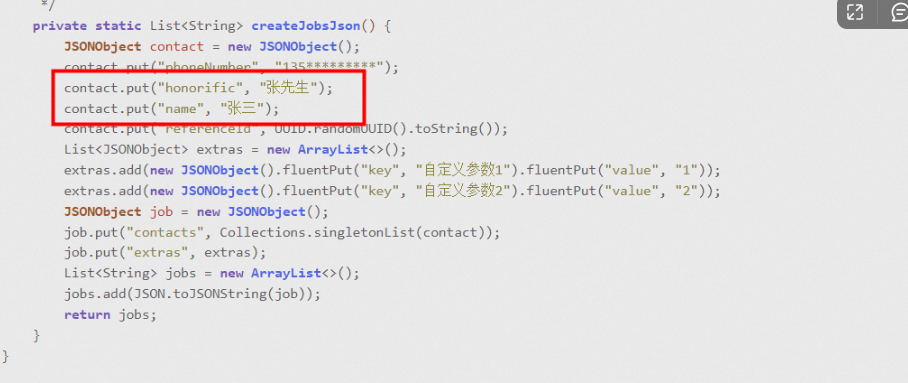
This is a required item, and the content is written casually. If name and honorific are not used in the conversation, they can be passed on at will. They can be anything at will. The specific content is not verified at the back end. Users should also pass on if they do not use it. In general, name and honorific are used in outbound scenes. If they are passed on here, they will be directly replaced in the speech.
5. When you call the ModifyJobGroup operation, an error message is reported: Handle job group error.
You can call the ModifyJobGroup operation to modify the information of a job group. The job group can be modified only when it is in the Draft or Pending state. If it is in another state (Completed, Scheduling, Paused, or Stopped), you cannot modify the job group. You need to check the status of the corresponding task group.
12. Is the API call successful when there is no outbound number?
Different APIs have different dependencies on outbound call numbers (line numbers):
CreateJobGroup: The outbound number is not required. The CallingNumber parameter is optional. If you call the CreateJobGroup operation without this parameter when you do not apply for an outbound number, the task group can still be successfully created and the JobGroupId is returned. In this case, the CallingNumbers parameter in the response is an empty array, and the task group status is Draft.
AssignJobs and StartJob (Assign Task and Initiate Outbound Task): The configured outbound number (number line) is required. If no outbound number is configured, the call to these two interfaces will fail. If you call the StartJob operation, MissingJobJson is returned if you do not specify JobJson. If you specify JobJson, ParameterNull.JobContacts is returned because JobContacts contains the CallingNumber information required to initiate an outbound call.
The outbound number (number line) needs to be purchased and applied separately, which is a necessary condition for initiating outbound tasks.