Quick integration
This topic describes how to integrate intelligent outbound calls. This topic also describes how to integrate intelligent outbound calls by using the API. This topic also describes how to call the API operations of intelligent outbound calls.
Integrated guidance solution
No. Line non-intelligent customer service product capabilities, need to be purchased separately, support three-party and cloud communication party access. (There is a SIP fee for the connection of the three-party line).
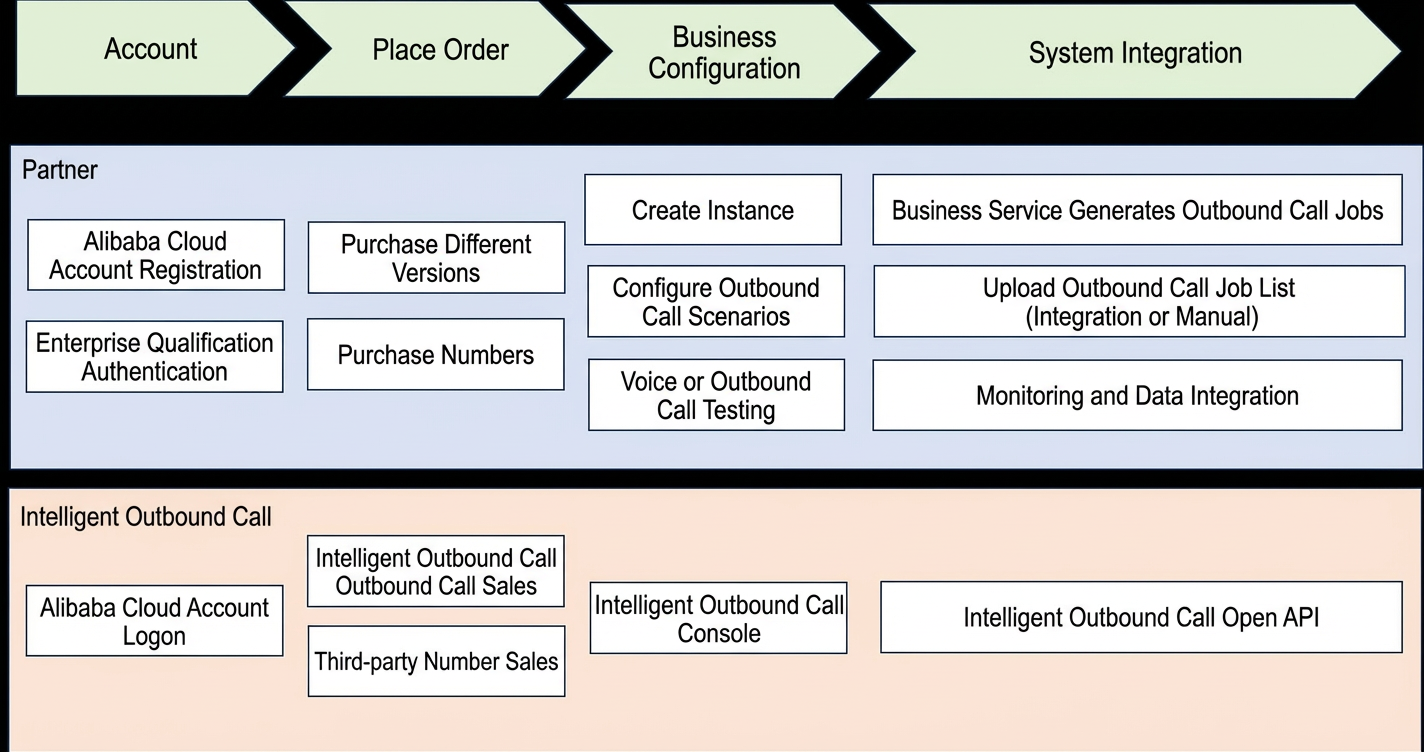
Integration of task invocation interfaces
Step 1: Obtain the instance ID and scenario ID
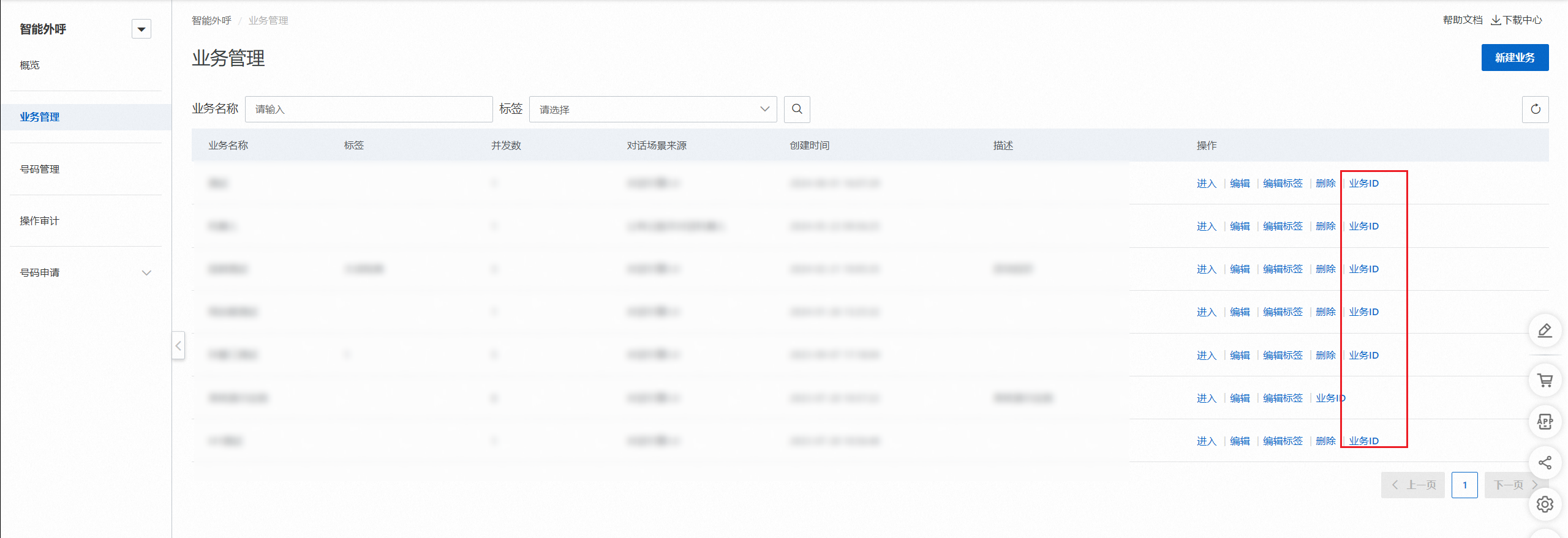
Reference business management after the outbound instance and outbound call are created, obtain the instance ID(InstanceId) and scenario ID(ScriptId). The instance ID is the service ID, in the format of UUID (such as 85bb6415-3167-41a0-b1fd-e5ff7dc4f6b4). Business management page Click business ID button to copy the obtained. The order ID is the number of the purchase order, in a numeric-only format such as 2000540843790081, and is different from the instance ID. The specific steps are as follows:
Business management: Find the created business and click edit, will show instance ID.
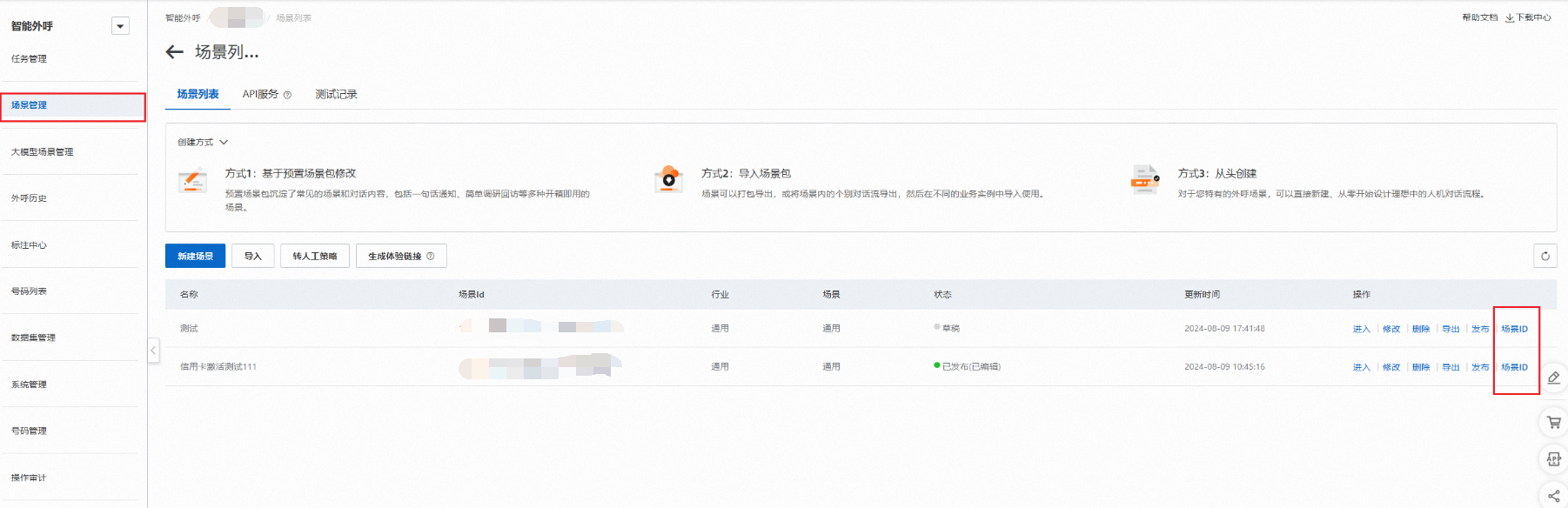
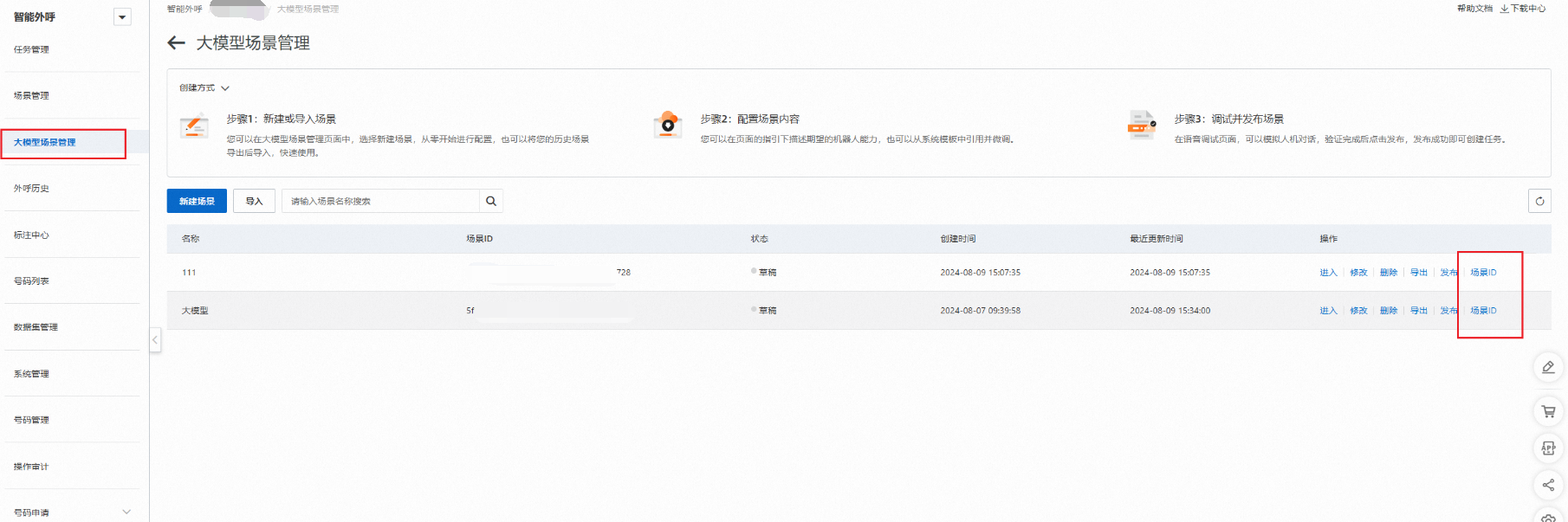
Scenario ID: Enter the service and choose scene management, on the created speech scene side, click scene ID, can be obtained.
Step 2: Create an outbound task
Call create an outbound task group interface to obtain the returned JobGroupId.
Step 3: Upload the outbound number list
Call batch create outbound tasks interface, pass in the obtained JobGroupId, and pass in the list of outbound called numbers to the task.
Step 4: Obtain the task result
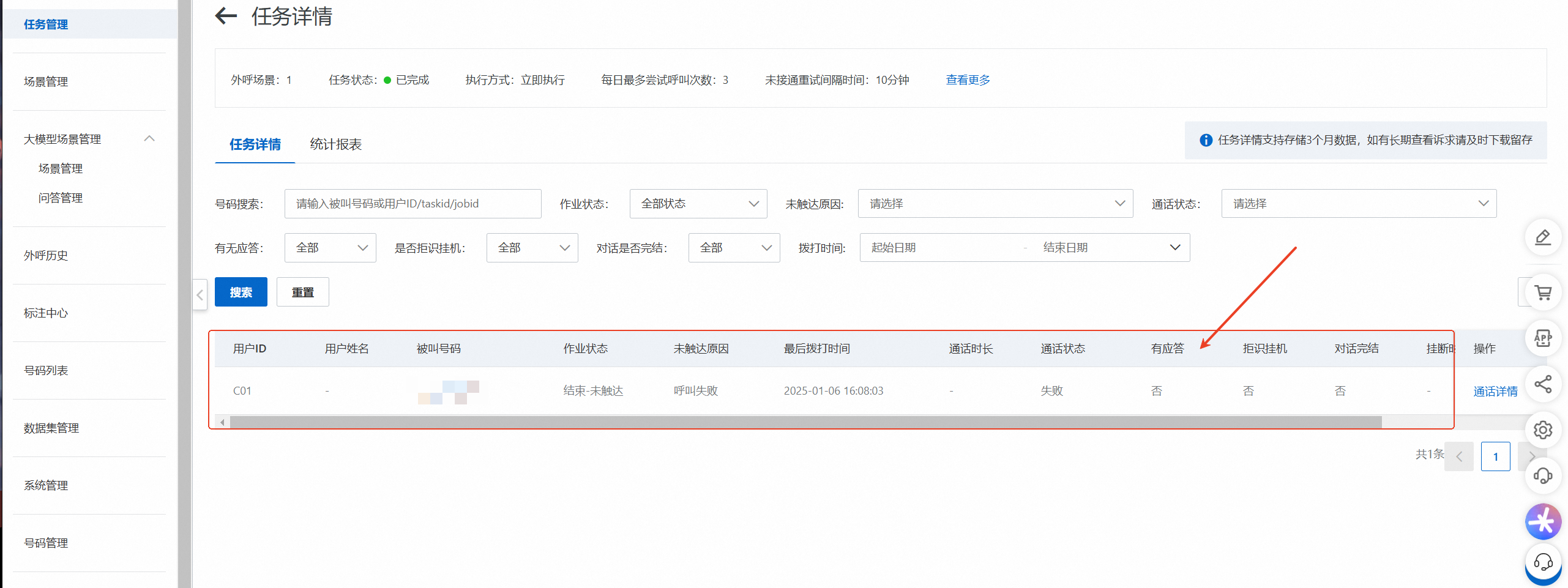
Call query tasks based on task results interface to obtain the task result. The interface corresponds to the console location capabilities as follows:
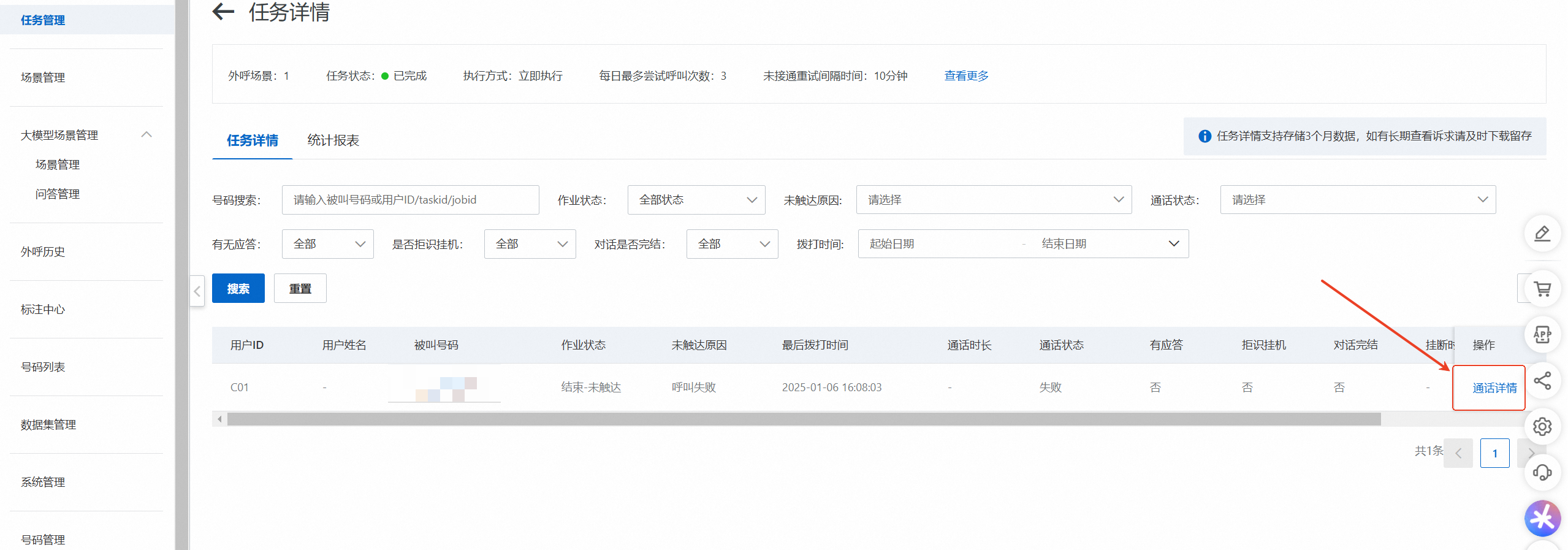
Call returns the conversation data of an outbound task the interface obtains the call details of a single number. The interface corresponds to the console location capabilities as follows:
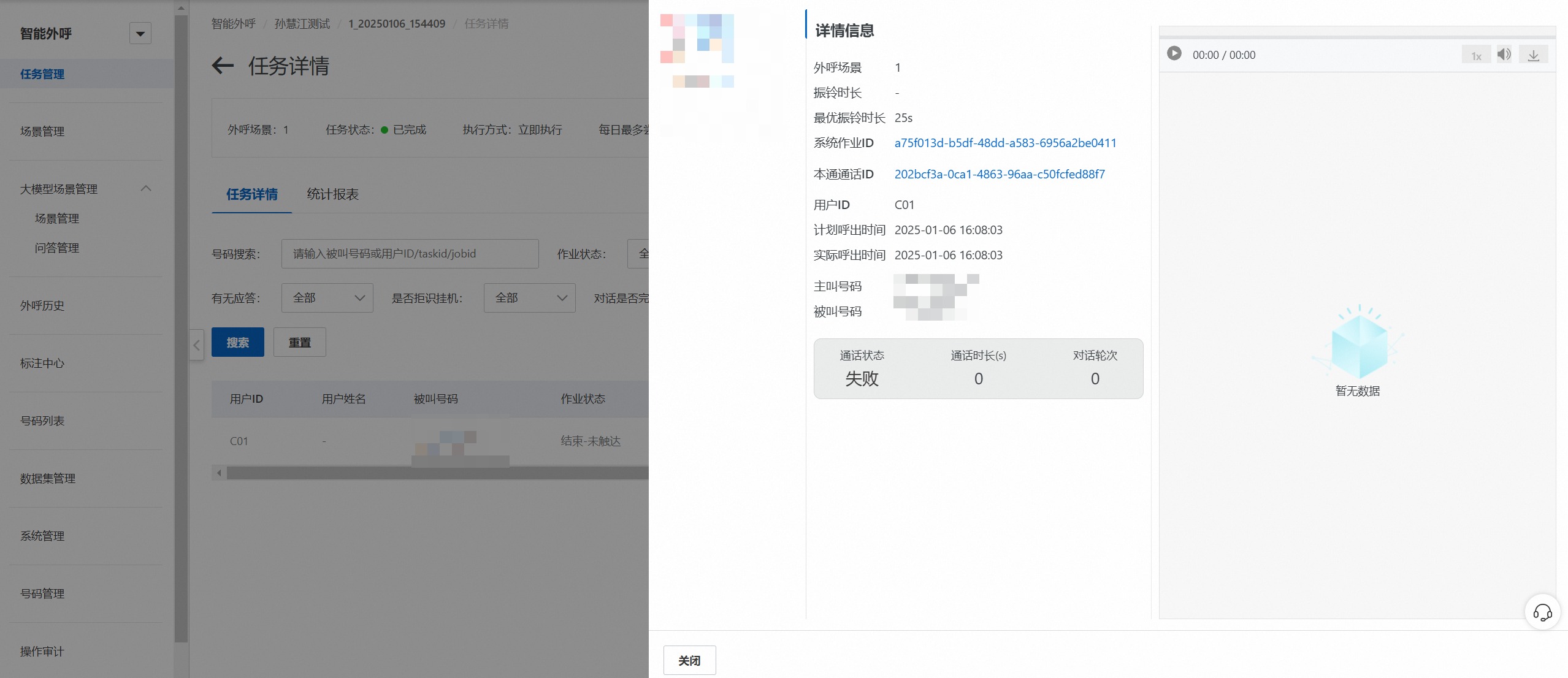
Call download call recording interface to obtain a recording. The interface corresponds to the console location capabilities as follows:
For more information about the integrated interfaces of outbound robots, see: API Directory.
Automatic push callback for task results
Introduction to MQ
Introduction: For the call completion status of each outbound call task, the intelligent outbound call service will pass the MSMQ ( RocketMQ) to notify the caller. The message returns the task ID, the status of the outbound task (connected, no one answered, call failed), and so on.
Operation: The access party purchased the RocketMQ service from Alibaba Cloud. The intelligent outbound robot currently supports RocketMQ4.0, RocketMQ5.0, and ROCKET_MQ_5_SERVERLESS. If the customer needs MQ4.0, self-Service Tools apply for adding white as an MQ 4.0.
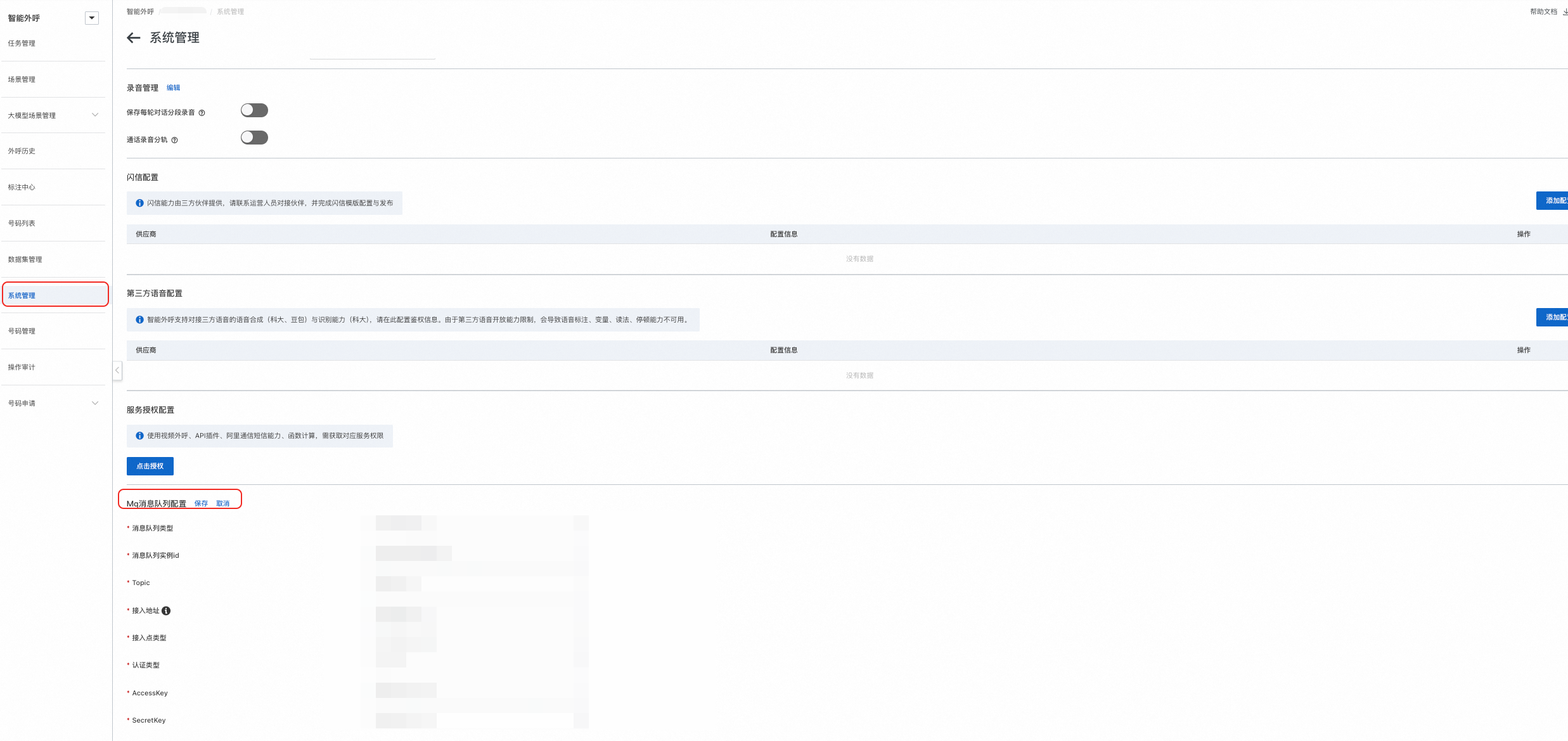
Note: when accessing the MQ service, you need to system administration to configure, fill in the corresponding MQ MSMQ configuration the parameter value. For more information, see outbound system administration.

After you use RocketMQ 4.0, you must enter the following information:
MSMQ Instance ID: Enter the instance ID after MQ is configured.
Topic: Enter the topic corresponding to the MQ service.
Access Address: Enter the access address of the MQ service. The address must be TCP-based and must be public.
Access Point Type: Select NAMESRV_ADDR or ONS_ADDR based on the actual access point type.
Authentication Type: The default value is AK_SK.
AccessKey: Enter the AccessKey pair of MQ to be used.
SecretKey: Enter the SecretKey corresponding to the MQ to be used.
After you use RocketMQ5.0, you must enter the following information:
MSMQ Instance ID: Enter the instance ID after MQ is configured.
Topic: Enter the topic corresponding to the MQ service.
Access Address: Enter the access address of the MQ service.
Access Point Type: Select NAMESRV_ADDR or ONS_ADDR based on the actual access point type.
Authentication type: username and password.
Username: Enter the username of the MQ service.
Password: Enter the password of the MQ service.
When you choose to use ROCKET_MQ_5_SERVERLESS:
MSMQ Instance ID: Enter the instance ID after MQ is configured.
Topic: Enter the topic corresponding to the MQ service.
Access Address: Enter the access address of the MQ service. The address must be a TCP connection and must be public.
Access Point Type: Select NAMESRV_ADDR or ONS_ADDR based on the actual access point type.
Authentication type: username and password.
Username: Enter the username of the MQ service.
Password: Enter the password of the MQ service.
Recommended SDK versions for MQ
<dependency>
<groupId>com.aliyun.openservices</groupId>
<artifactId>ons-client</artifactId>
<version>1.8.8.Final</version
</dependency>
MQ activation and integration
For more information about how to purchase RocketMQ, see its product details page: product details page.
For more information about subscribing to RocketMQ messages, see the help documentation of RocketMQ: message Queue for Apache RocketMQ Help Document.
For more information about how to obtain the task completion information after the MSMQ is activated, see: subscribe to messages, call the TCP SDK to send and receive normal messages.
MQ message type
Message level | Message Type | EventType |
Job | Completed | JobComplete |
call | Start Call | Dialing |
call | Connect the call | CallAnswered |
Call | End of call: On-hook or not connected timeout | CallFinished |
Call | Large model tags | LabelReady |
Recording | Recording generated successfully | RecordingReady |
CallFinished message body
{
    "contacts": [
        {
            "honorific": "259049",
            "id": "d045421c-5c56-4e60-bd30-52621bd40358",
            "name": "259049",
            "phoneNumber": "1854625****",
            "referenceId": "102553299"
        }
    ],
    "eventTime": 1732032007598,
    "eventType": "CallAnswered",
    "extras": [
        {
            "key": "TenantId",
            "value": "1594349927946608"
        },
        {
            "key": "ServiceId",
            "value": "208983907113910398"
        }
    ],
    "groupId": "b842817b-3a8e-455e-974f-60a22c7181a8",
    "id": "c18312d3-1e3a-4f07-a00a-bf92d3bcce87",
    "instanceId": "e2d412ad-6571-43a7-9624-0d779fb80a9e",
    "scriptId": "0e700dc9-39e9-4872-8cc8-0654d38c9615",
    "tagHits": [

    ],
    "task": {
        "actualTime": 1732032007576,
        "callId": "ee819df9f4e54e26a741591431534878",
        "calledNumber": "1854625****",
        "callingNumber": "0218045****",
        "id": "88a26ac5-645e-4423-bb39-3d5943a27dc9",
        "planedTime": 1732031999000,
        "status": "Executing"
    }
}
JobComplete message body
{
    "contacts": [
        {
            "honorific": "259049",
            "id": "d045421c-5c56-4e60-bd30-52621bd40358",
            "name": "259049",
            "phoneNumber": "185xxxxxxx",
            "referenceId": "102553299"
        }
    ],
    "eventTime": 1732032015258,
    "eventType": "JobComplete",
    "extras": [
        {
            "key": "TenantId",
            "value": "1594349927946608"
        },
        {
            "key": "ServiceId",
            "value": "208983907113910398"
        }
    ],
    "groupId": "b842817b-3a8e-455e-974f-60a22c7181a8",
    "id": "c18312d3-1e3a-4f07-a00a-bf92d3bcce87",
    "instanceId": "e2d412ad-6571-43a7-9624-0d779fb80a9e",
    "scriptId": "0e700dc9-39e9-4872-8cc8-0654d38c9615",
    "status": "Succeeded",
    "tagHits": [

    ],
    "tasks": [
        {
            "actualTime": 1732032008000,
            "callId": "ee819df9f4e54e26a741591431534878",
            "calledNumber": "185xxxxxxxx",
            "callingNumber": "021xxxxxxxx",
            "endTime": 1732032015000,
            "hasLastPlaybackCompleted": true,
            "id": "88a26ac5-645e-4423-bb39-3d5943a27dc9",
            "planedTime": 1732031999000,
            "realRingingDuration": 7,
            "ringingDuration": 25,
            "status": "Succeeded"
        }
    ]
}
CallAnswered message body
{
    "contacts": [
        {
            "honorific": "259049",
            "id": "d045421c-5c56-4e60-bd30-52621bd40358",
            "name": "259049",
            "phoneNumber": "185xxxxxxxx",
            "referenceId": "102553299"
        }
    ],
    "eventTime": 1732032007598,
    "eventType": "CallAnswered",
    "extras": [
        {
            "key": "TenantId",
            "value": "1594349927946608"
        },
        {
            "key": "ServiceId",
            "value": "208983907113910398"
        }
    ],
    "groupId": "b842817b-3a8e-455e-974f-60a22c7181a8",
    "id": "c18312d3-1e3a-4f07-a00a-bf92d3bcce87",
    "instanceId": "e2d412ad-6571-43a7-9624-0d779fb80a9e",
    "scriptId": "0e700dc9-39e9-4872-8cc8-0654d38c9615",
    "tagHits": [

    ],
    "task": {
        "actualTime": 1732032007576,
        "callId": "ee819df9f4e54e26a741591431534878",
        "calledNumber": "185xxxxxxxx",
        "callingNumber": "021xxxxxxxx",
        "id": "88a26ac5-645e-4423-bb39-3d5943a27dc9",
        "planedTime": 1732031999000,
        "status": "Executing"
    }
}
LabelReady message body
{
    "eventTime": 1732087443211,
    "eventType": "LabelReady",
    "instanceId": "ae4572af-376f-439f-8970-38764acbaa91",
    "jobId": "12964626-49a9-4da2-beec-783b94637aff",
    "labelMap": {
        "Call summary": "The user said that the range hood has not arrived yet, so the installation cannot be arranged. It is recommended that users contact the service center to confirm the installation after the arrival of the goods. ",
        "Real number": "Not triggered",
        "Demolition": "Not triggered",
        "On-site": "Not triggered",
        "Confirm reservation": "Not triggered",
        "Modify Address": "Not triggered",
        "Arrival": "Not arrived",
        "Manual service": "Not triggered"
    },
    "scriptId": "a81f9147-ec4c-43d3-9dfa-e939a68b1d62",
    "taskId": "4fb3a6b5-3468-4f35-b3eb-dfe9f31333d0"
}
RecordingReady message body
{
    "eventType":"RecordingReady",
    "eventTime":1588850490334,
    "instanceId":"08a4c460-***-737e069a154f",
    "groupId":"8869f35d-***-9b46437bc0fa",
    "id":"08a4c460-***-737e069a154f",
    "extras":[
        {
            "key":"custom",
            "value":"aaa"
        }
    ],
    "contacts":[
        {
            "id":"762c2e16-***-00a0f13372b1",
            "honorific":"test",
            "name":"test",
            "phoneNumber":"11111111",
            "referenceId":"762c2e16-***-00a0f13372b1"
        }
    ],
    "recording":{
        "taskId":"60b48efe-***-5d6b70479641",
        "callId":"60b48efe-***-5d6b70479641",
        "duration":5,
        "fileName":"a.wav",
        "mkvUrl":"https://a.wav",
        "url":"https://a.wav"
    }
}
Enumeration value for each state
JobGroup Status Example Values
-JobGroupStatus {
    Draft(0)
    Scheduling(1), scheduling
    Executing(2), executing
    Completed(3), completed
    Paused(4), pending
    Failed(5)
    Cancelled(6), canceled
    Initializing(7)
}

Job Status Example Values
-JobStatus {
    Scheduling(0, "Scheduling"),
    Executing(1, "Executing"),
    Succeeded(2, "End-Touched"),
    Paused(3, "Pause"),
    Failed(4, "End-untouched"),
    Cancelled(5, "Canceled-manual intervention"),
    Drafted(6, "Draft"),
}


Example Value of Task Status
-TaskStatus {
    Execute (0, "Dialing"),
    Succeeded(1, "connected"),
    NoAnswer(2, "Not connected-no answer"),
    NotExist(3, "Not connected-empty"),
    Busy(4, "Not connected-busy"),
    Cancelled(5, "No outgoing call-task stopped"),
    Failed(6, "Failed"),
    NotConnected(7, "Not connected-unable to connect"),
    PoweredOff(8, "Not on-off"),
    OutOfService(9, "Not connected-called down"),
    InArrears(10, "Not connected-called overdue payment"),
    EmptyNumber(11, "No outgoing call-no outgoing call"),
    PerDayCallCountLimit(12, "Not exhaled-daily limit exceeded"),
    ContactBlockList(13, "Not called-blacklist"),
    CallerNotRegistered(14, "Not Outgoing-Calling Number Not Registered"),
    Terminated(15, "Not called out-terminated"),
    VerificationCancelled(16, "Not Outgoing-Pre-Call Authentication Not Canceled"),
    OutOfServiceNoCall(17, "No outgoing call-the called party stops and does not call out"),
    InArrearsNoCall(18, "No outbound call-the called party is overdue and does not call out"),
    CallingNumberNotExist(19, "Not called-calling number does not exist"),
    SucceededFinish(20, "engaged-normal completed"),
    SucceededChatbotHangUpAfterNoAnswer(21, "Connected-Robot hangs up after rejection"),
    SucceededChatbotHangUpAfterSilence(22, "connected-silent timeout on-hook"),
    SucceededClientHangUpAfterNoAnswer(23, "Connected-User hangs up after rejection"),
    SucceededClientHangUp(24, "Completed-user hung up for no reason"),
    SucceededTransferByIntent(25, "connected-hit intent to manual"),
    SucceededTransferAfterNoAnswer(26, "connected-refuse to transfer manual"),
    SucceededInoInterAction(27, "connected-no interaction on user side"),
    SucceededError(28, "connected-system aborted"),
    SucceededSpecialInterceptVoiceAssistant(29, "connected-special case intercept-voice assistant"),
    SucceededSpecialInterceptExtensionNumberTransfer(30, "connected-special condition hold-extension transfer")
}

Untouched Reason Example Value
-JobFailureReason
{

    /**
     * Unknown error
     */
    Unknown(0),

    /**
     * No Answer
     */
    NoAnswer(1),

    /**
     * Invalid policy. The policy configuration is incorrect.
     */
    InvalidStrategy(2),

    /**
     * Timeout is found during scheduling.
     */
    TimeUp(3),

    /**
     * Policy is empty or not found
     */
    NoStrategy(4),

    /**
     * Call failed
     */
    CallFailed(5),

    /**
     * Number daily call limit
     */
    PerDayCallCountLimit(6),

    /**
     * Ban outbound list
     */
    ContactBlockList(7),

    /**
     * Empty numbers are no longer outbound
     */
    EmptyNumber(8),

    /**
     * Number daily call limit
     */
    JobPerDayCallCountLimit(9),

    /**
     * Pre-call verification does not pass cancellation
     */
    VerificationCancelled(10),

    /**
     * Stop calling
     */
    ContactSuspended(11),

    /**
     * overdue payment
     */
    InArrears(12),

    /**
     * Shutdown
     */
    OutOfService(13),

    /**
     * The maximum number of task attempts. This field takes effect when the RepeatBy(@see ) field is set to None.
     */
    NoneRepeatableJobMaxAttemptCountLimit(14);

}
Task Status Enumeration Value Return
Dialing, LabelReady, and RecordingReady message body do not have Task the status value is returned.
Succeeded the reason for the status has been subdivided and will not be displayed. Succeeded: 1 (connected) status. All returns are of the specific subdivision reason type.
status code Enumeration Value | JobComplete | CallAnswered | CallFinished |
Execute (0, "Dialing") | There are returns | There are returns | No Return |
Succeeded(1, "Connected") | No Return | No Return | No Return |
NoAnswer(2, "Not connected-no answer") | There are returns | No Return | There are returns |
NotExist(3, "Not connected-empty") | There are returns | No Return | There are returns |
Busy(4, "Not connected-busy") | There are returns | No Return | There are returns |
Cancelled(5, "No outgoing call-task stopped") | There are returns | No Return | No Return |
Failed(6, "Failed") | There are returns | No Return | There are returns |
NotConnected(7, "Not connected-unable to connect") | There are returns | No Return | There are returns |
PoweredOff(8, "Not on-off") | There are returns | No Return | There are returns |
OutOfService(9, "Not connected-called down") | There are returns | No Return | There are returns |
InArrears(10, "Not connected-called overdue payment") | There are returns | No Return | There are returns |
EmptyNumber(11, "No outgoing call-no outgoing call") | There are returns | No Return | No Return |
PerDayCallCountLimit(12, "Not exhaled-Daily Limit Exceeded") | There are returns | No Return | No Return |
ContactBlockList(13, "Not Called-Blacklisted") | There are returns | No Return | No Return |
CallerNotRegistered(14, "Not outgoing-calling number not registered") | There are returns | No Return | No Return |
Terminated(15, "Not Called-Terminated") | There are returns | No Return | No Return |
VerificationCancelled(16, "Not called out-pre-call authentication does not pass cancel") | No Return | No Return | No Return |
OutOfServiceNoCall(17, "Not Outgoing-Called Stopped Not Outgoing") | No Return | No Return | No Return |
InArrearsNoCall(18, "No outbound call-the called party is overdue and does not call out") | There are returns | No Return | No Return |
CallingNumberNotExist(19, "Not called out-calling number does not exist") | There are returns | No Return | No Return |
SucceededFinish(20, "engaged-normal complete") | There are returns | No Return | There are returns |
SucceededChatbotHangUpAfterNoAnswer(21, "connected-robot hangs up after rejection") | There are returns | No Return | There are returns |
SucceededChatbotHangUpAfterSilence(22, "ON-silent timeout on-hook") | There are returns | No Return | There are returns |
SucceededClientHangUpAfterNoAnswer(23, "connected-user hangs up after rejection") | There are returns | No Return | There are returns |
SucceededClientHangUp(24, "Completed-User hung up for no reason") | There are returns | No Return | There are returns |
SucceededTransferByIntent (25, "Completed-Hit Intent to Manual") | There are returns | No Return | There are returns |
SucceededTransferAfterNoAnswer (26, "connected-refuse to transfer manual") | There are returns | No Return | There are returns |
SucceededInoInterAction(27, "connected-no interaction on user side") | There are returns | No Return | There are returns |
SucceededError(28, "Power On-System Abnormal Interrupt") | There are returns | No Return | There are returns |
SucceededSpecialInterceptVoiceAssistant(29, "connected-special situation intercept-voice assistant") | There are returns | No Return | There are returns |
SucceededSpecialInterceptExtensionNumberTransfer(30, "connected-special condition hold-extension transfer") | There are returns | No Return | There are returns |