Activate Alibaba Cloud CDN
You need to activate Alibaba Cloud CDN before you use it for the first time. This topic describes how to activate Alibaba Cloud CDN.
Prerequisites
An Alibaba Cloud account is createdand complete real-name verification for the account. If you have not registered,completeaccount registrationandreal-name verification。
Procedure
-
Go to the Alibaba Cloud CDN product page.
-
Click Activate Now.
-
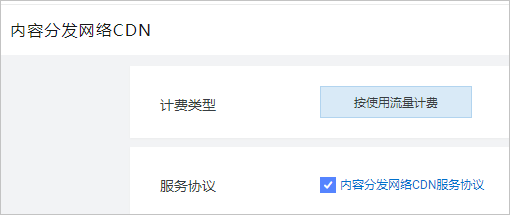
Billing Methodis Pay-By-Data-Transfer by default,and selectService Agreement。By default,
For more information about the pricing of Alibaba Cloud CDN, go to the CDNPricing page.
-
Click Activate Now.
After you activate Alibaba Cloud CDN, click Console on the Alibaba CloudCDNconsole page to log on to the Alibaba Cloud CDN console.
What to do next
After you activate Alibaba Cloud CDN, you need to add domain names to Alibaba Cloud CDN. For more information, see add a domain name.
Deactivate or stop the billing of Alibaba Cloud CDN
If you directly deactivate Alibaba Cloud CDN, your business may be interrupted. Therefore, Alibaba Cloud does not allow you to deactivate Alibaba Cloud CDN in the console. However, if you do not add domain names to Alibaba Cloud CDN or use features such as EdgeRoutine, you are not charged for Alibaba Cloud CDN. For more information, see How do I deactivate or stop the billing of Alibaba Cloud CDN?
Related API operations
OpenCdnService: activates Alibaba Cloud CDN.