Cluster high availability
Alibaba Cloud Cloudera Data Platform (CDP) supports high availability by default for cluster components such as Hadoop Distributed File System (HDFS) NameNode, YARN ResourceManager, and Hive Metastore Server. In addition, the MariaDB metadatabase, which stores metadata for components like Hive and Hue, is configured with master-slave replication. This setup maximizes service availability and data recoverability.
Component layout
A high availability cluster uses a 3-master-node architecture. To save on hardware costs, one of the three master nodes is designated as a utility node by default.
HDFS NameNode
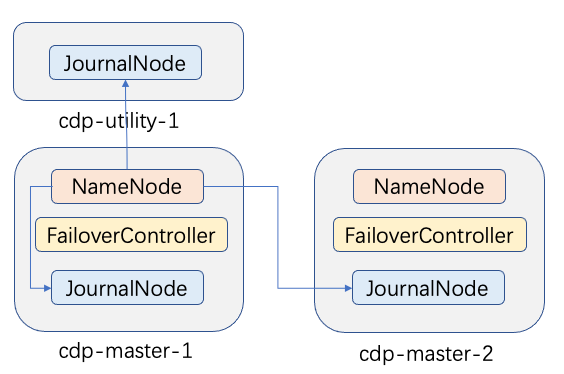
For the HDFS NameNode, Alibaba Cloud CDP deploys a NameNode on two master nodes. One node is active, and the other is on standby.
A JournalNode is deployed on the master nodes and the utility node to ensure high availability for the NameNode logs. In addition, a FailoverController is deployed on the two master nodes. This ensures an automatic switchover to the standby NameNode if the active NameNode goes down. The failover process requires no manual intervention.
YARN ResourceManager
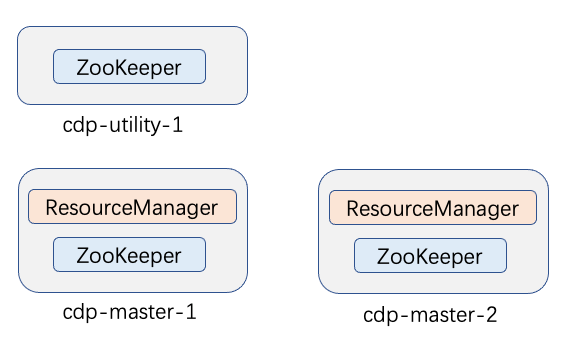
Similar to the NameNode, Alibaba Cloud CDP deploys a ResourceManager on two master nodes. One ResourceManager instance is active, and the other is on standby.
The ResourceManager does not require an additional ZKFC component deployment because its embedded ActiveStandbyElector performs health checks and leader election.
If the active ResourceManager goes down, a fast switchover to the standby ResourceManager occurs. This process requires no manual intervention.
Metadatabase
Components such as Cloudera Manager, Hive, and Hue require a database to store their metadata. The metadatabase is deployed on the utility node and the master-1 node in a master-slave architecture. The metadatabase on the utility node acts as the master. The metadatabase on the master-1 node acts as the slave and replicates data from the master.
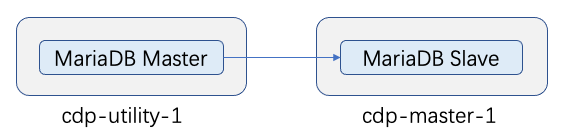
If the utility node goes down or the MariaDB master on the utility node fails, follow these steps to switch the metadatabase to the slave database on the cdp-master-1 node:
On cdp-master-1, run the
mysqlcommand to connect to the MySQL terminal.Stop the MariaDB slave I/O thread:
stop slave io_threadDisable the MariaDB slave role:
stop slaveIn the
/var/lib/mysqldirectory, rename the master.info and relay-log.info files:cd /var/lib/mysql; mv master.info master.info.bak; mv relay-log.info relay-log.info.bakModify the MariaDB configuration file:
vi /etc/my.cnf
# Delete:
read_only
relay-log = relay-bin
relay-log-index = relay-bin.index

# Add:
log_bin = mysql-bin
log-bin-index = mysql-bin.index
binlog_format = ROW
max_binlog_size = 100M
Restart MariaDB:
service mysql restartOn cdp-master-1, run
mysqlto connect to the MySQL terminal. Then, runreset master.Switch the CM database to the secondary database by modifying the configuration file on the utility node:
vi /etc/cloudera-scm-server/db.properties
# Set com.cloudera.cmf.db.host to the FQDN of the MariaDB slave machine
com.cloudera.cmf.db.host=[FQDN of the MariaDB slave machine]
Restart CM:
service cloudera-scm-server restartYou can configure the database addresses for Hive, Hue, and RMAN in the CM management interface. You must restart the services for the new configuration to take effect. The following procedure uses Hue as an example.