Use path analysis
Cloud Enterprise Network (CEN) integrates withNetwork Intelligence Service (NIS) to provide path analysis. You can use path analysis to diagnose network connectivity between your resources.
Background
When you run a path analysis, Network Intelligence Service (NIS) provides hop-by-hop details for the virtual network path between a source and a destination. If the destination is unreachable, the analysis identifies the blocking component and the reason. Path analysis primarily checks instance status and network configurations, including the status of network instances, security group configurations, network ACL configurations, route table configurations, and Server Load Balancer (SLB) configurations. Path analysis does not send data packets or analyze the data plane. You only need to specify the traffic path from the source to the destination. For more information, see Use path analysis.
This topic uses two examples, one for communication between ECS instances in the same region and one for communication between ECS instances across regions, to demonstrate how to use path analysis in the CEN console.
Example 1: Same-region ECS communication
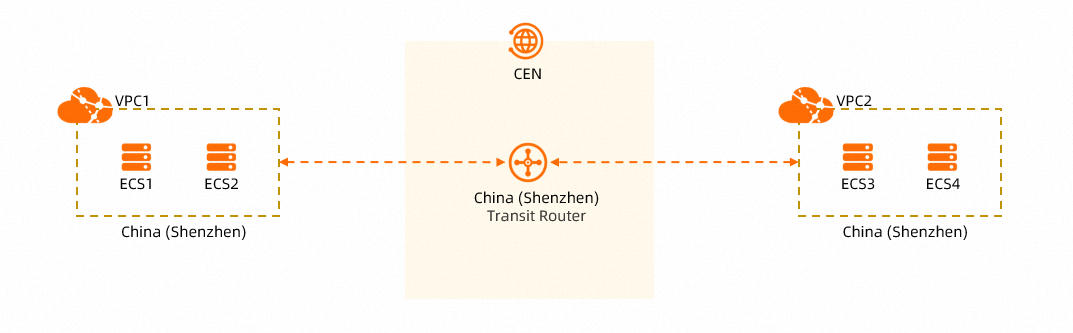
When you use Cloud Enterprise Network (CEN) to connect VPC1 and VPC2 in the same region, you can run path analyses for the paths between ECS1 and ECS3, ECS1 and ECS4, ECS2 and ECS3, and ECS2 and ECS4 to verify connectivity between the ECS instances in VPC1 and VPC2 before routing production traffic.
The following steps describe how to run a path analysis for the path from ECS1 to ECS3. The steps for the other paths are similar and are not described in this topic.
Path analysis between ECS1 and ECS3
Log on to the CEN console.
On the CEN Instance page, click the ID of the CEN instance that you want to manage.
-
On the instance details page, click the Path Analysis tab.
If you have not activated Network Intelligence Service, follow the on-screen instructions to activate it.
-
On the Path Analysis tab, configure the parameters as described in the following table, and then click Start Analyzing.
NoteThis example uses TCP port 80 on ECS3 to test connectivity between ECS1 and ECS3. You can select a protocol that matches your network environment.
Parameter
Description
Source
The source of the path. Network Intelligence Service supports multiple types of resources as path analysis sources. For more information, see Create a path.
In this example, set Source Type to ECS and select the ECS1 instance.
Destination
The destination of the path.
In this example, set Destination Type to ECS and select the ECS3 instance.
Protocol
The protocol to test.
In this example, select TCP.
Destination Port
The destination port to test.
In this example, select 80.
Save Path
Specifies whether to save the current path analysis for reuse.
Default value: No. This feature is not supported.
-
On the Path Analysis tab, view the analysis result. If the path is unreachable, resolve the issue based on the findings, and then rerun the analysis to confirm connectivity.
The analysis result shows Path Unreachable - No matching security group rule, traffic denied by default rule. The unreachable node is the elastic network interface of the destination. After you resolve the security group rules for the elastic network interface and rerun the path analysis, the result changes to Path Reachable - Normal. The system also recommends that you run a reverse path analysis to verify round-trip connectivity.
Example 2: Cross-region ECS communication
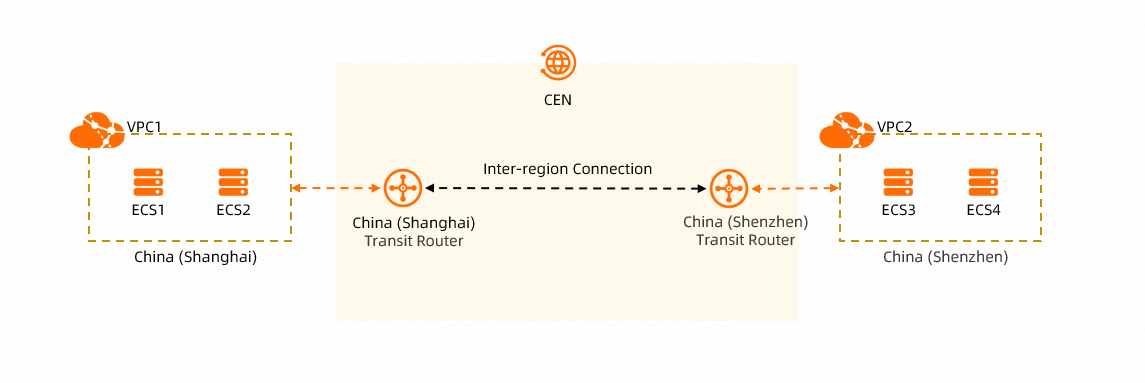
When you use Cloud Enterprise Network (CEN) to connect VPC1 and VPC2 across regions, you can run path analyses for the paths between ECS1 and ECS3, ECS1 and ECS4, ECS2 and ECS3, and ECS2 and ECS4 to verify connectivity between the ECS instances in VPC1 and VPC2 before routing production traffic.
The following steps describe how to run a path analysis for the path from ECS1 to ECS3. The steps for the other paths are similar and are not described in this topic.
Path analysis between ECS1 and ECS3
Log on to the CEN console.
On the CEN Instance page, click the ID of the CEN instance that you want to manage.
-
On the instance details page, click the Path Analysis tab.
-
On the Path Analysis tab, configure the parameters as described in the following table, and then click Start Analyzing.
NoteThis example uses the ICMP protocol to test connectivity between ECS1 and ECS3. You can select a protocol that matches your network environment.
Parameter
Description
Source
The source of the path. Network Intelligence Service supports multiple types of resources as path analysis sources. For more information, see Create a path.
In this example, set Source Type to ECS and select the ECS1 instance.
Destination
The destination of the path.
In this example, set Destination Type to ECS and select the ECS3 instance.
Protocol
The protocol to test.
In this example, select ICMP.
Destination Port
The destination port to test.
This parameter is not required when Protocol is set to ICMP.
Save Path
Specifies whether to save the current path analysis for reuse.
Default value: No. This feature is not supported.
-
On the Path Analysis tab, view the analysis result. If the path is unreachable, resolve the issue based on the findings, and then rerun the analysis to confirm connectivity.
The first path analysis shows that the path between ECS1 and ECS3 is unreachable. This is because an inter-region connection has not been created between the transit router in the China (Shanghai) region and the transit router in the China (Shenzhen) region. As a result, the two transit routers cannot learn routes from the VPCs in each other's regions.
Create an inter-region connection between the transit router in the China (Shanghai) region and the transit router in the China (Shenzhen) region, and enable all advanced features when you create the connection. The two transit routers can then automatically learn the routes from the VPCs in each other's regions. Rerun the path analysis to confirm that the path between ECS1 and ECS3 is reachable.
FAQ
What should I do if path analysis shows reachable but the actual service (such as Kafka or Redis) is still not working?
If path analysis indicates that the path is reachable but your application (such as Kafka or Redis) still cannot connect, check the following:
-
Protocol compatibility: Some cloud services (such as Kafka) block ICMP traffic by default. If a ping test fails, this does not necessarily mean the path is unreachable. Use Telnet or select TCP as the protocol in path analysis to verify port connectivity.
-
Route entries and quotas: If the port test also fails and your security group rules or network ACL whitelist entries are already configured, log on to the CEN console to check the connection status of the transit router. Search for the target CIDR block in the route table to confirm whether route conflicts or missing route entries exist. If route entries are insufficient, apply to increase the transit router route entry quota.
-
Configuration propagation delay: In cross-region scenarios such as connecting to a Redis instance across regions, a brief connectivity interruption may occur even when the configuration is correct. This can be caused by network latency or a delay in the transit router connection taking effect. Wait a few minutes, and then rerun path analysis or retry the application connection.