Insert data in batches or asynchronously
This topic describes how to insert data in batches or asynchronously into ApsaraDB for ClickHouse.
Bulk insert data
By default, each `insert` `operation` sent to ApsaraDB for `ClickHouse` immediately creates a `data partition` in storage. This `partition` contains the inserted data and the required `metadata`. Therefore, sending fewer and larger `insert` operations reduces the number of writes compared to sending many small `insert` operations.
In general, you should use large batches of at least 1,000 rows for each `insert`. Ideally, you should use batches of 10,000 to 100,000 rows. To achieve this, you can implement a buffering mechanism, such as using the Buffer `table engine` for `bulk insert` operations or using `asynchronous` inserts. For more information about `asynchronous` data insertion, see Asynchronous data insertion.
Regardless of the `insert` size, limit the rate to one `insert` `query` (a `query` `statement` that includes `INSERT`) per second. This is because the created data partitions are merged into larger partitions in the background to optimize data reads. If you `send` too many `insert` queries per second, the background `merge` process may not be able to keep up with the number of new partitions. However, you can use a higher `insert` `query` rate when you use `asynchronous` inserts. For more information about `asynchronous` data insertion, see Asynchronous data insertion.
Asynchronous data insertion
ApsaraDB for `ClickHouse` is well-suited for writing data in large batches. This method saves computing cycles, disk `I/O`, and costs. `Batch processing` is a common write method on the `client` side. To support `batch processing` on the `ClickHouse` `server` side, you can use the `asynchronous` `insert` mode.
To start `asynchronous` writes, you can `enable` the async_insert setting. For more information, see async_insert. By `default`, ApsaraDB for `ClickHouse` writes data synchronously. Each `insert` `operation` immediately creates a `partition` that contains the inserted data. This is the `default` `behavior` when the async_insert setting is `set` to its `default` `value` of 0: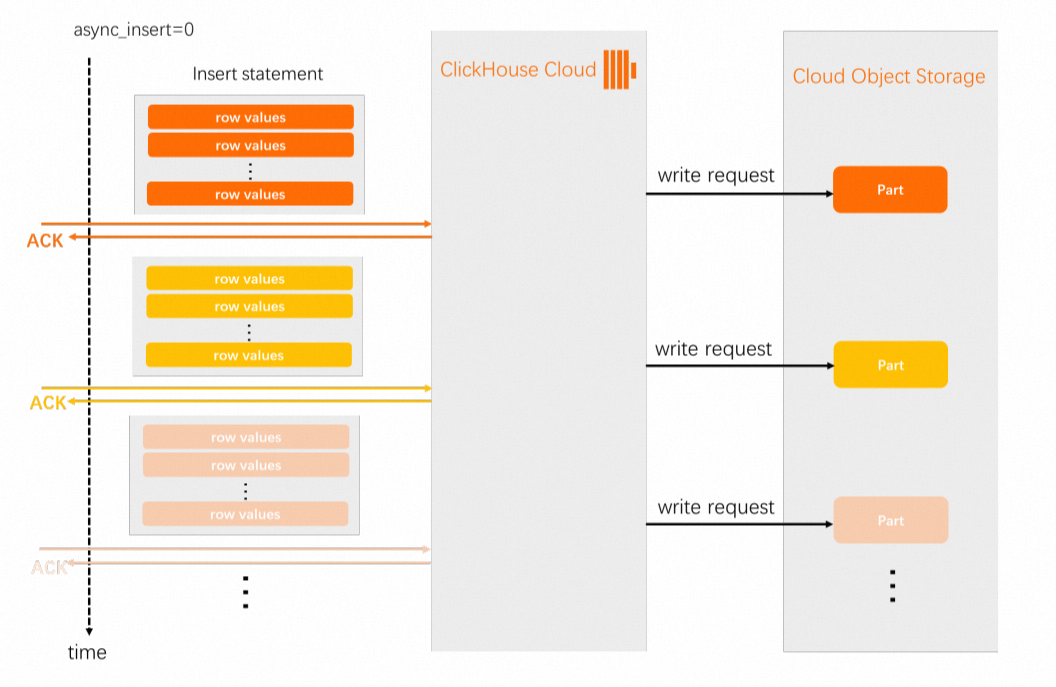
When async_insert is set to 1, ApsaraDB for ClickHouse first stores incoming insert operations in a memory buffer and then periodically flushes them to disk.
ApsaraDB for `ClickHouse` flushes the `buffer` to disk in one of the following scenarios:
The `buffer` reaches the size specified by the `async_insert_max_data_size` `parameter`.
The time specified by the `async_insert_busy_timeout_ms` `parameter` has passed since the last `buffer` flush.
If either of these conditions is met, ApsaraDB for `ClickHouse` flushes its `memory` `buffer` to disk.
After you modify the async_insert_busy_timeout_ms or async_insert_max_data_size setting, data becomes queryable as soon as it is written to a storage partition.
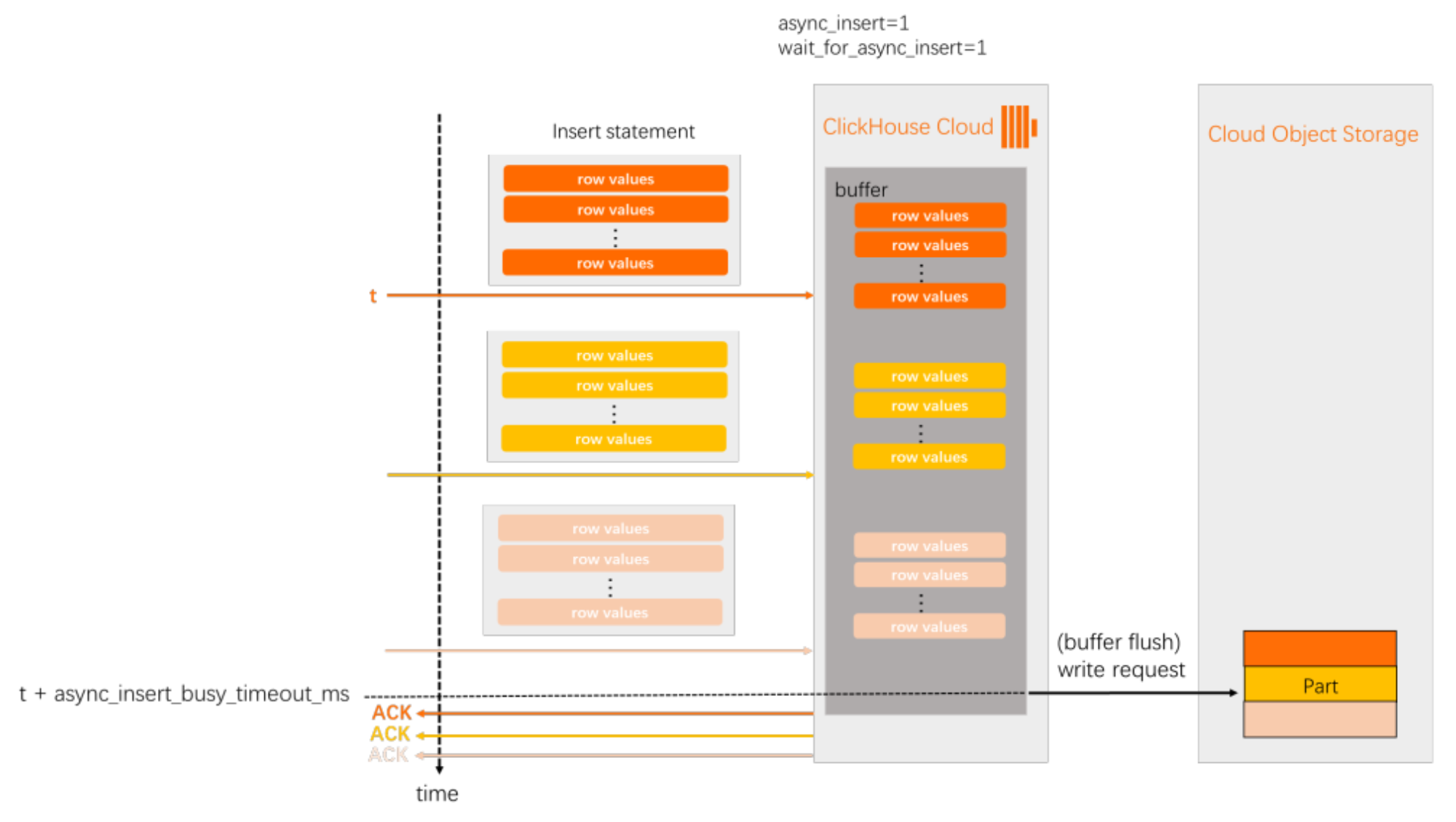
The wait_for_async_insert setting lets you configure whether a confirmation for the `insert` `statement` is returned immediately after the data is inserted into the `buffer` (`wait_for_async_insert` = 0) or after the data is flushed from the `buffer` and written to a `partition` (`wait_for_async_insert` = 1). The `default` `value` is 1. For more information about how to `set` wait_for_async_insert, see wait_for_async_insert.
The following diagrams show two settings for async_insert and wait_for_async_insert: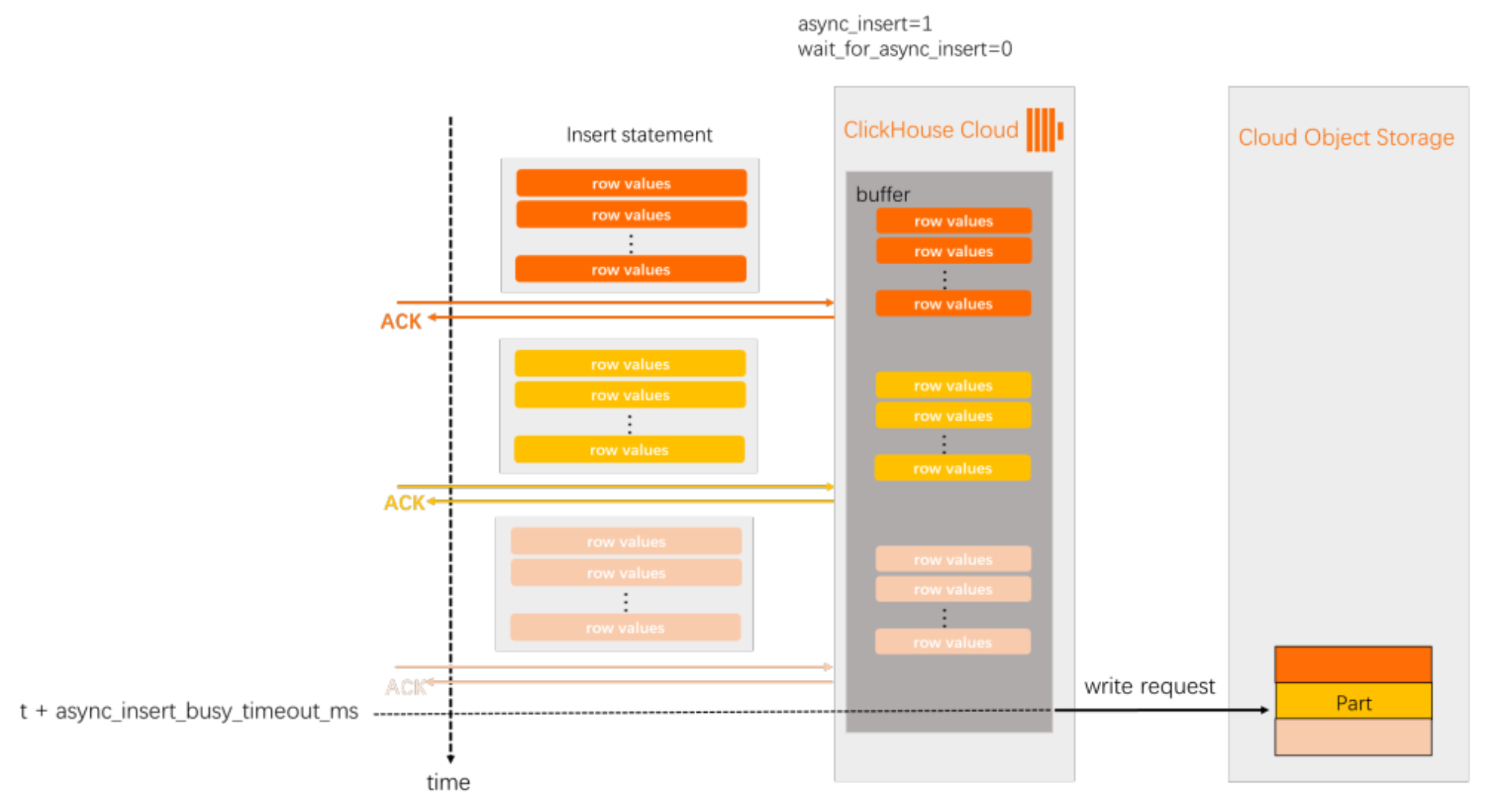
Enable asynchronous inserts
You can `enable` `asynchronous` inserts for a specific user or for a specific `query`:
`Enable` `asynchronous` inserts at the user level. This example uses the `default` user
default. If you created a different user, `replace` the `username`:ALTER USER default SETTINGS async_insert = 1Use the
SETTINGS`clause` of anINSERT`statement` to specify the `asynchronous` `insert` settings.INSERT INTO YourTable SETTINGS async_insert=1, wait_for_async_insert=1 VALUES (...)Specify the `asynchronous` `insert` settings as connection parameters when you use an ApsaraDB for `ClickHouse` programming language `client`. For example, when you use the `ClickHouse` `Java Database Connectivity` (JDBC) `driver` to connect to ApsaraDB for `ClickHouse` `Enterprise Edition`, you can specify the settings in the JDBC connection `string`:
"jdbc:ch://HOST.clickhouse.cloud:8443/?user=default&password=PASSWORD&ssl=true&custom_http_params=async_insert=1,wait_for_async_insert=1"When you use `asynchronous` inserts, we recommend that you `set`
async_insert=1andwait_for_async_insert=1. Usingwait_for_async_insert=0is risky because the `INSERT` `client` does not know if a `fault` occurred. If the `client` continues to write data at a high rate when the `ClickHouse` `server` needs to slow down writes, the `server` cannot apply back pressure to ensure `service` `reliability` and may become overloaded.
When you use `asynchronous` inserts, automatic deduplication is disabled by `default`.
The advantage of synchronous `batch processing` is that it supports the `default` automatic deduplication of `table` data. This is useful if the same `insert` `statement` is sent to ApsaraDB for `ClickHouse` `Enterprise Edition` multiple times. For example, this can happen because of temporary `network connectivity` issues that trigger automatic retries in the `client` software.