Migrate using ClickHouse-Local
Migrate your self-managed database to ApsaraDB for ClickHouse Enterprise Edition to optimize data management, improve data access performance, and reduce maintenance costs. ApsaraDB for ClickHouse Enterprise Edition provides a simple and reliable solution for your migration tasks using the ClickHouse-Local tool.
What is ClickHouse-Local?
ClickHouse typically runs as a cluster where multiple instances of the ClickHouse database engine run in a distributed mode on different servers. On a single server, the ClickHouse database engine runs as part of the clickhouse-server program. Database access paths, users, and security are configured in the server configuration file.
The ClickHouse-Local tool lets you use the ClickHouse database engine from the command line without configuring and starting an ApsaraDB for ClickHouse cluster.

Background information
If ClickHouse provides an integration engine or table function for your self-managed database, or if your database provides a Java Database Connectivity (JDBC) driver or Open Database Connectivity (ODBC) driver, you can use ClickHouse-Local as an extract, transform, and load (ETL) tool. This lets you migrate data from your current database system to ApsaraDB for ClickHouse Enterprise Edition. For more information about ClickHouse-Local, integration engines, and table functions, see ClickHouse-Local, Integration Engines, and Table Functions.
ClickHouse provides integration engines and table functions for databases such as MySQL, PostgreSQL, MongoDB, and SQLite, which allow you to create integration engines on the fly. For other popular database systems, JDBC or ODBC drivers are available. For more information about MySQL, PostgreSQL, MongoDB, and SQLite, see MySQL, PostgreSQL, MongoDB, and SQLite.

Prerequisites
-
You must add the IP address of the host where ClickHouse-Local is installed, such as an ECS instance or a local server, to the IP address whitelist of your ApsaraDB for ClickHouse Enterprise Edition cluster. For more information, see Set a whitelist.
-
The structure of the destination table in ApsaraDB for ClickHouse Enterprise Edition must match the structure of the source table. The column names and order must be identical, and the column data types must be compatible. For more information about data type mapping, see Data type mapping.
Install ClickHouse-Local
You need a host machine, such as an ECS instance or a local server, to run ClickHouse-Local. This host must be able to access both your source database and the destination ApsaraDB for ClickHouse Enterprise Edition cluster.
-
Download ClickHouse-Local.
curl https://clickhouse.com/ | sh -
Run ClickHouse-Local.
./clickhouse local
Example 1: Migrate from MySQL to ApsaraDB for ClickHouse Enterprise Edition using an integration engine
You can use an integration table engine that is dynamically created by the `mysql` table function to read data from the source MySQL database. Then, you can use the `remoteSecure` table function to write the data to the destination table in your ApsaraDB for ClickHouse Enterprise Edition cluster.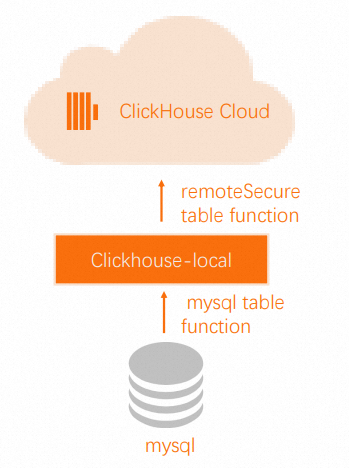
-
On your destination ApsaraDB for ClickHouse Enterprise Edition cluster, perform the following steps:
-
Create the destination database.
CREATE DATABASE db -
Create the destination table. The structure of the destination table must match the structure of the source MySQL table.
CREATE TABLE db.table ...
-
-
Run ClickHouse-Local on the host machine.
./clickhouse local --query "INSERT INTO FUNCTION remoteSecure('HOSTNAME.clickhouse.cloud:9440', 'db.table', 'default', 'PASS') SELECT * FROM mysql('host:port', 'database', 'table', 'user', 'password');"NoteNo data is stored on the ClickHouse-Local host. Data is read from the source MySQL table and immediately written to the destination table in the ApsaraDB for ClickHouse Enterprise Edition cluster.
Example 2: Migrate from MySQL to ApsaraDB for ClickHouse Enterprise Edition using JDBC
You can use the JDBC integration table engine, the ClickHouse JDBC bridge, and the MySQL JDBC driver to read data from the source MySQL database. Then, you can use the `remoteSecure` table function to write the data to the destination table in your ApsaraDB for ClickHouse Enterprise Edition cluster. For more information about the JDBC integration table engine, ClickHouse JDBC bridge, and `remoteSecure` table function, see JDBC Integration Table Engine, ClickHouse JDBC bridge, and remoteSecure Table Function.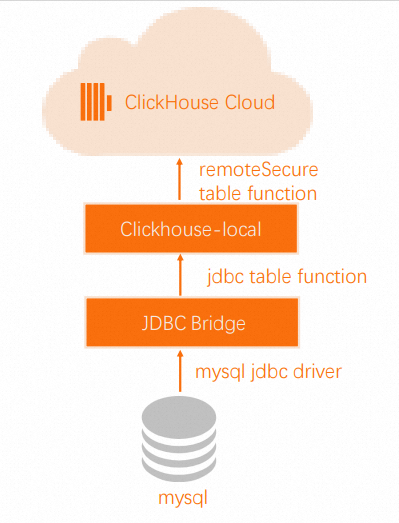
-
On your destination ApsaraDB for ClickHouse Enterprise Edition cluster, perform the following steps:
-
Create the destination database.
CREATE DATABASE db -
Create the destination table. The structure of the destination table must match the structure of the source MySQL table.
CREATE TABLE db.table ...
-
-
Install, configure, and run the ClickHouse JDBC Bridge on the host machine. For more information, see the User Guide.
-
Run ClickHouse-Local on the host machine.
./clickhouse local --query " INSERT INTO FUNCTION remoteSecure('HOSTNAME.clickhouse.cloud:9440', 'db.table', 'default', 'PASS') SELECT * FROM mysql('host:port', 'database', 'table', 'user', 'password');"NoteNo data is stored on the ClickHouse-Local host. Data is read from the source MySQL table and immediately written to the destination table in the ApsaraDB for ClickHouse Enterprise Edition cluster.
Data type mapping
|
RDS MySQL or PolarDB for MySQL type |
ClickHouse type |
|
Unsigned tinyint |
UInt8 |
|
Tinyint |
Int8 |
|
Unsigned smallint |
UInt16 |
|
Smallint |
Int16 |
|
Unsigned int, Unsigned mediumint |
UInt32 |
|
Int, Mediumint |
Int32 |
|
Unsigned bigint |
UInt64 |
|
Bigint |
Int64 |
|
Float |
Float32 |
|
Double |
Float64 |
|
Date |
Date |
|
Datetime, Timestamp |
DateTime |
|
Binary |
FixedString |
|
Other |
String |