What is Cloud Backup
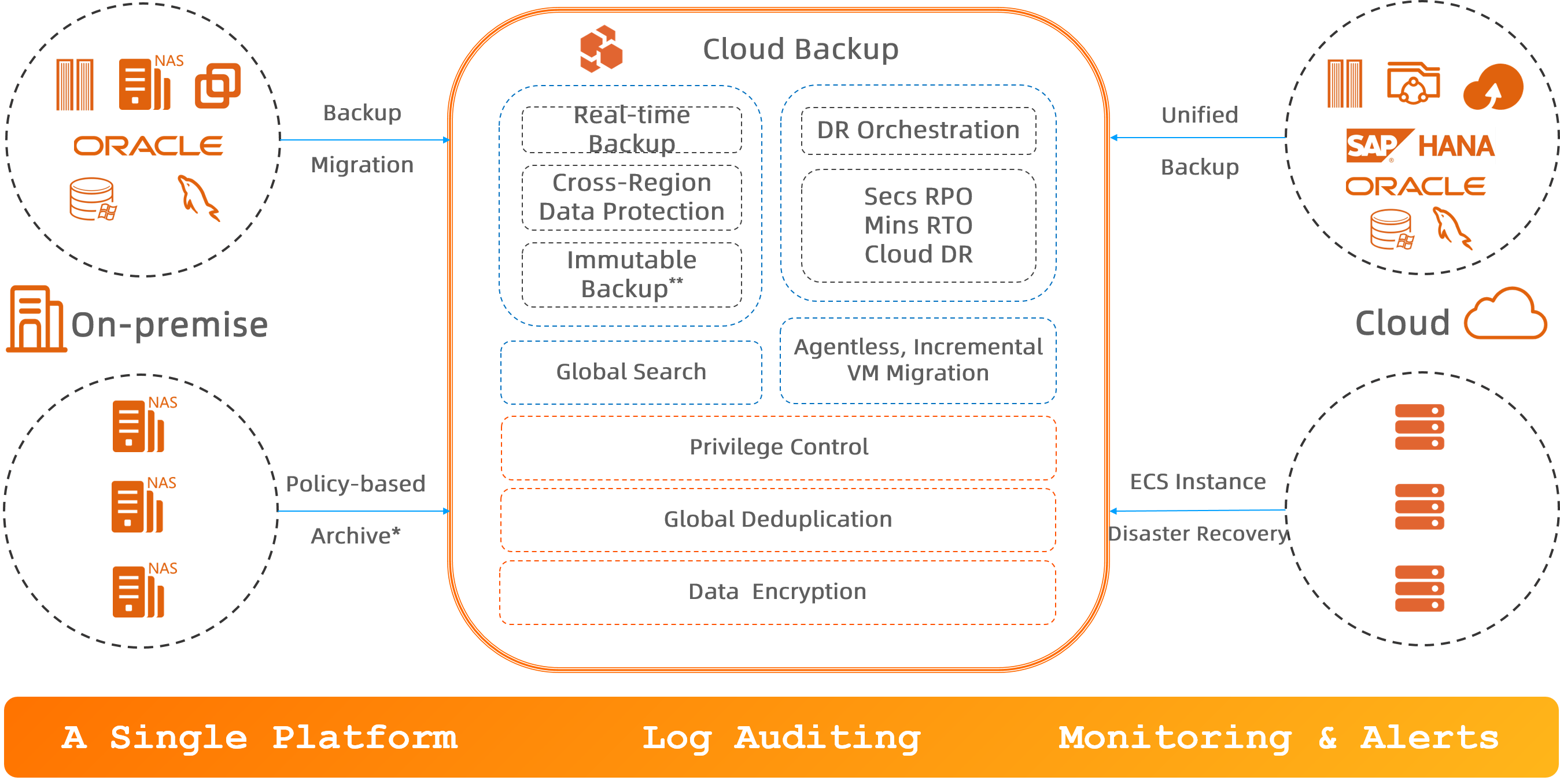
Cloud Backup is the unified disaster recovery platform from Alibaba Cloud. It provides backup, disaster recovery (DR), and policy-based archive management for cloud and on-premises resources, including ECS instances, databases, file systems, NAS, OSS, and VMware virtual machines.
Prerequisites
Before you read this topic, you should understand the following concepts:
Scenarios
Back up data on the cloud
Back up important data to a backup vault over the Alibaba Cloud internal network. Supported data sources include ECS files, self-managed MySQL, Oracle, SQL Server, and SAP HANA databases, NAS file systems, OSS buckets, and Tablestore instances. Cloud Backup supports real-time backups of MySQL and Oracle databases with a near-zero recovery point objective (RPO). Back up data from other cloud platforms to a backup vault on Alibaba Cloud.
Back up on-premises data to the cloud
Back up on-premises data from servers, NAS file systems, VMware virtual machines, and databases directly to a backup vault with flexible backup policies.
Cross-region or cross-account backup and ECS cross-region disaster recovery
Implement cross-region or cross-account disaster recovery for your backup data using cross-region backup or cross-account replication of backup vaults. Use cross-account backup to add multiple layers of data protection.
Cloud Backup provides two types of cross-region disaster recovery solutions for ECS instances to meet different RPO and RTO requirements: continuous replication and async replication of cloud disks.
Migrate VMware VMs to the cloud
Migrate on-premises VMware virtual machines to the cloud without an agent. Cloud Backup provides a simple and fast incremental migration method.
Archive data from on-premises NAS, HDFS, and S3-compatible storage based on policies
Archive large volumes of files from on-premises NAS, Hadoop Distributed File System (HDFS), and S3-compatible storage to an archive vault or a cold archive vault based on policies. Configure flexible archive policies. Cloud Backup also supports full-text search of file content in both local storage and archive vaults, with results returned in seconds.
Data sources supported for backup
Data source | System | |
On-premises data center | Files and directories | Windows, Windows Server, Linux |
NAS | N/A | |
Virtual machine images in VMware vSphere | Windows, Windows Server, Linux | |
MySQL, Oracle, and SQL Server databases | Windows, Windows Server, Linux | |
Alibaba Cloud ECS | Files and directories in an ECS instance | Windows Server, Linux |
SAP HANA deployed on an ECS instance | Windows Server, Linux | |
MySQL, Oracle, and SQL Server deployed on an ECS instance | Windows Server, Linux | |
Cloud disks (system disks and data disks) | N/A | |
Entire ECS instances | Windows Server, Linux | |
Alibaba Cloud File Storage NAS | Data stored in Alibaba Cloud File Storage NAS | N/A |
Alibaba Cloud Object Storage Service (OSS) | Data stored in Alibaba Cloud Object Storage Service (OSS) | N/A |
Alibaba Cloud Tablestore | Data in tables of Alibaba Cloud Tablestore instances | N/A |
Data sources supported for policy-based archiving
Data source | |
On-premises NAS | File Storage NAS deployed on local servers |
HDFS system | Hadoop Distributed File System (HDFS) deployed on local servers |
S3-compatible storage | Amazon S3-compatible storage |
Cloud Backup fees
Cloud Backup supports the pay-as-you-go billing method and subscription resource plans. For more information about the billable items of Cloud Backup, see Billing methods and billable items of Cloud Backup.
Activate the service
Activating Cloud Backup is free. Fees are incurred only when you use Cloud Backup features.
Activating the Cloud Backup service enables it, but does not automatically back up any data. Back up your important data promptly. If data is lost or accidentally deleted without a backup, the data cannot be recovered.
Deactivate the service
You cannot directly deactivate the service after it is activated. If you only activate the service but do not use it, no fees are incurred.
If you have incurred fees and want to stop using this product and stop billing, see How do I stop billing for Cloud Backup?. Note: Backup data cannot be recovered after it is deleted.
To view the details of your bills, see Resource usage and bills.
Online technical support
To receive faster support and avoid ticket queues, you can contact Cloud Backup technical support directly with questions about fees, features, and usage.
Cloud Backup Service Support Group
You can quickly consult on issues such as fees, features, and usage. Click to join the Cloud Backup Service Support group (We recommend using Chrome to open the link), or manually search for the DingTalk group ID: 174895001544
Cloud Backup Expert Support
You can obtain live analysis from technical experts to quickly resolve product issues. Click to contact expert support (Use Chrome to open the link), or add the expert as a DingTalk contact: d37_g935gslgo