Keep At Least One Backup Version
Enable the Keep At Least One Backup Version feature to prevent your last backup version from being deleted due to an expired retention period or accidental deletion. This ensures a backup is always available for restoration and protects against data loss.
What is Keep At Least One Backup Version?
When this option is enabled, the system does not delete the latest backup version of the plan, even if its retention period expires or you initiate a manual deletion.
On the Create Policy page, in the Lifecycle section, turn on the Keep At Least One Backup Version switch.
Why enable Keep At Least One Backup Version?
Enabling this feature prevents data loss from misconfigured backup plans or accidental deletion. It also avoids the need for a new full backup if no valid backup version exists, thereby improving deduplication efficiency, increasing backup speed, and reducing network data transfer. Consider enabling this feature in the following scenarios.
-
The retention period is too short
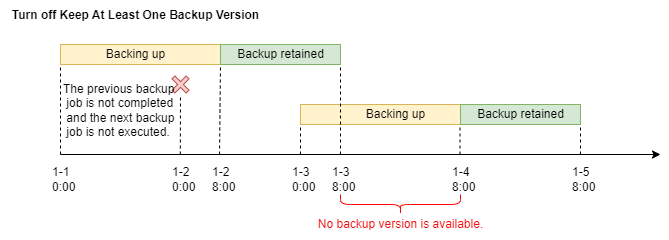
Imagine you have a backup plan that runs daily at 00:00 with a retention period of one day. However, each backup job takes 32 hours to complete due to the large data volume. Without Keep At Least One Backup Version enabled, the system deletes the backup from January 1 at 08:00 on January 3, while the new backup is still in progress. During this time, no backup version is available for restoration.
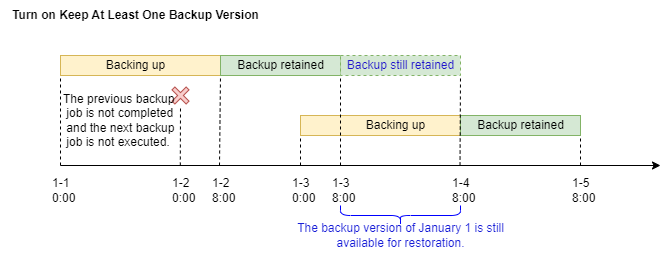
If you enable Keep At Least One Backup Version, the system retains the backup from January 1 even after its retention period expires. The system deletes it only after the new backup job completes, ensuring you always have a backup version available for restoration.
-
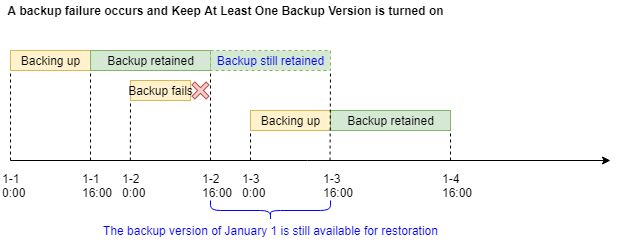
A backup job fails
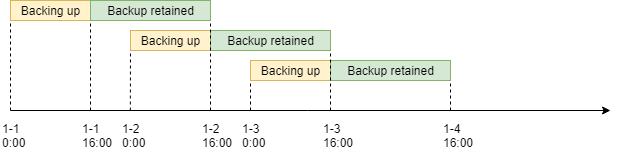
Suppose you have a backup plan that runs daily at 00:00 with a retention period of one day. If no backup job fails, you always have one available backup version.
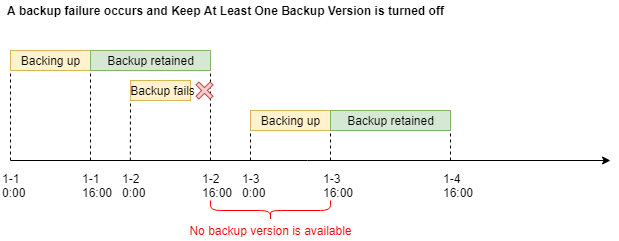
However, if the backup job on January 2 fails, the situation changes. Without Keep At Least One Backup Version enabled, the system deletes the backup from January 1 on January 2, leaving you with no backup version for restoration until the backup job on January 3 completes successfully.
If you enable Keep At Least One Backup Version, the system retains the backup from January 1 even after its retention period expires. This ensures that you have a backup version available for restoration until a new backup job completes successfully.
Enabling Keep At Least One Backup Version
You can enable Keep At Least One Backup Version when you create or edit a backup plan in the console.
-
At least one backup version is retained only when the data source is associated with a backup policy. If you disassociate the data source from the backup policy, the system automatically deletes the corresponding backup point after it expires.
-
For a general backup policy, the system always retains at least one backup point from remote replication. However, for an ECS instance backup policy, the Keep At Least One Backup Version setting of the local policy does not affect backup points from remote replication.
-
If you delete a backup plan, recreate it as soon as possible and enable Keep At Least One Backup Version. This action prevents the system from deleting existing backups when they expire, which would leave you with no backup version for restoration.
-
This feature does not support Tablestore backups.