Before you use ECS Backup Essential Edition, you must purchase a subscription instance. This topic describes how to purchase a subscription instance and provides usage notes.
Usage notes
A subscription instance can attach to only one ECS instance.
Subscription instances of ECS Backup Essential Edition are region-specific and cannot be used across regions. Before you purchase an instance, confirm that it is in the correct region.
You must attach a subscription instance to an ECS instance before the subscription expires.
Subscription instances of ECS Backup Essential Edition require an upfront payment. The pay-as-you-go billing method is not supported.
Data volume limit for ECS Backup Essential Edition
Each subscription instance of ECS Backup Essential Edition can protect a total data volume of up to 500 GB. This limit applies only to the total size of the source data for File Backup and Database Backup. This limit does not apply to entire machine backups. If the limit is exceeded, the backup job fails.
You cannot increase the data volume limit by attaching multiple subscription instances to a single ECS instance.
Purchase link
Purchase a subscription instance of ECS Backup Essential Edition
Supported subscription duration
The supported subscription duration is one year. Auto-renewal for one-year periods is supported.
Supported regions
ECS Backup Essential Edition is available only in specific regions. For a list of supported regions, see Supported regions for subscription instances of ECS Backup Essential Edition.
Procedure
Log on to the Cloud Backup console.
In the navigation pane on the left, choose .
On the ECS Backup Essential Edition page, click Purchase Subscription Instance.
On the purchase page, select a region, subscription duration, and quantity, and then complete the payment.
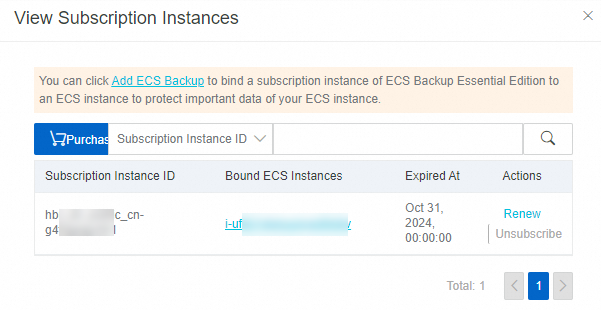
On the ECS Backup Essential Edition page, click View Subscription Instances to view the IDs of your purchased subscription instances and the ECS instances to which they are attached. You can also click Renew or Unsubscribe.
After the purchase is complete, you can attach the subscription instance to an ECS instance to create backup jobs. For more information, see Backup and recovery.